
Solved!
Go to SolutionI'm trying to get perspective with my secure-boot certificate problem
Thanks for all the contributions to my questions regarding updating my expired secure-boot certificate for my Dell Inspiron 7777.
I now know there will be no BIOS update for my device model, it can't be done manually, I cant replace the devices components (motherboard, chip-set, etc), and third party virus software will not offer me protection from "boot" threat.
I am trying to understand the risk of continuing without secure-boot protection. My device is only used for personal reasons and contains personal stuff. I use the device to access the internet for shopping and all the other day to day things we have to do online.
I do regular backups to an external drive, create a new system image every few months, and have a recover drive. Should I replace my device?
5
1
Posted September 20th, 2026 06:11
Hello @Adds-up , I see that you have indicated about the lack of Secure Boot on your Inspiron 7777 from this thread and the other post. However, you neglected to mention about the current status of Secure Boot update from Microsoft to your system.
From my observation, many systems with 8th gen processors have been successfully updated and received 2023 Secure Boot certificates from Microsoft.
Run PowerShell command to check your Secure Boot status https://www.dell.com/support/kbdoc/en-tc/000385747/how-to-check-secure-boot-certificates
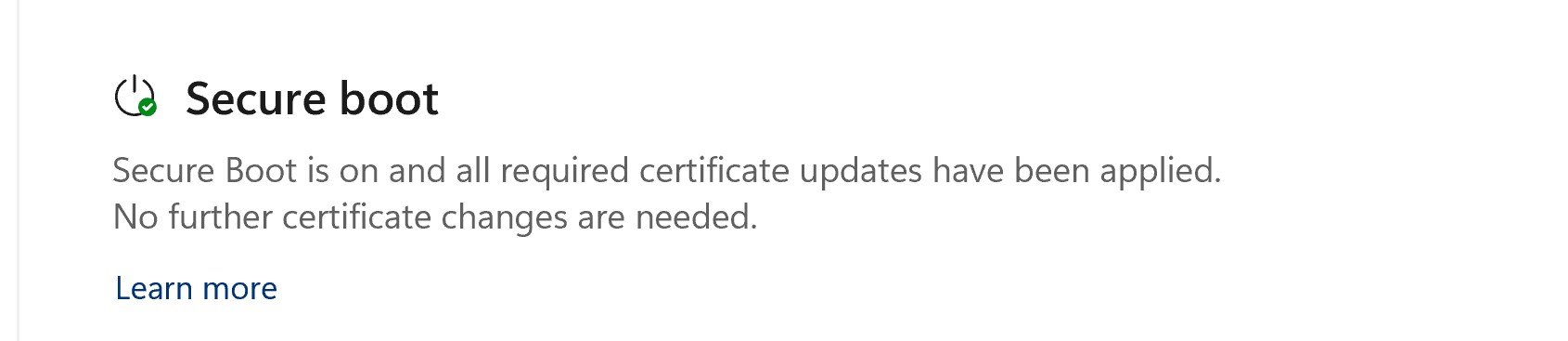
Or, open Windows Security => Device Security and check description under Secure Boot. Example of updated certificates as below.
5
1
Posted September 20th, 2026 14:49
Good to see Tesla and Chino helping OP here.
I wanted to know what can a malicious rootkit do?
Without a Secure Boot certificate or when Secure Boot is disabled/unverified, a malicious rootkit (specifically a bootkit or UEFI firmware rootkit) can load unverified, malicious code before your operating system even starts.
does it sound scary like the coming Halloween?
A malicious rootkit gives an attacker hidden, administrator-level control over a computer system while actively evading detection by users and security software.Core Actions of a RootkitGains Privileged Access: It targets system vulnerabilities to secure "root" or administrator-level privileges, allowing the attacker deep access to the core operating system.Hides Its Presence: It cloaks malicious files, network activity, registry keys, and running processes so standard task managers and antivirus tools cannot see them.Opens a Backdoor: It creates a hidden entry point for remote attackers to log in, modify software, or execute commands whenever they want.Disables Security Controls: It neutralizes installed antivirus programs, firewalls, and monitoring tools to protect itself and other malware from removal.Delivers Additional Payloads: It installs secondary threats like keyloggers, password stealers, ransomware, or financial data snatchers.Executes Network Attacks: It can draft the infected machine into a botnet to launch distributed denial-of-service (DDoS) attacks(edited)
8
0
Posted September 21st, 2026 16:12
@redxps630 Thanks for your reply. Scary stuff!
10
0
Posted September 21st, 2026 16:19
@Chino de Oro It was Windows Security that alerted me that the secure boot certificate had expired. Microsoft points me to Dell. Dell is not including my Inspiron 7777 model in its update programme.
8
1
Posted September 21st, 2026 19:42
@Adds-up , just want you not to over worry. In my personal opinion, from reading up your computer usages and your careful characteristic, the chances of your computer gets compromised from Secure Boot is very slim to none. On other hand, since the expiration date of certificates in June, there is no report from community users about Secure Boot compromised issue.

Tesla1856
10 Wizard
•
18086 Posts
•
71947 Points
9
0
Posted September 19th, 2026 16:00
@Adds-up ,
If you use your credit-cards online, do online-banking, or things like your IRS taxes online ... seems risky to me. The usual/obvious problems and also ID-Theft.
I'm guessing you have never experienced a virus-attack, ransomware attack and lock-down, or seen a "man in the middle" compromised system.
Those where all years ago for me (and some incidents were experienced by our small-business clients with their own IT staff). Seems to me, the Bots are getting smarter (more evil) with the help of AI.
https://www.ituonline.com/blogs/the-hidden-risks-of-disabling-secure-boot-unintentionally/
Dell Rockstar
Microsoft Windows and Apple iOS Developer (Retired)
- Like many of you, I can appreciate a good game-engine.
- I answer questions here, but I'm not a Dell employee.
- Consider giving posts you like a "thumbs-up"
- Posting models-numbers and software versions speeds trouble-shooting.
- Click "Mark as Accepted Answer" on any post that answers your question best.