
UNSOLVED
Reinstalation system Dell AssisSupport
I've had problems with my computer since new. After a lengthy conversation with support, they told me to reinstall Windows. Windows was reinstalled several times using Dell SupportAssist (F12) because there were constant problems. One time, I used Reset -> Update and downloaded the latest version. The computer seems to be working now.
I didn't make any backups because there was nothing needed on the computer, as it's a new computer. It was only a month old.
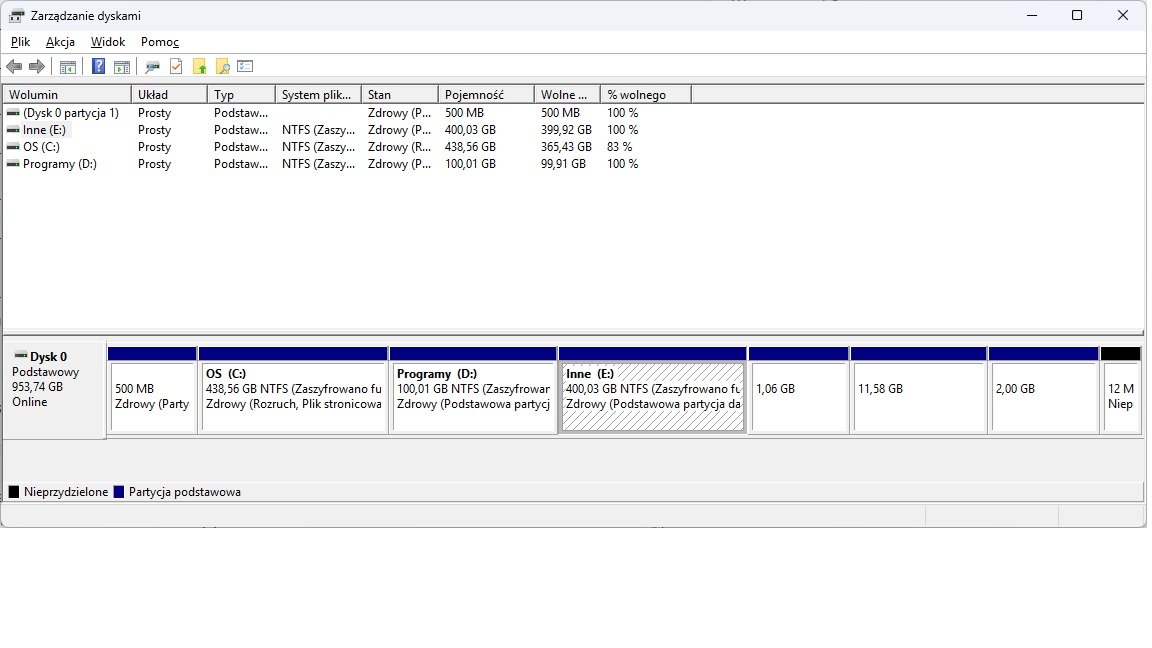
Now I've created three partitions: C, D, and E (C - Windows, D - programs, E - other)
as well as three unnamed partitions installed by the Dell reinstaller, and one black partition.
1. What are these three unassigned partitions, and is it possible to recover the recovery partition?
2. Should the SupportAssist reinstaller delete the recovery partitions?
0
0
Posted May 18th, 2026 02:54
It's not said what version of Windows your using. I can't read the language it's in, but still might be able to help.
The best way to load Windows is to download it to a flash drive from the Microsoft site. Then upload to the SSD from the flash drive. No using Dell Support Assist to reload Windows.
When loading Windows, it should get to a window asking what partition to load on. Delete all previous partitions except the ones it doesn't allow you to, like System for one. Click on Next and Windows will automatically make the necessary partitions.
This is the only workaround I know as long as Disk Management doesn't allow the deletion of partitions.


anne_droid
6 Operator
•
2593 Posts
•
9553 Points
0
0
Posted May 17th, 2026 11:07
Hi
I suggest Paragon Partition Manager for handling these kind of things, the free CE version is more than adequate.
Kind Regards
anne_droid