
Solved!
Go to SolutionB
BrentonSpear
1 Rookie
•
6 Posts
•
25 Points
0
137
October 8th, 2026 14:58
R740 and Tesla P40 GPU Riser 2A power cable
Hi there.
I am after some info and I hope you can assist me.
I have a dell R740 with riser 1a + 2a + 3A config.
I’m have a Tesla p40 in riser 1 and want to add a second p40 into riser 2.
I am trying to work out the correct power cable for this second P40.
I believe that it should be a Dell 4VPD3 cable that connects to the mobo using J_BP2 (white) connector and then into the Tesla p40.
Is this correct?
Any assistance is appreciated :)
0
0
Posted October 9th, 2026 11:07
Hi @BrentonSpear,
To power a Tesla P40 mounted in Riser 2 of your PowerEdge R740, you will actually need to change your motherboard connection.
While the 4VPD3 cable is the correct cable type for the Tesla P40, the white motherboard connector J_BP2 is the wrong source. J_BP2 provides power to the drive backplane (Backplane 2). Plugs for GPU power on the R740 are specifically color-coded and labeled for risers.
The Correct Connections for Riser 2:
- The Motherboard Header: You must plug the cable into J_GPU_2 (Black) on the motherboard.
- The Cable: The 4VPD3 cable is perfectly correct. Plug the mini-8-pin side into J_GPU_2 and the EPS 8-pin side into your Tesla P40.
R740 Motherboard Power Map:
- J_GPU_1 (Black): Powers Riser 1
- J_GPU_2 (Black): Powers Riser 2 ( this would be on the riser itself)
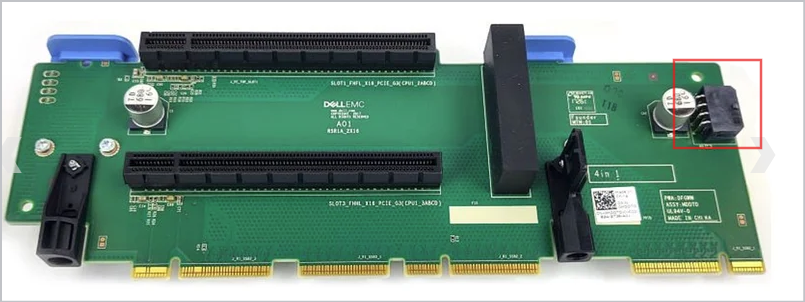
J_BP1 / J_BP2 (White): Dedicated exclusively to Drive Backplanes
The standard passive-cooled NVIDIA Tesla P40 relies entirely on the server's chassis airflow to stay cool. If you run it without the correct components, it will thermally throttle or overheat within minutes.
Core GPU Shroud Part Number
- RFFDP (or 0RFFDP): This is the official Dell PowerEdge R740 / R740xd GPU Air Shroud (Air Baffle). Unlike the standard memory/CPU shroud, the GPU shroud features removable plastic filler panels/brackets on the rear left and right sides.
- For Riser 2 Setup: You will use the RFFDP shroud, but you must pop out the snap-in shroud filler bracket corresponding to the Riser 2 slot pathway to let the air pass directly through the Tesla P40.
The Rest of the Crucial "GPU Enablement Kit"
To safely run a 250W Tesla P40 in Riser 2, the shroud alone isn't enough. Dell requires these additional parts to be installed in the server:
- High-Performance Fans (DP/N: N2014 or 0N2014): You must replace all 6 standard silver-labeled fans with the High-Performance (Gold-labeled) fans. Standard fans cannot push enough static pressure through the P40's dense passive heatsink fins.
- 1U Low-Profile CPU Heatsinks (DP/N: TRMWD or 0TRMWD): If your server currently has the standard tall (2U) CPU heatsinks, the GPU air shroud will not physically fit over them. You must swap them for the slim 1U High-Performance heatsinks.
Adding a second Tesla P40 brings substantial power requirements. Here is what you need to consider regarding the power supplies for a dual-P40 configuration in a Dell PowerEdge R740:
1. Recommended PSU Wattage
- Dual 1100W PSUs (Minimum):
This will work but depending on your CPU configuration and input line voltage, iDRAC may require you to run the PSUs in Non-Redundant mode (combined power) rather than 1+1 redundant mode to prevent throttling under heavy loads. - Dual 1600W PSUs (Recommended / Best Practice):
This is the official Dell recommendation for running two high-power (~250W–300W) double-wide accelerator cards. It guarantees full 1+1 redundancy, meaning if one PSU or power feed fails, the server will not crash or shut down under full synthetic load.
Regards,
DELL-Bridjet V
Social Media and Communities Professional
Dell Technologies | Enterprise Support Services
#IWork4Dell
Was your query answered? Please click Thumbs Up on the post that helped to Mark it as Accepted Answer!
0
0
Posted October 9th, 2026 11:59
Thanks for the very detailed and helpful answer.
I have the full enablement kit for the server, I am just missing this one cable for Riser 2A.
The riser picture you have added is Riser 1A correct? I have this riser in place and it is connected to my first P40.
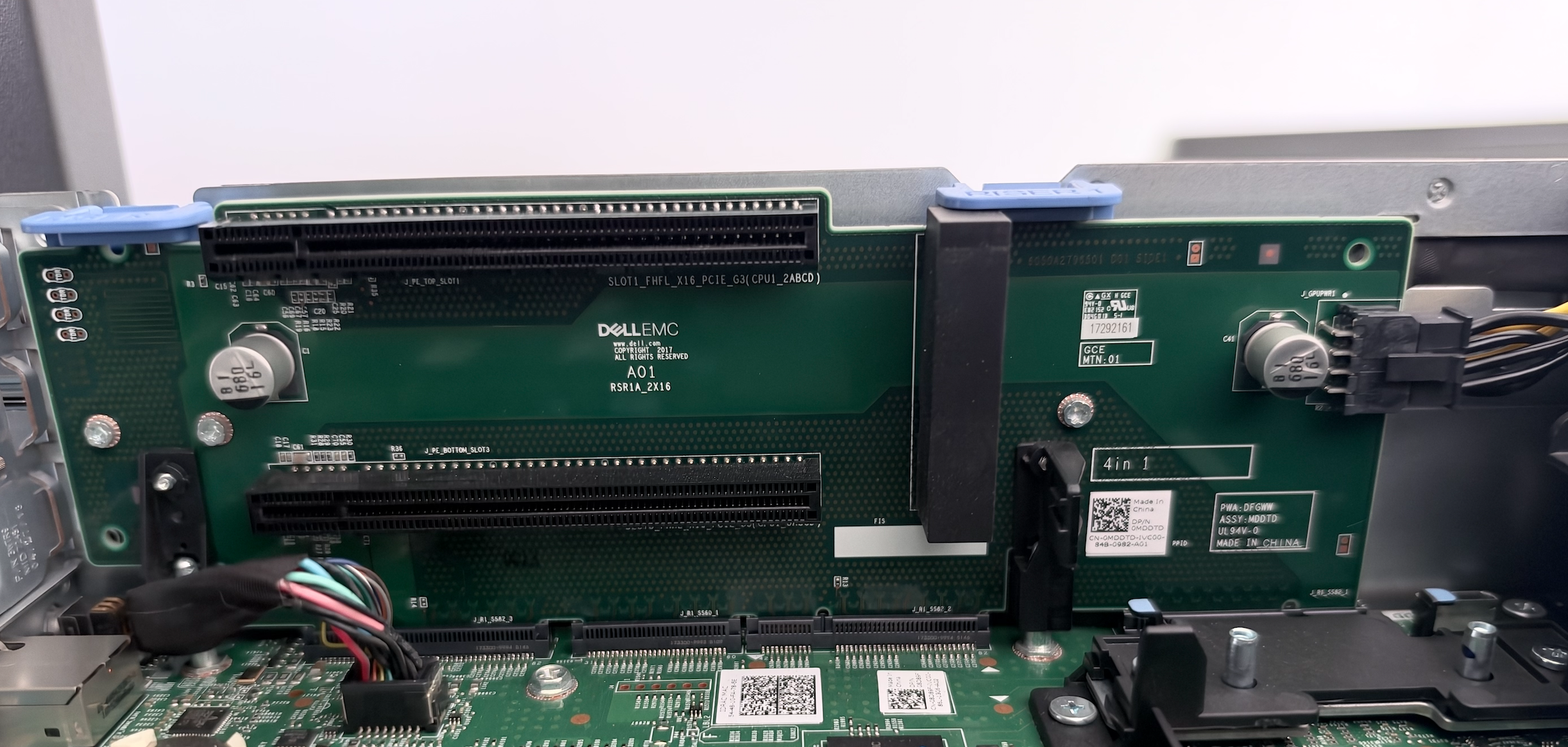
My Riser 2A is part number 0J7W3k. See image below.
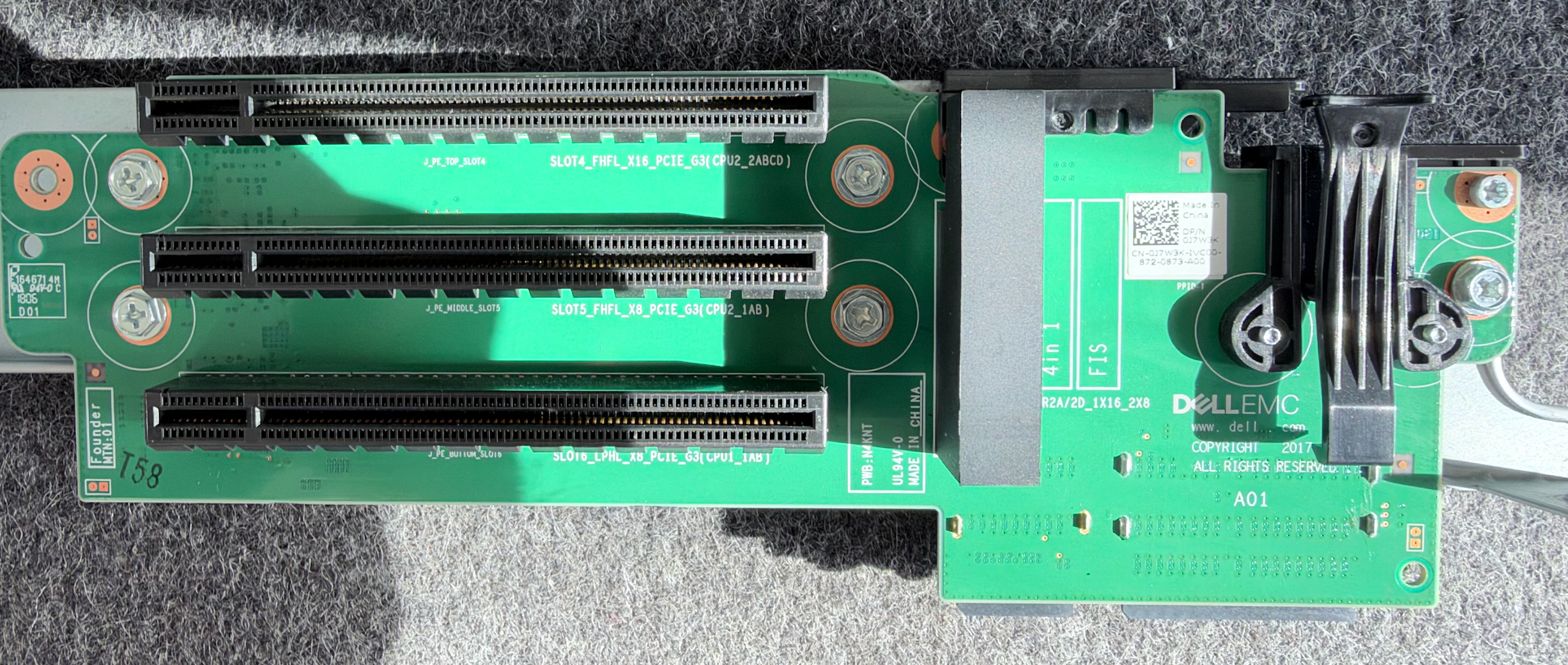
My Riser 2A does not have a power connector on it, that is why I was looking for the power connector on the motherboard.
I cannot locate J_GPU_2 (Black) on the motherboard anywhere. Here are the connections near CPU2 that I have found:
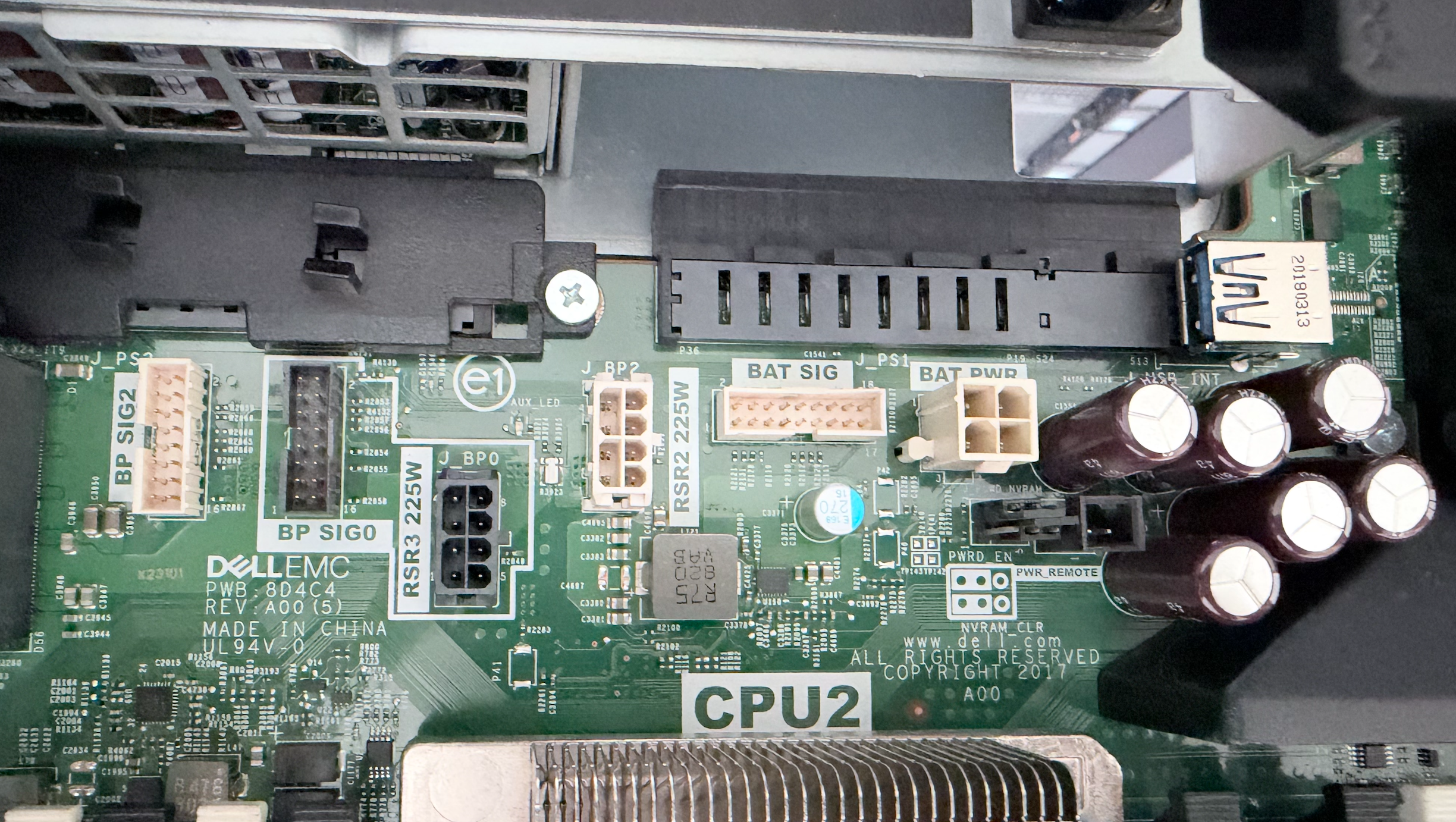
From this picture, should I be connecting the 4VPD3 cable to J_BP2 (RSR2_225W) as this is the one that provides the additional 225W of power needed to power the GPU (it gets 75W from the PCIe slot)?
5
0
Posted October 12th, 2026 21:30

DELL-Bridjet V
Moderator
•
117 Posts
•
335 Points
8
1
Posted October 13th, 2026 04:58
Hi @BrentonSpear,
Sorry for the late response, I was OOO.
I researched further and see that the J_BP2 will also handle Riser 2 PCIe 225W power and the cable 4VPD3 is the right cable.
Regards,
DELL-Bridjet V
Social Media and Communities Professional
Dell Technologies | Enterprise Support Services
#IWork4Dell
Was your query answered? Please click Thumbs Up on the post that helped to Mark it as Accepted Answer!