
UNSOLVED
Is a NVIDIA Titan RTX Graphics Card good for T7910 to run AI PDF conversion software? Alternatives?
I need to run AI columnar PDF conversion software in a Dell T7910 desktop (standard PDF conversion software fails at converting columnar PDF files).
To do this I am planning to install a NVIDIA Titan RTX Graphics Card ($1,000 on Amazon) in my Dell T7910 desktop. AI PDF conversions like OLMOCR require at least a GPU of 20GB.
My T7910 desktop has 64 GB of memory, a 1300w PSU, has two Intel Xeon CPUs E5-2637 v3 @ 3.50Hz and runs Windows 11 and Windows WSL. I am thinking of upgrading the CPUs to
I would be interested to learn about experiences forum members have regarding upgrading a T7910 to run AI PDF conversion applications like OLMOCR by installing a GPU 24GB card.
I would also welcome comments on my plans to upgrade my CPUs to two Intel Xeon E5-2699 v4. I understand these CPUs would be best for AI PDF conversion, but I am far from being an expert on CPUs.
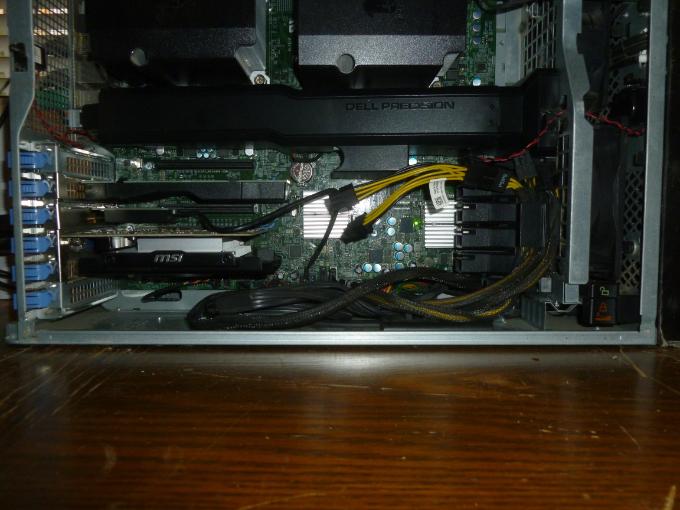
For reference, here is an internal photograph of my T7910. Yes, space is limited.
0
0
Posted March 19th, 2026 22:12
@redxps630 Hi, thanks for pointing this out. I very much appreciate it.
I was attracted to this card because I need 24GB of GPU RAM and it was not prohibiitively expensive like some other cards I had looked at. Some are priced at more than $4,000.
I would be grateful if you could suggest some 24GB cards i could look at that cost $1,000 or les. Or am I dreaming? Do I have spend thousands just to get a GPU card.
Crazy!
Thanks, though for advising that the Titan is too old.
0
0
Posted March 20th, 2026 01:47
@gakerby , it isn't good to do piece meal upgrade when the components prices for memory, SSD, graphics cards have been so much higher than before. If it's necessary, invest into a newer system. It's a lot cheaper that way. If you have access to US market, Dell systems are a lot cheaper than other part of the world.
0
0
Posted March 20th, 2026 04:23
AI columnar PDF conversion software graphics card requirements then tap/click on the "Show more" dropdown for graphic card suggestions.
0
0
Posted March 20th, 2026 05:14
I'm not sure what it is you are actually trying to do with OCR. You mean columns, like a newspaper?
Not sure what happened to Nuance Power-PDF, but it could do columns ... it could do anything really.
And it would easily run on a nice computer like that with an Titan-RTX. IIRC, I was running it on an Intel-i7 with a GTX-1070. It mostly used the CPU for processing. Scan at 300-dpi and go.
(edited)
Dell Rockstar
Microsoft Windows and Apple iOS Developer (Retired)
- Like many of you, I can appreciate a good game-engine.
- I answer questions here, but I'm not a Dell employee.
- Consider giving posts you like a "thumbs-up"
- Posting models-numbers and software versions speeds trouble-shooting.
- Click "Mark as Accepted Answer" on any post that answers your question best.0
0
Posted March 20th, 2026 11:20
0
0
Posted March 20th, 2026 18:20
Item is no longer available. @gakerby Did you buy it?
0
0
Posted March 20th, 2026 20:40
@redxps630 Thanks for pointing out the age of the NVIDIA Titan RTX.
Since posting I have done more research. I am now thinking of buying the ASRock B60 Intel Arc Pro B60 B60 CT 24G 24GB. It's only $650 and was only launched in 2025 making it very recent.
If you have any thoughts about installing the ASRock B60 in a T7910, I would very much like to hear them.
Thanks again for your comments. I very much appreciate them.
0
0
Posted March 20th, 2026 20:45
@Chino de Oro I take your point and have given it much thought. The problem is that my T7910 still satisfies my computing needs. To get an equivalent replacement would cost about $3,000+. I don't feel the need the improved performance I would get from a new T7910 workstation would be that noticeable given what computing I am doing now. $3,000+ is more than I want to spend now.
Also, I am now thinking of buying the ASRock B60 Intel Arc Pro B60 B60 CT 24G 24GB. It's only $650 and was only launched in 2025. I think this should provide me with the computing power I need now. At only $650 it's not a large investment.
Your thoughts abotuinstalling the ASRock B60 in a T7910 would be most welcome.
Thanks again for your comments. I very much appreciate them.
0
0
Posted March 20th, 2026 20:46
@bradthetechnut Thanks for the link. I'm looking into it.


redxps630
11 Legend
•
16431 Posts
•
83176 Points
0
0
Posted March 19th, 2026 21:17
Titan is too old.
VRAM: At least 12 GB of GPU RAM is needed for general use, while some configurations may use up to 20 GB or more depending on batch size and model utilization settings.