PowerEdge BIOS Performance and Workload Tuning Guide for 16G
Executive summary
Overview
As server technology evolves, new capabilities emerge to optimize workload performance to meet the differing needs of customers. Some customers require maximum performance. Others require minimal latency, while others want optimized performance/watt. These optimizations often require fundamental differences in BIOS configuration.
To complicate the challenges for IT administrators, optimized settings change over time and can differ between server models and generations. Engineers at Dell Technologies have worked to dramatically simplify the process of BIOS tuning with the availability of “workload profile” based server configuration automation.
Workload profile based optimization significantly reduces the time required to achieve optimized workload tuning, while ensuring consistency across server models, generations, and feature enhancements. Dell PowerEdge servers streamline the deployment process and increase customers’ agility by allowing for the rapid deployment, or redeployment, of their server assets.
Note: For 14th and 15th generation PowerEdge servers, see the papers specific to each generation. BIOS settings are different between generations.
Revisions
|
Date |
Part number/ |
Description |
|
June 2024 |
H20052 |
Initial release |
|
August 2026 |
H20052.1 |
Clarifying BIOS configurations and adding alt text for tables |
We value your feedback
Dell Technologies and the authors of this document welcome your feedback on this document. Contact the Dell Technologies team by email.
Author: David Dam
Contributors: Sebastian Alert, Michael Christensen, Doug Iler, Rich Schnur, Deepak Rangaraj, Donald Russell, Diego Esteves, Waseem Raja, Charan Soppadandi, Kavya Ar, Chris Cote, Nirmala Sundararajan
Note: For links to other documentation for this topic, see the PowerEdge Systems Management Info Hub.
Introduction
Introduction
The option for selecting a workload profile has been a part of PowerEdge servers since the 13th generation of servers, such as the R730. However, the solution for that generation was limited in scope. Starting with 14G servers, the Workload Profile selection has been expanded.
The following list highlights the profiles available for all 16G PowerEdge servers:
BIOS Settings Optimized for:
- High Performance Computing Environments
- Low Latency Computing Environments
- Virtualization Optimized
- Virtualization Optimized - Performance per Watt
- Database Optimized
- Database Optimized - Performance per Watt
- Software Defined Storage Optimized
- Software Defined Storage Optimized - Performance per Watt
- Telco Optimized
- Network Functions Virtualization Infrastructure Forwarding Platform (NFVI FP) Optimized Turbo
- Network Functions Virtualization Infrastructure Forwarding Platform (NFVI FP) Energy-Balance Turbo
Default BIOS settings
Default BIOS settings
A Workload Profile is a one-time configuration that applies a predefined set of BIOS settings for workload optimization. Reverting the profile to "Not Configured" does not restore the modified settings to their default values. To return all affected settings to their defaults, use "Reset to Defaults".
Note: The default settings may be subject to change.
The default BIOS settings are listed in three major groups:
Default memory settings
Table 1. Default memory settings
|
System Setup Screen |
BIOS Attribute Name |
BIOS Default Setting |
Description |
|
Memory Settings |
Memory Operating Mode |
OptimizerMode |
If enabled, the DRAM controllers operate independently in the 64-bit mode and provide optimized memory performance. |
|
Node Interleaving |
Disabled |
If enabled, memory interleaving is supported if a symmetric memory configuration is installed. If disabled, the system supports Non-Uniform Memory Access (NUMA) (asymmetric) memory configurations. Operating Systems that detect NUMA can detect the distribution of memory in a system, and then can intelligently allocate memory in an optimal manner. Operating Systems that are not NUMA aware could allocate memory to a processor that is not local, resulting in a loss of performance. Node Interleaving should only be enabled for Operating Systems that are not aware of NUMA. |
Default processor settings
Table 2. Default processor settings
|
System Setup Screen |
BIOS Attribute Name |
BIOS Default Setting |
Description |
|
Processor Settings |
Logical Processor |
Enabled |
Enable or disable the logical processors (Hyper-Threading Technology) |
|
|
CPU Interconnect Speed |
Maximum data rate |
This setting governs the frequency of the communication links among the CPUs in the system. Standard and basic bin processors support lower link frequencies than the advanced parts. Maximum Data Rate indicates that the BIOS chooses the communication links at the maximum frequency that the processor supports. Specific processor frequencies can also be selected. For best performance, select the Maximum Data setting. Any reduction in the communication link frequency affects the performance of nonlocal memory accesses and cache coherency traffic. In addition, it can reduce access speed to nonlocal I/O devices from a CPU. However, if power-saving considerations outweigh performance, reduce the frequency of the CPU communication links. Note: It is important to localize memory and I/O accesses to the nearest NUMA node to minimize the impact to system performance. |
|
Virtualization Technology |
Enabled |
When this option is Enabled, BIOS enables the processor virtualization features. |
|
|
Sub NUMA Cluster |
Disabled |
Sub NUMA Clustering (SNC) is a feature for breaking up the Low Latency Compute (LLC) into disjointed clusters and is based on address range. Each cluster is bound to a subset of the memory controllers in the system. It improves average latency to the LLC |
|
|
MADT Core Enumeration |
Round Robin |
Specifies the MADT Core Enumeration. This option is set to default in Round Robin. The linear option supports industry core enumeration, whereas the Round Robin option supports Dell optimized core enumeration. |
|
|
UPI Prefetch |
Enabled |
UPI Prefetch is a mechanism to get the memory read started early on the DDR bus. The UPI Rx path spawns a MemSpecRd to the integrated Memory Controller (iMC) directly. |
|
|
XPT Prefetch |
Enabled |
This option is set to Enabled by default. |
|
|
LLC Prefetch |
Enabled |
Enables or disables the LLC Prefetch on all threads. This option is set to Enabled by default. |
|
|
Dell Controlled Turbo |
Disabled |
Enables control of the turbo engagement. It sets the maximum turbo ratio limit and is based on the number of active cores. This option is active only when the CPU power management is set to maximum performance and Turbo Boost is Enabled. |
|
|
Number of Cores Per Processor |
All |
Controls the number of enabled cores in each processor. Under certain circumstances, limited performance improvements to Intel Turbo Boost Technology and potentially larger shared caches may benefit some workloads. Most computing environments tend to benefit more from a larger number of processing cores. Disabling cores to gain nominal performance enhancements must be carefully weighed before changing this setting from the default. Number of Cores per Processor means how many COREs (supported by the specific CPU SKU) can be enabled |
|
|
Hardware Prefetcher |
Enabled |
When enabled, the processor can prefetch extra cache lines for every memory request. This setting can affect performance that is based on the application and workloads running on the system and memory bandwidth utilization. |
|
|
DCU Streamer Prefetcher |
Enabled |
Enable or disable the Data Cache Unit (DCU) streamer prefetcher. This setting can affect performance that is based on the application and workloads running on the system. This setting is recommended for high performance computing applications. |
|
|
DCU IP Prefetcher |
Enabled |
Enable or disable the Data Cache Unit (DCU) IP prefetcher. This setting can affect performance that is based on the application and workloads running on the system. This setting is recommended for high performance computing applications. |
|
|
x2APIC |
Enabled |
Enable or disable the X2APIC mode. Compared to the traditional xAPIC architecture, X2APIC extends the processor addressability and enhances the performance of interrupt delivery. |
Table 3. New processor options and default settings for 16G Intel
|
BIOS Attribute Name |
Default Setting |
|
Adjacent Cache Line Prefetch |
Enabled |
|
AMP Prefetch |
Disabled |
|
AVX ICCP Pre-Grant Level |
128 Heavy |
|
AVX ICCP Pre-Grant License |
Disabled |
|
AVX P1 |
Normal |
|
CPU Physical Address Limit |
Enabled |
|
Dead Line LLC Alloc |
Enabled |
|
Dell Controlled Turbo Setting |
Disabled |
|
Directory AtoS |
Disabled |
|
Directory Mode |
Enabled |
|
Homeless Prefetch |
Auto |
|
Intel SST-CP |
Disabled |
|
Kernel DMA Protection |
Disabled |
|
Local Machine Check Exception |
Enabled |
|
Logical Processor Idling |
Disabled |
|
Processor N Controlled Turbo |
Disabled |
|
Uncore Frequency RAPL |
Enabled |
Default system profile settings
Table 4. Default system profile settings
|
System Setup Screen |
BIOS Attribute Name |
BIOS Default Setting |
Description |
|
System Profile Settings |
System Profile |
Performance Per Watt (DAPC) |
Enables you to set the CPU power management mode. The Dell Active Power Control (DAPC) mode enables BIOS to manage the processor power states. DAPC helps achieve performance/watt maximized at all utilization levels and workload types, while still meeting performance requirements. The Maximum Performance mode keeps the processor running at the highest frequency all the time. The Operating System Demand Based Power Management (OD DBPM) means that it is the Operating System that controls the processor’s power management. |
|
|
CPU Power Management |
System DBPM (DAPC) |
The CPU power management setting in the BIOS of a Dell PowerEdge computer allows you to set how the CPU is power managed. The default setting is usually System DBPM (DAPC), which stands for Demand-Based Power Management. Other options include: OS DBPM, Performance per Watt (DAPC), and Performance per Watt (OS). |
|
Memory Frequency |
MaxPref |
The speed at which the memory bus operates. The maximum possible frequency in the system may not be the maximum frequency rated on the installed DIMM. The maximum memory bus frequency depends on:
In most profiles, except the Dense Configuration Optimized profile, the BIOS configures the memory bus frequency to the maximum possible frequency. Under the Custom menu, a memory frequency can be selected for the required value. The selected frequency cannot exceed the maximum possible frequency for the system. It is limited by the capabilities and configuration of the system as noted. |
|
|
Turbo Boost |
Enabled |
If the operating environment allows, Turbo Boost mode allows the processor to engage to a higher frequency than the processor’s nominal or rated frequency. This results in higher system performance. Turbo Boost is engaged on a per-socket basis. If some of the cores of a socket are idle, then other cores of the same socket can go to a higher processor performance state |
|
|
C1E |
Enabled |
Enable or disable the processor to switch to C1E (Enhanced Halt State) when it is idle. |
|
|
C State |
Enabled |
Enable or disable the processor to operate in all available power states. |
|
|
Write Data CRC |
Disabled |
When set to Enabled, DDR4 data bus issues are detected and corrected during ‘write’ operations. Two extra cycles are required for CRC bit generation which impacts the performance. |
|
|
Memory patrol Scrub |
Standard |
Patrol Scrubbing is a feature that searches the memory for errors and repairs correctable errors to prevent the accumulation of memory errors. |
|
|
Memory Refresh Rate |
1x |
The memory controller will periodically refresh the data in memory. The frequency at which memory is normally refreshed is referred to as 1x refresh rate. When memory modules are operating at a higher-than-normal temperature or to further increase system reliability, the refresh rate can be set to 2x. |
|
|
Uncore Frequency |
DynamicUFS |
Selects the Processor Uncore Frequency. Dynamic mode allows the processor to optimize power resources across the cores and uncore during runtime. The optimization of the uncore frequency to either save power or optimize performance is influenced by the setting of the Energy Efficient Policy. |
|
|
Energy Efficient Policy |
BalancedPerformance |
Selects the Energy Efficient Policy. The CPU uses the setting to manipulate the internal behavior of the processor and determines whether to target higher performance or better power savings. |
|
|
Monitor/Mwait |
Enabled |
Enables you to enable/disable the Monitor/Mwait instructions of the processor. When set to disabled, these two instructions are not supported by the processor. Note: Monitor/Mwait can be disabled only when C state is disabled in Custom mode. When C state is enabled in Custom mode, changing this setting does not impact system power or performance. |
|
|
CPU Interconnect Bus Link Power Management |
Enabled |
When enabled, CPU interconnect bus link power management can reduce overall system power a bit while slightly reducing system performance. |
|
|
PCI ASPM L1 Link Power Management |
Enabled |
When enabled, PCIe Advanced State Power Management (ASPM) can reduce overall system power a bit while slightly reducing system performance. |
Table 5. New system profile options and default settings for 16G Intel (only for Telco and NFVI FP)
|
BIOS Attribute Name |
Default Setting |
|
APS rocketing |
Disabled |
|
CPU C1 Auto Demotion |
Enabled |
|
CPU C1 Auto UnDemotion |
Enabled |
|
Dynamic L1 |
Enabled |
|
Energy Efficient Turbo |
Enabled |
|
GPSS Timer |
500us |
|
OS ACPI Cx |
OS Cx C2 |
|
Enabled |
|
|
Scalability |
Disabled |
|
Workload Configuration |
Balance |
Detailed settings for Intel BIOS profile
Detailed settings for Intel BIOS profile
The following tables provide the BIOS setting recommendations for the 16th generation of Intel PowerEdge servers.
This section defines the various profile settings. The main groups are:
Low latency
Table 6. Settings for low latency compute
|
|
BIOS Default |
Low Latency Optimized Profile |
|
|
System Setup Screen |
BIOS Attribute Name |
BIOS Default Setting |
Profile Setting |
|
Memory Settings |
Memory Operating Mode |
Optimizer Mode |
Optimizer Mode |
|
Node Interleaving |
Disabled |
Disabled |
|
|
Processor Settings |
Logical Processor |
Enabled |
Disabled |
|
Cpu Interconnect Speed |
Maximum data rate |
Maximum data rate |
|
|
Virtualization Technology |
Enabled |
Disabled |
|
|
Sub NUMA Cluster |
Disabled |
Disabled |
|
|
MADT Core Enumeration |
Round Robin |
Round Robin |
|
|
UPI Prefetch |
Enabled |
Enabled |
|
|
XPT Prefetch |
Enabled |
Enabled |
|
|
LLC Prefetch |
Enabled |
Enabled |
|
|
Dell Controlled Turbo |
Disabled |
Enabled |
|
|
Number of Cores Per Processor |
All |
All |
|
|
Hardware Prefetcher |
Enabled |
Enabled |
|
|
DCU Streamer Prefetcher |
Enabled |
Enabled |
|
|
DCU IP Prefetcher |
Enabled |
Enabled |
|
|
x2APIC |
Enabled |
Disabled |
|
|
AVX ICCP Pre-Grant License |
Disabled |
Disabled |
|
|
AVX ICCP Pre-Grant Level |
128 Heavy |
128 Heavy |
|
|
CPU Physical Address Limit |
Enabled |
Enabled |
|
|
Dead Line LLC Alloc |
Enabled |
Enabled |
|
|
Directory AtoS |
Disabled |
Disabled |
|
|
Directory Mode |
Enabled |
Enabled |
|
|
Kernel DMA Protection |
Disabled |
Disabled |
|
|
Local Machine Check Exception |
Enabled |
Enabled |
|
|
Adjacent Cache Line Prefetch |
Enabled |
Enabled |
|
|
AVX P1 |
Normal |
Normal |
|
|
Intel SST-CP |
Disabled |
Disabled |
|
|
Dell Controlled Turbo Setting |
Disabled |
Enabled |
|
|
Processor N Controlled Turbo |
Disabled |
Enabled |
|
|
Logical Processor Idling |
Disabled |
Disabled |
|
|
Integrated Devices |
Memory Mapped I/O above 4GB |
Enabled |
Enabled |
|
Embedded NIC1 and NIC2 |
Enabled |
Enabled |
|
|
I/O Snoop HoldOff Response |
2K Cycles |
2K Cycles |
|
|
System Profile Settings |
System Profile |
Performance Per Watt (DAPC) |
Custom |
|
CPU Power Management |
System DBPM (DAPC) |
MaxPerf |
|
|
Memory Frequency |
MaxPerf |
MaxPerf |
|
|
Turbo Boost |
Enabled |
Enabled |
|
|
Energy Efficient Turbo |
Enabled |
Disabled |
|
|
C1E |
Enabled |
Disabled |
|
|
C State |
Enabled |
Disabled |
|
|
Write Data CRC |
Disabled |
Disabled |
|
|
Memory patrol Scrub |
Standard |
Disabled |
|
|
Memory Refresh Rate |
1x |
1x |
|
|
Uncore Frequency |
DynamicUFS |
MaxUFS |
|
|
Custom Uncore Frequency |
n/a |
n/a |
|
|
Energy Efficient Policy |
BalancedPerformance |
MaxPower |
|
|
Monitor/Mwait |
Enabled |
Disabled |
|
|
CPU Interconnect Bus Link Power Management |
Enabled |
Enabled |
|
|
PCI ASPM L1 Link Power Management |
Enabled |
Enabled |
|
|
Workload Configuration |
Balance |
Balance |
|
|
Boot Settings |
Boot Sequence Retry |
Enabled |
Enabled |
|
Network Settings |
PXE Device1 |
Enabled |
Enabled |
High Performance Computing
Table 7. Details on High Performance Computing
|
|
BIOS Default |
HPC Profile |
|
|
System Setup Screen |
BIOS Attribute Name |
BIOS Default Setting |
Profile Setting |
|
Memory Settings |
Memory Operating Mode |
Optimizer Mode |
Optimizer Mode |
|
Node Interleaving |
Disabled |
Disabled |
|
|
Processor Settings |
Logical Processor |
Enabled |
Disabled |
|
Cpu Interconnect Speed |
Maximum data rate |
Maximum data rate |
|
|
Virtualization Technology |
Enabled |
Disabled |
|
|
Sub NUMA Cluster |
Disabled |
4-Way Clustering |
|
|
MADT Core Enumeration |
Round Robin |
Linear |
|
|
UPI Prefetch |
Enabled |
Enabled |
|
|
XPT Prefetch |
Enabled |
Enabled |
|
|
LLC Prefetch |
Enabled |
Enabled |
|
|
Dell Controlled Turbo |
Disabled |
Disabled |
|
|
Number of Cores Per Processor |
All |
All |
|
|
Hardware Prefetcher |
Enabled |
Enabled |
|
|
DCU Streamer Prefetcher |
Enabled |
Enabled |
|
|
DCU IP Prefetcher |
Enabled |
Enabled |
|
|
x2APIC |
Enabled |
Enabled |
|
|
AVX ICCP Pre-Grant License |
Disabled |
Disabled |
|
|
AVX ICCP Pre-Grant Level |
128 Heavy |
128 Heavy |
|
|
CPU Physical Address Limit |
Enabled |
Enabled |
|
|
Dead Line LLC Alloc |
Enabled |
Enabled |
|
|
Directory AtoS |
Disabled |
Disabled |
|
|
Directory Mode |
Enabled |
Enabled |
|
|
Kernel DMA Protection |
Disabled |
Disabled |
|
|
Local Machine Check Exception |
Enabled |
Enabled |
|
|
Adjacent Cache Line Prefetch |
Enabled |
Enabled |
|
|
AVX P1 |
Normal |
Normal |
|
|
Intel SST-CP |
Disabled |
Disabled |
|
|
Dell Controlled Turbo Setting |
Disabled |
Disabled |
|
|
Processor N Controlled Turbo |
Disabled |
Disabled |
|
|
Logical Processor Idling |
Disabled |
Disabled |
|
|
Integrated Devices |
Memory Mapped I/O above 4GB |
Enabled |
Enabled |
|
Embedded NIC1 and NIC2 |
Enabled |
Enabled |
|
|
I/O Snoop HoldOff Response |
2K Cycles |
2K Cycles |
|
|
System Profile Settings |
System Profile |
Performance Per Watt (DAPC) |
Performance |
|
CPU Power Management |
System DBPM (DAPC) |
Controlled by System Profile (MaxPerf) |
|
|
Memory Frequency |
MaxPerf |
Controlled by System Profile (MaxPerf) |
|
|
Turbo Boost |
Enabled |
Controlled by System Profile (Enabled) |
|
|
Energy Efficient Turbo |
Enabled |
Controlled by System Profile (Disabled) |
|
|
C1E |
Enabled |
Controlled by System Profile (Disabled) |
|
|
C State |
Enabled |
Controlled by System Profile (Disabled) |
|
|
Write Data CRC |
Disabled |
Controlled by System Profile (Disabled) |
|
|
Memory patrol Scrub |
Standard |
Controlled by System Profile (Standard) |
|
|
Memory Refresh Rate |
1x |
Controlled by System Profile (1x) |
|
|
Uncore Frequency |
DynamicUFS |
Controlled by System Profile (MaxUFS) |
|
|
Custom Uncore Frequency |
n/a |
n/a |
|
|
Energy Efficient Policy |
BalancedPerformance |
Controlled by System Profile (MaxPower) |
|
|
Monitor/Mwait |
Enabled |
Controlled by System Profile (Enabled) |
|
|
CPU Interconnect Bus Link Power Management |
Enabled |
Controlled by System Profile (Disabled) |
|
|
PCI ASPM L1 Link Power Management |
Enabled |
Controlled by System Profile (Disabled) |
|
|
Workload Configuration |
Balance |
Controlled by System Profile (Balance) |
|
|
Boot Settings |
Boot Sequence Retry |
Enabled |
Enabled |
|
Network Settings |
PXE Device1 |
Enabled |
Enabled |
Virtualization optimized
Table 8. Details for Virtualization Optimized and performance per watt
|
|
BIOS Default |
Virtualization Optimized Performance Profile |
Virtualization Optimized Performance Per Watt Profile |
|
|
System Setup Screen |
BIOS Attribute Name |
BIOS Default Setting |
Profile Setting |
Profile Setting |
|
Memory Settings |
Memory Operating Mode |
Optimizer Mode |
Optimizer Mode |
Optimizer Mode |
|
Node Interleaving |
Disabled |
Disabled |
Disabled |
|
|
Processor Settings |
Logical Processor |
Enabled |
Enabled |
Enabled |
|
Cpu Interconnect Speed |
Maximum data rate |
Maximum data rate |
Maximum data rate |
|
|
Virtualization Technology |
Enabled |
Enabled |
Enabled |
|
|
Sub NUMA Cluster |
Disabled |
Disabled |
Disabled |
|
|
MADT Core Enumeration |
Round Robin |
Round Robin |
Round Robin |
|
|
UPI Prefetch |
Enabled |
Enabled |
Enabled |
|
|
XPT Prefetch |
Enabled |
Enabled |
Enabled |
|
|
LLC Prefetch |
Enabled |
Enabled |
Enabled |
|
|
Dell Controlled Turbo |
Disabled |
Disabled |
Disabled |
|
|
Number of Cores Per Processor |
All |
All |
All |
|
|
Hardware Prefetcher |
Enabled |
Enabled |
Enabled |
|
|
DCU Streamer Prefetcher |
Enabled |
Enabled |
Enabled |
|
|
DCU IP Prefetcher |
Enabled |
Enabled |
Enabled |
|
|
x2APIC |
Enabled |
Enabled |
Enabled |
|
|
AVX ICCP Pre-Grant License |
Disabled |
Disabled |
Disabled |
|
|
AVX ICCP Pre-Grant Level |
128 Heavy |
128 Heavy |
128 Heavy |
|
|
CPU Physical Address Limit |
Enabled |
Enabled |
Enabled |
|
|
Dead Line LLC Alloc |
Enabled |
Enabled |
Enabled |
|
|
Directory AtoS |
Disabled |
Disabled |
Disabled |
|
|
Directory Mode |
Enabled |
Enabled |
Enabled |
|
|
Kernel DMA Protection |
Disabled |
Disabled |
Disabled |
|
|
Local Machine Check Exception |
Enabled |
Enabled |
Enabled |
|
|
Adjacent Cache Line Prefetch |
Enabled |
Enabled |
Enabled |
|
|
AVX P1 |
Normal |
Normal |
Normal |
|
|
Intel SST-CP |
Disabled |
Disabled |
Disabled |
|
|
Dell Controlled Turbo Setting |
Disabled |
Disabled |
Disabled |
|
|
Processor N Controlled Turbo |
Disabled |
Disabled |
Disabled |
|
|
Logical Processor Idling |
Disabled |
Disabled |
Disabled |
|
|
Integrated Devices |
Memory Mapped I/O above 4GB |
Enabled |
Enabled |
Enabled |
|
Embedded NIC1 and NIC2 |
Enabled |
Enabled |
Enabled |
|
|
I/O Snoop HoldOff Response |
2K Cycles |
2K Cycles |
2K Cycles |
|
|
System Profile Settings |
System Profile |
Performance Per Watt (DAPC) |
Performance |
Performance Per Watt (DAPC) |
|
CPU Power Management |
System DBPM (DAPC) |
Controlled by System Profile (MaxPerf) |
Controlled by System Profile (System DBPM (DAPC) |
|
|
Memory Frequency |
MaxPerf |
Controlled by System Profile (MaxPerf) |
Controlled by System Profile (MaxPerf) |
|
|
Turbo Boost |
Enabled |
Controlled by System Profile (Enabled) |
Controlled by System Profile (Enabled) |
|
|
Energy Efficient Turbo |
Enabled |
Controlled by System Profile (Disabled) |
Controlled by System Profile (Enabled) |
|
|
C1E |
Enabled |
Controlled by System Profile (Disabled) |
Controlled by System Profile (Enabled) |
|
|
C State |
Enabled |
Controlled by System Profile (Disabled) |
Controlled by System Profile (Enabled) |
|
|
Write Data CRC |
Disabled |
Controlled by System Profile (Disabled) |
Controlled by System Profile (Disabled) |
|
|
Memory patrol Scrub |
Standard |
Controlled by System Profile (Standard) |
Controlled by System Profile (Standard) |
|
|
Memory Refresh Rate |
1x |
Controlled by System Profile (1x) |
Controlled by System Profile (1x) |
|
|
Uncore Frequency |
DynamicUFS |
Controlled by System Profile (MaxUFS) |
Controlled by System Profile (DynamicUFS) |
|
|
Custom Uncore Frequency |
n/a |
n/a |
n/a |
|
|
Energy Efficient Policy |
BalancedPerformance |
Controlled by System Profile (MaxPower) |
Controlled by System Profile (BalancedPerformance) |
|
|
Monitor/Mwait |
Enabled |
Controlled by System Profile (Enabled) |
Controlled by System Profile (Enabled) |
|
|
CPU Interconnect Bus Link Power Management |
Enabled |
Controlled by System Profile (Disabled) |
Controlled by System Profile (Enabled) |
|
|
PCI ASPM L1 Link Power Management |
Enabled |
Controlled by System Profile (Disabled) |
Controlled by System Profile (Enabled) |
|
|
Workload Configuration |
Balance |
Controlled by System Profile (Balance) |
Controlled by System Profile (Balance) |
|
|
Boot Settings |
Boot Sequence Retry |
Enabled |
Enabled |
Enabled |
|
Network Settings |
PXE Device1 |
Enabled |
Enabled |
Enabled |
Database optimized
Table 9. Detailed settings for database optimized and performance per watt
|
|
BIOS Default |
Database Optimized Performance Profile |
Database Optimized Performance Per Watt Profile |
|
|
System Setup Screen |
BIOS Attribute Name |
BIOS Default Setting |
Profile Setting |
Profile Setting |
|
Memory Settings |
Memory Operating Mode |
Optimizer Mode |
Optimizer Mode |
Optimizer Mode |
|
Node Interleaving |
Disabled |
Disabled |
Disabled |
|
|
Processor Settings |
Logical Processor |
Enabled |
Enabled |
Enabled |
|
Cpu Interconnect Speed |
Maximum data rate |
Maximum data rate |
Maximum data rate |
|
|
Virtualization Technology |
Enabled |
Disabled |
Disabled |
|
|
Sub NUMA Cluster |
Disabled |
Disabled |
Disabled |
|
|
MADT Core Enumeration |
Round Robin |
Round Robin |
Round Robin |
|
|
UPI Prefetch |
Enabled |
Enabled |
Enabled |
|
|
XPT Prefetch |
Enabled |
Enabled |
Enabled |
|
|
LLC Prefetch |
Enabled |
Enabled |
Enabled |
|
|
Dell Controlled Turbo |
Disabled |
Disabled |
Disabled |
|
|
Number of Cores Per Processor |
All |
All |
All |
|
|
Hardware Prefetcher |
Enabled |
Enabled |
Enabled |
|
|
DCU Streamer Prefetcher |
Enabled |
Enabled |
Enabled |
|
|
DCU IP Prefetcher |
Enabled |
Enabled |
Enabled |
|
|
x2APIC |
Enabled |
Enabled |
Enabled |
|
|
AVX ICCP Pre-Grant License |
Disabled |
Disabled |
Disabled |
|
|
AVX ICCP Pre-Grant Level |
128 Heavy |
128 Heavy |
128 Heavy |
|
|
CPU Physical Address Limit |
Enabled |
Enabled |
Enabled |
|
|
Dead Line LLC Alloc |
Enabled |
Enabled |
Enabled |
|
|
Directory AtoS |
Disabled |
Disabled |
Disabled |
|
|
Directory Mode |
Enabled |
Enabled |
Enabled |
|
|
Kernel DMA Protection |
Disabled |
Disabled |
Disabled |
|
|
Local Machine Check Exception |
Enabled |
Enabled |
Enabled |
|
|
Adjacent Cache Line Prefetch |
Enabled |
Enabled |
Enabled |
|
|
AVX P1 |
Normal |
Normal |
Normal |
|
|
Intel SST-CP |
Disabled |
Disabled |
Disabled |
|
|
Dell Controlled Turbo Setting |
Disabled |
Disabled |
Disabled |
|
|
Processor N Controlled Turbo |
Disabled |
Disabled |
Disabled |
|
|
Logical Processor Idling |
Disabled |
Disabled |
Disabled |
|
|
Integrated Devices |
Memory Mapped I/O above 4GB |
Enabled |
Enabled |
Enabled |
|
Embedded NIC1 and NIC2 |
Enabled |
Enabled |
Enabled |
|
|
I/O Snoop HoldOff Response |
2K Cycles |
2K Cycles |
2K Cycles |
|
|
System Profile Settings |
System Profile |
Performance Per Watt (DAPC) |
Performance |
Performance Per Watt (DAPC) |
|
CPU Power Management |
System DBPM (DAPC) |
Controlled by System Profile (MaxPerf) |
Controlled by System Profile (System DBPM (DAPC) |
|
|
Memory Frequency |
MaxPerf |
Controlled by System Profile (MaxPerf) |
Controlled by System Profile (MaxPerf) |
|
|
Turbo Boost |
Enabled |
Controlled by System Profile (Enabled) |
Controlled by System Profile (Enabled) |
|
|
Energy Efficient Turbo |
Enabled |
Controlled by System Profile (Disabled) |
Controlled by System Profile (Enabled) |
|
|
C1E |
Enabled |
Controlled by System Profile (Disabled) |
Controlled by System Profile (Enabled) |
|
|
C State |
Enabled |
Controlled by System Profile (Disabled) |
Controlled by System Profile (Enabled) |
|
|
Write Data CRC |
Disabled |
Controlled by System Profile (Disabled) |
Controlled by System Profile (Disabled) |
|
|
Memory patrol Scrub |
Standard |
Controlled by System Profile (Standard) |
Controlled by System Profile (Standard) |
|
|
Memory Refresh Rate |
1x |
Controlled by System Profile (1x) |
Controlled by System Profile (1x) |
|
|
Uncore Frequency |
DynamicUFS |
Controlled by System Profile (MaxUFS) |
Controlled by System Profile (DynamicUFS) |
|
|
Custom Uncore Frequency |
n/a |
n/a |
n/a |
|
|
Energy Efficient Policy |
BalancedPerformance |
Controlled by System Profile (MaxPower) |
Controlled by System Profile (BalancedPerformance) |
|
|
Monitor/Mwait |
Enabled |
Controlled by System Profile (Enabled) |
Controlled by System Profile (Enabled) |
|
|
CPU Interconnect Bus Link Power Management |
Enabled |
Controlled by System Profile (Disabled) |
Controlled by System Profile (Enabled) |
|
|
PCI ASPM L1 Link Power Management |
Enabled |
Controlled by System Profile (Disabled) |
Controlled by System Profile (Enabled) |
|
|
Workload Configuration |
Balance |
Controlled by System Profile (Balance) |
Controlled by System Profile (Balance) |
|
|
Boot Settings |
Boot Sequence Retry |
Enabled |
Enabled |
Enabled |
|
Network Settings |
PXE Device1 |
Enabled |
Enabled |
Enabled |
Software Defined Storage optimized
Table 10. Detailed settings for SDS and SDS performance per watt
|
|
BIOS Default |
SDS Optimized Performance Profile |
SDS Optimized Performance Per Watt Profile |
|
|
System Setup Screen |
BIOS Attribute Name |
BIOS Default Setting |
Profile Setting |
Profile Setting |
|
Memory Settings |
Memory Operating Mode |
Optimizer Mode |
Optimizer Mode |
Optimizer Mode |
|
Node Interleaving |
Disabled |
Disabled |
Disabled |
|
|
Processor Settings |
Logical Processor |
Enabled |
Enabled |
Enabled |
|
Cpu Interconnect Speed |
Maximum data rate |
Maximum data rate |
Maximum data rate |
|
|
Virtualization Technology |
Enabled |
Disabled |
Disabled |
|
|
Sub NUMA Cluster |
Disabled |
Disabled |
Disabled |
|
|
MADT Core Enumeration |
Round Robin |
Round Robin |
Round Robin |
|
|
UPI Prefetch |
Enabled |
Enabled |
Enabled |
|
|
XPT Prefetch |
Enabled |
Enabled |
Enabled |
|
|
LLC Prefetch |
Enabled |
Enabled |
Enabled |
|
|
Dell Controlled Turbo |
Disabled |
Disabled |
Disabled |
|
|
Number of Cores Per Processor |
All |
All |
All |
|
|
Hardware Prefetcher |
Enabled |
Enabled |
Enabled |
|
|
DCU Streamer Prefetcher |
Enabled |
Enabled |
Enabled |
|
|
DCU IP Prefetcher |
Enabled |
Enabled |
Enabled |
|
|
x2APIC |
Enabled |
Enabled |
Enabled |
|
|
AVX ICCP Pre-Grant License |
Disabled |
Disabled |
Disabled |
|
|
AVX ICCP Pre-Grant Level |
128 Heavy |
128 Heavy |
128 Heavy |
|
|
CPU Physical Address Limit |
Enabled |
Enabled |
Enabled |
|
|
Dead Line LLC Alloc |
Enabled |
Enabled |
Enabled |
|
|
Directory AtoS |
Disabled |
Disabled |
Disabled |
|
|
Directory Mode |
Enabled |
Enabled |
Enabled |
|
|
Kernel DMA Protection |
Disabled |
Disabled |
Disabled |
|
|
Local Machine Check Exception |
Enabled |
Enabled |
Enabled |
|
|
Adjacent Cache Line Prefetch |
Enabled |
Enabled |
Enabled |
|
|
AVX P1 |
Normal |
Normal |
Normal |
|
|
Intel SST-CP |
Disabled |
Disabled |
Disabled |
|
|
Dell Controlled Turbo Setting |
Disabled |
Disabled |
Disabled |
|
|
Processor N Controlled Turbo |
Disabled |
Disabled |
Disabled |
|
|
Logical Processor Idling |
Disabled |
Disabled |
Disabled |
|
|
Integrated Devices |
Memory Mapped I/O above 4GB |
Enabled |
Enabled |
Enabled |
|
Embedded NIC1 and NIC2 |
Enabled |
Enabled |
Enabled |
|
|
I/O Snoop HoldOff Response |
2K Cycles |
2K Cycles |
2K Cycles |
|
|
System Profile Settings |
System Profile |
Performance Per Watt (DAPC) |
Performance |
Performance Per Watt (DAPC) |
|
CPU Power Management |
System DBPM (DAPC) |
Controlled by System Profile (MaxPerf) |
Controlled by System Profile (System DBPM (DAPC) |
|
|
Memory Frequency |
MaxPerf |
Controlled by System Profile (MaxPerf) |
Controlled by System Profile (MaxPerf) |
|
|
Turbo Boost |
Enabled |
Controlled by System Profile (Enabled) |
Controlled by System Profile (Enabled) |
|
|
Energy Efficient Turbo |
Enabled |
Controlled by System Profile (Disabled) |
Controlled by System Profile (Enabled) |
|
|
C1E |
Enabled |
Controlled by System Profile (Disabled) |
Controlled by System Profile (Enabled) |
|
|
C State |
Enabled |
Controlled by System Profile (Disabled) |
Controlled by System Profile (Enabled) |
|
|
Write Data CRC |
Disabled |
Controlled by System Profile (Disabled) |
Controlled by System Profile (Disabled) |
|
|
Memory patrol Scrub |
Standard |
Controlled by System Profile (Standard) |
Controlled by System Profile (Standard) |
|
|
Memory Refresh Rate |
1x |
Controlled by System Profile (1x) |
Controlled by System Profile (1x) |
|
|
Uncore Frequency |
DynamicUFS |
Controlled by System Profile (MaxUFS) |
Controlled by System Profile (DynamicUFS) |
|
|
Custom Uncore Frequency |
n/a |
n/a |
n/a |
|
|
Energy Efficient Policy |
BalancedPerformance |
Controlled by System Profile (MaxPower) |
Controlled by System Profile (BalancedPerformance) |
|
|
Monitor/Mwait |
Enabled |
Controlled by System Profile (Enabled) |
Controlled by System Profile (Enabled) |
|
|
CPU Interconnect Bus Link Power Management |
Enabled |
Controlled by System Profile (Disabled) |
Controlled by System Profile (Enabled) |
|
|
PCI ASPM L1 Link Power Management |
Enabled |
Controlled by System Profile (Disabled) |
Controlled by System Profile (Enabled) |
|
|
Workload Configuration |
Balance |
Controlled by System Profile (Balance) |
Controlled by System Profile (Balance) |
|
|
Boot Settings |
Boot Sequence Retry |
Enabled |
Enabled |
Enabled |
|
Network Settings |
PXE Device1 |
Enabled |
Enabled |
Enabled |
Telco optimized
Table 11. Detailed settings for Telco (available for 16G only)
|
|
BIOS Default |
Telco Optimized Profile |
|
|
System Setup Screen |
BIOS Attribute Name |
BIOS Default Setting |
Profile Setting |
|
Memory Settings |
Memory Operating Mode |
Optimizer Mode |
Optimizer Mode |
|
Node Interleaving |
Disabled |
Disabled |
|
|
Processor Settings |
Logical Processor |
Enabled |
Enabled |
|
Cpu Interconnect Speed |
Maximum data rate |
Maximum data rate |
|
|
Virtualization Technology |
Enabled |
Enabled |
|
|
Sub NUMA Cluster |
Disabled |
Disabled |
|
|
MADT Core Enumeration |
Round Robin |
Round Robin |
|
|
UPI Prefetch |
Enabled |
Enabled |
|
|
XPT Prefetch |
Enabled |
Enabled |
|
|
LLC Prefetch |
Enabled |
Disabled |
|
|
Dell Controlled Turbo |
Disabled |
Disabled |
|
|
Number of Cores Per Processor |
All |
All |
|
|
Hardware Prefetcher |
Enabled |
Enabled |
|
|
DCU Streamer Prefetcher |
Enabled |
Enabled |
|
|
DCU IP Prefetcher |
Enabled |
Enabled |
|
|
x2APIC |
Enabled |
Enabled |
|
|
AVX ICCP Pre-Grant License |
Disabled |
Enabled |
|
|
AVX ICCP Pre-Grant Level |
128 Heavy |
512 Heavy |
|
|
CPU Physical Address Limit |
Enabled |
Enabled |
|
|
Dead Line LLC Alloc |
Enabled |
Enabled |
|
|
Directory AtoS |
Disabled |
Disabled |
|
|
Directory Mode |
Enabled |
Enabled |
|
|
Kernel DMA Protection |
Disabled |
Disabled |
|
|
Local Machine Check Exception |
Enabled |
Enabled |
|
|
Adjacent Cache Line Prefetch |
Enabled |
Enabled |
|
|
AVX P1 |
Normal |
Level 2 |
|
|
Intel SST-CP |
Disabled |
Disabled |
|
|
Dell Controlled Turbo Setting |
Disabled |
Disabled |
|
|
Processor N Controlled Turbo |
Disabled |
Disabled |
|
|
Logical Processor Idling |
Disabled |
Disabled |
|
|
AMP Prefetch |
Disabled |
Enabled |
|
|
Homeless Prefetch |
Auto |
Enabled |
|
|
Uncore Frequency RAPL |
Enabled |
Disabled |
|
|
Integrated Devices |
Memory Mapped I/O above 4GB |
Enabled |
Enabled |
|
Embedded NIC1 and NIC2 |
Enabled |
Enabled |
|
|
I/O Snoop HoldOff Response |
2K Cycles |
2K Cycles |
|
|
System Profile Settings |
System Profile |
Performance Per Watt (DAPC) |
Custom |
|
CPU Power Management |
System DBPM (DAPC) |
System DBPM (Telco) |
|
|
Memory Frequency |
MaxPerf |
MaxPerf |
|
|
Turbo Boost |
Enabled |
Enabled |
|
|
Energy Efficient Turbo |
Enabled |
Disabled |
|
|
C1E |
Enabled |
Disabled |
|
|
C State |
Enabled |
Enabled |
|
|
Write Data CRC |
Disabled |
Disabled |
|
|
Memory patrol Scrub |
Standard |
Disabled |
|
|
Memory Refresh Rate |
1x |
1x |
|
|
Uncore Frequency |
DynamicUFS |
MaxUFS |
|
|
Custom Uncore Frequency |
n/a |
1.6 GHz |
|
|
Energy Efficient Policy |
BalancedPerformance |
MaxPower |
|
|
Monitor/Mwait |
Enabled |
Enabled |
|
|
CPU Interconnect Bus Link Power Management |
Enabled |
Enabled |
|
|
PCI ASPM L1 Link Power Management |
Enabled |
Disabled |
|
|
Workload Configuration |
Balance |
IO Sensitive |
|
|
GPSS Timer |
500us |
0 us |
|
|
CPU C1 Auto Demotion |
Enabled |
Disabled |
|
|
CPU C1 Auto UnDemotion |
Enabled |
Disabled |
|
|
OS ACPI Cx |
OS Cx C2 |
OS Cx C2 |
|
|
Package C-States |
Enabled |
Disabled |
|
|
Dynamic L1 |
Enabled |
Disabled |
|
|
APS rocketing |
Disabled |
Disabled |
|
|
Scalability |
Disabled |
Disabled |
|
|
Boot Settings |
Boot Sequence Retry |
Enabled |
Enabled |
|
Network Settings |
PXE Device1 |
Enabled |
Enabled |
Network Functions
This table lists settings for Network Functions Virtualization Infrastructure Forwarding Platform (NFVI FP) optimized.
Table 12. Detailed settings for NFVI and NFVI energy balance
|
|
BIOS Default |
NFVI FP Optimized Turbo Profile |
NFVI FP Energy-Balance Turbo Profile |
|
|
System Setup Screen |
BIOS Attribute Name |
BIOS Default Setting |
Profile Setting |
Profile Setting |
|
Memory Settings |
Memory Operating Mode |
Optimizer Mode |
Optimizer Mode |
Optimizer Mode |
|
Node Interleaving |
Disabled |
Disabled |
Disabled |
|
|
Processor Settings |
Logical Processor |
Enabled |
Enabled |
Enabled |
|
Cpu Interconnect Speed |
Maximum data rate |
Maximum data rate |
Maximum data rate |
|
|
Virtualization Technology |
Enabled |
Enabled |
Enabled |
|
|
Sub NUMA Cluster |
Disabled |
Disabled |
Disabled |
|
|
MADT Core Enumeration |
Round Robin |
Round Robin |
Round Robin |
|
|
UPI Prefetch |
Enabled |
Enabled |
Enabled |
|
|
XPT Prefetch |
Enabled |
Enabled |
Enabled |
|
|
LLC Prefetch |
Enabled |
Enabled |
Enabled |
|
|
Dell Controlled Turbo |
Disabled |
Disabled |
Disabled |
|
|
Number of Cores Per Processor |
All |
All |
All |
|
|
Hardware Prefetcher |
Enabled |
Enabled |
Enabled |
|
|
DCU Streamer Prefetcher |
Enabled |
Enabled |
Enabled |
|
|
DCU IP Prefetcher |
Enabled |
Enabled |
Enabled |
|
|
x2APIC |
Enabled |
Enabled |
Enabled |
|
|
AVX ICCP Pre-Grant License |
Disabled |
Disabled |
Disabled |
|
|
AVX ICCP Pre-Grant Level |
128 Heavy |
128 Heavy |
128 Heavy |
|
|
CPU Physical Address Limit |
Enabled |
Enabled |
Enabled |
|
|
Dead Line LLC Alloc |
Enabled |
Enabled |
Enabled |
|
|
Directory AtoS |
Disabled |
Disabled |
Disabled |
|
|
Directory Mode |
Enabled |
Enabled |
Enabled |
|
|
Kernel DMA Protection |
Disabled |
Disabled |
Disabled |
|
|
Local Machine Check Exception |
Enabled |
Enabled |
Enabled |
|
|
Adjacent Cache Line Prefetch |
Enabled |
Enabled |
Enabled |
|
|
AVX P1 |
Normal |
Normal |
Normal |
|
|
Intel SST-CP |
Disabled |
Disabled |
Disabled |
|
|
Dell Controlled Turbo Setting |
Disabled |
Disabled |
Disabled |
|
|
Processor N Controlled Turbo |
Disabled |
Disabled |
Disabled |
|
|
Logical Processor Idling |
Disabled |
Disabled |
Disabled |
|
|
AMP Prefetch |
Disabled |
Disabled |
Disabled |
|
|
Homeless Prefetch |
Auto |
Enabled |
Enabled |
|
|
Uncore Frequency RAPL |
Enabled |
Disabled |
Enabled |
|
|
Integrated Devices |
Memory Mapped I/O above 4GB |
Enabled |
Enabled |
Enabled |
|
Embedded NIC1 and NIC2 |
Enabled |
Enabled |
Enabled |
|
|
I/O Snoop HoldOff Response |
2K Cycles |
2K Cycles |
2K Cycles |
|
|
System Profile Settings |
System Profile |
Performance Per Watt (DAPC) |
Custom |
Custom |
|
CPU Power Management |
System DBPM (DAPC) |
System DBPM (Telco) |
System DBPM (Telco) |
|
|
Memory Frequency |
MaxPerf |
MaxPerf |
MaxPerf |
|
|
Turbo Boost |
Enabled |
Enabled |
Enabled |
|
|
Energy Efficient Turbo |
Enabled |
Disabled |
Enabled |
|
|
C1E |
Enabled |
Enabled |
Enabled |
|
|
C State |
Enabled |
Enabled |
Enabled |
|
|
Write Data CRC |
Disabled |
Disabled |
Disabled |
|
|
Memory patrol Scrub |
Standard |
Disabled |
Disabled |
|
|
Memory Refresh Rate |
1x |
1x |
1x |
|
|
Uncore Frequency |
DynamicUFS |
MaxUFS |
DynamicUFS |
|
|
Custom Uncore Frequency |
n/a |
1.6 GHz |
n/a |
|
|
Energy Efficient Policy |
BalancedPerformance |
n/a |
n/a |
|
|
Monitor/Mwait |
Enabled |
Enabled |
Enabled |
|
|
CPU Interconnect Bus Link Power Management |
Enabled |
Enabled |
Enabled |
|
|
PCI ASPM L1 Link Power Management |
Enabled |
Enabled |
Enabled |
|
|
Workload Configuration |
Balance |
IO Sensitive |
Balance |
|
|
GPSS Timer |
500us |
0 us |
0 us |
|
|
CPU C1 Auto Demotion |
Enabled |
Disabled |
Disabled |
|
|
CPU C1 Auto UnDemotion |
Enabled |
Disabled |
Disabled |
|
|
OS ACPI Cx |
OS Cx C2 |
OS Cx C2 |
OS Cx C2 |
|
|
Package C-States |
Enabled |
Disabled |
Enabled |
|
|
Dynamic L1 |
Enabled |
Disabled |
Enabled |
|
|
APS rocketing |
Disabled |
Disabled |
Enabled |
|
|
Scalability |
Disabled |
Disabled |
Enabled |
|
|
Boot Settings |
Boot Sequence Retry |
Enabled |
Enabled |
Enabled |
|
Network Settings |
PXE Device1 |
Enabled |
Enabled |
Enabled |
Settings for AI workloads
Table 13. Detailed settings for AI workloads
|
|
BIOS Default |
AI Optimized Profile |
|
|
System Setup Screen |
BIOS Attribute Name |
BIOS Default Setting |
Profile Setting |
|
Memory Settings |
Memory Operating Mode |
Optimizer Mode |
Optimizer Mode |
|
Node Interleaving |
Disabled |
Disabled |
|
|
Processor Settings |
Logical Processor |
Enabled |
Enabled |
|
Cpu Interconnect Speed |
Maximum data rate |
Maximum data rate |
|
|
Virtualization Technology |
Enabled |
Enabled |
|
|
Sub NUMA Cluster |
Disabled |
Disabled |
|
|
MADT Core Enumeration |
Round Robin |
Linear |
|
|
UPI Prefetch |
Enabled |
Enabled |
|
|
XPT Prefetch |
Enabled |
Enabled |
|
|
LLC Prefetch |
Enabled |
Enabled |
|
|
Dell Controlled Turbo |
Disabled |
Enabled |
|
|
Number of Cores Per Processor |
All |
All |
|
|
Hardware Prefetcher |
Enabled |
Enabled |
|
|
DCU Streamer Prefetcher |
Enabled |
Enabled |
|
|
DCU IP Prefetcher |
Enabled |
Enabled |
|
|
x2APIC |
Enabled |
Disabled |
|
|
AVX ICCP Pre-Grant License |
Disabled |
Disabled |
|
|
AVX ICCP Pre-Grant Level |
128 Heavy |
128 Heavy |
|
|
CPU Physical Address Limit |
Enabled |
Enabled |
|
|
Dead Line LLC Alloc |
Enabled |
Enabled |
|
|
Directory AtoS |
Disabled |
Disabled |
|
|
Directory Mode |
Enabled |
Enabled |
|
|
Kernel DMA Protection |
Disabled |
Disabled |
|
|
Local Machine Check Exception |
Enabled |
Enabled |
|
|
Adjacent Cache Line Prefetch |
Enabled |
Enabled |
|
|
AVX P1 |
Normal |
Normal |
|
|
Intel SST-CP |
Disabled |
Disabled |
|
|
Dell Controlled Turbo Setting |
Disabled |
Enabled |
|
|
Processor N Controlled Turbo |
Disabled |
Enabled |
|
|
Logical Processor Idling |
Disabled |
Disabled |
|
|
Integrated Devices |
Memory Mapped I/O above 4GB |
Enabled |
Enabled |
|
Embedded NIC1 and NIC2 |
Enabled |
Enabled |
|
|
I/O Snoop HoldOff Response |
2K Cycles |
2K Cycles |
|
|
System Profile Settings |
System Profile |
Performance Per Watt (DAPC) |
Performance Per Watt (DAPC) |
|
CPU Power Management |
System DBPM (DAPC) |
System DBPM (DAPC) |
|
|
Memory Frequency |
MaxPerf |
MaxPerf |
|
|
Turbo Boost |
Enabled |
Enabled |
|
|
Energy Efficient Turbo |
Enabled |
Enabled |
|
|
C1E |
Enabled |
Enabled |
|
|
C State |
Enabled |
Enabled |
|
|
Write Data CRC |
Disabled |
Disabled |
|
|
Memory patrol Scrub |
Standard |
Standard |
|
|
Memory Refresh Rate |
1x |
1x |
|
|
Uncore Frequency |
DynamicUFS |
DynamicUFS |
|
|
Custom Uncore Frequency |
n/a |
n/a |
|
|
Energy Efficient Policy |
BalancedPerformance |
BalancedPerformance |
|
|
Monitor/Mwait |
Enabled |
Enabled |
|
|
CPU Interconnect Bus Link Power Management |
Enabled |
Enabled |
|
|
PCI ASPM L1 Link Power Management |
Enabled |
Enabled |
|
|
Workload Configuration |
Balance |
Balance |
|
|
Boot Settings |
Boot Sequence Retry |
Enabled |
Enabled |
|
Network Settings |
PXE Device1 |
Enabled |
Enabled |
Detailed settings for AMD BIOS profile
Detailed settings for AMD BIOS profile
The following tables provide the BIOS setting recommendations for the latest generation of AMD PowerEdge servers.
This section defines the various profile settings. The main groups are:
Low latency
Table 14. Detailed settings for low latency
|
|
BIOS Default |
Low Latency Optimized Profile |
|
|
System Setup Screen |
BIOS Attribute Name |
BIOS Default Setting |
Profile Setting |
|
Memory Settings |
System Memory Testing |
Disabled |
Disabled |
|
DRAM Refresh Delay |
Minimum |
Performance |
|
|
Correctable memory ECC SMI |
Enabled |
Disabled |
|
|
Uncorrectable Memory Error (DIMM Self healing on uncorrectable memory) |
Enabled |
Disabled |
|
|
Correctable Error Logging |
Disabled |
Disabled |
|
|
Processor Settings |
Logical Processor |
Enabled |
Disabled |
|
Virtualization Technology |
Enabled |
Disabled |
|
|
IOMMU Support |
Enabled |
Enabled |
|
|
Kernel DMA Protection |
Disabled |
Disabled |
|
|
L1 Stream HW Prefetcher |
Enabled |
Enabled |
|
|
L2 Stream HW Prefetcher |
Enabled |
Enabled |
|
|
L1 Stride Prefetcher |
Enabled |
Enabled |
|
|
L1 Region Prefetcher |
Enabled |
Enabled |
|
|
L2 Up Down Prefetcher |
Enabled |
Enabled |
|
|
MADT Core Enumeration |
Linear |
Linear |
|
|
NUMA Node Per Socket |
1 |
4 |
|
|
L3 cache as NUMA |
Disabled |
Disabled |
|
|
Secure Memory Encryption |
Disabled |
Disabled |
|
|
Minimum SEV no-ES ASID |
1 |
1 |
|
|
SNP Memory Coverage |
Disabled |
Disabled |
|
|
Secure Nested Paging |
Disabled |
Disabled |
|
|
Transparent Secure Memory Encryption |
Disabled |
Disabled |
|
|
ACPI CST C2 Latency |
800 |
800 |
|
|
Configurable TDP |
Maximum |
Maximum |
|
|
x2APIC Mode |
Enabled |
Enabled |
|
|
Number of CCDs per Processor |
All |
All |
|
|
Number of Cores per CCD |
All |
All |
|
|
Thermal Profile |
Default |
MaxPerf |
|
|
System Profile Settings |
System Profile |
Performance Per Watt (DAPC) |
Custom |
|
CPU Power Management |
System DBPM (DAPC) |
MaxPerf |
|
|
Memory Frequency |
MaxPerf |
MaxPerf |
|
|
Turbo Boost |
Enabled |
Enabled |
|
|
C State |
Enabled |
Disabled |
|
|
Write Data CRC |
Disabled |
Disabled |
|
|
Memory patrol Scrub |
Standard |
Disabled |
|
|
Memory Refresh Rate |
1x |
1x |
|
|
Workload Profile |
Not configured |
Not configured |
|
|
PCI ASPM L1 Link Power Management |
Enabled |
Disabled |
|
|
Determinism Slider |
Performance Determinism |
Power Determinism |
|
|
Power Profile Select |
High Performance Mode |
High Performance Mode |
|
|
PCIE Speed PMM Control |
Auto |
(GEN 5) |
|
|
EQ Bypass to Highest Rate |
Disabled |
Disabled |
|
|
DF PState Frequency Optimizer |
Enabled |
Enabled |
|
|
DF PState Latency Optimizer |
Enabled |
Enabled |
|
|
DF CState |
Enabled |
Enabled |
|
|
Host System Management Port (HSMP) Support |
Enabled |
Enabled |
|
|
Boost FMax |
0-Auto |
0-Auto |
|
|
Algorithm Performance Boost Disable (ApbDis) |
Disabled |
Enabled |
|
|
ApbDis Fixed Socket P-State |
n/a |
P0 |
|
|
Dynamic Link Width Management (DLWM) |
Unforced |
Forced x16 |
|
|
Workload Configuration |
Balance |
Balance |
|
|
iDRAC Settings |
Thermal Profile |
Default |
MaxPerf |
High performance compute
Table 15. Details setting for HPC
|
|
BIOS Default |
HPC Optimized Profile |
|
|
System Setup Screen |
BIOS Attribute Name |
BIOS Default Setting |
Profile Setting |
|
Memory Settings |
System Memory Testing |
Disabled |
Disabled |
|
DRAM Refresh Delay |
Minimum |
Performance |
|
|
Correctable memory ECC SMI |
Enabled |
Disabled |
|
|
Uncorrectable Memory Error (DIMM Self-healing on uncorrectable memory) |
Enabled |
Disabled |
|
|
Correctable Error Logging |
Disabled |
Disabled |
|
|
Processor Settings |
Logical Processor |
Enabled |
Disabled |
|
Virtualization Technology |
Enabled |
Disabled |
|
|
IOMMU Support |
Enabled |
Enabled |
|
|
Kernel DMA Protection |
Disabled |
Disabled |
|
|
L1 Stream HW Prefetcher |
Enabled |
Enabled |
|
|
L2 Stream HW Prefetcher |
Enabled |
Enabled |
|
|
L1 Stride Prefetcher |
Enabled |
Enabled |
|
|
L1 Region Prefetcher |
Enabled |
Enabled |
|
|
L2 Up Down Prefetcher |
Enabled |
Enabled |
|
|
MADT Core Enumeration |
Linear |
Linear |
|
|
NUMA Node Per Socket |
1 |
4 |
|
|
L3 cache as NUMA |
Disabled |
Disabled |
|
|
Secure Memory Encryption |
Disabled |
Disabled |
|
|
Minimum SEV no-ES ASID |
1 |
1 |
|
|
SNP Memory Coverage |
Disabled |
Disabled |
|
|
Secure Nested Paging |
Disabled |
Disabled |
|
|
Transparent Secure Memory Encryption |
Disabled |
Disabled |
|
|
ACPI CST C2 Latency |
800 |
18 |
|
|
Configurable TDP |
Maximum |
Maximum |
|
|
x2APIC Mode |
Enabled |
Enabled |
|
|
Number of CCDs per Processor |
All |
All |
|
|
Number of Cores per CCD |
All |
All |
|
|
System Profile Settings |
System Profile |
Performance Per Watt (DAPC) |
Custom |
|
CPU Power Management |
System DBPM (DAPC) |
MaxPerf |
|
|
Memory Frequency |
MaxPerf |
MaxPerf |
|
|
Turbo Boost |
Enabled |
Enabled |
|
|
C State |
Enabled |
Disabled |
|
|
Write Data CRC |
Disabled |
Enabled |
|
|
Memory patrol Scrub |
Standard |
Disabled |
|
|
Memory Refresh Rate |
1x |
1x |
|
|
Workload Profile |
Not configured |
HPL |
|
|
PCI ASPM L1 Link Power Management |
Enabled |
Disabled |
|
|
Determinism Slider |
Performance Determinism |
Power Determinism |
|
|
Power Profile Select |
High Performance Mode |
High Performance Mode |
|
|
PCIE Speed PMM Control |
Auto |
Auto |
|
|
EQ Bypass to Highest Rate |
Disabled |
Disabled |
|
|
DF PState Frequency Optimizer |
Enabled |
Enabled |
|
|
DF PState Latency Optimizer |
Enabled |
Enabled |
|
|
DF CState |
Enabled |
Enabled |
|
|
Host System Management Port (HSMP) Support |
Enabled |
Enabled |
|
|
Boost FMax |
0-Auto |
0-Auto |
|
|
Algorithm Performance Boost Disable (ApbDis) |
Disabled |
Disabled |
|
|
ApbDis Fixed Socket P-State |
n/a |
n/a |
|
|
Dynamic Link Width Management (DLWM) |
Unforced |
Unforced |
|
|
iDRAC Settings |
Thermal Profile |
Default |
MaxPerf |
Virtualization / VMmark3
Table 16. Detailed settings for Virtualization and VMmark3
|
|
BIOS Default |
Virtualization Optimized Profile |
|
|
System Setup Screen |
BIOS Attribute Name |
BIOS Default Setting |
Profile Setting |
|
Memory Settings |
System Memory Testing |
Disabled |
Disabled |
|
DRAM Refresh Delay |
Minimum |
Performance |
|
|
Correctable memory ECC SMI |
Enabled |
Enabled |
|
|
Uncorrectable Memory Error (DIMM Self-healing on uncorrectable memory) |
Enabled |
Enabled |
|
|
Correctable Error Logging |
Disabled |
Enabled |
|
|
Processor Settings |
Logical Processor |
Enabled |
Enabled |
|
Virtualization Technology |
Enabled |
Enabled |
|
|
IOMMU Support |
Enabled |
Enabled |
|
|
Kernel DMA Protection |
Disabled |
Disabled |
|
|
L1 Stream HW Prefetcher |
Enabled |
Enabled |
|
|
L2 Stream HW Prefetcher |
Enabled |
Disabled |
|
|
L1 Stride Prefetcher |
Enabled |
Enabled |
|
|
L1 Region Prefetcher |
Enabled |
Enabled |
|
|
L2 Up Down Prefetcher |
Enabled |
Disabled |
|
|
MADT Core Enumeration |
Linear |
Linear |
|
|
NUMA Node Per Socket |
1 |
1 |
|
|
L3 cache as NUMA |
Disabled |
Disabled |
|
|
Secure Memory Encryption |
Disabled |
Disabled |
|
|
Minimum SEV no-ES ASID |
1 |
1 |
|
|
SNP Memory Coverage |
Disabled |
Disabled |
|
|
Secure Nested Paging |
Disabled |
Disabled |
|
|
Transparent Secure Memory Encryption |
Disabled |
Disabled |
|
|
ACPI CST C2 Latency |
800 |
800 |
|
|
Configurable TDP |
Maximum |
Maximum |
|
|
x2APIC Mode |
Enabled |
Enabled |
|
|
Number of CCDs per Processor |
All |
All |
|
|
Number of Cores per CCD |
All |
All |
|
|
System Profile Settings |
System Profile |
Performance Per Watt (DAPC) |
Performance |
|
CPU Power Management |
System DBPM (DAPC) |
MaxPerf |
|
|
Memory Frequency |
MaxPerf |
MaxPerf |
|
|
Turbo Boost |
Enabled |
Enabled |
|
|
C State |
Enabled |
Enabled |
|
|
Write Data CRC |
Disabled |
Disabled |
|
|
Memory patrol Scrub |
Standard |
Disabled |
|
|
Memory Refresh Rate |
1x |
1x |
|
|
Workload Profile |
Not configured |
Not configured |
|
|
PCI ASPM L1 Link Power Management |
Enabled |
Disabled |
|
|
Determinism Slider |
Performance Determinism |
Power Determinism |
|
|
Power Profile Select |
High Performance Mode |
High Performance Mode |
|
|
PCIE Speed PMM Control |
Auto |
Auto |
|
|
EQ Bypass to Highest Rate |
Disabled |
Disabled |
|
|
DF PState Frequency Optimizer |
Enabled |
Enabled |
|
|
DF PState Latency Optimizer |
Enabled |
Enabled |
|
|
DF CState |
Enabled |
Enabled |
|
|
Host System Management Port (HSMP) Support |
Enabled |
Enabled |
|
|
Boost FMax |
0-Auto |
0-Auto |
|
|
Algorithm Performance Boost Disable (ApbDis) |
Disabled |
Disabled |
|
|
ApbDis Fixed Socket P-State |
n/a |
n/a |
|
|
Dynamic Link Width Management (DLWM) |
Unforced |
Unforced |
|
|
iDRAC Settings |
Thermal Profile |
Default |
MaxPerf |
The key drivers of performance are:
- LUNs layout (1x LUN per tile)
- Configuration of Tile VMs
- Tuning the ESXi hosts
- Networking (Separate portgroup for each workload category)
- Reducing tiledelay during BM run
- A Big NO to disabling L1 Prefetcher
- NPS settings
- No imbalance of VMs during BM run
- No latency issues for vMotion
Stream benchmark and memory throughput
Table 17. Detailed settings for stream benchmark and memory throughput
|
|
BIOS Default |
Stream Optimized Profile |
|
|
System Setup Screen |
BIOS Attribute Name |
BIOS Default Setting |
Profile Setting |
|
Memory Settings |
System Memory Testing |
Disabled |
Disabled |
|
DRAM Refresh Delay |
Minimum |
Performance |
|
|
Correctable memory ECC SMI |
Enabled |
Disabled |
|
|
Uncorrectable Memory Error (DIMM Self-healing on uncorrectable memory) |
Enabled |
Disabled |
|
|
Correctable Error Logging |
Disabled |
Disabled |
|
|
Processor Settings |
Logical Processor |
Enabled |
Disabled |
|
Virtualization Technology |
Enabled |
Disabled |
|
|
IOMMU Support |
Enabled |
Enabled |
|
|
Kernel DMA Protection |
Disabled |
Disabled |
|
|
L1 Stream HW Prefetcher |
Enabled |
Enabled |
|
|
L2 Stream HW Prefetcher |
Enabled |
Enabled |
|
|
L1 Stride Prefetcher |
Enabled |
Enabled |
|
|
L1 Region Prefetcher |
Enabled |
Enabled |
|
|
L2 Up Down Prefetcher |
Enabled |
Enabled |
|
|
MADT Core Enumeration |
Linear |
Linear |
|
|
NUMA Node Per Socket |
1 |
4 |
|
|
L3 cache as NUMA |
Disabled |
Disabled |
|
|
Secure Memory Encryption |
Disabled |
Disabled |
|
|
Minimum SEV no-ES ASID |
1 |
1 |
|
|
SNP Memory Coverage |
Disabled |
Disabled |
|
|
Secure Nested Paging |
Disabled |
Disabled |
|
|
Transparent Secure Memory Encryption |
Disabled |
Disabled |
|
|
ACPI CST C2 Latency |
800 |
800 |
|
|
Configurable TDP |
Maximum |
Maximum |
|
|
x2APIC Mode |
Enabled |
Enabled |
|
|
Number of CCDs per Processor |
All |
All |
|
|
Number of Cores per CCD |
All |
All |
|
|
Thermal Profile |
Default |
MaxPerf |
|
|
System Profile Settings |
System Profile |
Performance Per Watt (DAPC) |
Custom |
|
CPU Power Management |
System DBPM (DAPC) |
OS DBPM |
|
|
Memory Frequency |
MaxPerf |
MaxPerf |
|
|
Turbo Boost |
Enabled |
Enabled |
|
|
C State |
Enabled |
Disabled |
|
|
Write Data CRC |
Disabled |
Disabled |
|
|
Memory patrol Scrub |
Standard |
Disabled |
|
|
Memory Refresh Rate |
1x |
1x |
|
|
Workload Profile |
Not configured |
Not configured |
|
|
PCI ASPM L1 Link Power Management |
Enabled |
Disabled |
|
|
Determinism Slider |
Performance Determinism |
Power Determinism |
|
|
Power Profile Select |
High Performance Mode |
High Performance Mode |
|
|
PCIE Speed PMM Control |
Auto |
Auto |
|
|
EQ Bypass to Highest Rate |
Disabled |
Disabled |
|
|
DF PState Frequency Optimizer |
Enabled |
Enabled |
|
|
DF PState Latency Optimizer |
Enabled |
Enabled |
|
|
DF CState |
Enabled |
Enabled |
|
|
Host System Management Port (HSMP) Support |
Enabled |
Enabled |
|
|
Boost FMax |
0-Auto |
0-Auto |
|
|
Algorithm Performance Boost Disable (ApbDis) |
Disabled |
Disabled |
|
|
ApbDis Fixed Socket P-State |
n/a |
n/a |
|
|
Dynamic Link Width Management (DLWM) |
Unforced |
Unforced |
|
|
iDRAC Settings |
Thermal Profile |
Default |
MaxPerf |
SPEC CPU® 2017 benchmark and general-purpose performance
Table 18. Details setting for SPECcpu2017 int rate (General Purpose performance) and fp rate benchmark
|
|
BIOS Default |
SPECcpu2017 int rate (General Purpose Performance) Optimized Profile |
SPECcpu2017 fp rate Optimized Profile |
|
|
System Setup Screen |
BIOS Attribute Name |
BIOS Default Setting |
Profile Setting |
Profile Setting |
|
Memory Settings |
System Memory Testing |
Disabled |
Disabled |
Disabled |
|
DRAM Refresh Delay |
Minimum |
Performance |
Performance |
|
|
Correctable memory ECC SMI |
Enabled |
Disabled |
Disabled |
|
|
Uncorrectable Memory Error (DIMM Self-healing on uncorrectable memory) |
Enabled |
Disabled |
Disabled |
|
|
Correctable Error Logging |
Disabled |
Disabled |
Disabled |
|
|
Processor Settings |
Logical Processor |
Enabled |
Enabled |
Disabled |
|
Virtualization Technology |
Enabled |
Disabled |
Disabled |
|
|
IOMMU Support |
Enabled |
Enabled |
Enabled |
|
|
Kernel DMA Protection |
Disabled |
Disabled |
Disabled |
|
|
L1 Stream HW Prefetcher |
Enabled |
Enabled |
Disabled |
|
|
L2 Stream HW Prefetcher |
Enabled |
Enabled |
Enabled |
|
|
L1 Stride Prefetcher |
Enabled |
Enabled |
Enabled |
|
|
L1 Region Prefetcher |
Enabled |
Enabled |
Enabled |
|
|
L2 Up Down Prefetcher |
Enabled |
Enabled |
Enabled |
|
|
MADT Core Enumeration |
Linear |
Linear |
Linear |
|
|
NUMA Node Per Socket |
1 |
4 |
4 |
|
|
L3 cache as NUMA |
Disabled |
Disabled |
Disabled |
|
|
Secure Memory Encryption |
Disabled |
Disabled |
Disabled |
|
|
Minimum SEV no-ES ASID |
1 |
1 |
1 |
|
|
SNP Memory Coverage |
Disabled |
Disabled |
Disabled |
|
|
Secure Nested Paging |
Disabled |
Disabled |
Disabled |
|
|
Transparent Secure Memory Encryption |
Disabled |
Disabled |
Disabled |
|
|
ACPI CST C2 Latency |
800 |
18 |
18 |
|
|
Configurable TDP |
Maximum |
Maximum |
Maximum |
|
|
x2APIC Mode |
Enabled |
Enabled |
Enabled |
|
|
Number of CCDs per Processor |
All |
All |
All |
|
|
Number of Cores per CCD |
All |
All |
All |
|
|
Thermal Profile |
Default |
MaxPerf |
MaxPerf |
|
|
System Profile Settings |
System Profile |
Performance Per Watt (DAPC) |
Custom |
Custom |
|
CPU Power Management |
OS DBPM |
OS DBPM |
OS DBPM |
|
|
Memory Frequency |
MaxPerf |
MaxPerf |
MaxPerf |
|
|
Turbo Boost |
Enabled |
Enabled |
Enabled |
|
|
C State |
Enabled |
Enabled |
Enabled |
|
|
Write Data CRC |
Disabled |
Disabled |
Disabled |
|
|
Memory patrol Scrub |
Standard |
Disabled |
Disabled |
|
|
Memory Refresh Rate |
1x |
1x |
1x |
|
|
Workload Profile |
Not configured |
Not configured |
Not configured |
|
|
PCI ASPM L1 Link Power Management |
Enabled |
Disabled |
Disabled |
|
|
Determinism Slider |
Performance Determinism |
Power Determinism |
Power Determinism |
|
|
Power Profile Select |
High Performance Mode |
High Performance Mode |
High Performance Mode |
|
|
PCIE Speed PMM Control |
Auto |
Auto |
Auto |
|
|
EQ Bypass to Highest Rate |
Disabled |
Disabled |
Disabled |
|
|
DF PState Frequency Optimizer |
Enabled |
Enabled |
Enabled |
|
|
DF PState Latency Optimizer |
Enabled |
Enabled |
Enabled |
|
|
DF CState |
Enabled |
Enabled |
Enabled |
|
|
Host System Management Port (HSMP) Support |
Enabled |
Enabled |
Enabled |
|
|
Boost FMax |
0-Auto |
0-Auto |
0-Auto |
|
|
Algorithm Performance Boost Disable (ApbDis) |
Disabled |
Disabled |
Disabled |
|
|
ApbDis Fixed Socket P-State |
n/a |
n/a |
n/a |
|
|
Dynamic Link Width Management (DLWM) |
Unforced |
Unforced |
Unforced |
|
|
iDRAC Settings |
Thermal Profile |
Default |
MaxPerf |
MaxPerf |
Table 19. Detailed BIOS settings for SPECcpu2017 int speed and fp speed
|
System Setup Screen |
BIOS Attribute Name |
BIOS Default Setting |
SPECcpu2017 int speed |
SPECcpu2017 fp speed |
|
Memory Settings |
System Memory Testing |
Disabled |
Disabled |
Disabled |
|
DRAM Refresh Delay |
Minimum |
Performance |
Performance |
|
|
Correctable memory ECC SMI |
Enabled |
Disabled |
Disabled |
|
|
Uncorrectable Memory Error (DIMM Self-healing on uncorrectable memory) |
Enabled |
Disabled |
Disabled |
|
|
Correctable Error Logging |
Disabled |
Disabled |
Disabled |
|
|
Processor Settings |
Logical Processor |
Enabled |
Disabled |
Disabled |
|
Virtualization Technology |
Enabled |
Disabled |
Disabled |
|
|
IOMMU Support |
Enabled |
Enabled |
Enabled |
|
|
Kernel DMA Protection |
Disabled |
Disabled |
Disabled |
|
|
L1 Stream HW Prefetcher |
Enabled |
Enabled |
Enabled |
|
|
L2 Stream HW Prefetcher |
Enabled |
Enabled |
Enabled |
|
|
L1 Stride Prefetcher |
Enabled |
Enabled |
Enabled |
|
|
L1 Region Prefetcher |
Enabled |
Enabled |
Enabled |
|
|
L2 Up Down Prefetcher |
Enabled |
Enabled |
Enabled |
|
|
MADT Core Enumeration |
Linear |
Linear |
Linear |
|
|
NUMA Node Per Socket |
1 |
4 |
4 |
|
|
L3 cache as NUMA |
Disabled |
Disabled |
Disabled |
|
|
Secure Memory Encryption |
Disabled |
Disabled |
Disabled |
|
|
Minimum SEV no-ES ASID |
1 |
1 |
1 |
|
|
SNP Memory Coverage |
Disabled |
Disabled |
Disabled |
|
|
Secure Nested Paging |
Disabled |
Disabled |
Disabled |
|
|
Transparent Secure Memory Encryption |
Disabled |
Disabled |
Disabled |
|
|
ACPI CST C2 Latency |
800 |
18 |
18 |
|
|
Configurable TDP |
Maximum |
Maximum |
Maximum |
|
|
x2APIC Mode |
Enabled |
Enabled |
Enabled |
|
|
Number of CCDs per Processor |
All |
All |
All |
|
|
Number of Cores per CCD |
All |
All |
All |
|
|
Thermal Profile |
Default |
MaxPerf |
MaxPerf |
|
|
System Profile Settings |
System Profile |
Performance Per Watt (DAPC) |
Custom |
Custom |
|
CPU Power Management |
OS DBPM |
OS DBPM |
OS DBPM |
|
|
Memory Frequency |
MaxPerf |
MaxPerf |
MaxPerf |
|
|
Turbo Boost |
Enabled |
Enabled |
Enabled |
|
|
C State |
Enabled |
Disabled |
Disabled |
|
|
Write Data CRC |
Disabled |
Disabled |
Disabled |
|
|
Memory patrol Scrub |
Standard |
Disabled |
Disabled |
|
|
Memory Refresh Rate |
1x |
1x |
1x |
|
|
Workload Profile |
Not configured |
Not configured |
Not configured |
|
|
PCI ASPM L1 Link Power Management |
Enabled |
Disabled |
Disabled |
|
|
Determinism Slider |
Performance Determinism |
Power Determinism |
Power Determinism |
|
|
Power Profile Select |
High Performance Mode |
High Performance Mode |
High Performance Mode |
|
|
PCIE Speed PMM Control |
Auto |
Auto |
Auto |
|
|
EQ Bypass to Highest Rate |
Disabled |
Disabled |
Disabled |
|
|
DF PState Frequency Optimizer |
Enabled |
Enabled |
Enabled |
|
|
DF PState Latency Optimizer |
Enabled |
Enabled |
Enabled |
|
|
DF CState |
Enabled |
Enabled |
Enabled |
|
|
Host System Management Port (HSMP) Support |
Enabled |
Enabled |
Enabled |
|
|
Boost FMax |
0-Auto |
0-Auto |
0-Auto |
|
|
Algorithm Performance Boost Disable (ApbDis) |
Disabled |
Enabled |
Enabled |
|
|
ApbDis Fixed Socket P-State |
n/a |
P0 |
P0 |
|
|
Dynamic Link Width Management (DLWM) |
Unforced |
Unforced |
Unforced |
|
|
iDRAC Settings |
Thermal Profile |
Default |
MaxPerf |
MaxPerf |
BIOS setting recommendations specific to C6615
Table 20. Detailed settings specific to C6615
|
System Setup Screen |
Processor settings |
System profile setting |
|
Setting |
NUMA Node per Socket |
CPU Power Management |
|
BIOS Defaults |
1 |
OS DBPM |
|
SPECcpu2017 int rate (General Purpose Performance) |
1 |
OS DBPM |
|
SPECcpu2017 fp rate |
1 |
OS DBPM |
|
SPEC cpu2017 int speed |
1 |
OS DBPM |
|
SPEC cpu2017 fp speed |
1 |
OS DBPM |
|
Stream & Memory Throughput |
2 |
OS DBPM |
|
HPC |
1 |
OS DBPM |
|
Low Latency |
2 |
OS DBPM |
Glossary
Glossary
This glossary provides detailed descriptions of all possible BIOS parameters, allowing administrators to fine-tune system performance, stability, and security.
ACPI CST C2 Latency - Enter in 18 - 1000 microseconds (decimal value). Larger C2 latency values will reduce the number of C2 transitions and reduce C2 residency. Fewer transitions can help when performance is sensitive to the latency of C2 entry and exit. Higher residency can improve performance by allowing higher frequency boost and reduce idle core power. With Linux kernel 6.0 or later, the C2 transition cost is significantly reduced. The best value will depend on kernel version, use case, and workload.
Adjacent Cache Prefetch - Lightly threaded applications and some benchmarks can benefit from having the adjacent cache line prefetch enabled. Default is Enabled.
Algorithm Performance Boost Disable (ApbDis) - When enabled, a specific hard-fused Data Fabric (SoC) P-state is forced for optimizing workloads sensitive to latency or throughput. For higher performance and power savings, when disabled, P-states will be automatically managed by the Application Power Management, allowing the processor to provide maximum performance while remaining within a specified power-delivery and thermal envelope.
ApbDis Fixed Socket P-State - This value defines the forced P-state when ApbDis is enabled.
C1 Enhanced Mode - Enabling C1E (C1 enhanced) state can save power by halting CPU cores that are idle.
Configurable TDP - Configurable TDP allows the reconfiguration of the processor Thermal Design Power (TDP) levels based on the power and thermal delivery capabilities of the system. TDP refers to the maximum amount of power the cooling system is required to dissipate.
Note: This option is only available on certain SKUs of the processors, and the number of alternative levels varies as well.
Correctable Error Logging - Enable/Disable logging of correctable memory threshold error.
Correctable Memory ECC SMI - Allows the system to log ECC-corrected DRAM errors into the SEL log. Logging these rare errors can help identify marginal components, however the system will pause for a few milliseconds after an error while the log entry is created. Latency-conscious customers may want to disable the feature. Spare Mode and Mirror mode require this feature to be enabled.
CPU Frequency Limits -The maximum turbo frequency can be restricted with turbo limiting to a frequency that is between the maximum turbo frequency and the rated frequency for the CPU installed.
CPU Power Management - CPU Power Management allows the selection of CPU power management methodology. Maximum Performance is typically selected for performance-centric workloads where it is acceptable to consume additional power to achieve the highest possible performance for the computing environment. This mode drives processor frequency to the maximum across all cores (although idled cores can still be frequency-reduced by C-States enforcement through BIOS or OS mechanisms if enabled). This mode also offers the lowest latency of the CPU Power Management Mode options, so it is always preferred for latency-sensitive environments. OS DBPM is another Performance Per Watt option that relies on the operating system to dynamically control individual core frequency. Both Windows and Linux can take advantage of this mode to reduce the frequency of idled or underutilized cores to save power. This will be Read-only unless System Profile is set to Custom.
C-States - C-states reduce CPU idle power. There are three options in this mode: Legacy, Autonomous, and Disable.
Enabled: When “Enabled” is selected, the operating system initiates the C-state transitions. Some OS SW may defeat the ACPI mapping, such as intel_idle driver.
Autonomous: When "Autonomous" is selected, HALT and C1 requests get converted to C6 requests in hardware.
DCU Streamer Prefetcher - DCU (Level 1 Data Cache) streamer prefetcher is an L1 data cache prefetcher. Lightly threaded applications and some benchmarks can benefit from having the DCU streamer prefetcher enabled. Default setting is Enabled.
DeadLine LLC Allocation - In some Intel CPU caching schemes, mid-level cache (MLC) evictions are filled into the last level cache (LLC). If a line is evicted from the MLC to the LLC, the core can flag the evicted MLC lines as "dead." This means that the lines are not likely to be read again. This option allows deadlines to be dropped and never fill the LLC if the option is disabled.
Values for this BIOS option can be:
Disabled: Disabling this option can save space in the LLC by never filling MLC deadlines into the LLC.
Enabled: Opportunistically fill MLC deadlines in LLC, if space is available.
Determinism Slider - The Determinism Slider controls whether BIOS will enable determinism to control performance.
Performance Determinism: BIOS will enable 100% deterministic performance control.
Power Determinism: BIOS will not enable deterministic performance control.
DIMM Self-Healing (Post Package Repair) on Uncorrectable Memory Error - Enable/Disable Post Package Repair (PPR) on Uncorrectable Memory Error.
Dram Refresh Delay - By enabling the CPU memory controller to delay running the REFRESH commands, you can improve the performance for some workloads. By minimizing the delay time, it is ensured that the memory controller runs the REFRESH command at regular intervals. For Intel-based servers, this setting only affects systems configured with DIMMs which use 8 Gb density DRAMs.
Dynamic Link Width Management (DLWM) - DLWM reduces the XGMI link width between sockets from x16 to x8 (default) when no traffic is detected on the link. As with Data Fabric and Memory P-states, this feature is optimized to trade power between core and high IO/memory bandwidth workloads.
Forced: Force link width to x16, x8, or x2.
Unforced: Link width will be managed by the DLWM engine.
Energy Efficient Turbo - When energy efficient turbo is enabled, the CPU's optimal turbo frequency will be tuned dynamically based on CPU utilization.
Execute Disable Bit - The execute disable bit allows memory to be marked as executable or non-executable when used with a supporting operating system. This can improve system security by configuring the processor to raise an error to the operating system when code attempts to run in non-executable memory.
Hardware Prefetcher - Lightly threaded applications and some benchmarks can benefit from having the hardware prefetcher enabled. Default is Enabled.
Hyper-Threading - Enabling Hyper-Threading lets the operating system address two virtual or logical cores for a physical presented core. Workloads can be shared between virtual or logical cores when possible. The main function of hyper-threading is to increase the number of independent instructions in the pipeline for using the processor resources more efficiently.
Intel Virtualization Technology - Intel Virtualization Technology allows a platform to run multiple operating systems and applications in independent partitions, so that one computer system can function as multiple virtual systems. Default is Enabled.
IOMMU Support - Enable or Disable IOMMU support. Required to create IVRS ACPI Table.
Kernel DMA Protection - When set to Enabled, using IOMMU, BIOS & Operating System will enable direct memory access protection for DMA-capable peripheral devices. Enable IOMMU Support to use this option.
L1 Region Prefetcher - When set to Enabled, the processor provides additional fetch to data along with the data access to the given instruction for performance tuning by controlling the L1 region prefetcher setting. Use the recommended setting, and this option will allow for optimizing overall workloads.
L1 Stream HW Prefetcher - When set to Enabled, the processor provides advanced performance tuning by controlling the L1 stream HW prefetcher setting. Use the recommended setting, and this option will allow for optimizing overall workloads.
L1 Stride Prefetcher - When set to Enabled, the processor provides additional fetch to the data access for an individual instruction for performance tuning by controlling the L1 stride prefetcher setting. Use the recommended setting, and this option will allow for optimizing overall workloads.
L2 Stream HW Prefetcher - When set to Enabled, the processor provides advanced performance tuning by controlling the L2 stream HW prefetcher setting. Use the recommended setting, and this option will allow for optimizing overall workloads.
L2 Up Down Prefetcher - When set to Enabled, the processor uses memory access to determine whether to fetch next or previous for all memory accesses for advanced performance tuning by controlling the L2 up/down prefetcher setting. Use the recommended setting, and this option will allow for optimizing overall workloads.
L3 cache as NUMA Domain - This field specifies that each CCX within the processor will be declared as a NUMA Domain.
Logical Processor - Each processor core supports up to two logical processors. When set to Enabled, the BIOS reports all logical processors. When set to Disabled, the BIOS only reports one logical processor per core. Generally, a higher processor count results in increased performance for most multi-threaded workloads, and the recommendation is to keep this enabled. However, there are some floating point/scientific workloads, including HPC workloads, where disabling this feature may result in higher performance.
MADT Core Enumeration - This field determines how BIOS enumerates processor cores in the ACPI MADT table. When set to Round Robin, processor cores are enumerated in a Round Robin order to evenly distribute interrupt controllers for the OS across all Sockets and Dies. When set to Linear, processor cores are enumerated across all Dies within a Socket before enumerating additional Sockets for a linear distribution of interrupt controllers for the OS.
Memory Frequency - Memory Frequency governs the BIOS memory frequency. The variables that govern maximum memory frequency include the maximum rated frequency of the DIMMs, the DIMMs per channel population, the processor choice, and this BIOS option. Additional power savings can be achieved by reducing the memory frequency at the expense of reduced performance. This will be Read-only unless System Profile is set to Custom.
Memory Patrol Scrub - Memory Patrol Scrubbing searches the memory for errors and repairs correctable errors to prevent the accumulation of memory errors. When set to Disabled, no patrol scrubbing will occur. When set to Standard Mode, the entire memory array will be scrubbed once in a 24-hour period. When set to Extended Mode, the entire memory array will be scrubbed more frequently to further increase system reliability. This will be Read-only unless System Profile is set to Custom.
Memory Refresh Rate - The memory controller will periodically refresh the data in memory. The frequency at which memory is normally refreshed is referred to as 1X refresh rate. When memory modules are operating at a higher-than-normal temperature or to further increase system reliability, the refresh rate can be set to 2X, however this may have a negative impact on memory subsystem performance under certain circumstances. This will be Read-only unless System Profile is set to Custom.
Minimum SEV non-ES ASID - This field determines the number of Secure Encrypted Virtualization (SEV) Encrypted States (ES) and non-ES available Address Space IDs. The number specified is the dividing line between ES and non-ES ASIDs. The register save state area is also encrypted along with the entire guest memory area. The maximum number of ASIDs available depends on installed CPU and memory configuration which can either be 15, 253, or 509. The default value is 1, and the value entered by user means the number of non-ES ASIDs starts from the value entered and ends at the maximum number of ASIDs available. A value of 1 means there are only non-ES ASIDs available. For example, if the maximum number of ASIDs is 15, the default value 1 means there are 15 SEV non-ES ASIDs and 0 SEV ES ASIDs. Alternatively, if the maximum number of ASIDs is 15, the value 4 means there are 12 SEV non-ES ASIDs and 3 SEV ES ASIDs. Further, if the maximum number of ASIDs is 509, the value 40 means there are 470 SEV non-ES ASIDs and 39 SEV ES ASIDs.
Monitor/Mwait - Instructions are used to engage C-states.
NUMA Nodes Per Socket - This field specifies the number of NUMA nodes per socket. The Zero option is for 2 socket configurations.
Number of CCDs per Processor - This field enables the number of CCDs per Processor.
Number of Cores per CCD - This field enables the number of Cores per CCD.
Disable: When "Disable" is selected, only C0 and C1 are used by the OS. C1 gets enabled automatically when an OS autohalt.
Patrol Scrub - Patrol scrub is a memory RAS feature that runs a background memory scrub against all DIMMs. This feature can negatively affect performance.
PCI ASPM L1 Link Power Management - When enabled, PCIe Advanced State Power Management (ASPM) can reduce overall system power while slightly reducing system performance.
Note: Some devices may not perform properly (they may hang or cause the system to hang) when ASPM is enabled. For this reason, L1 will only be enabled for validated qualified cards.
Per Core P-state - When per-core P-states are enabled, each physical CPU core can operate at separate frequencies. If disabled, all cores in a package will operate at the highest resolved frequency of all active threads.
Power Profile Select - High Performance Mode (default): Favors core performance. All DF P-States are available in this mode, and the default DF P-State and DLWM algorithms are active.
Efficiency Mode: Configures the system for power efficiency. Limits boost frequency available to cores and restricts DF P-States available in the system. Maximum IO.
Performance Mode: Sets up Data Fabric to maximize IO sub-system performance.
Secure Memory Encryption - This field enables or disables AMD secure encryption features such as Secure Memory Encryption (SME) and Secure Encrypted Virtualization (SEV). In addition to enabling this option, SME must be supported and activated by the operating system. Similarly, SEV must be supported and activated by the hypervisor. This option also determines if other secure encryption features such as TSME and SEV-SNP features can be enabled.
Secure Nested Paging - This option enables or disables SEV-SNP, a set of additional security protections.
SNP Memory Coverage - This option selects the operating mode of the Secure Nested Paging (SNP) Memory and the Reverse Map Table (RMP). The RMP is used to ensure a one-to-one mapping between system physical addresses and guest physical addresses.
Sub-NUMA Cluster (SNC) - SNC breaks up the last level cache (LLC) into disjoint clusters based on address range, with each cluster bound to a subset of the memory controllers in the system. SNC improves average latency to the LLC and memory. SNC is a replacement for the cluster on die (COD) feature found in previous processor families. For a multi-socketed system, all SNC clusters are mapped to unique NUMA domains. (See also IMC interleaving.) Values for this BIOS option can be:
Disabled: The LLC is treated as one cluster when this option is disabled.
Enabled: Uses LLC capacity more efficiently and reduces latency due to core/IMC proximity. This might provide performance improvement on NUMA-aware operating systems.
System Memory Testing - System Memory Testing indicates whether the BIOS system memory tests are conducted during POST. When set to Enabled, memory tests are performed.
Note: Enabling this feature will result in a longer boot time. The extent of the increased time depends on the size of the system memory.
System profile: (Default="Performance Per Watt") - To assist the average customer in setting each individual power/performance feature for their specific environment, a menu option is provided that can help a customer optimize the system for factors such as minimum power usage/acoustic levels, maximum efficiency, Energy Star optimization, and maximum performance.
Performance Per Watt OS mode optimizes the performance/watt efficiency with a bias towards performance. It is the favored mode for Energy Star. Note that this mode is slightly different than Performance Per Watt DAPC mode. In this mode, no bus speeds are derated, leaving the OS in charge of making those changes.
Custom allows the user to individually modify any of the low-level settings that are preset and unchangeable in any of the other four preset modes.
Transparent Secure Memory Encryption - This field enables or disables Transparent Secure Memory Encryption (TSME). TSME is always-on memory encryption that does not require operating system or hypervisor support. If the operating system supports SME, this field does not need to be enabled. If the hypervisor supports SEV, this field does not need to be enabled. Enabling TSME affects system memory performance.
Trusted Execution Technology - Enable Intel Trusted Execution Technology (Intel TXT). Default is Disabled.
Turbo Boost - Turbo Boost governs the Boost Technology. This feature allows the processor cores to be automatically clocked up in frequency beyond the advertised processor speed. The amount of increased frequency (or 'turbo upside') one can expect from an EPYC processor depends on the processor model, thermal limitations of the operating environment, and in some cases power consumption. In general terms, the fewer cores being exercised with work, the higher the potential turbo upside. The potential drawbacks for Boost are mainly centered on increased power consumption and possible frequency jitter that can affect a small minority of latency-sensitive environments. This will be Read-only unless System Profile is set to Custom.
Uncore Frequency Scaling - When enabled, the CPU uncore will dynamically change speed based on the workload.
UPI Prefetcher - UPI prefetch is a mechanism to get the memory read started early on the DDR bus. The UPI receive path will spawn a memory read to the memory controller prefetcher.
Virtualization Technology - When set to Enabled, the BIOS will enable processor Virtualization features and provide the virtualization support to the Operating System (OS) through the DMAR table. In general, only virtualized environments such as VMware ESX(, Microsoft Hyper-V, Red Hat KVM, and other virtualized operating systems will take advantage of these features. Disabling this feature is not known to significantly alter the performance or power characteristics of the system, so leaving this option Enabled is advised for most cases.
x2APIC Mode - Enable or Disable x2APIC mode. Compared to the traditional xAPIC architecture, x2APIC extends processor addressability and enhances interrupt delivery performance.
XPT Prefetcher - A mechanism that enables a read request that is being sent to the last level cache to speculatively issue a copy of that read to the memory controller prefetcher.
Setting and viewing BIOS workload profiles in iDRAC9
Setting and viewing BIOS workload profiles in iDRAC9
iDRAC9 allows you to view all the BIOS settings while the server is up and running. You no longer have to power off and reboot the server to see the various BIOS settings. One of the BIOS settings is Workload Profiles.
To go to the BIOS settings page from the dashboard, select Configuration then BIOS Settings.

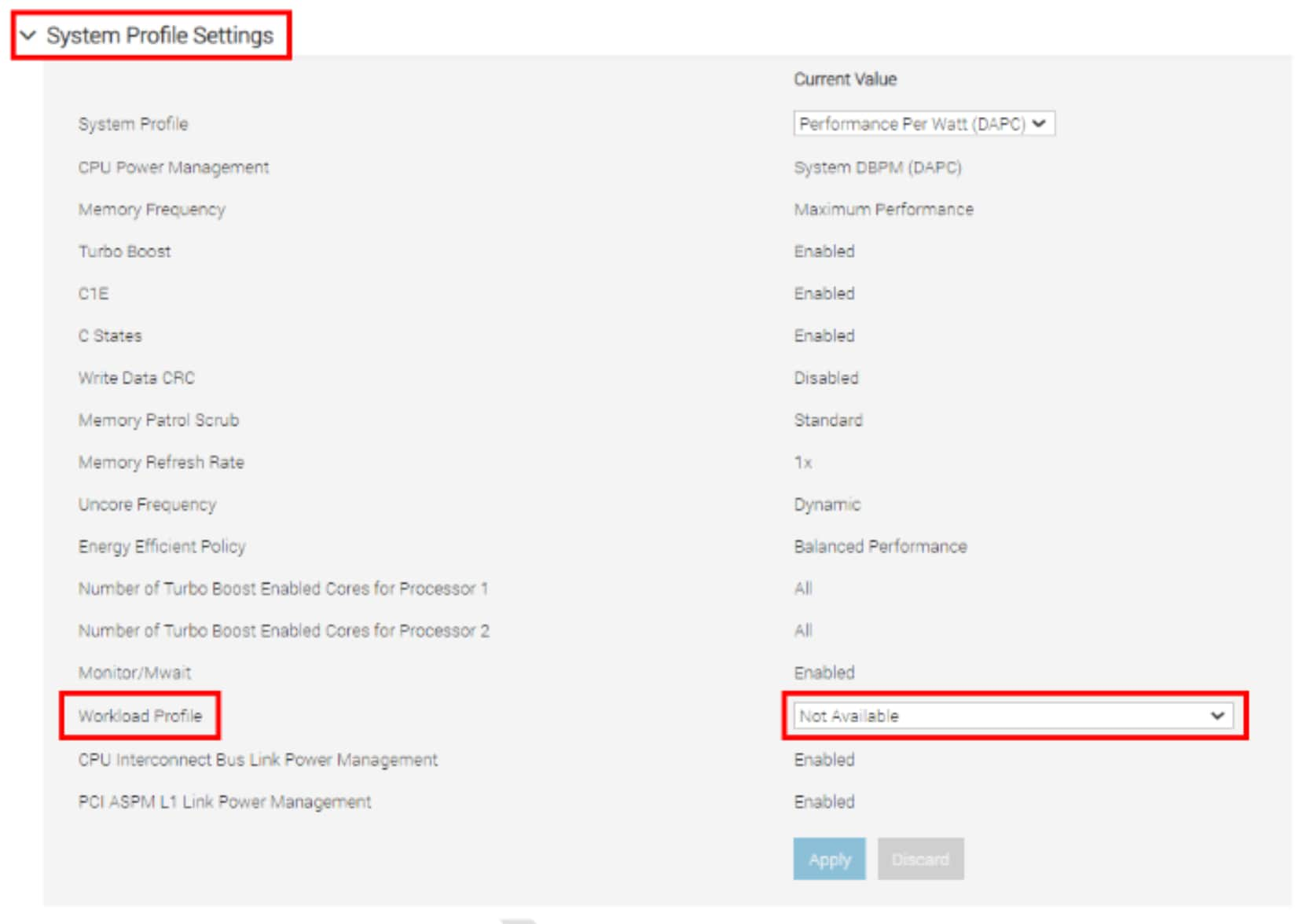 Scroll down to the System Profile Settings tab.
References
Dell Technologies documentation
The following Dell Technologies documentation provides other information related to this document. Access to these documents depends on your login credentials. If you do not have access to a document, contact your Dell Technologies representative.