
Solution Guide—AI Agents for Business Users with Aible

Solution Guide—AI Agents for Business Users with Aible This solution guide describes how organizations can use Aible on the Dell AI Factory to rapidly derive insights, predictions, and recommendations directly from enterprise data.

Introduction

Executive summary

Every organization of every size today sits on a growing reservoir of data, yet only a fraction of it ever shapes decisions. Dashboards accumulate, reports circulate, and AI experiments start and stall. Not because leaders lack ambition, but because turning raw data into real outcomes has remained slow, specialized, and difficult to scale. What businesses need is not another tool, but a way to bring meaningful intelligence directly to the people who make decisions every day.

Aible on the Dell AI Platform changes this dynamic. Together, they introduce a practical path for organizations to operationalize AI where their data lives, without forcing teams through lengthy development cycles or complex new workflows. Aible’s AI agents analyze data immediately, explore patterns at depth, and convert findings into clear recommendations—all in terms business users understand. Dell provides the secure, high‑performance foundation that keeps this intelligence close to enterprise systems, ensuring data stays under your control and performance scales with demand.

The result is a shift from siloed analytics to everyday, embedded insight. Teams can test ideas faster, respond earlier to emerging trends, and automate the kinds of routine analysis that once consumed hours or days. Executives get clearer signals. Operational teams get guidance they can act on. And the organization begins to build momentum—one agent, one dataset, one decision at a time.

This guide shows how to put that momentum into motion.

About this document

This document is intended for teams evaluating how to bring AI‑driven capabilities into everyday business analytics workflows without adding complexity or long adoption cycles. It focuses on how Aible and the Dell AI Platform work together to make this practical in enterprise environments.

The content is organized to help readers understand what is required to deploy and operate the solution, and how business users interact with it in practice. It provides both a high‑level product overview and how the solution benefits existing data environments.

Audience

This document is intended for organizations, from commercial to enterprise scale, that rely, or plan to rely, on data to operate their business and are looking to use AI to broaden who can extract value from that data. It is written for technology and data leaders responsible for enabling analytics and AI across the enterprise, who require solutions that can be adopted quickly without creating dependence on scarce specialist skills.

The guide also addresses business leaders and line‑of‑business sponsors who are accountable for performance outcomes and want more direct access to insights and recommendations derived from enterprise data, without waiting on extended development cycles or intermediary teams.

Revision history

The following table shows the revision history of this document.

 Table 1.  Revision history 
Date Version Change summary
February 2026 H04648.0 Initial release.
August 2026 H04648.1 Installation instructions changed from manual to DAP blueprint.
September 2026 H04648.2
Updated compute sizing information.

Solution overview

Business challenge

Many organizations already have more data than they can effectively use. Reports are delivered, dashboards are reviewed, and models are built, yet important questions still surface too late or require specialized teams and long cycles to answer. As a result, valuable data often remains under‑utilized and insight generation does not scale with the business.

The challenge is more than access to AI. It includes who can apply it, how quickly it can be applied, and whether it fits into how decisions are actually made. Traditional approaches concentrate advanced analysis within small expert teams, creating bottlenecks that slow progress and disconnect insights from day‑to‑day operations. At the same time, many initiatives struggle to move from exploration to consistent use across the organization.

Addressing this challenge requires an approach that expands participation in data‑driven work without sacrificing rigor, and the ability to operate close to enterprise data at scale. Together, Aible and the Dell AI Platform provide a foundation for doing this by combining accessible, business‑oriented AI capabilities with an enterprise platform designed to run where data resides and support sustained adoption.

Use cases

Aible supports a wide range of data‑driven use cases across functions and industries, from exploratory analysis and performance monitoring to prediction, optimization, and decision support. The platform combines flexibility with pre‑built tools and agents designed for common industry scenarios, giving organizations a practical starting point while remaining adaptable to specific needs. The examples that follow highlight a set, from a vast universe, of use cases to illustrate how Aible is applied in practice.

Retail: early detection of performance shifts and their drivers

Retail performance is shaped by a complex and shifting set of factors. Customer behavior changes across stores and channels, competitors adjust pricing and promotions market by market, and external forces such as tariffs, inflation, and supply chain disruptions continually alter the operating landscape. While retailers track sales, margins, and transactions closely, they often lack timely insight into why those metrics are moving, forcing teams to react after the impact is already visible.

Aible addresses this challenge by automatically analyzing retail data at a level of detail that is not practical with manual or hypothesis‑driven approaches. The platform evaluates millions of combinations across customer characteristics, product attributes, locations, pricing actions, and time to identify the specific drivers behind performance changes. Instead of assuming that past patterns will hold or relying on predefined questions, Aible enables agentic analysis that surfaces what matters now, highlighting the most impactful shifts and ranking them by business relevance.

Running on the Dell AI Platform, this analysis can be executed directly against large‑scale retail data environments, supporting continuous monitoring rather than periodic reporting. The result is an early‑warning, situational awareness capability that helps retailers recognize emerging trends, understand their drivers, and respond confidently as conditions change, rather than relying on lagging indicators or static assumptions. For more information, visit Aible retail solution brief.

Healthcare: clarity behind care and financial outcomes

Healthcare providers contend with constant changes in insurance coverage, patient behavior, and operating costs, alongside evolving claim approval standards and reimbursement models across payers. External pressures such as new regulations, inflation, and workforce shortages further complicate planning and execution. When performance changes, providers are often left reacting after the fact, limiting their ability to protect patient outcomes, financial performance, and operational resilience.

Aible helps providers uncover what is driving those changes by analyzing how clinical, operational, and financial factors interact. The platform examines patterns across patient demographics, visit types, service lines, payer approval behavior, and treatment costs to identify not only which areas are shifting, but why. By surfacing combinations of factors that would take weeks or months to analyze manually, Aible enables healthcare teams to recognize emerging issues earlier and focus attention where it can have the greatest impact. Deployed on the Dell AI Platform, this analysis can be performed directly within existing healthcare data environments, supporting timely, informed decisions across care delivery and revenue cycle operations. For more information, visit Aible healthcare solutions brief.

Financial Services: actionable insight for asset management

Banks and asset managers track assets under management, portfolio performance, and client activity across products, regions, and market conditions. Interest rate movements, market volatility, regulatory constraints, and competitive actions all influence results, but traditional analysis often separates these dimensions, making it difficult to understand how portfolio and client behavior interact in practice.

Aible enables teams to analyze these factors together by evaluating patterns across product mix, client segments, regional performance, and market conditions. By examining millions of combinations, the platform highlights where portfolio performance is changing and how client behavior and external conditions are contributing. Deployed on the Dell AI Platform, this analysis can run at scale against existing financial data environments, supporting earlier interpretation of emerging risks and opportunities and enabling more timely, informed decisions. For more information, visit Aible asset management solution brief.

Solution description

Aible on the Dell AI Platform provides a user-friendly, no-code platform for building and running AI agents that work directly with enterprise data to generate insights, predictions, and recommendations. The solution is designed to operate in controlled enterprise environments without requiring extensive data preparation or re‑engineering before work can begin.
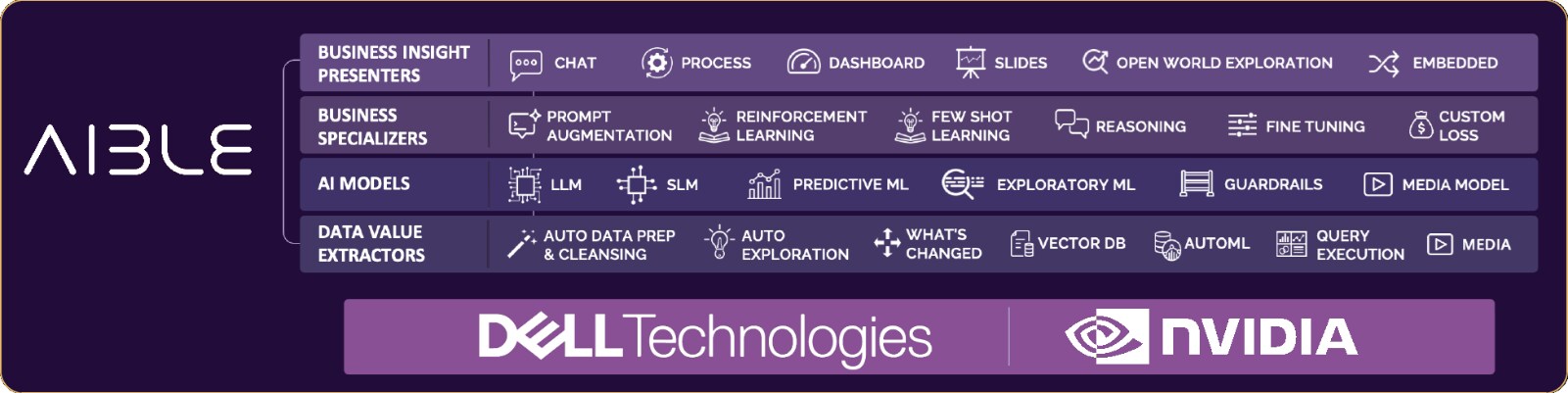
Figure 1. Aible capabilities
Aible capabilities

The platform’s capabilities, as shown in Figure 1, support both reuse and adaptation. At the data level, Aible automatically prepares and explores datasets, examining large numbers of variable combinations to identify patterns and relationships that are difficult to surface with predefined queries. At the model level, it supports a mix of predictive, exploratory, and language models, which can be adapted using feedback, reasoning steps, and domain‑specific logic. At the interaction level, results can be surfaced through multiple formats, including conversational interfaces, dashboards, slides, and embedded outputs, depending on how teams consume information. Template agents are available as starting points for common analytical and operational tasks, allowing teams to reach value quickly while retaining the ability for customization.

Aible supports both isolation and collaboration as part of its operating model. Data, agents, and outputs can be kept separate by team or use case, while still enabling controlled sharing when collaboration is required. When deployed on the Dell AI Platform, this approach allows AI agents to operate close to organization data and decision processes, supporting consistent use across multiple teams and workflows without turning analytics and AI into standalone projects.

Benefits

Empower business users

Aible enables business users to rapidly prototype and iterate AI agents by expressing domain and task‑specific questions in business language rather than code. Template agents provide immediate starting points, while automated data preparation and exploration remove the need for extensive upfront work. As users provide feedback, agents automatically correct reasoning, adjust prompts and models, and improve outputs, allowing teams to refine logic quickly as understanding evolves.

Govern with control and efficiency

Aible enables organizations to govern AI agents entirely within on‑premises or customer‑controlled environments, keeping data, models, and execution under direct operational control. Agents consume compute resources only when active and automatically stop when not in use, allowing teams to iterate and scale without introducing persistent infrastructure overhead. This supports responsible experimentation with control while remaining aligned with enterprise deployment requirements.

Distribute across teams and environments

Aible allows agents and outputs to be reused across teams by sharing them as templates. This supports consistent approaches while letting teams work within their own environments, rather than forcing analysis into a single centralized workflow. Organizations can extend AI use incrementally across departments while keeping ownership close to where the work happens.

Analyze with automated exploration

Aible performs AI‑first automated data analysis by evaluating every possible group‑by and drill‑down across datasets, rather than relying on user‑defined queries. Using Natural Language Querying (NLQ), users can also interact with results while agents automatically surface high‑impact patterns and summarize findings. Outputs are deterministically validated back to source data, eliminating hallucinations and enabling analysis at a depth and speed not achievable with traditional query‑driven approaches.

Solution design

Solution architecture

In this solution, Aible runs on the Dell AI Platform as an on‑premises architecture designed to execute agent‑based analytics directly against enterprise data. As exemplified in Figure 2, Dell infrastructure provides the scalable compute and acceleration required for analytical, predictive, and generative workloads, while Aible deploys AI agents that perform automated data exploration and model‑driven reasoning close to data sources. This design supports incremental scaling from single systems to clustered deployments keeping execution within the enterprise environment.
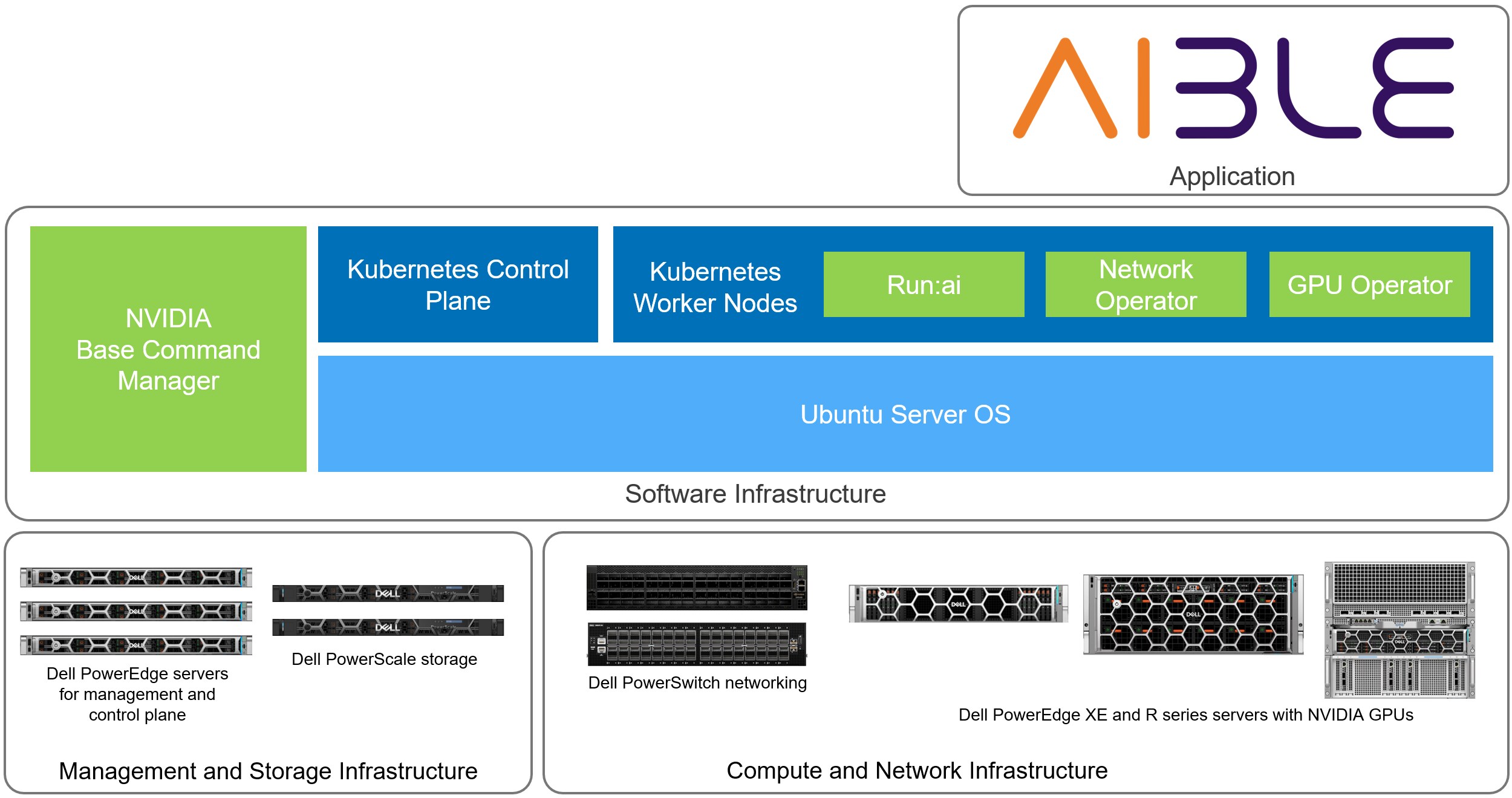
Figure 2. Dell AI Platform with NVIDIA components serving as the foundation to run Aible workload
Dell AI Platform with NVIDIA components serving as the foundation to run Aible workload

Figure 2 includes optional modules, applicable if Dell AI Platform with NVIDIA and NVIDIA software stack is chosen. The following section lists the Dell AI Platform configurations.

Supported Dell AI Factory infrastructure

Aible is deployed on Dell AI Factory, which provides validated, GPU-accelerated infrastructure for enterprise AI workloads. The platform supports Kubernetes-based execution, high‑throughput networking, and persistent storage required for large‑scale model training, pipelines, and inference.

Validated configurations

This blueprint solution was validated on the following configuration:

Table 2. Validated configuration details
Components Details
Modular foundation Enterprise Inferencing
Dell AI Factory Dell AI Factory with NVIDIA
Server Dell PowerEdge XE7745 (2 worker nodes)
GPU NVIDIA H200 NVL (4 per node)

For details on the underlying Dell AI Factory configuration options, see the applicable design guide listed below:

Applicable Dell AI Factory modular foundations

Dell AI Factory supports multiple modular foundation configurations designed for different scale and networking requirements. Aible is expected to operate on all currently available modular foundations, provided deployment prerequisites are met, and the target environment is managed through Dell Automation Platform. These include:

  • Pilot Module: Single-node deployment option on PowerEdge R7725 or R770 with 2 GPUs.
  • Small Inference Foundation: Scalable, production-ready infrastructure for lightweight AI inference workloads and initial experimentation.
  • Enterprise Inference Foundation: Scalable, production-ready infrastructure tailored for high-demand AI inference across enterprise use cases.
  • Distributed AI Model Foundation: Scalable, production-ready infrastructure optimized for advanced model fine-tuning and customization at scale.

Each modular foundation offers choice of Dell AI Factory including networking, servers and GPU models. Aible blueprint can also be deployed on existing Dell AI Factories or custom Dell AI clusters, as long as the cluster is inventoried by Dell Automation Platform and meets the required prerequisites.

Key components

Dell AI Platform with NVIDIA


PowerEdge servers

Dell AI Factory deployments support CPU silicon diversity, allowing organizations to choose Intel or AMD processors based on workload characteristics, performance requirements, and standardization preferences.

Dell PowerEdge R670 and R6715 servers are typically used for management and control‑plane roles, providing a compact platform for orchestration, scheduling, and platform services. For general compute and AI workloads, PowerEdge R770 and R7725 deliver a dual‑socket platform with accelerator‑enabled configurations, making them suitable for data processing, analytics, and AI services. PowerEdge R7715 offers a single‑socket alternative for similar use cases.

PowerEdge XE7740 and XE7745 provide dense PCIe GPU platforms optimized for high-performance AI and data analytics. PowerEdge XE9780 represents an 8U system for SXM GPUs. Together, these platforms enable a tiered design that separates management, general compute, and high-density GPU execution within the same Dell AI Factory environment.


NVIDIA GPUs

The NVIDIA H200, H100, and RTX PRO 6000 GPUs support a broad range of AI and data analytics workloads. The H200 and H100 are designed for large‑scale model training and inference, offering high throughput for compute‑intensive tasks. The RTX PRO 6000 and RTX PRO 4500 provide versatile acceleration for mixed workloads, including analytics, visualization, and inference. Together, these GPUs allow organizations to match performance characteristics to workload requirements across enterprise environments.


Dell PowerSwitch with Enterprise SONiC Distribution

AI workloads require networks that can move large amounts of data quickly and consistently with low latency. Dell PowerSwitch with Enterprise SONiC, including the SN‑series switches, provides a high‑performance Ethernet fabric designed for these needs, supporting scalable and efficient data movement across compute nodes.

Features such as congestion management, adaptive routing, and RDMA over Converged Ethernet (RoCE) help optimize communication between GPUs and reduce delays during training and inference. Together, these capabilities provide a simple, reliable networking foundation for AI environments while maintaining the flexibility of open Ethernet standards.

NVIDIA AI Enterprise

NVIDIA AI Enterprise (NVAIE) is a secure, end-to-end software platform that empowers organizations to accelerate their AI journey from pilot to production. It provides a comprehensive suite of tools and frameworks, optimized and supported to run on common data center infrastructure, streamlining the development and deployment of AI applications. By offering compatibility with leading AI frameworks and simplifying complex workflows, NVAIE helps your teams harness the full potential of AI with greater confidence and efficiency. This powerful platform provides the stability and performance needed to build and scale data science and AI workloads, helping you turn innovative ideas into real-world progress.

Aible

The Aible user interface is accessed through a web application that supports business interactions such as chat, dashboards, and slides. Core functions include creating new agents, working with saved sessions and agents, managing data and document sets, using use‑case blueprints, and configuring chat behavior. These capabilities provide the primary workflow for building, running, and interacting with agents, with AibleClaw ensuring that agent workflows can be captured as deterministic templates that execute consistently with controlled cost and governance. The simplicity of the solution coupled with the powerful outcomes makes this solution attractive for organizations of all sizes.

Additional capabilities are available as advanced features when enabled. These include predictive AI impact monitoring, language model fine‑tuning and AI feedback, data source evaluation for enterprise warehouses, and chat analytics. Advanced features extend observability, model control, and analytical depth, but are not required for standard agent creation and execution.
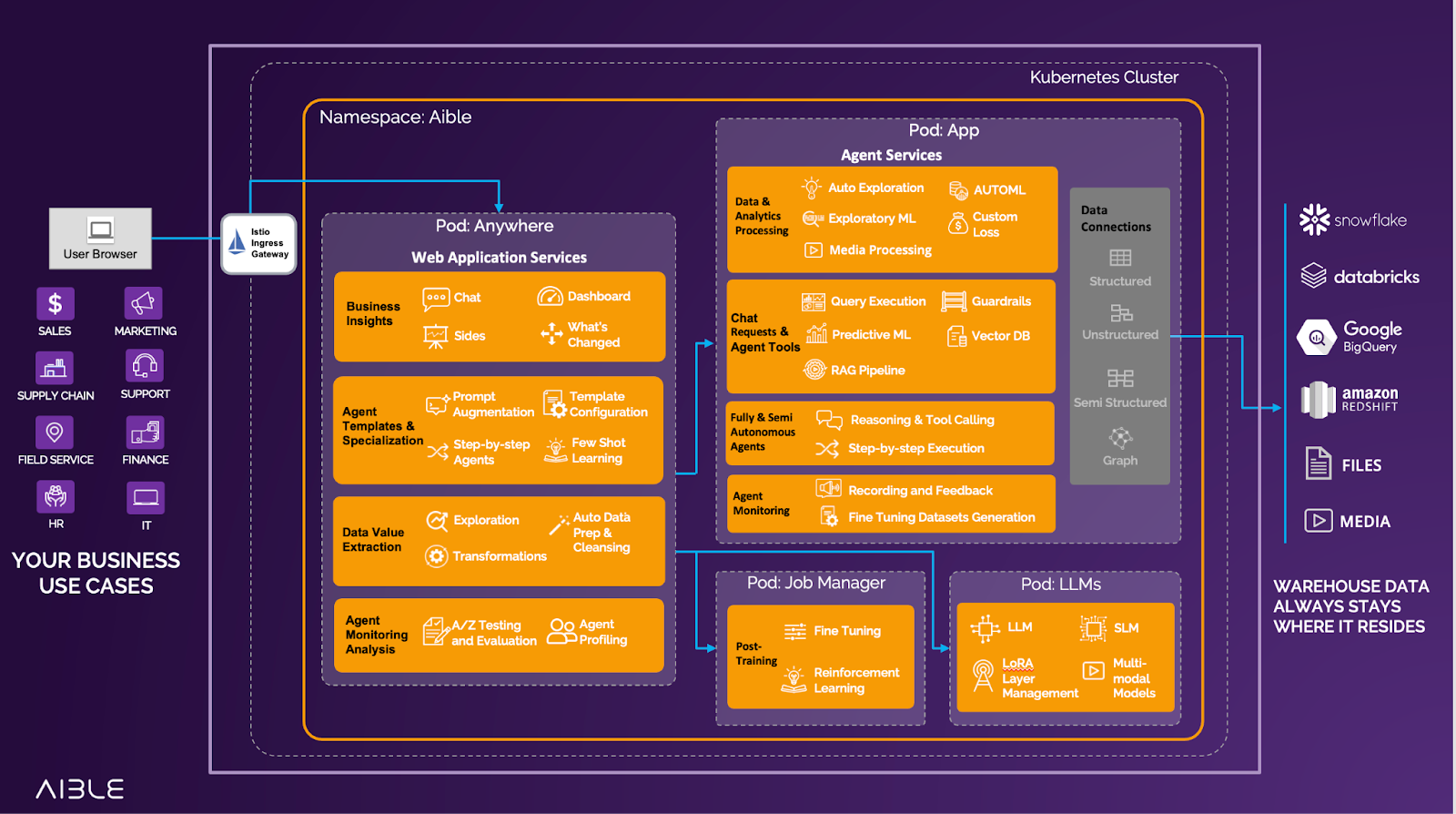
Figure 3. Aible application overview
Aible application overview

As shown in Figure 3, the platform is deployed within a Kubernetes cluster under a dedicated Aible namespace. User requests enter through the ingress gateway and are handled by web application services, which route requests to cloud agent services. These services perform data analytics processing, including AutoML, query execution, and application of guardrails. Requests flow through defined pipelines for chat requests, agent tools, and reasoning steps, all executed within the platform.

The architecture separates execution responsibilities across pods. Data connections interface with structured, semi‑structured, and unstructured data sources, including external data warehouses and file‑based systems, without moving the data from its original location. Language model execution is handled by dedicated LLM and SLM pods, while job management pods support fine‑tuning and post‑training activities. This separation allows multiple agents and analytics processes to run concurrently within the same cluster while sharing common infrastructure resources.

Sizing and scaling

Sizing the infrastructure for an on-premises deployment of Aible depends on the number of concurrent users and their activity. The Dell AI Platform and Aible are designed to scale up as additional capacity is needed. The overall capacity of the Dell AI Platform can be increased by adding nodes.

Kubernetes control plane sizing

On-premises deployments of Aible require a Kubernetes cluster with a control plane and compute nodes. The recommended three Kubernetes control plane nodes included in Dell AI Platform with NVIDIA configurations meet the control plane requirements for the Kubernetes cluster.

Compute sizing

The following table provides Dell's guidance for the number of Aible users. The table may not include all available configuration options. For the latest configuration offerings, contact your Dell Technologies sales representative. Actual performance depends on the workload mix, datasets, and run-time parameters.

 Table 3.  Compute sizing – active users per AI compute node 
Modular Foundation Active Users per Node AI Compute Server Model GPUs per node
Small Inference 20–30 Dell PowerEdge R770, R7725, R7715 2 × NVIDIA RTX PRO 6000
Enterprise Inference 150–200 Dell PowerEdge XE7745, XE7740 8 × NVIDIA RTX PRO 6000
Dell PowerEdge XE7745, XE7740 4 × NVIDIA H200 NVL
Distributed AI Model 400–500 Dell PowerEdge XE9780 8 × NVIDIA H200 SXM
Dell PowerEdge XE7740 / XE7745 8 × NVIDIA H200 NVL


Customers can use the table above to select the AI‑optimized servers for their solution and determine the approximate recommended number of nodes required to meet their expected concurrent usage. For example, for 100 active users, one could select three R7725 server nodes, each equipped with two RTX Pro 6000 GPUs.

Storage sizing

The standard Dell AI platform configurations include enough local storage to meet the runtime storage requirements for Aible Platform. Additional storage can be allocated using Kubernetes storage classes and provisioned from the Dell PowerScale storage included in the supported Dell AI platforms.

Pilot module

The pilot module is designed to run the solution on a single, all-in-one node. The recommended pilot module for Aible deployment is Dell PowerEdge R7725 with two NVIDIA RTX PRO 6000 GPUs, enabling teams to experiment with the workload quickly and establish a clear path to scale. Starting from this baseline, organizations can fully validate the solution for their environment and then expand to multi-node or higher-capacity configurations as adoption grows. This approach shortens time-to-value, reduces deployment risk, and standardizes the transition from pilot to production. Additionally, pilot module is the appropriate recommendation for organizations with restrictions in terms of investment, power, or rack space, which occasionally can be the case for small and medium businesses.

This pilot module configuration is dedicated to the Aible workload. Other workloads, such as the Dell Automation Platform Orchestrator (DAPO), must run on separate infrastructure with its own resources.

A deskside version of Aible is also available for Dell Pro Max with GB10. This option is suited for single user initial experimentation. The blueprint described later in the document is not intended for this use case.

Connectivity

Container registry and deployment artifacts

Aible is deployed through the Dell Automation Platform using a service‑composition blueprint that orchestrates the full installation workflow.

Container images and charts are pulled from multiple external registries during installation:

  • Aible Platform Images: Docker Hub (https://hub.docker.com/orgs/aible/repositories).
  • NVIDIA NIM and GPU-Accelerated Service Images: NVIDIA NGC container registry (nvcr.io).
  • Aible Platform Umbrella Chart: External OCI registry specified by the Chart OCI Reference input (form: oci://host[:port]/path/chart[:version]).
  • LLM Model Weights: Downloaded by the LLM service init container from Hugging Face during first install.

Network access and endpoints

Aible exposes its services through Kubernetes ingress on standard HTTP and HTTPS ports. External access is typically provided via a load balancer in front of the ingress controller.

  • Ingress ports: 80 (HTTP) and 443 (HTTPS)
  • On‑premises deployments commonly use MetalLB to provide load balancer functionality within the cluster
  • User access typically via https://aible-anywhere.com.

Unconnected deployment considerations

For unconnected or restricted environments, all container images and the Helm binary can be pre‑provisioned in a customer‑managed registry. The blueprint provides override inputs (container registry, ngc registry, helm chart repo, helm binary) to redirect pulls to internal mirrors. However, not all image registry references in the NIM subcharts can be overridden at this time. A fully unconnected deployment is under development for an upcoming blueprint update.

Security and access control

Dell believes that trust is the foundation of progress, which is why security is at the core of this powerful solution. To protect your most valuable asset, your data, this solution employs a zero-trust security framework that safeguards information at every turn. All data is protected with robust encryption, both while at rest and in transit, ensuring it remains secure across your entire ecosystem. This solution is designed to support your data sovereignty needs and is built to adhere to the highest global standards, giving you the confidence to innovate while maintaining compliance.

Empowering your teams with AI requires a system you can manage with precision and clarity. Admin and regular user roles are defined in the application setup. Users can maintain isolation of their data and agents or decide to share with specific users for collaboration, maintaining control over their assets.

General security considerations

AI solutions exist at the intersection of rapidly evolving AI technology and the ever-challenging security landscape. This unique position brings both incredible opportunities and significant risks. The security of any system exists in relation to the system’s threat profile: the value of a system's assets, the likelihood of an attempted attack, and the nature of potential attackers in terms of their resources, capabilities, and incentives. Furthermore, there is often a tension between security and convenience. Extra security measures might interfere with desirable use cases or lead to false-positive results. Therefore, Dell Technologies advises customers and architects to consider their specific operational contexts and conduct appropriate analysis to validate the applicability of the recommendations in this guide. Depending on the threat profile, additional services and security measures might be advisable.

Note that the recommendations and best practices contained in this guide and in other sources indicated are not a complete security evaluation of the Dell AI Platform in its entirety or its individual components, nor a complete threat and risk analysis. You can also find additional information at the Dell Security and Trust Center.

Aible applies robust security measures to protect enterprise data and ensure compliance with global standards. The application incorporates multi-layered protection, including encryption at rest and in transit, customizable data handling, and private deployment.

Deployment

Dell Automation Platform

The Aible application is available for deployment via blueprint. This light-touch deployment method is accessible through the Dell Automation Platform catalog.

The Dell Automation Platform is a comprehensive infrastructure management and orchestration solution created to streamline and automate the deployment and lifecycle management of your IT environments. It empowers your organization to move forward with confidence by simplifying how you manage infrastructure and workloads across private cloud, AI-driven solutions, and edge environments. This unified platform gives you a consistent and scalable operational model, simplifying everything from initial deployment to ongoing management and freeing your teams to focus on innovation.

The platform is composed from three independently versioned component blueprints, executed in sequence:

  • Input validation: Pre-flight checks on credentials and inputs; derives a unique namespace for the deployment.
  • Stack verification: Verifies cluster prerequisites in-cluster (GPU availability, storage class, Istio ingress, required CRDs) and fails fast if any are missing.
  • Aible deployment: Executes Helm releases, creates Kubernetes resources, runs the post-install Job (account/tenant/sample data seeding), and concludes with a deployment verification Job.

This staged design ensures that configuration and infrastructure problems are caught early, before any cluster resources are created.

Pre-deployment tasks

Target cluster prerequisites

To ensure compatibility and optimal performance, the target Kubernetes cluster must meet the following requirements:

  • Supported platform: Confirm that the target platform is supported and onboarded to DAP.
  • Operating system: Ubuntu 24.04.
  • NVIDIA GPU drivers: Version 580.95.05 or higher.
  • CUDA Toolkit: CUDA version 13.0+.
  • Kubernetes: Kubernetes version 1.30 or later with kubectl installed
  • NVIDIA GPU operator: Must be deployed on the cluster to manage GPU resources.
  • Service mesh: Istio 1.28.
  • External load balancer: MetalLB configured with a public IP address pool.
  • Storage class: A default storage class must be configured and enabled within the Kubernetes cluster. An NFS backed StorageClass is required for multi-node deployments.
  • Kubernetes deploying user permissions:
    • Create and bind Role and ClusterRole objects
    • Create Kubernetes Custom Resource Definition (CRD)
    • Create ServiceAccounts, Secrets, and ConfigMaps
    • Create Deployments, Jobs, DaemonSets, PodDisruptionBudgets
    • Create HorizontalPodAutoscalers, PersistentVolumeClaims
  • Connectivity: Internet access required.
  • Persistent critical services images that will be deployed: DuckDB

DAP Orchestrator prerequisites

The Aible blueprint was tested on DAP version 2.0. The DAP Orchestrator must have the following plugins installed to support the Aible blueprint:

  • Kubernetes Plugin (v3.4.0.0): Required for Kubernetes-related operations.
  • Utilities Plugin (v3.1.4.0): Used for scaling and general utilities.
  • Helm Plugin (v1.4.0.0): Facilitates deployment of Aible using Helm charts.

Deployment procedure

The Aible workload is deployed through the Dell Automation Platform using the Aible Platform blueprint. The blueprint automates the full deployment workflow including input validation, cluster verification, Helm chart installation, post-install account and data seeding, and deployment verification. The following sections describe the required secrets, blueprint inputs, and deployment steps.

Create the required secrets

The blueprint will require the selection of secrets as part of the inputs. Before deploying the blueprint, create the following secrets in the DAP Administration Module using the steps below:

  1. Navigate to Administration > Security.
  2. Select the Secrets tab, as shown in Figure 4.
    Figure 4. Secrets creation window in Dell Automation Platform
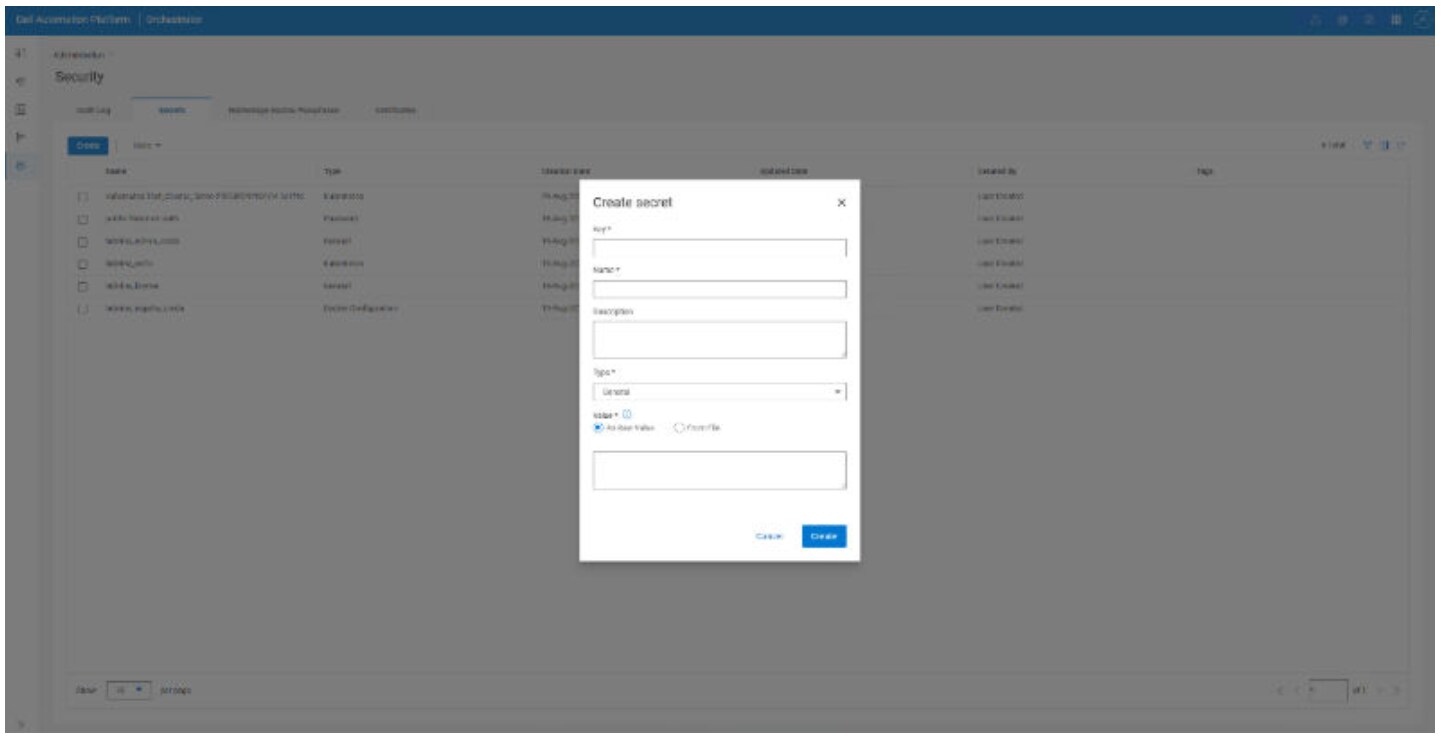
    Secrets creation window in Dell Automation Platform
  3. Click Create and define each of the required secrets individually, using the specifications provided in the following table.
Table 4. Aible blueprint secrets
Secret Name Secret Type Sample Value Used By
Kubernetes credentials k8s {"host": "https://10.0.0.1", "port": "6443", "verify_ssl": "TLS", "ssl_ca_cert": "<PEM>", "cert_file": "<PEM>", "key_file": "<PEM>"} All stages (input validation, stack verifier, deployment)
Docker Hub password password Docker Hub personal access token provided by Aible Input validation (existence); Aible deployment — image pulls from Docker Hub
NGC API key password NVIDIA NGC API key obtained from NVIDIA Input validation (existence); Aible deployment — NIM/NGC image pulls
Chart registry password password Harbor robot-account token or registry password Aible deployment — helm registry login for the umbrella chart pull. Optional: blank means an anonymous pull and login is skipped
Chart registry CA bundle password PEM-encoded CA certificate that signed the registry's TLS certificate Aible deployment — chart pull TLS verification (helm --ca-file). Optional: needed only for a private or self-signed registry certificate
Chart signing public keyring password Public key provided by Aible Aible deployment — chart provenance verification. Required when Enforce Chart Signature Verification is on
Admin password password Initial admin user password Input validation (existence); Aible deployment — post-install account seeding
User password password Standard user password Input validation (existence); Aible deployment — post-install account seeding
TLS certificate password PEM-encoded full-chain certificate Input validation (existence); Aible deployment — HTTPS ingress
TLS private key password PEM-encoded unencrypted private key Input validation (existence); Aible deployment — HTTPS ingress
TLS CA root password PEM-encoded CA root certificate Input validation (existence); Aible deployment — app-tier trust anchor
Safeclaw password password Safeclaw sandbox user password Aible deployment — only when enable_aible_claw: true

Download the blueprint

Solution AI blueprints are available in the Dell Automation Platform catalog and can be directly downloaded to the DAP Orchestrator for streamlined deployment. Access requires a valid Dell Automation Platform license and any applicable software licenses for the specific AI solution.

Note: Dell Automation Platform offers several Dell Technologies-validated solution blueprints that Dell Technologies supports. However, Dell Technologies cannot support user-created blueprints or blueprints that a third party creates.

CAUTION: Through blueprints, plug-ins, and/or other means (collectively, Blueprints), the Dell Automation Platform may deploy and/or manage hardware, software, products, or services that are provided by a third-party manufacturer or supplier and are not Dell or Dell EMC branded (collectively, Third-Party Products). Notwithstanding any other provisions: (1) Third-Party Products are subject to the standard license, services, warranty, indemnity, and support terms of the third-party manufacturer/supplier (or an applicable direct agreement between you and such manufacturer/supplier), to which you must adhere; (2) Blueprints are provided as is and without warranties or conditions; and (3) any warranty, damages, or indemnity claims against Dell in relation to Third-Party Products and/or Blueprints are expressly disclaimed and excluded.
  1. On the Dell Automation Platform home tab, select Go to Catalog from the Catalog tile (automation.dell.com/catalog).
  2. On the Dell AI Solutions tile, click Explore Offers.
  3. In the list of available AI Solution offers, select the Aible blueprint.
  4. Select View Details.
  5. On the detail page, click Download.
  6. If needed, upload the blueprint to your Dell Automation Platform Orchestrator. It will be visible under Inventory > Blueprints.

Blueprint inputs

Once all prerequisite steps are completed, deploy the Aible blueprint.

  1. Navigate to Inventory > Blueprint in the DAP Orchestrator.
  2. In the list of available blueprints, select the Aible blueprint and click Deploy.
  3. Enter a name for your deployment and click Next.

In the Configuration section, provide the required inputs, as shown in Figure 5. The following list describes the key inputs organized by group. A comprehensive table listing every input, its data type, default value, and validation rules is provided in Appendix A.
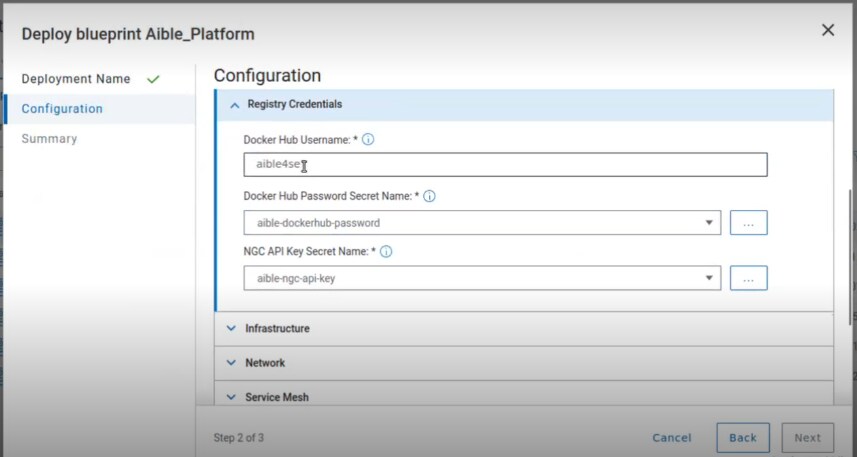
Figure 5. Aible blueprint configuration window
Aible blueprint configuration window

Credentials

  • Kubernetes Credentials: Secret containing the Kubernetes API connection details for the target cluster, holding the API token and `ssl_ca_cert`. Every operation the blueprint performs against the cluster authenticates with it, and it is parsed as the first deployment operation—if malformed, no subsequent stage executes. Created by the operator in the DAP secret store prior to deployment.

Registry Credentials

  • Docker Hub Username: Docker Hub account username used to pull the Aible container images. Provided by Aible to the customer; the default is the standard Aible pull account. Fixed once the platform is installed — changing it later requires reinstalling.
  • Docker Hub Password Secret Name: Name of the DAP secret holding the Docker Hub personal access token. Used to authenticate image pulls from the Aible organization on Docker Hub. The secret must exist in the DAP secret store before deployment; the input validation stage verifies its existence.
  • NGC API Key Secret Name: Name of the DAP secret holding the NVIDIA NGC API key, used to pull GPU-accelerated NIM model images from the NVIDIA NGC container registry. Obtained from NVIDIA. The secret must exist in the DAP secret store before deployment.

Chart Registry

  • Chart OCI Reference: OCI reference of the Aible Platform umbrella chart, of the form `oci://host[:port]/path/chart[:version]`. The version is a registry tag, not part of the repository path, and is passed to helm as `--version`. Always pin it: without a tag, helm resolves whichever tag is newest at deploy time, so two deployments a week apart can receive different charts.
  • Chart Registry Host: Registry host, with optional port, that `helm registry login` authenticates against — for example `registry.example.com:5000`. Kept separate from the chart reference because the login host never includes the repository path. No scheme, no path.
  • Chart Registry Username: Username, or Harbor robot-account name, for the chart registry. Leave blank for a registry that allows anonymous pulls; it is read only in combination with the password secret below. A password set with this left blank fails the pull.
  • Chart Registry Password Secret Name: Name of the DAP secret holding the chart registry password or robot-account token. Only the secret name is passed to the deployment, never the value, and it is read from the secret store at pull time. Leave blank for anonymous pulls—`helm registry login` is then skipped entirely. Prefer a pull-only robot account.
  • Chart Registry CA Bundle Secret Name: Name of the DAP secret holding the PEM-encoded CA bundle that signed the chart registry's TLS certificate, passed to helm as `--ca-file`. Required for a private or self-signed registry certificate; for a self-signed certificate the certificate is its own CA. Leave blank when the certificate chains to a public CA. TLS verification is never skipped.
  • Chart Signing Public Keyring Secret Name: Name of the DAP secret holding the public GPG keyring that chart provenance is verified against, as base64-encoded binary keyring data or an ASCII-armored public key. Whenever it is set, the chart's provenance is checked, so a signed chart is always verified. Required when signature enforcement is on.
  • Enforce Chart Signature Verification: Requires the chart to be signed. This controls only the case where a signature is absent. If it is on, an unsigned chart fails the deployment. If it is off, the chart is accepted and recorded as unsigned. A signature that is present is verified either way, and one that fails verification fails the deployment regardless of this setting. Enabling it also requires the signing keyring above.

Infrastructure

  • Kubernetes Namespace: Target Kubernetes namespace for the Aible deployment. Leave blank to auto-derive a unique namespace from the deployment name. If specifying a value, use a short, unique name not already owned by another active Aible deployment; the value is checked for valid formatting and for collisions. Keep the name short when deploying with Claw enabled, as long namespaces can collide on shared openshell ClusterRole names.
  • Storage Class: Kubernetes StorageClass backing the platform's persistent storage—its databases, caches, object storage, and model cache. Must already exist on the cluster; verify with `kubectl get storageclass`, or PVCs stay Pending and no pods start. Cannot be changed after install without recreating the storage and losing existing data.

Network

  • Anywhere Domain: Public base domain where the Aible Anywhere service is served on. Set it to the real public FQDN, and confirm DNS and ingress resolve to it and that it does not collide with another deployment—otherwise, ingress and TLS will not serve and the domain-collision check fails.
  • Target Infrastructure Deployment Id: Deployment ID of the target infrastructure deployment as registered in DAP. Leave blank for on-premises deployments where the cluster is reached directly using its Kubernetes credentials. Set it to the infrastructure deployment identifier when Aible runs as a hosted service and cluster traffic is routed through Dell's managed proxy, so requests reach the correct on-prem endpoint.

Service Mesh

  • Istio Gateway Namespace: Namespace where the cluster's Istio ingress gateway runs. The platform attaches its ingress routing here, so it must match the cluster's actual setup. Change it only if the gateway runs elsewhere, for example `istio-system`.
  • Istio Gateway Selector -istio Label: Value of the `istio` pod label on the cluster's Istio ingress gateway, used to select the gateway workload.
  • Istio Gateway Selector -app Label: Value of the `app` pod label on the cluster's Istio ingress gateway, used to select the gateway workload.
  • Ingress TLS Certificate Secret Name: Name of the DAP secret holding the TLS certificate the ingress gateway uses to serve HTTPS, in PEM format and including the full chain. The certificate must be valid for the Anywhere domain and its `www` subdomain.
  • Ingress TLS Private Key Secret Name: Name of the DAP secret holding the private key matching the TLS certificate above, in PEM format. The key must be unencrypted—the ingress gateway cannot use a passphrase-protected key.
  • Ingress Gateway Cluster IP: Cluster-internal IP address of the ingress gateway, so the platform's own service-to-service calls to its public web address reach the gateway. Required on clusters where the public address does not resolve from inside the cluster, which is common on-premises; leave blank where it already resolves. Obtain it with `kubectl -n istio-ingress get svc istio-ingress -o jsonpath='{.spec.clusterIP}'`.
  • Ingress TLS CA Root Secret Name: Name of the DAP secret holding the PEM-encoded CA root the app tier trusts when calling back through the ingress gateway on the public FQDN. For a self-signed gateway certificate, set this to the same secret as the TLS certificate—the served certificate is its own trust anchor. For a private or internal CA, set it to the CA root, not the served leaf or chain.

LLM Compute

  • LLM GPU Count: Number of GPUs assigned to the active LLM served by the platform, each requiring at least 24 GB of VRAM. Before installing, the platform checks the cluster has enough free GPUs to cover the requested count; if it does not, the LLM pod stays Pending and post-install waits on an app tier that never comes up. Set to 0 to run without a dedicated GPU allocation. Range 0-128.
  • LLM Model Profile: Optional model profile to pin for the active LLM. Leave blank to let the runtime auto-select the profile matching the detected GPU hardware, which is the safest choice on most clusters. Set an explicit profile ID only if auto-select picks the wrong profile.

Post-Install Setup

  • Enable Aible Claw: Enables Aible Claw, the interactive agentic sandbox capability. When true, the platform runs the agentic sandbox and creates its dedicated sandbox user, which makes the Safeclaw Password secret mandatory—post-install exits 1 without it. Set false to deploy without Claw: no sandbox is run, no sandbox user is created, and no Safeclaw password is needed. Changing this after install requires a deployment update.
  • Admin Email: Email address for the initial Aible admin user created during post-install.
  • Admin Password Secret Name: Name of the DAP secret holding the password for the initial Aible admin user. Must exist in the secret store before deployment.
  • Tenant Name: Display name for the Aible tenant account created during post-install. Two to 100 characters, starting and ending alphanumeric; letters, numbers, spaces, hyphens, and underscores are allowed.
  • Standard User Password Secret Name: Name of the DAP secret holding the password for the standard `user@aible.com` account created during post-install.
  • Safeclaw Password Secret Name: Name of the DAP secret holding the password for the agentic `safeclaw` sandbox user created during setup. Required whenever Aible Claw is enabled, and hidden and unused when it is disabled.
  • Install Agent Sandbox Operator: Whether the platform installs the Agent Sandbox operator—the `sandboxes.agents.x-k8s.io` CRD plus its controller—that Aible Claw needs to create sandboxes. Leave true on a dedicated cluster. Set false where infrastructure installs the operator separately alongside nim-operator or gpu-operator, so multiple deployments do not collide on the cluster-scoped CRD and an uninstall does not remove it cluster-wide. Only applies when Aible Claw is enabled; set it alongside Claw disabled and deployment creation fails with `OnlyWithInputError`.

Software Artifacts (Air-Gapped Overrides)

  • Helm Binary Download URL: URL the platform downloads the Helm binary from. Defaults to the public get.helm.sh release, pinned at 3.19.4 to clear CVE-2025-53547. Change it to a private mirror only for air-gapped deployments that cannot reach the internet.
  • Container Registry URL: Container registry the Aible application images are pulled from. Defaults to Docker Hub; change it to a private registry mirror only for unconnected deployments.
  • NGC Registry URL: Registry the NVIDIA NIM model images are pulled from. Defaults to nvcr.io; change it to a private mirror only for air-gapped deployments.

Deploy blueprint

Once all secrets are created and inputs are configured, deploy the Aible Platform blueprint through DAP. The blueprint executes its three stages automatically in sequence, as described in the following bullet points and presented in Figure 6.

  • Input validation: Verifies that all referenced DAP secrets exist, validates input values, and derives the unique deployment namespace.
  • Stack verification: Runs an in-cluster Job that checks GPU availability, storage class, Istio ingress configuration, required CRDs, and image pull access. If any prerequisite is missing, the deployment fails at this stage before any application resources are created.
  • Aible deployment: Installs the Helm releases, creates Kubernetes resources, runs the post-install Job (admin account creation, tenant setup, and sample data seeding), and concludes with a deployment verification Job.

Typical deployment time exceeds 30 minutes. The LLM tier downloads model weights from Hugging Face on first install, which may extend deployment time depending on network bandwidth. Size the deployment_verify_timeout input accordingly.
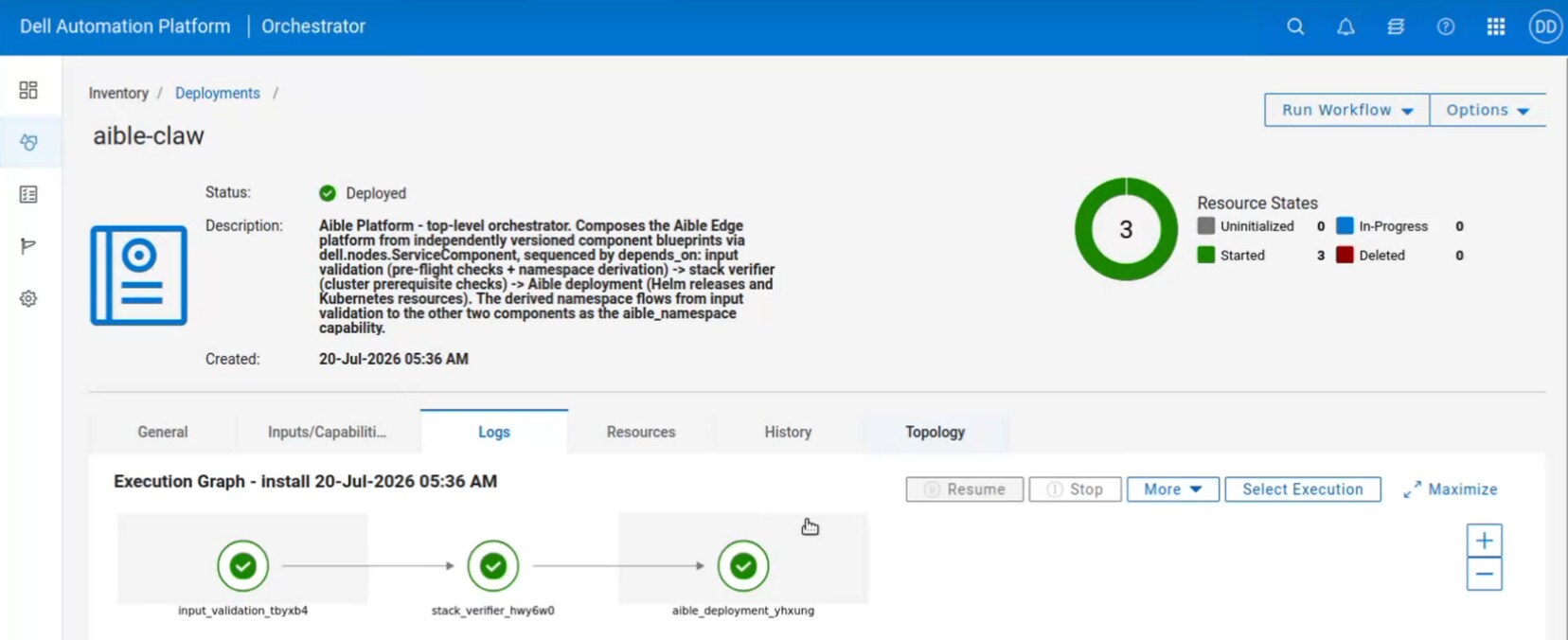
Figure 6. Aible blueprint execution graph
Aible blueprint execution graph

Post-deployment verification

The blueprint concludes with an automated deployment verification Job that confirms the platform is fully operational. This job is the success gate for the deployment and verifies the following:

  • The Helm release status is deployed
  • All workloads have reached their target replica counts
  • No pods are in an unhealthy state
  • The post-install Job (account seeding, tenant creation, sample data upload) has completed successfully
  • All Services have ready endpoints

The job output is available in the Job's pod logs and can be accessed with kubectl logs job/<name> -n <namespace>. The Job name is exposed as deployment_verification_job_name capability, for easy retrieval. For additional guidance on reviewing deployment logs, see Appendix B.

Access the application


Expose the application endpoint

Ensure the Kubernetes ingress controller or load balancer publishes an HTTPS endpoint for the Aible services.

This is typically done during installation and results in one or more FQDNs, for example: aible-anywhere.com, api.aible-anywhere.com, aible-app.aible-anywhere.com, aible-agent.aible-anywhere.com.


Verify name resolution

Confirm that the chosen endpoint resolves within the organization’s network. This may involve internal DNS, VPN access, or routing through an existing bastion host.

Open the application

  1. In a browser, navigate to the assigned app URL. The app URL can be found in DAP > deployments > aible deployment name > capabilities.
  2. Sign in using the credentials chosen during installation.

The Aible home page loads (see Figure 7), and the application is ready for agent creation and data analysis.
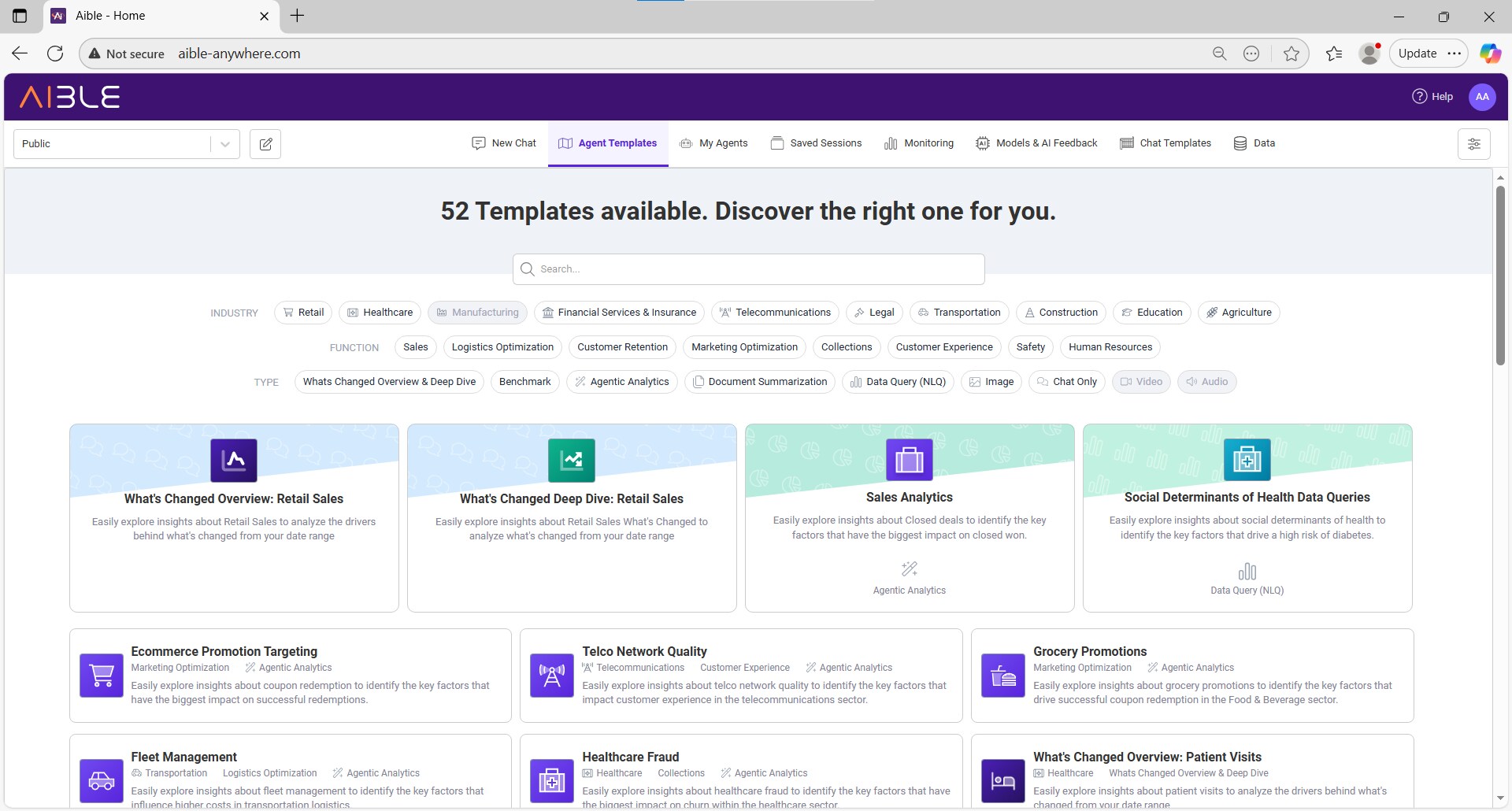
Figure 7. Aible application home page
Aible application home page

Initial administrative tasks

The deployment will automatically generate an admin and a standard user that can be used by default until new users are added. Aible application administration is intuitive and light. The following is a list of possible post-deployment administrative tasks.

  1. Add accounts or workspaces.
  2. Organize folders with users and roles.
  3. Manage users and passwords.

Getting started: your first AI agent

As emphasized throughout this document, one of the defining strengths of Aible is how quickly regular business users can begin working with their own data and seeing meaningful outcomes, without requiring data‑science expertise. After deployment, the user’s first step is to create a folder to store datasets and related resources, which can also be shared with other users for collaboration.

Figure 8. Aible folder menu
Aible folder menu

From there, users can either start a chat using a dataset as context or begin from an agent template. In the example below, the transportation industry category is selected, and Fleet Management appears as one of the suggested templates.
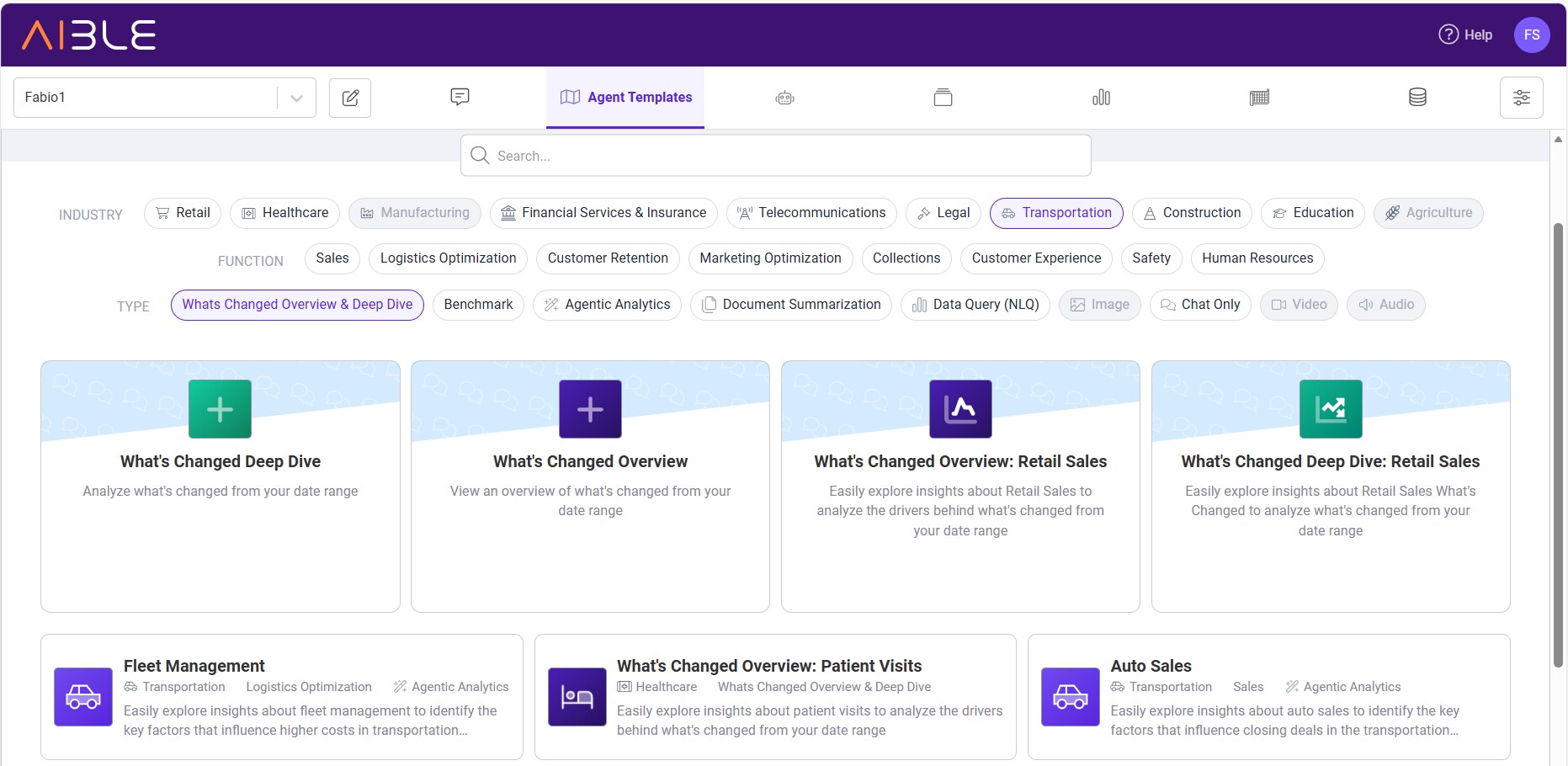
Figure 9. Aible agent templates for transportation industry
Aible agent templates for transportation industry

Choosing the Fleet Management template opens a setup window where the user selects the dataset and adjusts analysis settings such as the model, response format, and target KPI.
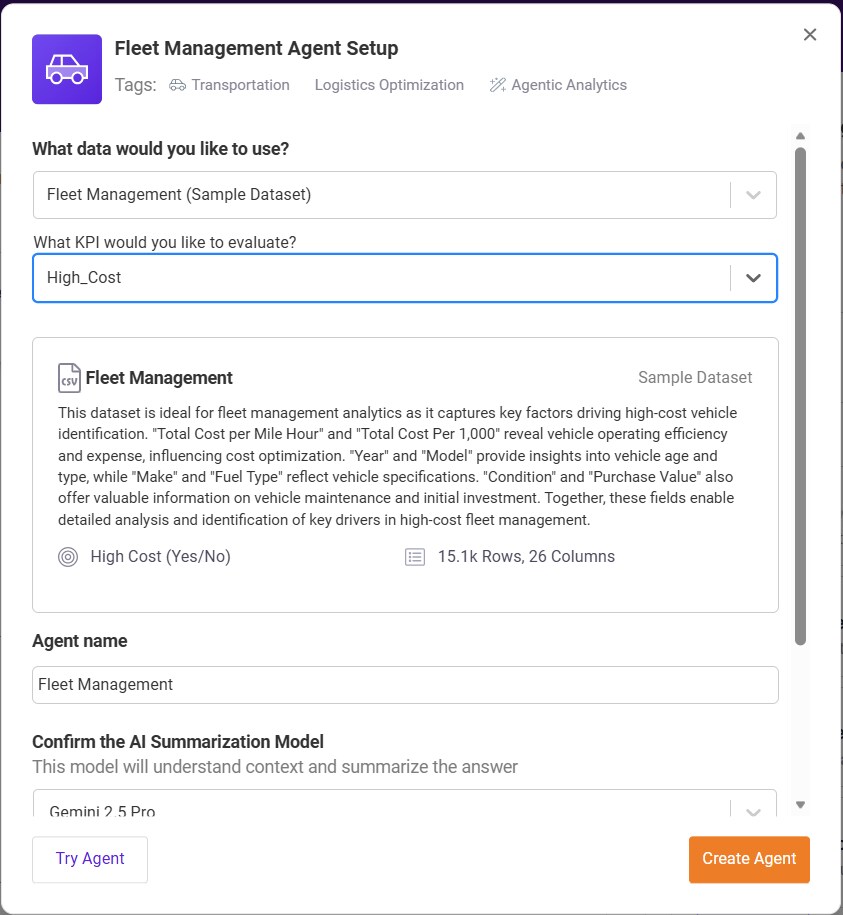
Figure 10. Aible Fleet Management agent setup
Aible Fleet Management agent setup

After clicking Create Agent, a chat interface loads with the agent’s reasoning steps displayed on the right side. Within seconds, the agent completes an initial analysis of the dataset and presents a summary, highlighting in blue the information that is directly traceable to the data source as a safeguard against hallucination.
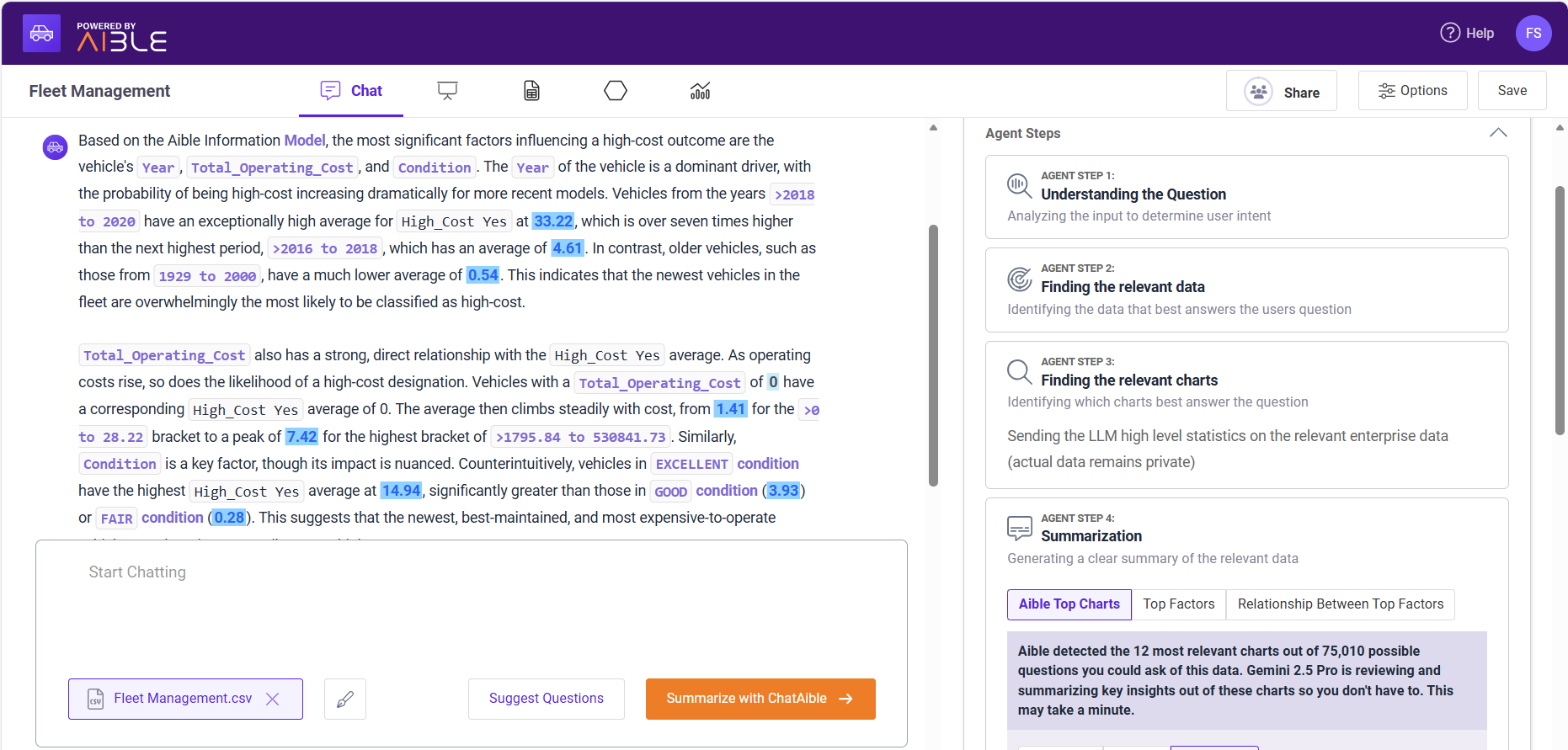
Figure 11. Aible fleet management agent steps and analysis summary
Aible fleet management agent steps and analysis summary

The top navigation allows users to switch between different views of the results, including chats, insights, summaries, dashboards, and more. These outputs provide a structured starting point for exploring opportunities such as cost optimization in the fleet management example.
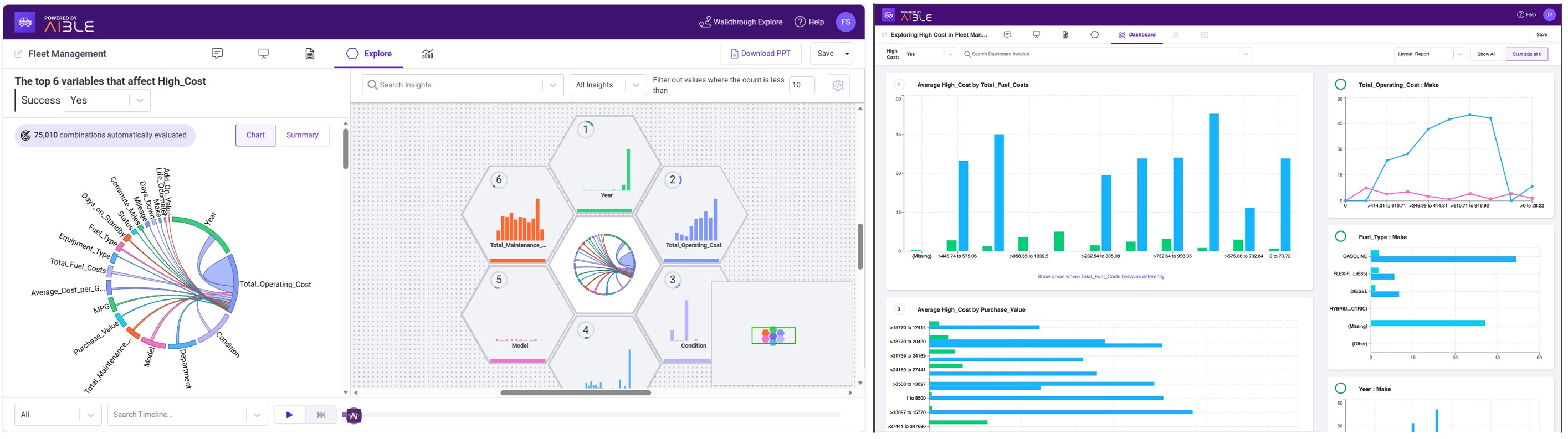
Figure 12. Aible Explore and dashboard panels for the Fleet Management agent
Aible Explore and dashboard panels for the Fleet Management agent

In summary, the process is simple: select data, choose a template or start a chat, review the analysis, and explore the outputs. Aible is designed so that meaningful value emerges quickly, even for teams without specialized analytical training.

Uninstall Aible workload

When running multiple Aible deployments on the same cluster, uninstall any non-Claw deployments independently as needed. If uninstalling a Claw-enabled deployment, ensure no other deployments depend on its cluster-scoped Claw resources before proceeding .

  1. In the DAP Orchestrator, click Inventory > Deployment.
  2. Select the Aible deployment you want to uninstall.
  3. Click Run workflow > Default workflow > Uninstall.
  4. Click Next, then click Run to initiate the uninstallation process.
  5. Repeat for each additional Aible deployment you want to remove.
Note: The Aible platform uses persistent volume claims (PVCs) annotated to preserve data across deployments and reinstalls. If you intend to fully remove all application data, verify that the associated PVCs have been deleted from the target namespace after the uninstallation completes.

Services and support

Overview

To ensure your AI initiatives are successful, Dell provides comprehensive support for your AI Workload.

  • ProSupport is the minimum offering required, and it includes technical assistance.
  • Dell provides technical support for Dell Intellectual Property and/or Dell entitled assets, (Dell Automation Platform, and associated Dell AI Platform Infrastructure) when utilized according to published best practices and compatibility matrices.
  • Vendor Software can be resold through Dell, but is considered non-OEM. AI Workload Software is entitled through the vendor whereby support is obtained through the vendor utilizing the end user's license agreement with the vendor. Customers must maintain an active vendor contract and vendor software administrative capability.
  • For Aible terms, refer to Aible terms of use and privacy policy.

More information about the Dell Pro Support offerings can be found at Dell Pro Support offerings.

Support for Dell Automation Platform

We are committed to helping you succeed with the Dell Automation Platform. Our comprehensive support provides you with expert guidance, resources, and tools to ensure a seamless deployment and management experience from day one. We believe in building trusted partnerships, and our support is designed to help you maximize the value of your investment. This allows you to confidently leverage the full power of automation to achieve your business goals and drive progress. For additional information, visit the Dell Support site.

Professional services

Dell Professional Services play an integral role in driving measurable value from the AI solutions powered by the Dell Automation Platform. This includes:

  • Delivering strategic guidance and expertise essential to defining and planning AI solution requirements.
  • Accelerating time to value of a production-ready AI environment that will drive measurable outcomes.
  • Quickly deploy, integrate, and operate the automation framework for maximized ROI.
  • Improve adoption of the AI solution to propel innovation.

Services experts bring deep technical experience and best practices, providing guidance and hands-on assistance at any stage of the AI lifecycle. Businesses rely on Dell Services to deliver measurable business impact quickly, in a way that is secure and scalable.

Conclusion

Summary

This guide has taken a complete, end‑to‑end look at what it takes to operationalize AI agents, whether it be in small, medium businesses or in the enterprise, using Aible on the Dell AI Platform. The journey began with the core business challenge: organizations have the data, but traditional analytics and AI workflows are too slow, too centralized, and too dependent on scarce expertise. From there, the guide examined how Aible shifts this model by enabling business users to explore data and generate insights immediately, while the Dell AI Platform provides the performance, control, and on‑premises execution required for enterprise environments.

Use‑case examples demonstrated how this approach applies in real contexts. In retail, Aible identified the combinations of factors driving performance shifts across stores, products, and customer behaviors. In healthcare, it analyzed clinical, operational, and financial data together to clarify the forces affecting care delivery and reimbursement. In financial services, it revealed how portfolios and client dynamics evolve under changing market conditions. These examples showed how AI agents surface relationships that manual analysis often misses, while allowing teams to act earlier and with greater confidence.

The guide then moved into the solution structure itself. It outlined Aible’s layered capabilities, from automated data preparation and exploration to predictive and language models, to multi‑format outputs, and showed how these run within a Kubernetes cluster on the Dell AI Platform. It detailed the supported server families, GPU options, storage considerations, and networking fabrics that allow deployments to scale from a single starter node to a multi‑node AI cluster. It also covered connectivity patterns, air‑gapped operation, ingress design, security considerations, and the process for deploying and verifying the environment.

The deployment chapter provided a practical sequence: prepare the target Kubernetes cluster, configure credentials, install Aible using Dell Automation Platform, initialize accounts and models, and access the application to begin work. Finally, the guide walked through the user’s first experience, creating folders, choosing templates, launching an agent, reviewing validated results, and exploring outputs across chats, insights, summaries, and dashboards, illustrating how quickly value is produced once the platform is in place.

Across all these steps, one theme is consistent: the combination of Aible’s agent‑driven analysis and the Dell AI Platform’s controlled, scalable infrastructure turns AI from an aspirational project into a practical, repeatable capability.

Contact your Dell Technologies sales representative, request a hands‑on demonstration of Aible on the Dell AI Platform, and select the starting configuration that best aligns with your data, scale, and operational requirements.

We value your feedback

Dell Technologies and the authors of this document welcome your feedback on this document and the information that it contains. Contact the Dell Technologies Solutions team by email.

References

Deployment configuration options

Deployment configuration options

The Aible deployment uses a single blueprint (Aible Platform) that orchestrates input validation, cluster verification, and application deployment.

The following table lists the configuration inputs organized by functional group.

Table 5. Aible Platform blueprint configuration options
# Input Field Description Type Required Default
Credentials
1 Kubernetes Credentials Secret containing the Kubernetes API connection details for the target cluster, holding the API token and ssl_ca_cert. Every operation the blueprint performs against the cluster authenticates with it, and it is parsed as the very first deployment operation — if malformed, no subsequent stage executes. Created by the operator in the DAP secret store prior to deployment. secret_key Yes —
Registry Credentials
2 Docker Hub Username Docker Hub account username used to pull the Aible container images. Provided by Aible to the customer; the default is the standard Aible pull account. Fixed once the platform is installed — changing it later requires reinstalling. string No aible4se
3 Docker Hub Password Secret Name Name of the DAP secret holding the Docker Hub personal access token. Used to authenticate image pulls from the Aible organization on Docker Hub. The secret must exist in the DAP secret store before deployment; the input validation stage verifies its existence. secret_key Yes —
4 NGC API Key Secret Name Name of the DAP secret holding the NVIDIA NGC API key, used to pull GPU-accelerated NIM model images from the NVIDIA NGC container registry. Obtained from NVIDIA. The secret must exist in the DAP secret store before deployment. secret_key Yes —
Chart Registry
5 Chart OCI Reference OCI reference of the Aible Platform umbrella chart, of the form oci://host[:port]/path/chart[:version]. The version is a registry tag, not part of the repository path, and is passed to helm as --version. Always pin it: without a tag, helm resolves whichever tag is newest at deploy time, so two deployments a week apart can receive different charts. string Yes —
6 Chart Registry Host Registry host, with optional port, that helm registry login authenticates against — for example registry.example.com:5000. Kept separate from the chart reference because the login host never includes the repository path. No scheme, no path. string Yes —
7 Chart Registry Username Username, or Harbor robot-account name, for the chart registry. Leave blank for a registry that allows anonymous pulls; it is read only in combination with the password secret below. A password set with this left blank fails the pull. string No —
8 Chart Registry Password Secret Name Name of the DAP secret holding the chart registry password or robot-account token. Only the secret name is passed to the deployment, never the value, and it is read from the secret store at pull time. Leave blank for anonymous pulls — helm registry login is then skipped entirely. Prefer a pull-only robot account. secret_key No —
9 Chart Registry CA Bundle Secret Name Name of the DAP secret holding the PEM-encoded CA bundle that signed the chart registry's TLS certificate, passed to helm as --ca-file. Required for a private or self-signed registry certificate; for a self-signed certificate the certificate is its own CA. Leave blank when the certificate chains to a public CA. TLS verification is never skipped. secret_key No —
10 Chart Signing Public Keyring Secret Name Name of the DAP secret holding the public GPG keyring that chart provenance is verified against, as base64-encoded binary keyring data or an ASCII-armored public key. Whenever it is set the chart's provenance is checked, so a signed chart is always verified. Required when signature enforcement is on. secret_key No —
11 Enforce Chart Signature Verification Requires the chart to be signed. This controls only the case where a signature is absent: on, an unsigned chart fails the deployment; off, it is accepted and recorded as unsigned. A signature that is present is verified either way, and one that fails verification fails the deployment regardless of this setting. Enabling it also requires the signing keyring above. boolean No true
Infrastructure
12 Kubernetes Namespace Target Kubernetes namespace for the Aible deployment. Leave blank to auto-derive a unique namespace from the deployment name. If specifying a value, use a short, unique name not already owned by another active Aible deployment; the value is checked for valid formatting and for collisions. Keep the name short when deploying with Claw enabled, as long namespaces can collide on shared openshell ClusterRole names. string No aible
13 Storage Class Kubernetes StorageClass backing the platform's persistent storage - its databases, caches, object storage, and model cache. Must already exist on the cluster; verify with kubectl get storageclass, or PVCs stay Pending and no pods start. Cannot be changed after install without recreating the storage and losing existing data. string No nfs-client
Network
14 Anywhere Domain Public base domain the Aible Anywhere service is served on. Set it to the real public FQDN, and confirm DNS and ingress resolve to it and that it does not collide with another deployment - otherwise ingress and TLS will not serve and the domain-collision check fails. string No aible-anywhere.com
15 Target Infrastructure Deployment Id Deployment ID of the target infrastructure deployment as registered in DAP. Leave blank for on-premises deployments where the cluster is reached directly using its Kubernetes credentials. Set it to the infrastructure deployment identifier when Aible runs as a hosted service and cluster traffic is routed through Dell's managed proxy, so requests reach the correct on-prem endpoint. string No (blank)
Service Mesh
16 Istio Gateway Namespace Namespace where the cluster's Istio ingress gateway runs. The platform attaches its ingress routing here, so it must match the cluster's actual setup. Change it only if the gateway runs elsewhere, for example istio-system. string No istio-ingress
17 Istio Gateway Selector -istio Label Value of the istio pod label on the cluster's Istio ingress gateway, used to select the gateway workload. string No ingress
18 Istio Gateway Selector -app Label Value of the app pod label on the cluster's Istio ingress gateway, used to select the gateway workload. string No istio-ingress
19 Ingress TLS Certificate Secret Name Name of the DAP secret holding the TLS certificate the ingress gateway uses to serve HTTPS, in PEM format and including the full chain. The certificate must be valid for the Anywhere domain and its www subdomain. secret_key Yes —
20 Ingress TLS Private Key Secret Name Name of the DAP secret holding the private key matching the TLS certificate above, in PEM format. The key must be unencrypted - the ingress gateway cannot use a passphrase-protected key. secret_key Yes —
21 Ingress Gateway Cluster IP Cluster-internal IP address of the ingress gateway, so the platform's own service-to-service calls to its public web address reach the gateway. Required on clusters where the public address does not resolve from inside the cluster, which is common on-premises; leave blank where it already resolves. Obtain it with kubectl -n istio-ingress get svc istio-ingress -o jsonpath='{.spec.clusterIP}'. string No (blank)
22 Ingress TLS CA Root Secret Name Name of the DAP secret holding the PEM-encoded CA root the app tier trusts when calling back through the ingress gateway on the public FQDN. For a self-signed gateway certificate, set this to the same secret as the TLS certificate - the served certificate is its own trust anchor. For a private or internal CA, set it to the CA root, not the served leaf or chain. secret_key Yes —
LLM Compute
23 LLM GPU Count Number of GPUs assigned to the active LLM served by the platform, each requiring at least 24 GB of VRAM. Before installing, the platform checks the cluster has enough free GPUs to cover the requested count; if it does not, the LLM pod stays Pending and post-install waits on an app tier that never comes up. Set to 0 to run without a dedicated GPU allocation. Range 0-128. integer No 8
24 LLM Model Profile Optional model profile to pin for the active LLM. Leave blank to let the runtime auto-select the profile matching the detected GPU hardware, which is the safest choice on most clusters. Set an explicit profile ID only if auto-select picks the wrong profile. string No (blank)
Post-Install Setup
25 Enable Aible Claw Enables Aible Claw, the interactive agentic sandbox capability. When true, the platform runs the agentic sandbox and creates its dedicated sandbox user, which makes the Safeclaw Password secret mandatory - post-install exits 1 without it. Set false to deploy without Claw: no sandbox is run, no sandbox user is created, and no Safeclaw password is needed. Changing this after install requires a deployment update. boolean No true
26 Admin Email Email address for the initial Aible admin user created during post-install. string No admin@aible.com
27 Admin Password Secret Name Name of the DAP secret holding the password for the initial Aible admin user. Must exist in the secret store before deployment. secret_key Yes —
28 Tenant Name Display name for the Aible tenant account created during post-install. Two to 100 characters, starting and ending alphanumeric; letters, numbers, spaces, hyphens, and underscores are allowed. string Yes —
29 Standard User Password Secret Name Name of the DAP secret holding the password for the standard user@aible.com account created during post-install. secret_key Yes —
30 Safeclaw Password Secret Name Name of the DAP secret holding the password for the agentic safeclaw sandbox user created during setup. Required whenever Aible Claw is enabled, and hidden and unused when it is disabled. secret_key Conditional —
31 Install Agent Sandbox Operator Whether the platform installs the Agent Sandbox operator - the sandboxes.agents.x-k8s.io CRD plus its controller - that Aible Claw needs to create sandboxes. Leave true on a dedicated cluster. Set false where infrastructure installs the operator separately alongside nim-operator or gpu-operator, so multiple deployments do not collide on the cluster-scoped CRD and an uninstall does not remove it cluster-wide. Only applies when Aible Claw is enabled; set it alongside Claw disabled and deployment creation fails with OnlyWithInputError. boolean No true
Software Artifacts (Unconnected Overrides)
32 Helm Binary Download URL URL the platform downloads the Helm binary from. Defaults to the public get.helm.sh release, pinned at 3.19.4 to clear CVE-2025-53547. Change it to a private mirror only for unconnected deployments that cannot reach the internet. string No https://get.helm.sh/helm-v3.19.4-linux-amd64.tar.gz
33 Container Registry URL Container registry the Aible application images are pulled from. Defaults to Docker Hub; change it to a private registry mirror only for unconnected deployments. string No https://index.docker.io/v1/
34 NGC Registry URL Registry the NVIDIA NIM model images are pulled from. Defaults to nvcr.io; change it to a private mirror only for unconnected deployments. string No nvcr.io
Advanced Configuration
35 Post-Install Image Tag Container image tag of the Aible post-install setup job, which runs the one-time setup creating the initial admin user and tenant. Leave at the default unless directed to use a specific version. string No 1.202607.5
36 Upload Concurrency Number of parallel workers used when uploading sample data during initial setup. Lower values are safer on small or single-node clusters, where too many parallel uploads can overwhelm the platform; raise it on larger clusters for faster loading. Range 1-64. integer No 1
37 API Workers Number of API worker processes for the core platform service. Keep this low on small nodes to avoid exhausting the database connection pool, which can prevent the API from starting; increase it on larger clusters for higher throughput. Range 1-64. integer No 2
38 MCP Server Model ID Aible model ID the MCP server uses when calling the LLM. This is the numeric model identifier registered in the Aible account during post-install, not the served model name. Leave at the default unless pointing the MCP server at a specific registered model. string No 1
39 Anywhere Image Tag Container image tag for the anywhere (Aible backend) chart, overriding the umbrella chart's centrally pinned tag. Leave at the default unless deploying a specific build. string No 20260528se
40 App Image Tag Container image tag for the app (Aible frontend) chart, overriding the umbrella chart's centrally pinned tag. Leave at the default unless deploying a specific build. string No 20260609se
41 Agent Image Tag Container image tag for the agent chart, overriding the umbrella chart's centrally pinned tag. Leave at the default unless deploying a specific build. string No v1.3.1.07012026.v2
42 Doc Image Tag Container image tag for the doc chart, overriding the umbrella chart's centrally pinned tag. Leave at the default unless deploying a specific build. string No 20260504
43 UI Image Tag Container image tag for the ui chart, overriding the umbrella chart's centrally pinned tag. Leave at the default unless deploying a specific build. string No 20260702.1se
44 LLM Image Tag Container image tag for the active LLM serving chart, overriding the umbrella chart's centrally pinned tag. Confirm the tag exists for that image, and avoid mutable tags such as latest. string No v0.25.1
45 MCP Server Image Tag Container image tag for the mcp-server chart, deployed when Aible Claw is enabled. Overrides the umbrella chart's centrally pinned tag; leave at the default unless deploying a specific build. string No 20260606.v1
46 OpenShell Image Tag Container image tag for the openshell gateway chart, deployed when Aible Claw is enabled. Overrides the umbrella chart's centrally pinned tag; leave at the default unless deploying a specific build. string No 20260610.1
47 OpenShell Control Plane Image Tag Container image tag for the openshell-cp control plane chart, deployed when Aible Claw is enabled. Overrides the umbrella chart's centrally pinned tag; leave at the default unless deploying a specific build. string No 20260706.1

Deployment troubleshooting

Deployment troubleshooting

This appendix provides operational guidance for monitoring the Aible platform during and after deployment, and for diagnosing issues if they arise.

Platform startup behavior

The Aible platform includes several services that initialize sequentially. Understanding their startup sequence helps operators distinguish normal initialization from actual issues.

  • Aible Anywhere service: Uses a readiness probe on port 80, where an in-pod nginx process fronts the API and UI. The service reports Ready once nginx binds, which includes an approximately five-minute startup grace period.
  • Post-install Job: After the Helm release completes, a post-install Job polls the API login endpoint for up to 300 seconds before beginning account and data seeding. During this window, gateway responses such as 502, 503, or 504 may appear in the Job logs while the platform initializes. If the API is not yet available when the polling window expires, the Job retries automatically up to six times, allowing the platform to complete initialization within the Helm install timeout window.
  • LLM tier: Model weights are downloaded in an init container before the LLM service starts. On first install, this download can take significant time depending on network bandwidth. The deployment verification timeout should be sized accordingly.

Reviewing deployment logs

The blueprint exposes relevant Job names as deployment capabilities, making it straightforward to retrieve diagnostic information when needed.

  • Stack verification Job: Contains per-check output indicating which cluster prerequisites passed or did not pass. Retrieve the Job name from the deployment capabilities and review the pod logs.
  • Deployment verification Job: Contains per-check output for all post-deployment health checks. The Job name is exposed as a deployment capability.
  • Post-install Job: If the platform is running but the admin user, tenant, or sample data are not present, the post-install Job logs will indicate what occurred during the seeding process.

To review any of these logs, use the standard Kubernetes command with the Job name and namespace from the deployment capabilities.

Note: The DAP platform does not currently forward per-check Job output into the main deployment log. This capability is expected in a future DAP release. Until then, reviewing the Job pod logs directly is the recommended approach.

Handling a failed Helm release

If a Helm release does not complete successfully, the release is intentionally preserved rather than rolled back automatically. This allows operators to inspect the deployed state and determine what occurred. Before attempting a new installation, the existing release must be removed manually.