Dépannage lorsque l'Assistant de déploiement ne parvient pas à détecter la matrice de la série SCv2000
Cet article concerne
Cet article ne concerne pas
Cet article n’est associé à aucun produit spécifique.
Toutes les versions du produit ne sont pas identifiées dans cet article.
Instructions
Si l'Assistant de déploiement ne parvient pas à détecter la matrice, procédez comme suit pour résoudre le problème.
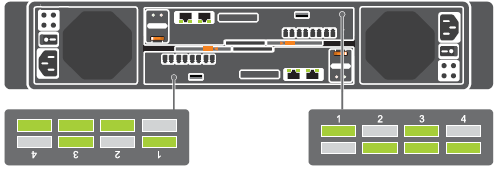

- Vérifiez que la matrice a été allumée au moins 5 minutes, sans voyant de panne allumé à l'avant du châssis ou sur l'un des deux contrôleurs. Vérifiez que les voyants de diagnostic de chaque contrôleur indiquent que les deux contrôleurs sont entièrement démarrés.
- Vérifiez que les câbles réseau sont connectés à des ports de contrôleur étiquetés «Mgmt». Il est important de noter que le contrôleur inférieur est inversé.
- Vérifiez que le serveur est connecté au même sous-réseau physique que la matrice, il est préférable de le connecter au même commutateur.
- Désactivez temporairement tout pare-feu exécuté sur le système exécutant l'Assistant de déploiement.
- Il est possible que les paramètres du commutateur bloquent la détection, utilisez l'une des deux méthodes pour résoudre ce problème.
- Si le serveur dispose de 2 cartes d'interface réseau inutilisées, vous pouvez contourner le commutateur à des fins de détection uniquement.
- Connectez directement le serveur au port de gestion de chaque contrôleur.
- Si vous le détectez, exécutez l'Assistant de déploiement, puis effectuez toutes les opérations via l'écran «Initialize Storage Center» (initialisation du centre de stockage). Une fois la configuration appliquée, recâblez les ports de gestion de la baie au commutateur réseau, avant de continuer.
- DésActivez la surveillance IGMP, la tempête de diffusion, la tempête de monodiffusion, la tempête de multidiffusion sur le commutateur réseau.
- Si le serveur dispose de 2 cartes d'interface réseau inutilisées, vous pouvez contourner le commutateur à des fins de détection uniquement.
- Utilisez l'adresse MAC de chaque contrôleur et effectuez manuellement la détection. L'adresse MAC peut être obtenue à partir du commutateur ou il est également situé sur le dessus de chaque contrôleur.
- Si aucune de ces méthodes ne fonctionne ou s'il y a un voyant de panne matérielle, contactez le support technique pour obtenir de l'aide.
Produits concernés
Dell Storage SCv2000, Dell Storage SCv2020, Dell Storage SCv2080Propriétés de l’article
Numéro d’article: 000121336
Type d’article: How To
Dernière modification: 13 Mar 2025
Version: 4
Trouvez des réponses à vos questions auprès d’autres utilisateurs Dell
Services de support
Vérifiez si votre appareil est couvert par les services de support.