Recorded Audio was distorted when played from Waves MaxxAudio Pro on Vostro 5890, Vostro 3690, OptiPlex 7090, OptiPlex 5090, Precision 3450
Summary: Recorded Audio was distorted when played from Waves MaxxAudio Pro on Vostro 5890, Vostro 3690, OptiPlex 7090, OptiPlex 5090, Precision 3450.
This article applies to
This article does not apply to
This article is not tied to any specific product.
Not all product versions are identified in this article.
Symptoms
When recording audio from external devices (such as phones) with Windows 10 Voice Recorder (Fig.1), and played with Waves MaxxAudio Pro (Fig.2) application, there could be audio distortion during playback. This does not happen when a human talking voice is recorded and played in the same way.
Affected Platforms
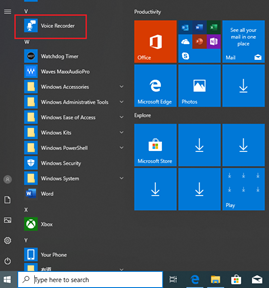
Fig. 1 Voice Recorder in Windows
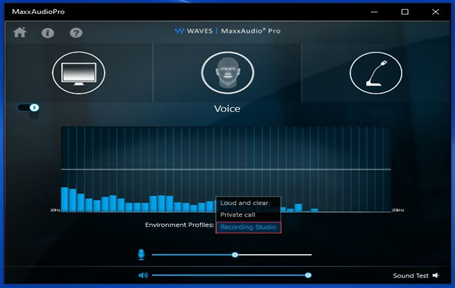
Fig. 2 Waves MaxxAudio settings
Affected Platforms
- Vostro 5890
- Vostro 3690
- OptiPlex 7090
- OptiPlex 5090
- Precision 3450
Fig. 1 Voice Recorder in Windows
Fig. 2 Waves MaxxAudio settings
Cause
This is because Waves MaxxAudio Pro default Environment Profiles is Loud and clear, which is not the correct setting for audio recorded from external devices.
Resolution
Change the Waves MaxxAudio Environment Profiles to "Recording Studio" to resolve the issue.
Affected Products
OptiPlex 5090 Tower, OptiPlex 5090 Micro, OptiPlex 5090 Small Form Factor, OptiPlex 7090 Tower, OptiPlex 7090 Micro, OptiPlex 7090 Small Form Factor, Precision 3450 Small Form Factor, Vostro 3690, Vostro 5890Article Properties
Article Number: 000184697
Article Type: Solution
Last Modified: 22 Apr 2025
Version: 7
Find answers to your questions from other Dell users
Support Services
Check if your device is covered by Support Services.