NVP-vProxy : échec de la restauration au niveau de l’image avec l’erreur « Could not update vmx file’s 'nvram' entry »
Résumé: Les restaurations instantanées et l’image de machine virtuelle (VM) échouent avec l’erreur « Could not update vmx file’s 'nvram' entry »
Symptômes
L’intégration NetWorker VMware Protection (NVP) est configurée avec l’appliance vProxy. Les restaurations au niveau image (machine virtuelle et instantanée) échouent après la création du répertoire de la machine virtuelle restaurée avec les erreurs suivantes dans les logs de restauration :
159373:nsrvproxy_recover: vProxy Log: YYYY-MM-DDTHH:MM:SSZ INFO:   [@(#) Build number: 34] Creating directory for storage type "VMFS".
159373:nsrvproxy_recover: vProxy Log: YYYY-MM-DDTHH:MM:SSZ INFO:   [@(#) Build number: 34] Successfully created the directory "[Datastore] <recovered VM name>" in datastore.
159373:nsrvproxy_recover: vProxy Log: YYYY-MM-DDTHH:MM:SSZ WARN:   [@(#) Build number: 34] Did not find nvram entry in vmx file.
159373:nsrvproxy_recover: vProxy Log: YYYY-MM-DDTHH:MM:SSZ ERROR:  [@(#) Build number: 34] Could not update vmx file's 'nvram' entry.
159373:nsrvproxy_recover: vProxy Log: YYYY-MM-DDTHH:MM:SSZ ERROR:  [@(#) Build number: 34] Unable to upload the configuration files: "Could not update vmx file's 'nvram' entry."
159373:nsrvproxy_recover: vProxy Log: YYYY-MM-DDTHH:MM:SSZ WARN:   [@(#) Build number: 34] RecoverVMSessions "11cda4f5-b22d-4fb6-8c1f-98ddbd9c4e05" cleaning up running recover session due to error.
159373:nsrvproxy_recover: vProxy Log: YYYY-MM-DDTHH:MM:SSZ ERROR:  [@(#) Build number: 34] Task to remove folder/file "" failed: Invalid datastore path ''.
159373:nsrvproxy_recover: vProxy Log: YYYY-MM-DDTHH:MM:SSZ ERROR:  [@(#) Build number: 34] Unable to remove the VM directory . Invalid datastore path ''.
159373:nsrvproxy_recover: vProxy Log: YYYY-MM-DDTHH:MM:SSZ ERROR:  [@(#) Build number: 34] Unable to tear down the recover session.
159373:nsrvproxy_recover: vProxy Log: YYYY-MM-DDTHH:MM:SSZ INFO:   [@(#) Build number: 34] Disconnected from session on vCenter 'vappvm101.dc.vapp.ctc'.
159373:nsrvproxy_recover: vProxy Log: YYYY-MM-DDTHH:MM:SSZ ERROR:  [@(#) Build number: 34] Failed to recover to a new VM. Could not update vmx file's 'nvram' entry.
Le problème s’est produit sur plusieurs savesets d’une même machine virtuelle, y compris les sauvegardes les plus récentes, malgré le téléchargement réussi du fichier vmx de la machine virtuelle.
Cause
Il manquait l’entrée nvram qui identifie le fichier nvram de la machine virtuelle dans le fichier vmx de la machine virtuelle (exemple : nvram = « VM_name.nvram »).
Le problème est probablement dû à une erreur lors du déploiement/de l’importation de la machine virtuelle sur vCenter Server.
Les fichiers de configuration des savesets correspondaient au fichier vmx de la machine virtuelle pour les points dans le temps où les sauvegardes étaient effectuées.
Résolution
Afin d’éviter ce problème pour les sauvegardes ultérieures, le fichier vmx de la machine virtuelle doit être mis à jour avec l’entrée de fichier nvram. Un administrateur VMware doit effectuer cette modification.
Le fichier .vmx des machines virtuelles peut être téléchargé à partir du dossier du datastore des machines virtuelles :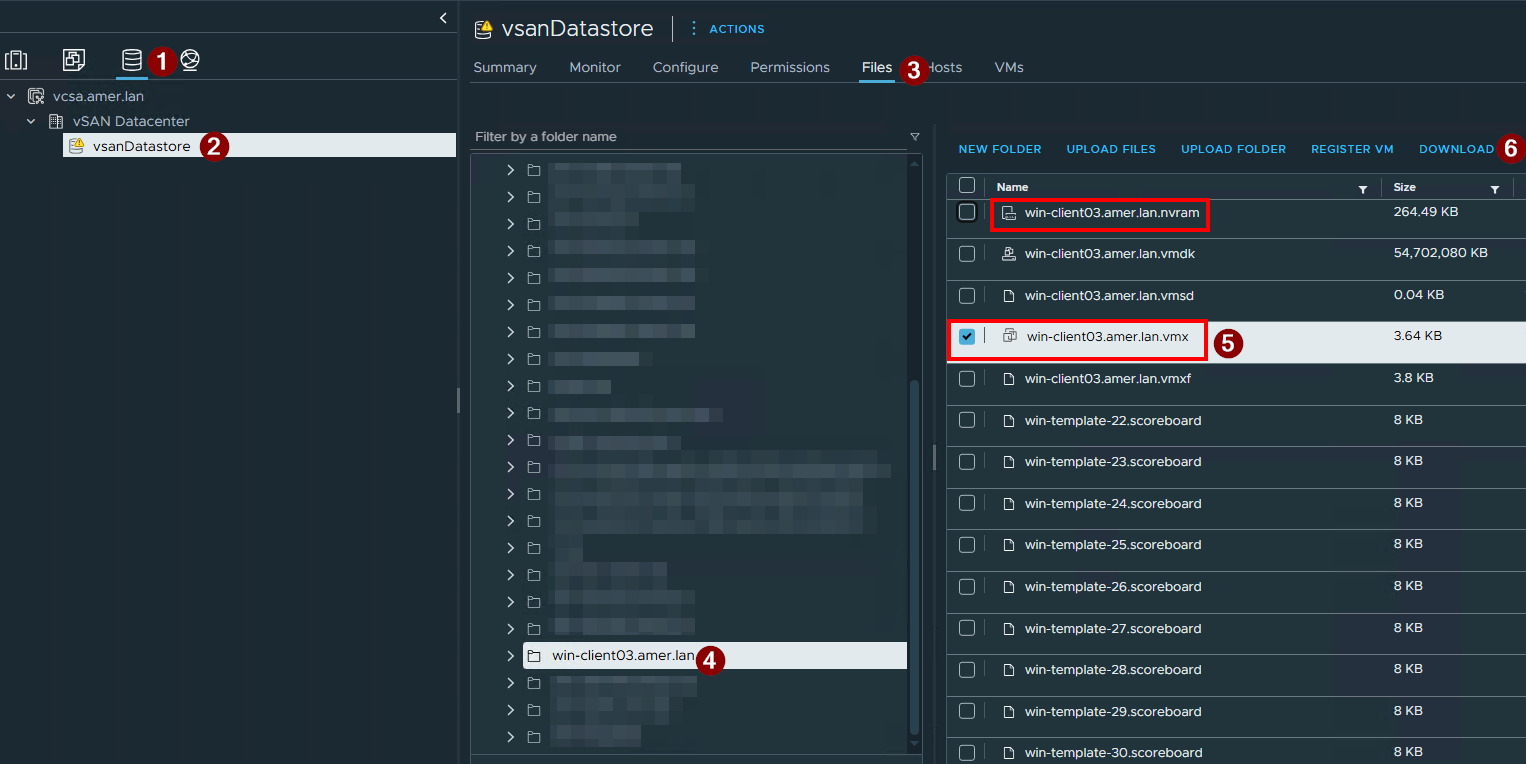
Ouvrez le fichier vmx dans un éditeur de texte. Assurez-vous que le fichier contient une ligne spécifiant le fichier nvram, par exemple :
Si l’entrée est manquante, ajoutez-la dans le fichier avec le nom de fichier nvram correct. Enregistrez le fichier, arrêtez la machine virtuelle et téléchargez le fichier .vmx mis à jour dans le dossier du datastore des machines virtuelles dans VMware. Mettez la machine virtuelle sous tension.
Les restaurations effectuées pour les sauvegardes effectuées après cette correction ne devraient pas rencontrer cette défaillance.