VCF on VxRail: How to Run the VCF-Verify Tool
Summary: This article introduces the VCF-Verify (VCFV) tool and how to successfully run VCF-Verify in VCF on VxRail environment.
This article applies to
This article does not apply to
This article is not tied to any specific product.
Not all product versions are identified in this article.
Instructions
NOTE: When downloading VCF-Verify, it is highly recommended that the associated
vcfv_readme.txt file is consulted before using VCF-Verify.
How VCF-Verify works
VCFV is designed to detect issues which may cause complications or failures during VCF on VxRail upgrades.
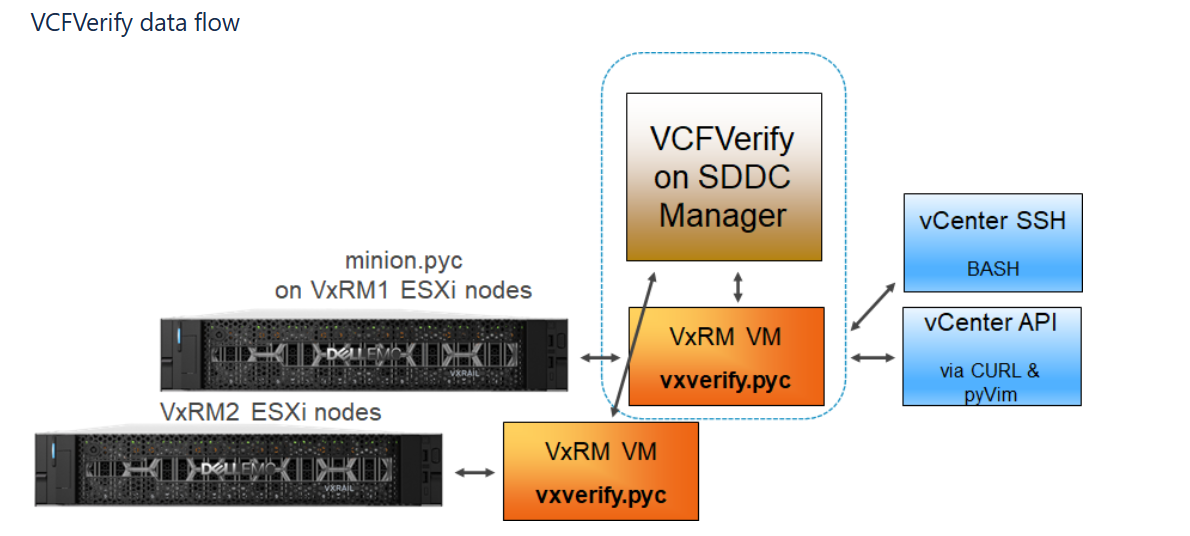
VCFV sends a copy of the latest VxVerify tool to each VxRail Manager, which runs health-checks and on each managed node. See article 21527: VxRail: How to run the VxRail Verify tool.
Running VCF-Verify
- Download the latest VCF-Verify package from Dell Solutions > VCF-Verify
- Copy the .zip file to SDDC Manager using SSH.
- Create
/tmp/vcfvfolder if it does not exist and set the permissions to unrestricted.
Example:
mkdir -m 777 /tmp/vcfv
cd /tmp/vcfv
- Unpack the VCF-Verify package to the above folder, which should have at least the following in the same directory:
vcfverify.sh(Script to kick off the correct VCFV version, for when there are multiple VCFV Python files)vcfv5a.pyc(VCF-Verify for VCF 3.9.1 to 5.0; Python 3.7)vcfv5b.pyc(VCF-Verify for VCF 5.1+; Python 3.10)vxv2.pyc(VxVerify for VxRail 4.5 and 4.7)vxv3.pyc(VxVerify for VxRail 7.0.010 to 8.0.201)vxv4.pyc(VxVerify for VxRail 7.0.210+)
- Root user is needed in VCFv4 vSphere 7, to have enough permissions for the additional Python packages
sudo ./vcfverify.sh
- Alternatively, if already logged in as root, run the following from the directory where VCF-Verify has been unpacked (for example,
/tmp/vcfv):
root@sddc [ /tmp/vcfv ]# ./vcfverify.sh
- The shell script prompts for the test profile to be used:
#==================================================#
|        VCFVerify5 Menu Driven launcher           |
#==================================================#
1) Upgrade healthcheck       5) Unused5
2) Core upgrade healthcheck  6) Unused6
3) General healthcheck       7) Unused7
4) Core post-upgrade check   8) Quit
Please enter your choice:
- If an upgrade profile is selected, the target VxRail code level is prompted for (the VxRail code level in the VCF upgrade bundle).
- Entering in the target VCF level cannot be accepted and the target VxRail code level is prompted for again.
- The vCenter Single Sign On (SSO) user and password (with Cloud Admin rights), can then be prompted for. If no user is supplied (pressing Enter), then the default administrator is assumed:
SSO user [default: administrator@vsphere.local]:

Enter vSphere SSO Administrator password:
- VCF-Verify then runs and sends VxVerify to each cluster.
Troubleshooting
- A privileged username and password is required to unpack the other account credentials. These must be specified with the
-u and -parguments or answering prompts from the shell script. - The privileged username should be a member of the group
Sddc_secured_access, which is necessary for running the lookup_passwords utility (used by VCF-Verify to provide and test all the credentials for VxRM and vCenter). - SDDC Manager on VCF 5.1 changed the installed Python version to 3.10 from Python 3.7 (VCF 3.9.1 to 5.0). To support multiple major Python releases, multiple pyc files are needed, so VCF-Verify includes the following pyc:
vcfv5a.pyc(VCF 3.9.1 to 5.0)vcfv5b.pyc(VCF 5.1+)
- VCF below 3.9.1 is not supported.
- Ensure the
vcfverify.shscript has 777 permissions (rwx). - When the VCF-Verify command completes, it saves a complete .zip file to /tmp. If some form of escalation or assistance is needed, upload this file.
- Each version of VxVerify and VCF-Verify is time-limited to prevent outdated versions being used. Check for a new version each week.
- It is also possible to substitute the latest versions of VxVerify 2 and 3 for
vxv2.pycandvxv3.pyc(changing the names to match), if the existing versions have expired. - VCF-Verify validates the .md5 files of vxv pyc files before startup. If they do not match with the hash calculation of the .pyc files, this is reported as a warning.
Additional Information
VCF-Verify data flow
Affected Products
VxRail E560 VCF, VxRail E560F VCF, VxRail E560N VCF, VxRail G560 VCF, VxRail G560F VCF, VxRail P570 VCF, VxRail P570F VCF, VxRail P580N VCF, VxRail S570 VCF, VxRail V570 VCF, VxRail V570F VCFArticle Properties
Article Number: 000190574
Article Type: How To
Last Modified: 16 Jul 2025
Version: 12
Find answers to your questions from other Dell users
Support Services
Check if your device is covered by Support Services.