IDPA: La actualización a 2.7.4 falla en el 56 % del progreso del subcomponente de hipervisor/ESXi debido a una falla de dependencia de VIB
Resumen: En este artículo, se describen los pasos necesarios para resolver una falla de actualización a la versión 2.7.4 causada por una dependencia de software en el componente del hipervisor ESXi. ...
Este artículo se aplica a
Este artículo no se aplica a
Este artículo no está vinculado a ningún producto específico.
No se identifican todas las versiones del producto en este artículo.
Síntomas
Una actualización a la versión 2.7.4 de IDPA puede fallar con un progreso de subcomponente del 56 % (o aproximadamente un 82 % de progreso general) en el flujo de trabajo de "Firmware de servidor e hipervisor". El panel de flujo de trabajo puede informar un error "Failed to install upgrade packages".
Errores del flujo de trabajo de actualización
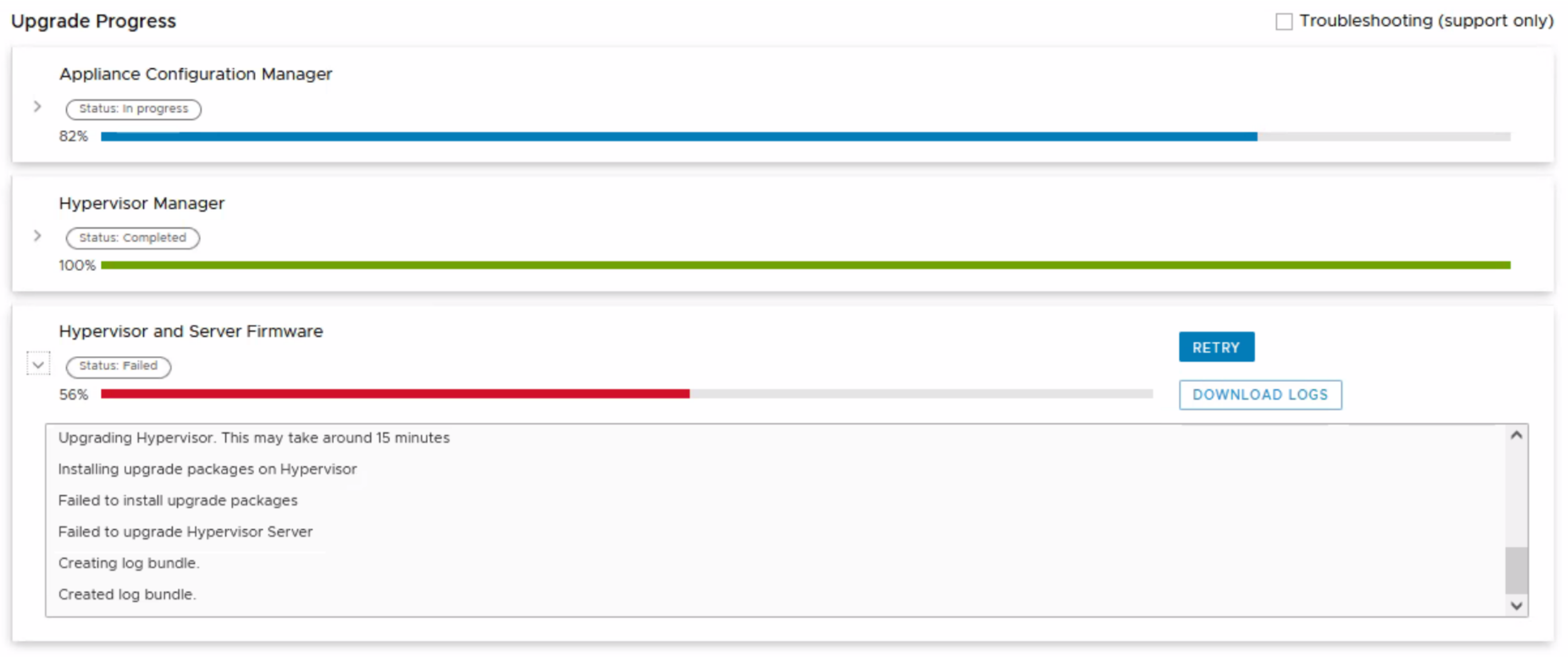
Mensajes del panel Firmware del servidor e hipervisor
Upgrading Hypervisor. This may take around 15 minutes
Installing upgrade packages on Hypervisor
Failed to install upgrade packages
Failed to upgrade Hypervisor Server
Creating log bundle.
Created log bundle.
Mensajes y patrones de registro
Los registros de actualización (/data01/tmp/patch/logs/esxi_logs.log) pueden informar un error de dependencia.
21/07/23 12:11:25  main() Executing install packages command: esxcli software profile update --depot=https://192.168.100.100:9443/dataprotection-upgrade/esxi_upgrade --profile=IDPA-14G-ESXi-7.0.3-041 --no-sig-check
21/07/23 12:11:25  main() Install packages command result: {'output': [u'Name                     Vendor    Acceptance Level  Creation Time        Modification Time', u'-----------------------  --------  ----------------  -------------------  -------------------', u'IDPA-14G-ESXi-7.0.3-041  Dell-EMC  PartnerSupported  2022-07-06T14:41:16  2022-09-10T03:41:07', u'Status: 0'], 'returnCode': 0}
21/07/23 12:11:36   run() Parsing returnCode, output: ['', '[DependencyError]\r\n VIB DEL_bootbank_racadm_9.4.0.ESXi670-3749 requires esx-version << 7.0, but the requirement cannot be satisfied within the ImageProfile.\r\n Please refer to the log file for more details.', 'Status: 1']
21/07/23 12:11:36 run_cmd_esxi_output() Command: esxcli software profile update --depot=https://192.168.100.100:9443/dataprotection-upgrade/esxi_upgrade --profile=IDPA-14G-ESXi-7.0.3-041 --no-sig-check
21/07/23 12:11:36 run_cmd_esxi_output() [DependencyError]
21/07/23 12:11:36 run_cmd_esxi_output()  VIB DEL_bootbank_racadm_9.4.0.ESXi670-3749 requires esx-version << 7.0, but the requirement cannot be satisfied within the ImageProfile.
21/07/23 12:11:36 run_cmd_esxi_output()  Please refer to the log file for more details.
21/07/23 12:11:36 run_cmd_esxi_output() Status: 1
21/07/23 12:11:36  main() exit code is: 1
21/07/23 12:11:36  main() Command output is:  VIB DEL_bootbank_racadm_9.4.0.ESXi670-3749 requires esx-version << 7.0, but the requirement cannot be satisfied within the ImageProfile.
21/07/23 12:11:36  main() Failed to install packages.
Causa
Se instaló una versión incompatible del paquete de software de herramientas de iDRAC en el host ESXi. El paquete de software de herramientas de iDRAC es un componente de software opcional que proporciona funcionalidad extendida para administrar la plataforma de administración fuera de banda de iDRAC.
Resolución
1. Abra una sesión de SSH/PuTTY en el host ESXi (hipervisor) como el usuario
"raíz" 2. Confirme que el paquete de software de herramientas de iDRAC (racadm) esté instalado
[root@dp4400-esx:~] esxcli software vib list | grep racadm
racadm                             9.4.0.ESXi670-3749                    DEL      PartnerSupported  2021-03-30
3. Quitar el paquete de software de herramientas de iDRAC
[root@backup-esx:~] esxcli software vib remove -n racadm
Removal Result
   Message: Operation finished successfully.
   Reboot Required: false
   VIBs Installed:
   VIBs Removed: DEL_bootbank_racadm_9.4.0.ESXi670-3749
   VIBs Skipped:
Información adicional
Las herramientas de iDRAC 9.4.0 y versiones anteriores no son compatibles y no permiten la instalación ni la actualización a VMware ESXi 7.0
https://www.dell.com/support/kbdoc/en-us/000176821/idrac-tools-9-4-0-and-earlier-versions-are-unsupported-and-will-not-allow-install-or-upgrade-to-vmware-esxi-7-0?lang=en
https://www.dell.com/support/kbdoc/en-us/000176821/idrac-tools-9-4-0-and-earlier-versions-are-unsupported-and-will-not-allow-install-or-upgrade-to-vmware-esxi-7-0?lang=en
Productos afectados
PowerProtect DP4400, PowerProtect Data Protection Software, Integrated Data Protection Appliance Family, PowerProtect Data Protection Hardware, Integrated Data Protection Appliance SoftwarePropiedades del artículo
Número del artículo: 000216067
Tipo de artículo: Solution
Última modificación: 18 may 2026
Versión: 4
Encuentre respuestas a sus preguntas de otros usuarios de Dell
Servicios de soporte
Compruebe si el dispositivo está cubierto por los servicios de soporte.