Dell VxRail: El respaldo integrado falla
Resumen: El respaldo integrado de VxRail falla con el mensaje "vCenter backup finished. Failed when upload the backup file to the SFTP server".
Este artículo se aplica a
Este artículo no se aplica a
Este artículo no está vinculado a ningún producto específico.
No se identifican todas las versiones del producto en este artículo.
Síntomas
El respaldo integrado de VxRail realiza un respaldo de vCenter y un respaldo de VxRail Manager. Luego, carga los archivos en un servidor SFTP remoto.
El respaldo de vCenter Y el respaldo de VxRail están completos. Los archivos de vCenter se cargan en el servidor SFTP, pero los archivos de VxRail no se cargan.
Informes de la interfaz del usuario: "Finalizó el respaldo de vCenter. Failed when upload the backup file to the SFTP server" (Falló al cargar el archivo de respaldo en el servidor SFTP)
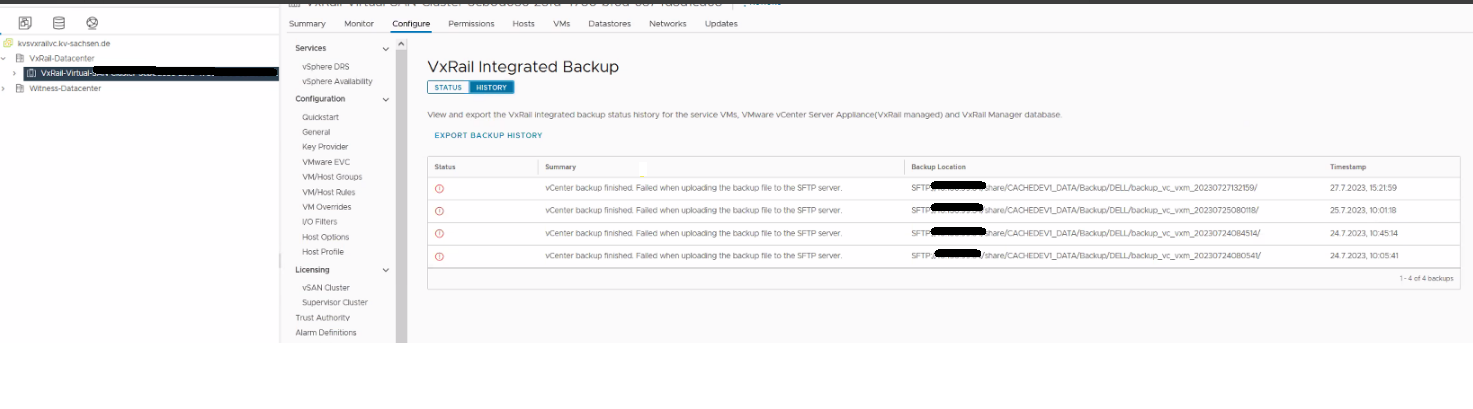
Figura 1: Captura de pantalla del mensaje de error en la interfaz del usuario de VxRail
/var/log/magic/VxRailBackupRestore.log muestra el siguiente mensaje:
El respaldo de vCenter Y el respaldo de VxRail están completos. Los archivos de vCenter se cargan en el servidor SFTP, pero los archivos de VxRail no se cargan.
Informes de la interfaz del usuario: "Finalizó el respaldo de vCenter. Failed when upload the backup file to the SFTP server" (Falló al cargar el archivo de respaldo en el servidor SFTP)
Figura 1: Captura de pantalla del mensaje de error en la interfaz del usuario de VxRail
/var/log/magic/VxRailBackupRestore.log muestra el siguiente mensaje:
INFO Upload to sftp server, ret: 5, output: (b'', b'Permission denied, please try again.\r\n')
Causa
Hay un carácter especial ($) en la contraseña de ubicación de SFTP. El código de carga actual de VzRM no lo maneja correctamente.
Un ejemplo de una contraseña incorrecta de ubicación de SFTP es: "AB$cdefgh 2"
Un ejemplo de una contraseña incorrecta de ubicación de SFTP es: "AB$cdefgh 2"
Resolución
El equipo de ingeniería de Dell VxRail está trabajando en una resolución para este problema. Se descubrió en VxRail versión 7.0.451.
Solución:
Utilice una contraseña de ubicación de SFTP sin caracteres especiales.
Solución:
Utilice una contraseña de ubicación de SFTP sin caracteres especiales.
Productos afectados
VxRail Appliance SeriesPropiedades del artículo
Número del artículo: 000216655
Tipo de artículo: Solution
Última modificación: 26 sept 2023
Versión: 1
Encuentre respuestas a sus preguntas de otros usuarios de Dell
Servicios de soporte
Compruebe si el dispositivo está cubierto por los servicios de soporte.