Windows 10 Displays Multiple Playback Devices When Connected to Dell Wireless Headset Using Bluetooth
Résumé: Learn why Windows 10 displays multiple playback devices with different names.
Cet article concerne
Cet article ne concerne pas
Cet article n’est associé à aucun produit spécifique.
Toutes les versions du produit ne sont pas identifiées dans cet article.
Symptômes
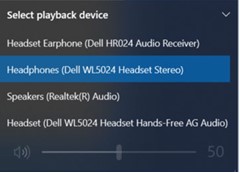
The computer runing Windows 10 may display multiple different playback devices with different names. This is noticed when connected to Dell Wireless Headset using Bluetooth.
Affected Headsets:
- Dell Pro Premium Wireless ANC Headset WL7024
- Dell Pro Plus Wireless ANC Headset WL5024
- Dell Pro Wireless Headset WL3024
Cause
This is to differentiate multiple paths of connections for the headsets.
Résolution
This is working as designed.
Headset Earphone (Dell HR024 Audio Receiver)
 |
If the dongle is connected, this option appears assuming that both the dongle and Bluetooth connection are used simultaneously. |
Headphones (Dell Pro Plus Wireless ANC Headset WL5024)
 |
This is the correct selection when connecting the headset using Bluetooth. Choose this option. See the Service Manual of the headset (Connecting the headset > Bluetooth connection) |
Headset (Dell WL5024 Headset Hands-Free AG Audio)
 |
This is a Bluetooth mono channel device that is primarily used for voice call. Not to be selected as playback device in the playback device list. |
Produits concernés
Dell Pro Wireless Headset WL3024, Dell Pro Plus Wireless ANC Headset WL5024, Dell Pro Premium Wireless ANC Headset WL7024Propriétés de l’article
Numéro d’article: 000227603
Type d’article: Solution
Dernière modification: 21 May 2026
Version: 7
Trouvez des réponses à vos questions auprès d’autres utilisateurs Dell
Services de support
Vérifiez si votre appareil est couvert par les services de support.