Secure Boot Mode Setting Does Not Change After Loading Default BIOS Settings on Dell Pro 5 Micro P5M1260
Summary: Learn about Secure Boot Mode settings not changing from Audit Mode to Deployed Mode after loading default BIOS settings on a Dell Pro 5 Micro P5M1260.
This article applies to
This article does not apply to
This article is not tied to any specific product.
Not all product versions are identified in this article.
Symptoms
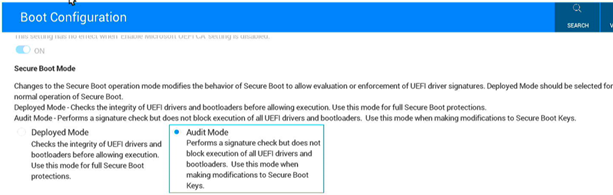
When resetting to default BIOS settings on many Dell computers, the Secure Boot Mode option resets to the default. When resetting to default BIOS settings on a Dell Pro 5 Micro P5M1260, the Secure Boot Mode option does not reset from Audit Mode to Deployed Mode.
Affected Platforms:
- Dell Pro 5 Micro P5M1260
Cause
Dell has changed how loading BIOS defaults works with the Dell Pro 5 Micro P5M1260. The Secure Boot Mode setting is designed to not reset when loading BIOS default settings.
Resolution
When loading default BIOS settings, optionally change the Secure Boot Mode setting manually.
- Press F2 while powering on the computer.
- Go to Boot Configuration.
- Change the Secure Boot Mode setting to either Deployed Mode or Audit Mode as is appropriate.
- Save the changes and exit the BIOS.
Affected Products
Dell Pro 5 Micro P5M1260Article Properties
Article Number: 000444134
Article Type: Solution
Last Modified: 24 مايو 2026
Version: 2
Find answers to your questions from other Dell users
Support Services
Check if your device is covered by Support Services.