Unisphere is not displaying masking view details
Summary: All the masking view information is visible in SYMCLI. The customer is unable to see the masking view information for all local arrays. Within Unisphere, none of the array masking view details are visible. ...
Symptoms
Customer is using Unisphere for VMAX 8.3.0.1 and SE 8.3.0.6.
All the masking view information is visible in SYMCLI. The customer is unable to see the masking view information for all local arrays. Within Unisphere, none of the array masking view details are visible.
In the Run.log:[Server:server-0] 23:05:25,392 ERROR [em.bp.OBJECTMODEL] (EJB default - 5) MaskingUtils.getDevMaskViewData:Unable to obtain unique ID for host: SymDevMaskViewGet failed with code 2566 (Unable to obtain unique ID for host)[Server:server-0] 23:05:25,408 ERROR [em.bp.OBJECTMODEL] (EJB default - 5) MaskingUtils.list_symm_login_data:An error occurred retrieving login history data for [FA-1D:ALL]: Unable to obtain unique ID for host[Server:server-0] 23:05:25,408 ERROR [em.bp.OBJECTMODEL] (EJB default - 5) MaskingUtils.list_symm_login_data:An error occurred retrieving login history data for [FA-2D:ALL]: Unable to obtain unique ID for host[Server:server-0] 23:05:25,408 ERROR [em.bp.OBJECTMODEL] (EJB default - 5) MaskingUtils.list_symm_login_data:An error occurred retrieving login history data for [FA-3D:ALL]: Unable to obtain unique ID for host[Server:server-0] 23:05:25,408 ERROR [em.bp.OBJECTMODEL] (EJB default - 5) MaskingUtils.list_symm_login_data:An error occurred retrieving login history data for [FA-4D:ALL]: Unable to obtain unique ID for host
The customer has reset the SYMCLI and U4V lockboxes and sees the same on a fresh installation.
Cause
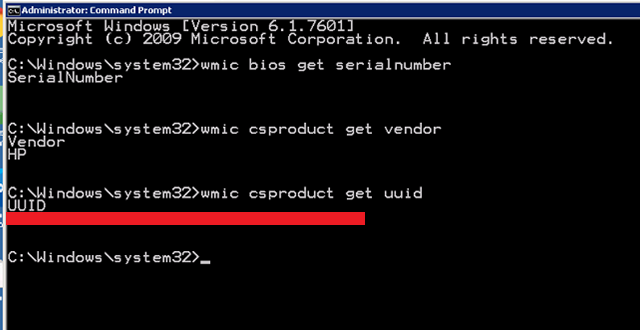
The BIOS serial number was empty, which is OK for the Operating System.
Unisphere is querying the operating system BIOS for this value, and it is returning a blank value. This query interprets the blank string as a garbage-filled string, and as a result, it fails the WMI query to the lockbox because it cannot interpret the string.
Resolution
This issue is fixed in Unisphere for VMAX 8.4 or higher.