PowerScale OneFS: SMB 홈 공유에 사용자 이름 확장 변수를 사용할 때 간헐적으로 파일을 찾을 수 없음 관련 오류
Summary: 컴퓨터 계정도 공유에 연결하지만 파일을 찾을 수 없는 경우 확장된 홈 디렉토리의 사용자 이름에 파일을 저장하는 데 간헐적으로 오류가 발생합니다.
This article applies to
This article does not apply to
This article is not tied to any specific product.
Not all product versions are identified in this article.
Symptoms
가변 경로 확장 또는 사용자 이름 확장 변수(%U)를 사용하여 자동으로 생성된 홈 디렉토리에서 파일을 저장, 수정 또는 이름 바꾸려고 하면 파일이 더 이상 해당 경로 또는 이와 유사한 위치에 없다는 오류가 간헐적으로 표시될 수 있습니다. 그러면 페이지가 새로 고쳐진 후 파일이 사라졌다가 다시 나타날 수 있습니다.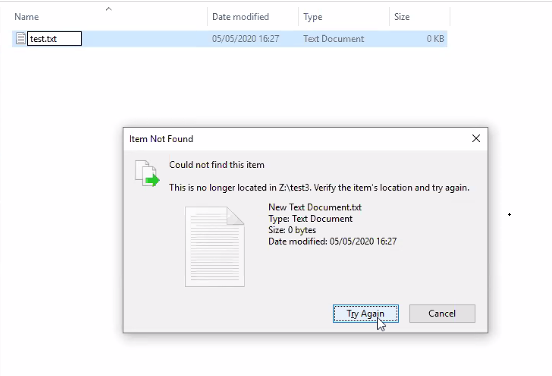
Cause
사용자 이름 확장 변수(%U)로 구성된 SMB 공유는 공유에 연결하는 각 사용자에 대해 홈 디렉토리가 자동으로 생성됨을 의미합니다. 이는 컴퓨터 계정이든 사용자 계정이든 관계없이 적용됩니다.
PowerScale-1# isi smb shares list --zone=SMBzone
Share Name  Path
-------------------------------------
homedir     /ifs/home/%U
-------------------------------------
Total: 1

PowerScale-1# ls -l /ifs/home/
total 5
drwx------     2 user0                   Isilon Users              27 May 15 11:32 user0
drwx------     3 EXAMPLE\dell-rabie-pc$  EXAMPLE\domain computers  28 May 15 11:36 dell-rabie-pc$ <<----- Computer account
drwx------     3 EXAMPLE\paul            EXAMPLE\domain users      28 May 15 11:36 paul           <<----- User account using computer "dell-rabie-pc$"
다음 패킷 캡처에서 사용자 paul은 \\homedir\profiles\paul\로 확장되는 파일을 \\homedir\profiles 공유에 생성합니다. 컴퓨터 계정은 동일한 파일을 찾으려고 시도하고 동일한 공유 \\homedir\profiles에 연결되어 있다고 생각합니다. \\homdir\profiles\dell-rabie-pc$\에서 찾고 있으므로 파일을 찾을 수 없습니다. \\homedir\profiles\paul\test가 \\homdir\profiles\dell-rabie-pc$\test와 다릅니다.
6600 48.216535 10.148.x.x   10.45.x.x SMB2 166 Session Setup Request, NTLMSSP_AUTH, User: EXAMPLE\paul    <<----- User account using computer "dell-rabie-pc$"
6661 48.216535 10.45.x.x   10.148.x.x SMB2 146 Session Setup Response
6662 48.800589 10.148.x.x   10.45.x.x SMB2 166 Tree Connect Request Tree: \\homedir\profiles
6663 48.801463 10.45.x.x   10.148.x.x SMB2 138 Tree Connect Response
6646 48.213583 10.148.x.x   10.45.x.x SMB2 422 Create Request File: test3\test\New Text Document.txt
6650 48.215117 10.45.x.x   10.148.x.x SMB2 374 Create Response File: test3\test\New Text Document.txt
6659 48.216535 10.148.x.x   10.45.x.x SMB2 166 Session Setup Request, NTLMSSP_AUTH, User: EXAMPLEdell-rabie-pc$ <<----- Computer account
6660 48.216535 10.45.x.x   10.148.x.x SMB2 146 Session Setup Response
6813 48.800589 10.148.x.x   10.45.x.x SMB2 166 Tree Connect Request Tree: \\homedir\profiles
6814 48.801463 10.45.x.x   10.148.x.x SMB2 138 Tree Connect Response
6819 48.802674 10.148.x.x   10.45.x.x SMB2 266 Create Request File: test3\test\New Text Document.txt
6820 48.803106 10.45.x.x   10.148.x.x SMB2 131 Create Response, Error: STATUS_OBJECT_PATH_NOT_FOUND

In frames 6646 and 6650, the file is created successfully. Frame 6819 shows a request to access "New Text Document.txt",  but frame 6820 shows that the file was not found.
Further inspection of the information in frame 6819, shows that the create request came from the computer account and not the user account:
6819 48.802674 10.148.x.x   10.45.x.x SMB2 266 Create Request File: test3\test\New Text Document.txt
Session Id: 0x07b5cf4100d5a9be
    [Account: dell-rabie-pc$ Acct:dell-rabie-pc$]
    [Domain: DDMI Domain:EXAMPLE]
    [Host: dell-rabie-pc Host:dell-rabie-pc]
Resolution
가변 경로 확장을 사용하여 자동으로 생성되지 않는 홈 디렉토리를 사용할 때는 이 문제가 발생하지 않습니다.
해결 방법:
- "도메인 컴퓨터" 그룹이 공유에 액세스하지 못하도록 거부할 수 있는 경우 파일을 찾을 수 없음 오류를 방지할 수 있습니다. 이 작업은 가능한 부정적인 영향을 확인하기 위해 먼저 테스트 설정에서 수행해야 합니다.
# isi smb shares view varexp
                                     Share Name: varexp
                                           Path: /ifs/varexp-home/%U
                                    Description:
                     Client-side Caching Policy: manual
Automatically expand user names or domain names: True
Automatically create home directories for users: True
                                      Browsable: True
Permissions:
Account                  Account Type  Run as Root  Permission Type  Permission
--------------------------------------------------------------------------------
EXAMPLE\domain computers group         0            deny             full
Everyone                 wellknown     0            allow            full
--------------------------------------------------------------------------------
Total: 2
2. 클라이언트가 not found 이벤트를 캐싱하지 못하도록 설정합니다. 단, 이렇게 하면 성능이 저하될 수 있습니다.
이러한 설정 수정에 대한 질문이나 우려 사항이 있는 경우 Microsoft 지원에 문의하세요.
레지스트리 항목을 추가하려면 다음 단계를 수행합니다.
- Windows 검색 창에 'regedit'를 입력합니다.
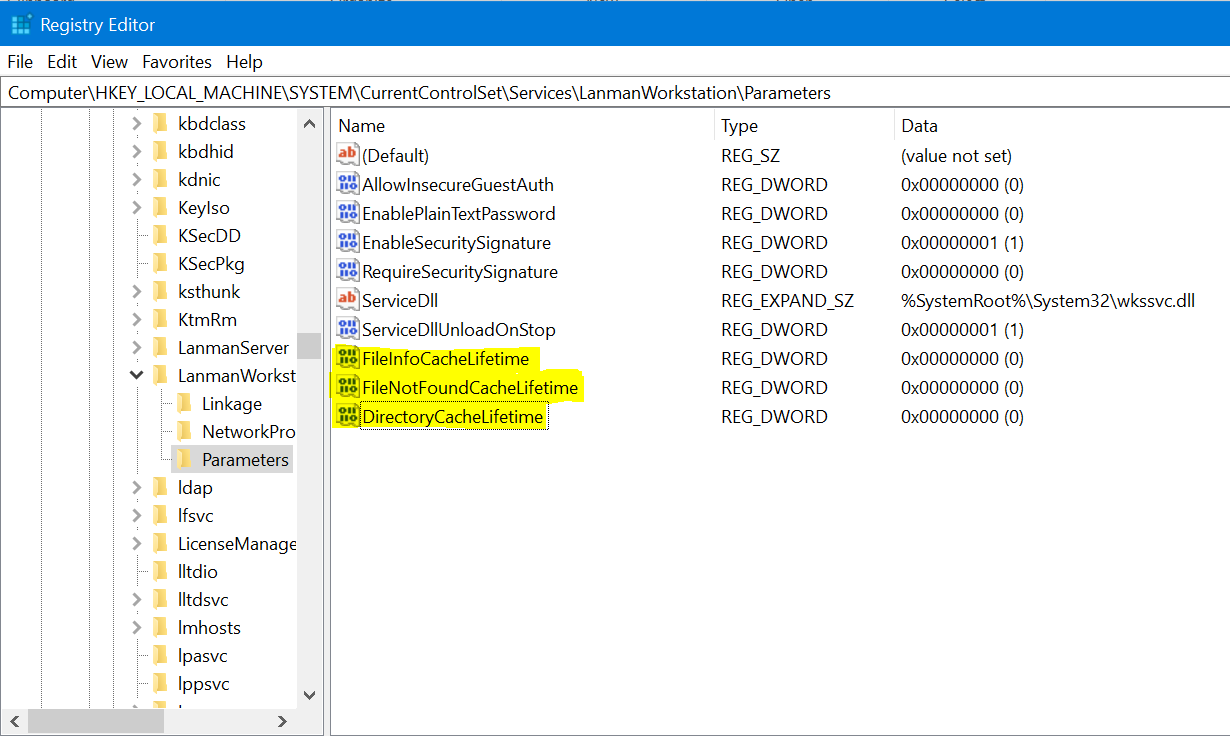
- 아래 위치로 이동합니다. 컴퓨터\HKEY_LOCAL_MACHINE\SYSTEM\CurrentControlSet\Services\LanmanWorkstation\Parameters
- 위의 위치에 도착하면 새 DWORD 값을 만듭니다 (새 > DWORD 값을 마우스 오른쪽 버튼으로 클릭>).
- 아래 레지스터 이름을 지정하십시오. 새로 생성된 값은 기본적으로 0입니다
FileNotFoundCacheLifetime Dword=0 >> The file not found cache timeout period.
공유 루트가 아닌 하위 디렉토리에 있는 경우에도 문제가 지속되거나 발생하는 경우 위의 항목과 함께 다음 레지스트리를 추가합니다.
FileInfoCacheLifetime Dword=0                               >> The file information cache timeout period.
DirectoryCacheLifetime Dword=0                            >> This is the directory cache timeout.
레지스트리 항목은 아래와 같이 나타납니다.
Additional Information
- 파일 정보 캐시를 사용하지 않도록 설정하면 클라이언트 성능에 큰 영향을 줄 수 있으며 서버로 전송되는 메타데이터 요청 수가 증가합니다.
- 레지스트리 값에 대한 자세한 내용은 여기에서 확인할 수 있습니다.
https://docs.microsoft.com/en-us/windows-server/administration/performance-tuning/role/file-server/
Affected Products
Isilon, PowerScale OneFSProducts
Storage, Enterprise Storage, Isilon, Isilon, PowerScale OneFSArticle Properties
Article Number: 000079025
Article Type: Solution
Last Modified: 16 ديسمبر 2025
Version: 4
Find answers to your questions from other Dell users
Support Services
Check if your device is covered by Support Services.