NetWorker REST API: HTTP GET 요청이 간헐적으로 시간 초과됨
Summary: NetWorker REST(Representational State Transfer) API(Application Program Interface)는 환경의 NetWorker Server에서 정보(HTTP GET)를 요청하는 데 사용됩니다. REST API가 간헐적으로 시간 초과를 쿼리하고 소켓 시간 초과로 인해 restapi.log에 내부 서버 오류 메시지가 표시됩니다. ...
Symptoms
NetWorker REST API는 정보(HTTP GET)을 업데이트해야 합니다. REST API 쿼리가 간헐적으로 시간 초과되고 restapi.log 소켓 시간 초과로 인한 내부 서버 오류 메시지를 표시합니다.
YYYY-MM-DD HH:MM:SS INFO [https-jsse-nio-9090-exec-26] c.e.n.w.WebApiResponse - Response status Method: 'GET', URI:'v3/global/backups', Status '200'
YYYY-MM-DD HH:MM:SS INFO [https-jsse-nio-9090-exec-26] c.e.n.w.WebApiResponse - Response status Method: 'GET', URI:'v3/global/backups', Status '500'
...
YYYY-MM-DD HH:MM:SS ERROR [https-jsse-nio-9090-exec-11] c.e.n.w.WebApiExceptionMapper - Status 'Internal Server Error', msg: java.io.IOException: Broken pipe
org.apache.catalina.connector.ClientAbortException: java.io.IOException: Broken pipe
	at org.apache.catalina.connector.OutputBuffer.realWriteBytes(OutputBuffer.java:333) ~[catalina.jar:9.0.10]
A curl NetWorker Server REST API에 대한 명령을 실행하면 다음이 표시됩니다.
[root@NetworkerServer]# curl -X GET -H "Content-Type: application/json" "https://mynsr.mydomain.com:9090/nwrestapi/v3/global/backups" -u "administrator" -k -1
Enter host password for user 'administrator':
curl: (28) Operation timed out after 300406 milliseconds with 0 out of 0 bytes received
Cause
v3/global/backups," "v3/global/jobs," 또는 "v3/global/volumes"는 리소스를 많이 사용하는 쿼리이며 대규모 환경에서 요청 시간 초과를 유발할 수 있습니다.
NetWorker REST API 서비스는 JVM(Java Virtual Machine)에서 실행되는 Apache Tomcat Java 서블릿 컨테이너에서 호스팅됩니다. REST API는 JVM 메모리를 사용하여 모든 요청을 처리하며, 리소스 집약적인 쿼리 후에 모든 메모리가 해제되지 않는 것을 볼 수 있습니다. JVM 메모리 사용률이 증가하면 결국 리소스를 덜 사용하는 다른 REST API 요청이 시간 초과될 수 있습니다.
Resolution
리소스를 많이 사용하는 요청을 사용하여 NetWorker Server에서 정보를 검색하지 마십시오. 예를 들어, "v3/global/backups" 또는 "v3/global/clients/CLIENT_NUMBER/backups전역을 사용하는 대신 정의된 시간 범위와 함께 사용할 수 있습니다.v3/global/backups"를 클릭하여 모든 백업을 검색합니다.
예를 들어 다음에 대한 결과를 제한합니다. saveTime 지정된 시간 범위 사이. 지난 24시간 이내에 완료된 작업에 대한 쿼리의 예:
../global/backups 예:
https://NETWORKER_SERVER_ADDRESS:9090/nwrestapi/v3/global/backups?q=saveTime:["START" TO "END"]
https://nsr.amer.lan:9090/nwrestapi/v3/global/backups?q=saveTime:["2024-07-24T00:00:01" TO "2024-07-24T23:59:59"]
../global/clients/client_resourceId_number/backups
https://NETWORKER_SERVER_ADDRESS:9090/nwrestapi/v3/global/clients/client_resourceID_number/backups?q=saveTime:["START" TO "END"]
https://nsr.amer.lan:9090/nwrestapi/v3/global/clients/87.0.90.20.0.0.0.0.196.80.99.102.192.168.9.150/backups?q=saveTime:["2024-07-24T00:00:01" TO "2024-07-24T23:59:59"]
../global/jobs:
https://NETWORKER_SERVER_ADDRESS:9090/nwrestapi/v3/global/jobs?q=endTime:["START" TO "END"]
https://nsr.amer.lan:9090/nwrestapi/v3/global/jobs?q=endTime:["2024-07-29T00:00:01" TO "2024-07-29T23:59:59"]
../global/volumes 예:
https://NETWORKER_SERVER_ADDRESS:9090/nwrestapi/v3/global/volumes?q=type:"MEDIA_TYPE"&fl=location,name,mode,pool,written
https://nsr.amer.lan:9090/nwrestapi/v3/global/volumes?q=type:"Data Domain"&fl=location,name,mode,pool,written
Additional Information
NetWorker API 호출에 대해서는 REST API 개발자 가이드 의 "쿼리 목록 필터"(q) 및 "필드 목록 필터"(fl) 설정을 클릭합니다.
REST API 디버깅은 다음에 정의되어 있습니다. NetWorker: REST API 디버깅
을 활성화하는 방법또는 다음 테스트를 사용할 수 있습니다.
REST API 명령에서 다음 옵션을 사용합니다.
| 옵션 | 목적 |
--max-time 3600 |
전체 전송(DNS, 연결, TLS, 요청 및 응답 본문)에 대해 하드 캡을 3600초(1시간)로 설정합니다. - 전체 작업이 1시간 이내에 완료되지 않은 경우 curl 시간 초과 오류로 중지합니다. |
--connect-timeout 60 |
TCP/TLS 연결을 설정할 수 있는 시간을 60초로 제한합니다. 만일 curl 60초 이내에 연결할 수 없으면 해당 시도에 실패합니다. 포함 --retry 활성화된 경우 다시 시도할 수 있습니다(아래 재시도 규칙 적용). 이 값은 재량에 따라 변경할 수 있습니다. |
--retry 3 |
지시 curl 일시적 오류에 대해 최대 3회까지 다시 시도하려면 - 이 값은 재량에 따라 변경할 수 있습니다.
일반적인 재시도 트리거:
|
--retry-delay 5 |
재시도 간 고정된 대기 시간을 5초로 설정합니다. 일시적인 장애 발생 후 curl 다음 시도 전에 5초 동안 기다립니다. 이 값은 재량에 따라 변경할 수 있습니다. |
-H "X-NW-AUTHC-BASE-URL:REMOTE_AUTHC_SERVER_ADDRESS:9090" |
(선택 사항) 이는 로그인 요청을 처리하는 데 사용되는 NetWorker 호스트가 REST API 엔드포인트의 NetWorker Server와 분리된 경우에만 필요합니다. 자세한 내용은 다음을 참조하십시오.
NetWorker REST API: RESTAPI 요청을 처리할 때 원격 AUTHC 서버를 사용하는 방법 |
Windows Powershell:
curl.exe -k -v --compressed `
  --max-time 3600 `
  --connect-timeout 60 `
  --retry 3 `
  --retry-delay 5 `
  -u NETWORKER_USERNAME:'PASSWORD' `
  -H "Accept: application/json" `
  "https://NETWORKER_SERVER_ADDRESS:9090/nwrestapi/v3/global/volumes/ENDPOINT" `
| ConvertFrom-Json `
| ConvertTo-Json -Depth 20 `
| Out-File -Encoding UTF8 OUTPUT_FILE_NAME
-Depth 20 는 PowerShell의 ConvertTo-Json cmdlet을 사용합니다. PowerShell에서 데이터를 JSON으로 직렬화할 때 포함되는 중첩 개체 및 배열의 수준 수를 제어합니다. 중첩된 개체(있는 경우)의 수는 사용되는 REST API 엔드포인트 및 잠재적인 "쿼리 목록 필터"(q) 또는 "필드 목록 필터"(fl) 매개 변수가 사용됩니다. NetWorker REST API 호출에 20이면 충분합니다.
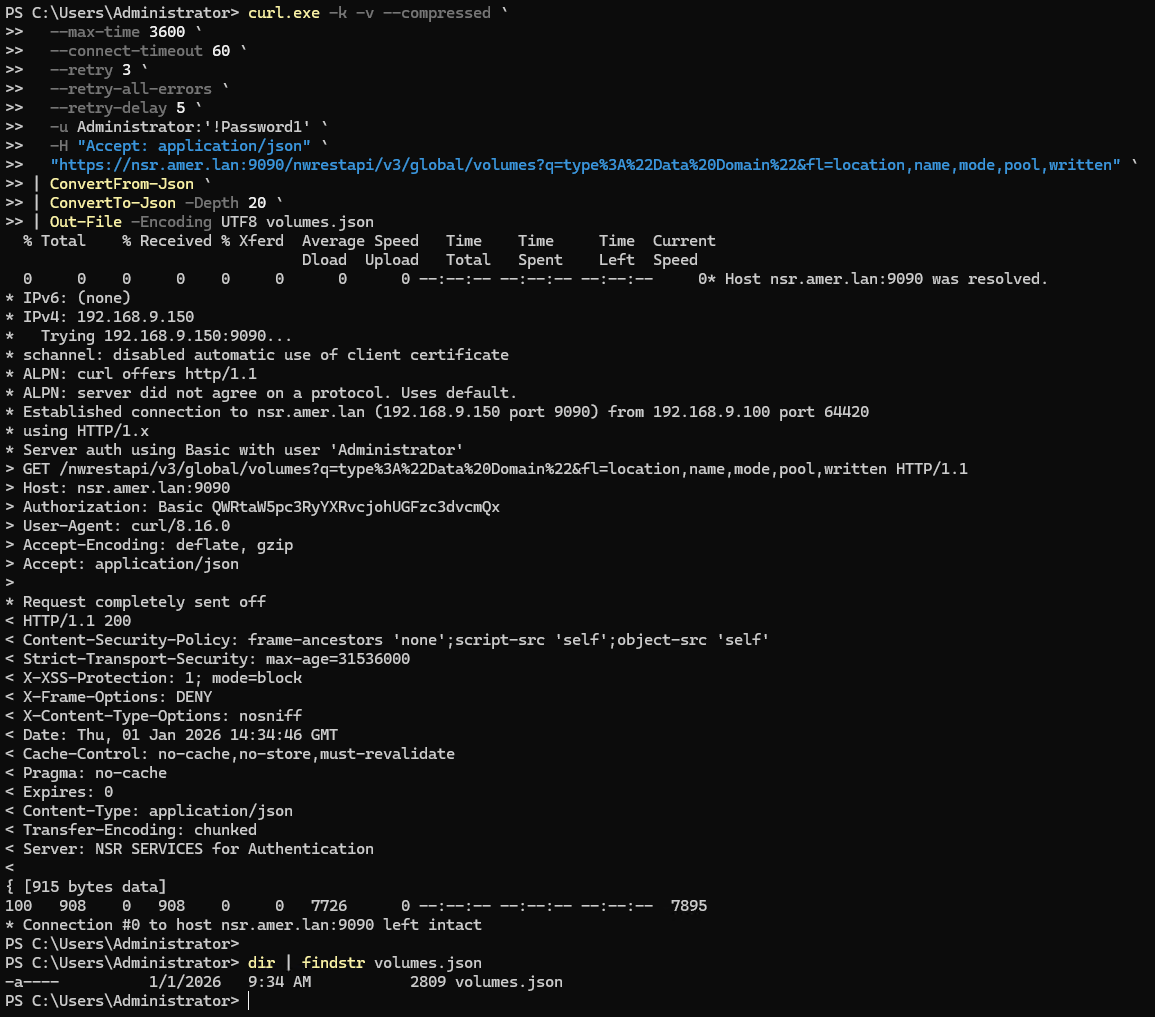
위의 예에서는
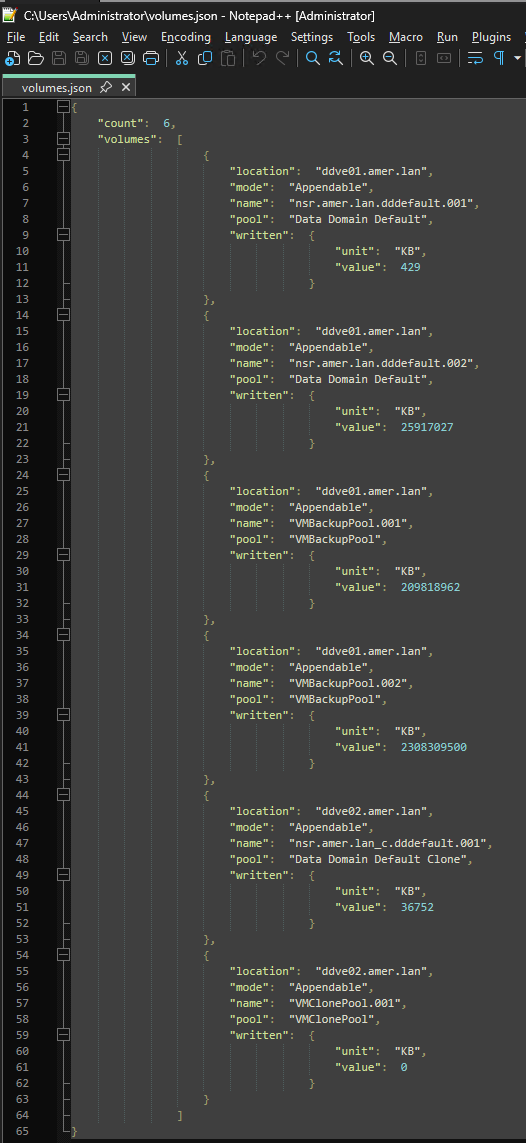
volumes.json 파일이 있는 디렉토리의 curl.exe 실행되었습니다. 파일의 내용에는 REST API 페이로드가 포함됩니다.
Linux:
curl -k -v --compressed \
  --max-time 3600 \
  --connect-timeout 60 \
  --retry 3 \
  --retry-all-errors \
  --retry-delay 5 \
  -u NETWORKER_USERNAME:'PASSWORD' \
  -H "Accept: application/json" \
  "https://NETWORKER_SERVER_ADDRESS:9090/nwrestapi/v3/global/volumes/ENDPOINT" \
  -o volumes.json
예( -v 간결함을 위해):
[root@nsr ~]# curl -k --compressed \
  --max-time 3600 \
  --connect-timeout 60 \
  --retry 3 \
  --retry-all-errors \
  --retry-delay 5 \
  -u Administrator:'!Password1' \
  -H "Accept: application/json" \
  "https://nsr.amer.lan:9090/nwrestapi/v3/global/volumes?q=type%3A%22Data%20Domain%22&fl=location,name,mode,pool,written" \
  -o volumes.json
  % Total    % Received % Xferd  Average Speed   Time    Time     Time  Current
                                 Dload  Upload   Total   Spent    Left  Speed
100   908    0   908    0     0  22700      0 --:--:-- --:--:-- --:--:-- 22146
이 예에서 "volumes.json"이(가) 명령이 실행된 동일한 디렉토리에 생성되었습니다. json 형식을 올바르게 구문 분석하기 위해 다양한 도구를 사용할 수 있으며 사용되는 도구는 설치된 OS 및 소프트웨어에 따라 다를 수 있습니다.
[root@nsr ~]# cat volumes.json | python -m json.tool
{
    "count": 6,
    "volumes": [
        {
            "location": "ddve01.amer.lan",
            "mode": "Appendable",
            "name": "nsr.amer.lan.dddefault.001",
            "pool": "Data Domain Default",
            "written": {
                "unit": "KB",
                "value": 429
            }
        },
        {
            "location": "ddve01.amer.lan",
            "mode": "Appendable",
            "name": "nsr.amer.lan.dddefault.002",
            "pool": "Data Domain Default",
            "written": {
                "unit": "KB",
                "value": 25917027
            }
        },
        {
            "location": "ddve01.amer.lan",
            "mode": "Appendable",
            "name": "VMBackupPool.001",
            "pool": "VMBackupPool",
            "written": {
                "unit": "KB",
                "value": 209818962
            }
        },
        {
            "location": "ddve01.amer.lan",
            "mode": "Appendable",
            "name": "VMBackupPool.002",
            "pool": "VMBackupPool",
            "written": {
                "unit": "KB",
                "value": 2308309500
            }
        },
        {
            "location": "ddve02.amer.lan",
            "mode": "Appendable",
            "name": "nsr.amer.lan_c.dddefault.001",
            "pool": "Data Domain Default Clone",
            "written": {
                "unit": "KB",
                "value": 36752
            }
        },
        {
            "location": "ddve02.amer.lan",
            "mode": "Appendable",
            "name": "VMClonePool.001",
            "pool": "VMClonePool",
            "written": {
                "unit": "KB",
                "value": 0
            }
        }
    ]
}