DPA:錯誤訊息「錯誤 401:未經授權的動作「會顯示在 UI 中
Summary: 使用者保持登錄數小時后,數據保護顧問 (DPA) UI 中出現 401 未經授權的操作錯誤;這是由於會話由於不活動而自動關閉引起的。
This article applies to
This article does not apply to
This article is not tied to any specific product.
Not all product versions are identified in this article.
Symptoms
使用者在 DPA UI 上看到錯誤訊息,且必須再次登入:
Error 401: Unauthorized Action Cause
當使用者一次登入 DPA UI 數小時,且開啟的工作階段由於閒置而關閉,或是其他環境因素而關閉工作階段時,就會發生此錯誤。
Resolution
可以忽略此錯誤,因為它不會影響 DPA 功能。
使用者可以再次登入 DPA 並照常繼續。
可以在 UI 上設定以下設定,以在特定時間段後強制乾淨註銷:
管理 > 使用者和安全 > 安全設定
會話過期參數可以設置為 6 小時的範例(預設值為關閉):
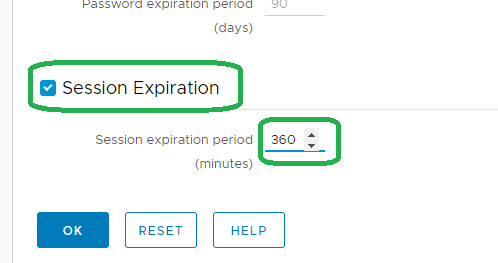
注意:上述功能於 18.2 推出。
請聯絡支援部門以取得更多資訊。
請聯絡支援部門以取得更多資訊。
Affected Products
Data Protection AdvisorProducts
Data Protection AdvisorArticle Properties
Article Number: 000173588
Article Type: Solution
Last Modified: 10 يونيو 2026
Version: 5
Find answers to your questions from other Dell users
Support Services
Check if your device is covered by Support Services.