VxRail: vSAN iSCSI Target Service Fails to Start
Summary: vSAN iSCSI Target Daemon (vitd) service fails to start.
This article applies to
This article does not apply to
This article is not tied to any specific product.
Not all product versions are identified in this article.
Symptoms
After the unexpected outage of a node, the ESXi node cannot provide iSCSI target service. The vSAN iSCSI target service fails to start.
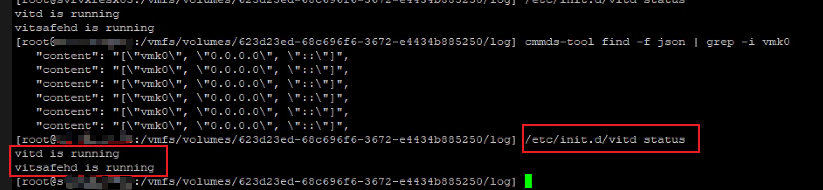
Run the following command to check the status of the
The UI shows all the VMKs are normal, similar to a working node:
Run the following command to check the status of the
vitd service:
/etc/init.d/vitd statusRestarting the
vitd service does not resolve the issue, nor does rebooting the ESXi host.
The UI shows all the VMKs are normal, similar to a working node:
vitd[2493716]: VITD: Thread-0x1ca7f5de40 invalid listen address vmk3:3260
vitd[2493732]: VITD: Thread-0x7d979e5e40 getaddrinfo for vmk3:3260 failed: Name or service not known
vitd[2493732]: VITD: Thread-0x7d979e5e40 invalid listen address vmk3:3260
vitd[2493748]: VITD: Thread-0xaf045e9e40 getaddrinfo for vmk3:3260 failed: Name or service not known
vitd[2493748]: VITD: Thread-0xaf045e9e40 invalid listen address vmk3:3260
vitd[2493765]: VITD: Thread-0x7d27ef1e40 getaddrinfo for vmk3:3260 failed: Name or service not known
Cause
This issue is due to a faulty vmk0, though it is not shown as missing on the UI. Even the command esxcfg-vmknic -l shows the vmk0.
By design, if the customer needs the vSAN iSCSI target service, vmk0 must be functioning. On the VxRail server, vmk0 is used for node discovery. It is also used to start the vSAN iSCSI target service.
Resolution
To address this issue, review the troubleshooting steps in VMware article vSAN Health Service (External Link)
- Restart the vSAN iSCSI services on the host. To restart the vSAN iSCSI service without interrupting current I/O operations, run the following command:
etc/init.d/vitd restart
- To restart vSAN iSCSI and rest I/O, run the following command.
This may interrupt and cancel current I/O operations.
/etc/init.d/vitd io_reset
- If the above does not resolve the issue, delete the failing
vmk0and re-create it. - Restart the vSAN iSCSI target service again.
etc/init.d/vitd restart
Affected Products
VxRail D560, VxRail D560F, VxRail E460, VxRail G560, VxRail G560F, VxRail V470Products
VxRail Appliance FamilyArticle Properties
Article Number: 000204209
Article Type: Solution
Last Modified: 27 مارس 2026
Version: 5
Find answers to your questions from other Dell users
Support Services
Check if your device is covered by Support Services.