NVE: Configure AFTD fails: The user 'root' does not own the contents of the device
Summary: Configure NetWorker advanced file type device (AFTD) on Isilon network file share (NFS) fails error "The user 'root (uid=0)' does not own the contents of the device"
This article applies to
This article does not apply to
This article is not tied to any specific product.
Not all product versions are identified in this article.
Symptoms
Configure NetWorker AFTD on Isilon NFS share fails.
Error: The user 'root (uid=0)' does not own the contents of device '<name>'
Cause
Since NetWorker Virtual Edition (NVE) does not support NFSv3, Isilon has to enable the NFSv4 along with the default version 3. There is a "root user mapping" setting in NFSv4. By default, the mapping is set to "nobody." This causes the NFS client failing to write on the share.
Resolution
- Log in to the Isilon OneFS admin UI as root.
- Click drop down tab "Protocols" -> "UNIX sharing (NFS)" -> Check or highlight the NFS exports sharing Path "<nfs mount>" -> Click Action "View/Edit" -> Click "Edit Export" -> Browse down to "root user mapping" click "Use custom" -> check "Do not map root users" -> Save changes
- Click drop down tab "Zone settings" -> Ensure that the "Enable NFSv4 no names" is checked.
- Log in to NVE as admin, then switch to root:
sudo su -(Alternatively, the below commands can be run as admin, but you must usesudo)
Umount the NFS mount, mount it again.umount /<mount point>mount -t nfs <Isilon host>:/ifs/<nfs mount> /<mount point>
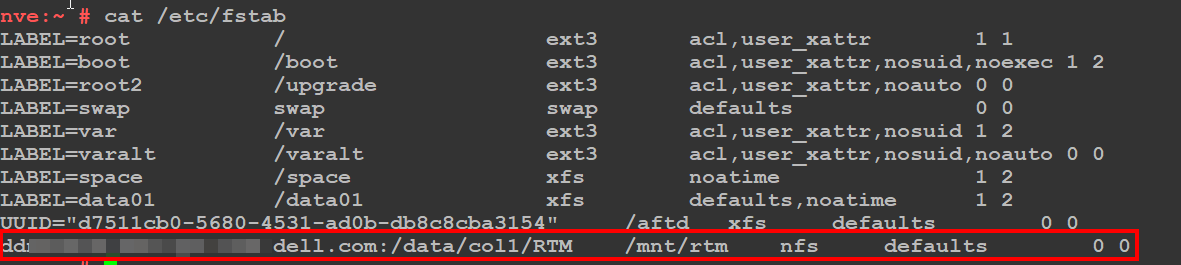
NOTE: Create an
/etc/fstab entry on the NVE to make the mountpoint persistent across system reboots. The below screenshot is a general example of a persistent NFS mountpoint.
- Log in to the NetWorker Management Console (NMC) as the NetWorker Administrator
- Configure the AFTD with the device configuration wizard.
Affected Products
NetWorkerProducts
NetWorker FamilyArticle Properties
Article Number: 000206193
Article Type: Solution
Last Modified: 06 أبريل 2026
Version: 2
Find answers to your questions from other Dell users
Support Services
Check if your device is covered by Support Services.