PowerPath for Windows: Removing Migration Enabler UMD and KMD driver context
Summary: Due to external requirements, for example the unexpected physical redeployment of cluster nodes, it may be necessary to abort a PowerPath Migration Enabler (PPME) migration and force-remove or force-deconfigure the PowerPath Migration Enabler user mode context (UMD) and the kernel mode context (KMD) from one, or more, host systems. Manual procedures exist to achieve this. PowerPath 7.2 and later contains an internal powermig command to provide additional procedural assurance. ...
Instructions
PowerPath for Windows 7.2 and later contain an internal command to remove the user mode context and the kernel mode context from driver parameterization in one command. A reboot is mandatory after executing the command.
STEP 1
To remove the UMD and KMD context, run:
CMD C:\>powermig nodecleanup
Ensure that all options to recover, abort and cleanup existing migrations are tried before trying this nodeCleanup command. Also, a host reboot is needed to complete all the steps of this command properly. Do you still want to continue? [yes]/no:
Answer 'y' to the question. The command responds as follows:
NOTE: Host reboot is needed for the cleanup to take effect. Also, delete the backed up KMD registry keys (cleanup_*) and PPME\db.old folder before running the command again.
STEP 2
Reboot the host. This concludes the core intervention part. At this point you can bring back the cluster, and so on.
STEP 3
The nodecleanup command only moves the control structures out of the way. It does not delete them. After the reboot, you must remove the renamed UMD and KMD structures. This can be done online. A second reboot is not necessary.
-
Remove the UMD context
From C:\Program Files\EMC\PPME, remove db.old.
C:\Program Files\EMC\PPME>dir
Volume in drive C has no label.
Volume Serial Number is 6A65-4A7A
Directory of C:\Program Files\EMC\PPME
12/11/2024 12:31 <DIR> .
12/11/2024 12:31 <DIR> ..
12/11/2024 13:13 <DIR> db
12/11/2024 12:31 <DIR> db.old <- Remove this directory
0 File(s) 0 bytes
4 Dir(s) 47,120,658,432 bytes free
-
Remove the KMD context
In HKEY_LOCAL_MACHINE\SYSTEM\CurrentControlSet\Control\EmcPowerPath\KMD_0, or HKEY_LOCAL_MACHINE\SYSTEM\CurrentControlSet\Control\EmcPowerPath\KMD_1 respectively, delete all "cleanup_*" keys.
Example
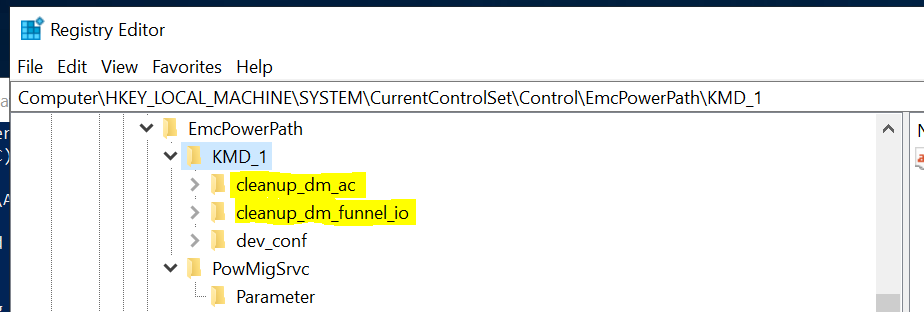
Remarks
- The
nodecleanupcommand addresses the driver context only. You still must remove the PPME cluster resource. - You may have to save the UMD and KMD content elsewhere before removing.
- This command is meant to provide procedural assurance in an emergency situation. If you are uncertain about the consequences, contact Dell Technical Support first to discuss other options.
- The server MUST be rebooted after the
nodecleanupaction.
Expected Error Messages
Powermig nodecleanupfails to run when run a second time, because the UMD context backup was not removed.
When you run the nodecleanup command a second time and you have not removed the UMD context, the command fails with PPME error(119): UMD DB cleanup failed.
Example
PS C:\> powermig nodecleanup
Ensure all options to recover, abort and cleanup existing migrations are tried before trying this nodeCleanup command. Also, a host reboot is needed to complete all the steps of this command properly. Do you still want to continue? [yes]/no: y
PPME error(119): UMD DB cleanup failed
Fix
db.old still exists. Run STEP 3-1 above.
Powermig nodecleanupfails to run when run a second time, because the KMD context backup was not removed.
When you run the command a second time and you have not removed the KMD context, the command fails with PPME error(118): KMD Registry cleanup failed.
Example
C:\Program Files\EMC\PPME>powermig nodecleanup
Ensure all options to recover, abort and cleanup existing migrations are tried before trying this nodeCleanup command. Also, a host reboot is needed to complete all the steps of this command properly. Do you still want to continue? [yes]/no: y
PPME error(118): KMD Registry cleanup failed
Fix
The cleanup values in KMD* still exist. Run STEP 3-2 above.