VxRail: Node Expansion Validation Error That the Host Cpu Is Not Compatible with the Cluster EVC Mode
Summary: For a new node running on VxRail versions from 8.0.320 to 8.0.361, during host first boot, the VxRail manager virtual machine is powered on and configured with Skylake CPU mode. If the cluster Enhanced vMotion Compatibility (EVC) mode is lower than Skylake, then adding the new node to the cluster reports CPU incompatible error. ...
Symptoms
Node expansion validate shows error "The host CPU is not compatible with the cluster EVC mode."
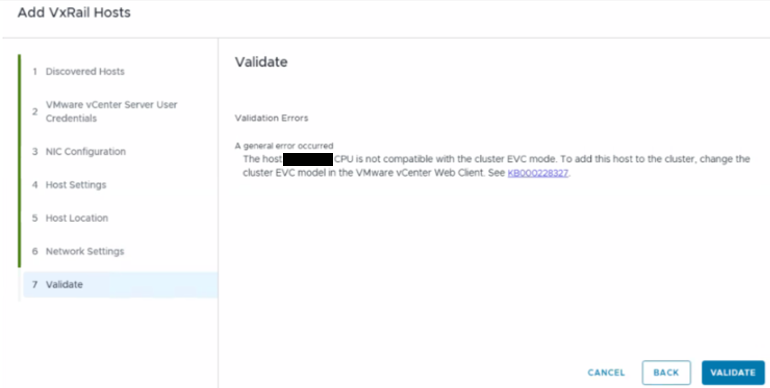
You may encounter this issue when:
- The new node VxRail version is from
8.0.320to8.0.361. - The VxRail manager virtual machine on the new node is already powered on.
- The cluster EVC is lower than Skylake, for example Haswell.
Cause
For VxRail versions 8.0.320 to 8.0.361, the VxRail manager virtual machine is configured with a CPU mode set to Skylake during the host's first boot.
However, if the cluster was initially deployed on a version earlier than 8.0.320, the default cluster EVC level would have been set to Haswell. Even if the cluster has been upgraded to a newer version, the cluster EVC level remains at Haswell unless manually changed. As a result, when adding a new node with a virtual machine (VM) running on Skylake CPU mode, which is higher than the cluster's EVC (Haswell), the validation process reports a CPU incompatibility error.
Resolution
Run the following commands on all the to-be-added new nodes to stop the election service and power off the VxRail manager VM.
esxcli daemon control stop -s election

python /opt/vxutils/data/vxrail-primary --stop
Additional Information
If the cluster was initially deployed on VxRail 8.0.320 to 8.0.361, the cluster default EVC level is set to Skylake, so you will not hit this issue.
In the future VxRail version higher than 8.0.361, the cluster deployment default EVC level is set to Haswell again, adding a new node running on 8.0.320 to 8.0.361 may also hit this issue.