PowerFlex 4.X: SupportAssist Connected but Telemetry Data Does Not Reach AIOps
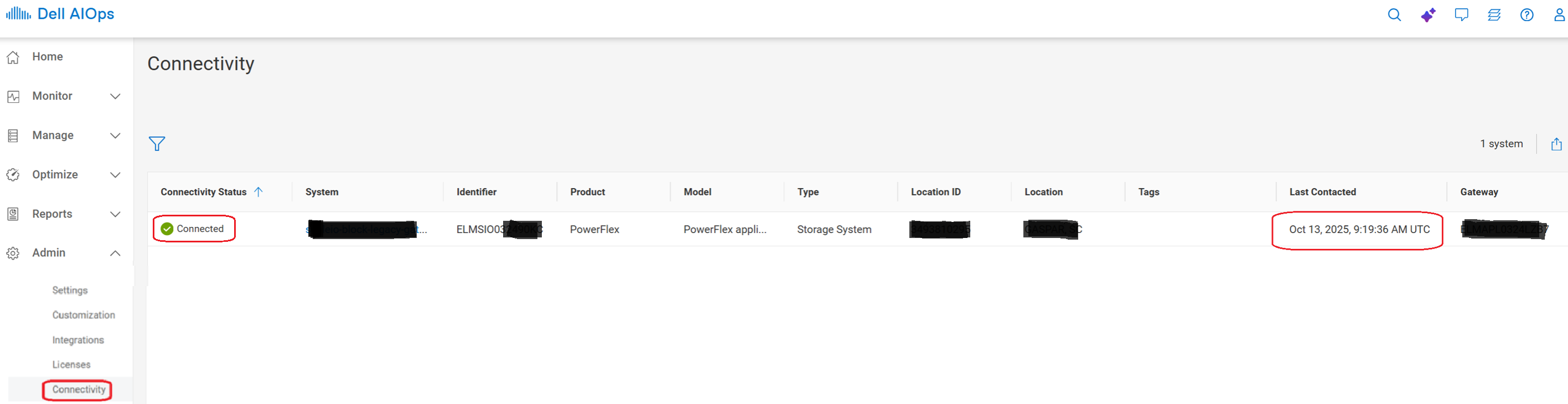
Summary: SupportAssist is connected; however AIOps (formerly known as CloudIQ (CIQ)) shows the 'Last Contacted' time as days or weeks ago.
Symptoms
1) Confirm SupportAssist is connected. Run the following command on any MVM:
kubectl get supportassist -n powerflex -o yamlExpected output:
state: Connected
statusMessage: SupportAssist configuration updated successfully
2) Access the Dell AIOps website to validate the issue exists
Go to Admin > Connectivity.
Find the correct system using it is eSWID (or "Software Unique ID" - SWUID), which can be found in the PowerFlex license section of PFMP, or by running the following command on any MVM:
kubectl get license -n powerflex -o yamlThe eSWID (ELMSIOxxxxx) shows Connected, but 'Last Contacted' date is in the past:
Exec into decks-support-store pod:
x=$(kubectl get pods -n powerflex|grep -i decks-support|awk '{print $1}'); kubectl exec -it -n powerflex $x -- bashvxflexappliance instead of vxrackflex for directory name below.)
json files initially get placed in these directories (capacity; health; inventory; performance)
ls -ltl /opt/secure/data/telemetry/vxrackflex/SCALEIO/performanceAfter transfer, all json files should be deleted from these directories (capacity; health; inventory; performance), and placed in the uploaded directory:
ls -ltr /opt/secure/data/telemetry/vxrackflex/uploadedImpact
AIOps telemetry is not updated with current data.
Cause
There is a defect in the Decks code related to cleanup logic and handling many files when SupportAssist is unavailable and then comes back online.
The path telemetry json files are supposed to take:
vxflexappliance instead of vxrackflex for directory name.
- On decks-support-store pod, telemetry files initially get placed in a subdirectory (capacity; health; inventory; performance) here: /opt/secure/data/telemetry/vxrackflex/SCALEIO
- After the telemetry files are sent home via SCG, the files are supposed to get placed here: /opt/secure/data/telemetry/vxrackflex/uploaded & deleted from the subdirectory mentioned above
Resolution
Unregister and re-register of SupportAssist addresses the issue. See article PowerFlex 4.6: How to Deregister and Reregister SupportAssist
Impacted Versions
PFMP 4.5.x - 4.8.x
Fixed In Version
PFMP 5.1