PowerScale: AD Sudo Commands Stop Working After Upgrade
Summary: Upon upgrading PowerScale OneFS, sudo commands ask for a password three times and then fails to run the command.
This article applies to
This article does not apply to
This article is not tied to any specific product.
Not all product versions are identified in this article.
Symptoms
The Active Directory user (in this case the AD username is "PowerScale") in a 'System Admin' role still allows SSH entry, command fails as follows:
cluster-1# ssh DOMAIN\\PowerScale@cluster-1
(DOMAIN\PowerScale@cluster-1) Password:
PowerScale OneFS 9.12.0.1
Could not chdir to home directory /ifs/home/DOMAIN/PowerScale: No such file or directory
cluster-1% sudo -s

We trust you have received the usual lecture from the local System
Administrator. It usually boils down to these three things:

    #1) Respect the privacy of others.
    #2) Think before you type.
    #3) With great power comes great responsibility.

For security reasons, the password you type will not be visible.

Password:
Sorry, try again.
Password:
Sorry, try again.
Password:
sudo: 3 incorrect password attempts
cluster0-1%
Errors in /var/log/auth.log are similar to:
2026-01-09T14:08:46.964341-05:00 <4.6> isi-9510-1(id1) sshd[9292]: Accepted keyboard-interactive/pam for DOMAIN\PowerScale from 10.20.48.1 port 31599 ssh2
2026-01-09T14:09:02.165862-05:00 <4.1> isi-9510-1(id1) sudo[9315]: DOMAIN\PowerScale : 3 incorrect password attempts ; TTY=pts/1 ; PWD=/ ; USER=root ; COMMAND=/bin/zs
Cause
An update to sudo caused upper case Active Directory usernames to fail. Note this is only for environments that need Active Directory users to get prompted for a password, passwordless sudo commands should be unaffected. Password protected prompts have entries in 'isi_visudo' like this:
DOMAIN\\powerscale ALL=(ALL) PASSWD: ALLResolution
PowerScale Engineering has identified this issue, and the fix is in OneFS 9.13.0.2+. Users can edit the username in Active Directory so that it is in all lowercase:
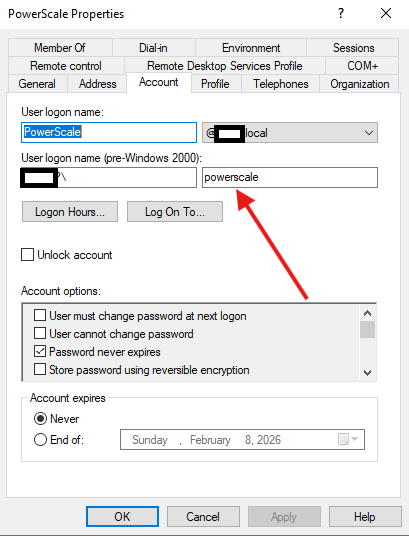
If the user is still not working, initiate a log gather and contact PowerScale Support.
Article Properties
Article Number: 000413077
Article Type: Solution
Last Modified: 23 يونيو 2026
Version: 2
Find answers to your questions from other Dell users
Support Services
Check if your device is covered by Support Services.