Dell Unity: SMB share creation failure
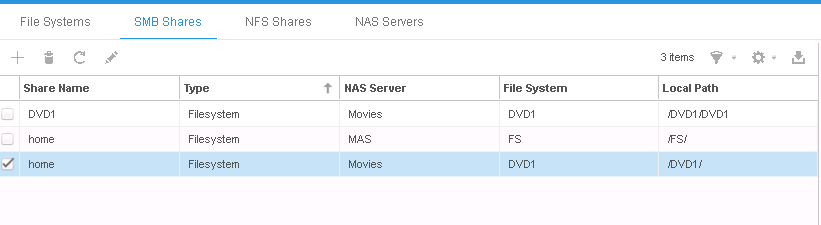
Summary: Creating an SMB share -called "home"- for an FS fails. By default, Unity has an enabled feature called "Home Directory Feature." A special share name, HOME, is reserved for the home directory. (User Correctable) ...
Symptoms
When a user try to create an SMB share with the name 'home', the following error appears:
Failed: The specified SMB share could not be created. (Error Code:0x900a213)
Relevant Article: KB491146
Cause
- The reason for this error is that there is already a default share called HOME.
- This is due to a feature in Unity called "Home Directory Feature."
- The home directory feature is ENABLED by default.
Resolution
There are two action plans:
- Renaming the Share name to anything other than HOME. Such as "home1" or " 'home'. "
- Disable the Home Directory Share Feature. (Steps below)
- Download Unity File CIFS Manager (attached to this KB).
- Right Click (Data Mover/NAS Server Management) > Connect to Data Mover/NAS Server and choose your nas server.
- Under the tab, you will find: HomeDir (enabled)
- Right click the HomeDir tab and disable.
- Try creating the SMB share with the name home, it will be created successfully now.
Additional Information
Home Directory Feature
A special share name, HOME, is reserved for the home directory. The following restrictions apply. If you have:
- Created a share called HOME, you cannot enable the home directory feature.
- When the home directory feature is enabled, you cannot create a share called HOME.
The home directory feature, which can be provided by the Home Directory snap-in, lets you create a single share, called HOME, to which all users connect. You do not have to create individual shares for each user.
The home directory feature simplifies the administration of personal shares and the process of connecting to them by letting you associate a username with a directory that then acts as the user's home directory. The home directory is mapped in a user's profile so that upon login, the home directory is automatically connected to a network drive.