ECS : Échec des écritures CAS avec l’erreur 10204
Summary: Les écritures CAS échouent avec l’erreur 10204
This article applies to
This article does not apply to
This article is not tied to any specific product.
Not all product versions are identified in this article.
Symptoms
Impossible d’écrire les données.
L’application CAS ne peut pas écrire les données sur ECS lorsque le quota est dépassé au niveau de l’espace de nommage.
Message d’erreur :
L’application CAS ne peut pas écrire les données sur ECS lorsque le quota est dépassé au niveau de l’espace de nommage.
Message d’erreur :
10204 FP_OPERATION_NOT_ALLOWED
Plus de détails :
Pour confirmer le problème :
CASScript>po localhost?test.pea

Attempting to connect to: localhost?test.pea

Connected to: localhost?test.pea

CASPool Properties:
         Connection String:                 localhost?test.pea
         Cluster Time:                      2020.11.01 02:34:12 GMT
         Buffer Size:                       16384
         Prefetch Buffer Size:              32768
         Connection Timeout:                120000
         Multi-Cluster Failover Enabled:    True
         Collision Avoidance Enabled:       False

CASScript>ftc test.pea

Creating new clip with blob containing the file:        test.pea

SDK Error Occurred:

         Error Number: -10204
         System Error: 18
         Error:        FP_OPERATION_NOT_ALLOWED
         Error Class:  null
         Trace:        NetworkPacket.checkControl(18)<HPPWriteBlobTransaction::run()<Cluster::writeBlob(stream,3QTQ0BLJMPL1B15EUFPAASG58K,,334,2,6QGPEE9TI6VBIu7NE36460Q8NJR,1604198057,-,-,-,-)<ClusterCloud::writeBlob(stream,3QTQ0BLJMPL1B15EUFPAASG58K,,334,2,6QGPEE9TI6VBIu7NE36460Q8NJR,1604198057,-,-,-,-)<FPTag::BlobWrite(stream,2)<FPTag_BlobWrite(-,-,0)

CASScript>
Informations sur le bucket :
admin@ecsnode1:/root> svc_bucket info pdc-sap-prod
svc_bucket v1.0.28 (svc_tools v1.8.3)                 Started 2020-11-01 02:36:15

Bucket ID                        ns-sap.pdc-sap-prod

  Name                             pdc-sap-prod
  Namespace                        ns-sap
  Owner User                       pdc-sap-prod
  Owner VDC Name                   pdc
  Owner zone/VDC ID                urn:storageos:VirtualDataCenterData:8bd24bf2-24ad-4815-b27d-ac83e20b4aeb
  Keypool Hash ID                  63f35c83e68c88405602d8df3241ff67d8fef80d80a76d693c28a960fe0012c3
  Bucket ACL:
    Type       Affects    Name                                Access Rights
    user       file/dir   pdc-sap-prod                        FULL_CONTROL

  Replication Group (vpool) Name   rg-pdc-rdc
  Replication Group (vpool) ID     urn:storageos:ReplicationGroupInfo:af31c958-bec3-454e-8b2c-e3024365c0e5:global
  Bucket Creation Date             2018-09-19 19:23:46 (1537385026479)
  Temp Failed (TSO)                False

  API Type                         CAS
  FS Access Enabled                False
  Encryption Enabled               True
  Versioning State                 Disabled
  ADO Enabled                      False
  ADO Read-Only                    False
  Reflection Expiration            False
  Reflection Age                   None

  Default FS Access permissions (for owner group):
    File                        Dir
    Read    Write   Exec       Read    Write   Exec
    Unk     Unk     Unk        Unk     Unk     Unk

  Object count                     542421
  Total Object Size                15000.0881 GB
Pour confirmer le problème :
Hard Quotas exceeded on namespace ns-sap error in blobsvc :
2020-11-01T02:34:17,380 [TaskScheduler-BlobService-COMMUNICATOR-ParallelExecutor-160-1e191963:172ad8de782:1f7:46d66] ERROR  FileDirectoryImpl.java (line 1914) Object operation failed on namespace ns-sap since write is disabled on the namespace due to hard quota being exceeded
2020-11-01T02:34:17,380 [TaskScheduler-BlobService-COMMUNICATOR-ParallelExecutor-160-1e191963:172ad8de782:1f7:46d66] ERROR  ListingDirectoryRequestHandler.java (line 109) handleObjectListEntryCreateRequest processing request 1e191966:172ae220b30:231:3041b5 caught exception {}
com.emc.storageos.data.object.exception.ObjectControllerException: Hard Quota exceeded on namespace ns-sap, object operation failed
at com.emc.storageos.data.object.impl.file.directoryTable.FileDirectoryImpl.checkHardQuota(FileDirectoryImpl.java:1915)
at com.emc.storageos.data.object.impl.file.directoryTable.FileDirectoryImpl.validateKeyPool(FileDirectoryImpl.java:1875)
at com.emc.storageos.data.object.impl.file.directoryTable.BlobsvcOperationBase.getAndValidateKeyPool(BlobsvcOperationBase.java:1058)
at com.emc.storageos.data.object.impl.file.directoryTable.BlobsvcOperationBase.getAndValidateKeyPool(BlobsvcOperationBase.java:1038)
at com.emc.storageos.data.object.impl.file.directoryTable.BlobsvcOperationBase.getAndValidateKeyPool(BlobsvcOperationBase.java:1029)
at com.emc.storageos.data.object.impl.operations.local.CreateListingEntry.createObjectListEntry(CreateListingEntry.java:48)
at com.emc.storageos.data.object.directoryService.impl.ListingDirectoryRequestHandler.handleObjectListEntryCreateRequest(ListingDirectoryRequestHandler.java:106)
at com.emc.storageos.data.object.directoryService.impl.FileDirectoryRequestHandler.doHandleRequest(FileDirectoryRequestHandler.java:267)
at com.emc.storageos.data.object.directoryService.impl.AbstractDirectoryRequestHandler.handleRequest(AbstractDirectoryRequestHandler.java:87)
at com.emc.storageos.data.object.directoryService.impl.CompositeDirectoryRequestHandler.handleRequest(CompositeDirectoryRequestHandler.java:53)
at com.emc.storageos.data.object.directoryService.impl.RemoteRequestProcessorBlobSvc.handleRequest(RemoteRequestProcessorBlobSvc.java:96)
at com.emc.storageos.data.object.communicator.AbstractRequestProcessor.handleRemoteRequest(AbstractRequestProcessor.java:226)
at com.emc.storageos.data.object.communicator.impl.RemoteDataNodeCommunicator.enqueueAndSend(RemoteDataNodeCommunicator.java:202)
at com.emc.storageos.data.object.directoryclient.OldRoutingClientBase._sendAndWaitForResponse(OldRoutingClientBase.java:241)
at com.emc.storageos.data.object.directoryclient.OldRoutingClientBase._sendAndWaitForResponseHelper(OldRoutingClientBase.java:500)
at com.emc.storageos.data.object.directoryclient.OldRoutingClientBase.sendAndWaitForResponseWithRetry(OldRoutingClientBase.java:687)
at com.emc.storageos.data.object.directoryclient.OldRoutingClientBase.sendAndWaitForResponseWithRetryAndUpdate(OldRoutingClientBase.java:1023)
at com.emc.storageos.data.object.directoryclient.OldRoutingClientBase.sendAndWaitForResponseWithRetryAndUpdate(OldRoutingClientBase.java:1112)
at com.emc.storageos.data.object.directoryclient.OldRoutingClientBase.sendAndWaitForResponseWithRetryAndUpdate(OldRoutingClientBase.java:1103)
at com.emc.storageos.data.object.directoryService.impl.DirectoryClient.insertObjectListEntry(DirectoryClient.java:1522)
at com.emc.storageos.data.object.directoryService.impl.DirectoryClient.insertObjectListEntry(DirectoryClient.java:1474)
at com.emc.storageos.data.object.directoryService.impl.CreateListEntryTask.sendRequest(CreateListEntryTask.java:191)
at com.emc.storageos.data.object.impl.file.directoryTable.ObjectDirectoryOperation.createListEntry(ObjectDirectoryOperation.java:941)
at com.emc.storageos.data.object.impl.file.directoryTable.ObjectDirectoryOperation.createListEntry(ObjectDirectoryOperation.java:890)
at com.emc.storageos.data.object.impl.file.directoryTable.ObjectDirectoryOperation.createObject(ObjectDirectoryOperation.java:184)
at com.emc.storageos.data.object.directoryService.impl.ObjectDirectoryRequestHandler.handleObjectCreateRequest(ObjectDirectoryRequestHandler.java:173)
at com.emc.storageos.data.object.directoryService.impl.FileDirectoryRequestHandler.doHandleRequest(FileDirectoryRequestHandler.java:227)
at com.emc.storageos.data.object.directoryService.impl.AbstractDirectoryRequestHandler.handleRequest(AbstractDirectoryRequestHandler.java:87)
at com.emc.storageos.data.object.directoryService.impl.CompositeDirectoryRequestHandler.handleRequest(CompositeDirectoryRequestHandler.java:53)
at com.emc.storageos.data.object.directoryService.impl.RemoteRequestProcessorBlobSvc.handleRequest(RemoteRequestProcessorBlobSvc.java:96)
at com.emc.storageos.data.object.communicator.AbstractRequestProcessor.handleRemoteRequest(AbstractRequestProcessor.java:226)
at com.emc.storageos.data.object.communicator.impl.RemoteOperationProcessor$RequestProcessor.run(RemoteOperationProcessor.java:350)
at com.emc.storageos.data.object.communicator.impl.RemoteOperationProcessor$RequestProcessor.call(RemoteOperationProcessor.java:328)
at com.emc.storageos.data.object.communicator.impl.RemoteOperationProcessor$RequestProcessor.call(RemoteOperationProcessor.java:318)
at java.util.concurrent.FutureTask.run(FutureTask.java:266)
at java.util.concurrent.ThreadPoolExecutor.runWorker(ThreadPoolExecutor.java:1149)
at java.util.concurrent.ThreadPoolExecutor$Worker.run(ThreadPoolExecutor.java:624)
at java.lang.Thread.run(Thread.java:748)
Blobsvc error :
admin@ecsnode1:~> svc_log -f 'write is disabled on the namespace due to hard quota being exceeded' -sr blobsvc
svc_log v1.0.24 (svc_tools v1.8.3)                 Started 2020-11-01 03:11:29

Running on nodes:              <All nodes>
Time range:                    2020-10-31 03:11:29 - 2020-11-01 03:11:29
Filter string(s):              'write is disabled on the namespace due to hard quota being exceeded'
Show nodename(s):              True
Search reclaim logs (if any):  False

169.254.1.1 2020-10-31T23:55:32,100 [TaskScheduler-BlobService-COMMUNICATOR-ParallelExecutor-107-1e191964:172addae669:212:46550] ERROR  FileDirectoryImpl.java (line 1914) Object operation failed on namespace ns-sap since write is disabled on the namespace due to hard quota being exceeded
169.254.1.1 2020-11-01T01:20:39,111 [TaskScheduler-BlobService-COMMUNICATOR-ParallelExecutor-1286-1e191963:172ad8de782:2e1:46d7b] ERROR  FileDirectoryImpl.java (line 1914) Object operation failed on namespace ns-sap since write is disabled on the namespace due to hard quota being exceeded
169.254.1.2 2020-10-31T23:43:29,414 [TaskScheduler-BlobService-COMMUNICATOR-ParallelExecutor-2833-1e191964:172addae669:224:46493] ERROR  FileDirectoryImpl.java (line 1914) Object operation failed on namespace ns-sap since write is disabled on the namespace due to hard quota being exceeded
169.254.1.2 2020-11-01T00:06:52,864 [TaskScheduler-BlobService-COMMUNICATOR-ParallelExecutor-1899-1e191966:172ae22875d:262:4491a] ERROR  FileDirectoryImpl.java (line 1914) Object operation failed on namespace ns-sap since write is disabled on the namespace due to hard quota being exceeded
169.254.1.2 2020-11-01T01:07:46,156 [TaskScheduler-BlobService-COMMUNICATOR-ParallelExecutor-790-1e191963:172ad8de782:20e:469ab] ERROR  FileDirectoryImpl.java (line 1914) Object operation failed on namespace ns-sap since write is disabled on the namespace due to hard quota being exceeded
169.254.1.3 2020-11-01T01:01:58,005 [TaskScheduler-BlobService-COMMUNICATOR-ParallelExecutor-2616-1e191966:172ae22875d:2f2:44ba9] ERROR  FileDirectoryImpl.java (line 1914) Object operation failed on namespace ns-sap since write is disabled on the namespace due to hard quota being exceeded
169.254.1.3 2020-11-01T02:34:20,733 [TaskScheduler-BlobService-COMMUNICATOR-ParallelExecutor-2557-1e191966:172ae22875d:1c5:44cdd] ERROR  FileDirectoryImpl.java (line 1914) Object operation failed on namespace ns-sap since write is disabled on the namespace due to hard quota being exceeded
169.254.1.4 2020-10-31T22:19:37,303 [TaskScheduler-BlobService-COMMUNICATOR-ParallelExecutor-1870-1e191964:172addae669:256:45e4e] ERROR  FileDirectoryImpl.java (line 1914) Object operation failed on namespace ns-sap since write is disabled on the namespace due to hard quota being exceeded
169.254.1.5 2020-11-01T00:33:28,036 [TaskScheduler-BlobService-COMMUNICATOR-ParallelExecutor-2807-1e191964:172addae669:30d:465b3] ERROR  FileDirectoryImpl.java (line 1914) Object operation failed on namespace ns-sap since write is disabled on the namespace due to hard quota being exceeded
169.254.1.5 2020-11-01T02:34:17,380 [TaskScheduler-BlobService-COMMUNICATOR-ParallelExecutor-160-1e191963:172ad8de782:1f7:46d66] ERROR  FileDirectoryImpl.java (line 1914) Object operation failed on namespace ns-sap since write is disabled on the namespace due to hard quota being exceeded
Cause
L’erreur 10204 est attendue lorsque le quota est atteint.
Resolution
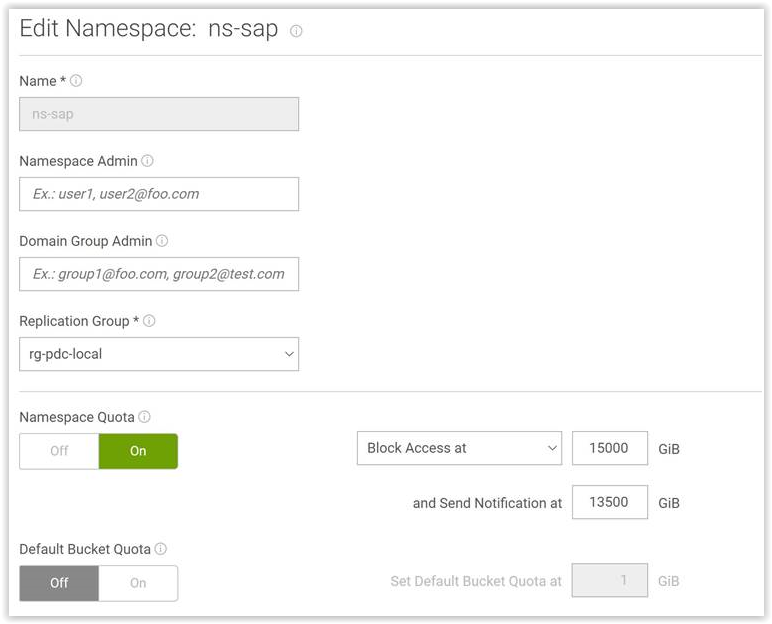
L’utilisateur a dû modifier le quota de l’espace de nommage. Auparavant, ils l’avaient configuré pour bloquer l’accès à 15 000 Go. Ils l’ont réinitialisé à la notification uniquement à 15 000 Go (sinon ils auraient également pu augmenter le quota à une valeur plus élevée). Après cette modification, les écritures ont fonctionné :
Passez de :
 À :
À :
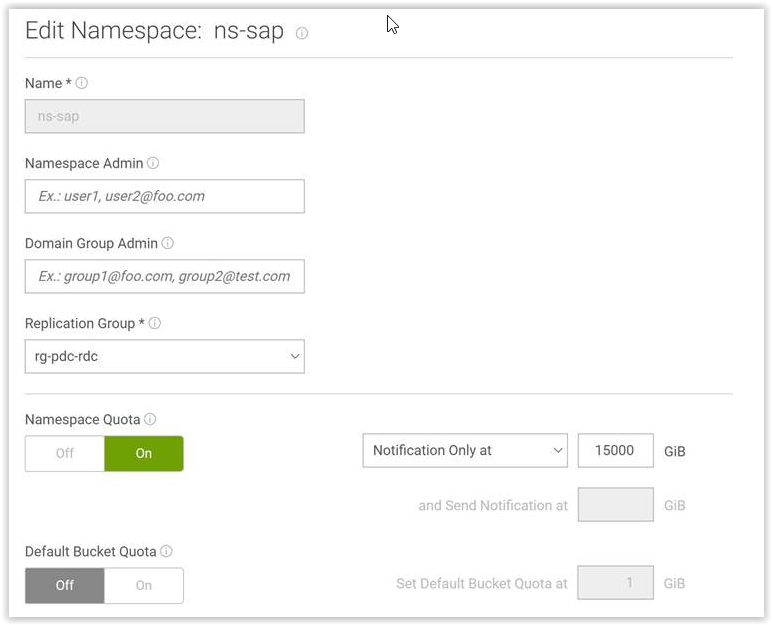 Pour éviter ce problème, nous pouvons également augmenter le quota à une valeur plus élevée.
Affected Products
ECS ApplianceProducts
ECS ApplianceArticle Properties
Article Number: 000180896
Article Type: Solution
Last Modified: 03 أغسطس 2026
Version: 6
Find answers to your questions from other Dell users
Support Services
Check if your device is covered by Support Services.