VxRail: Node Upgrade failed with No space left on device message
Summary: This KB article describes a situation when a node upgrade fails with a "No space left on device" error message.
Symptoms
Lifecycle Management (LCM) upgrade failed at each node with the following error message:
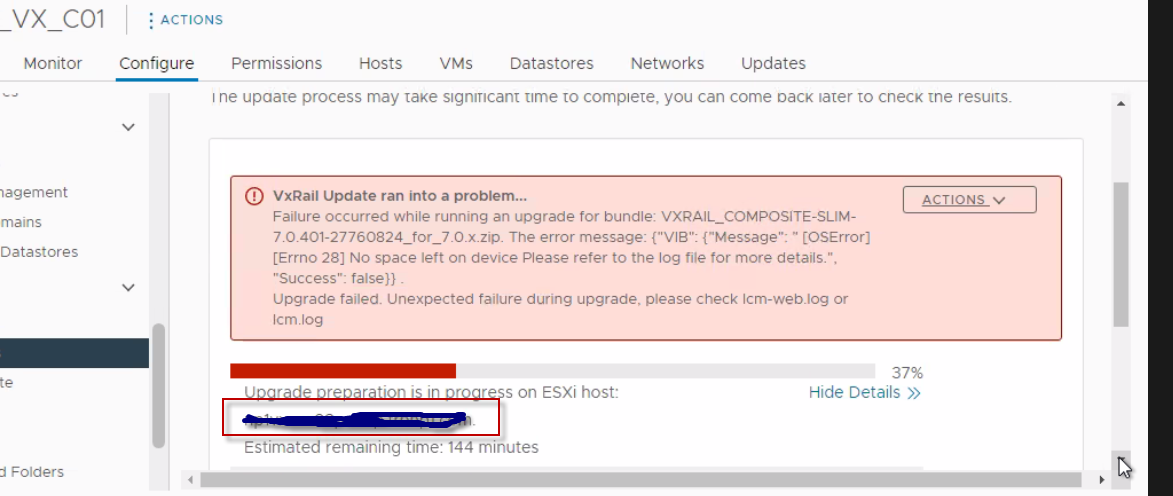 Figure 1. VxRail Update Error Message
From lcm-web.log:
2022-12-23 10:15:36,156 INFO [LCM] [lcm-node-0] c.e.m.m.e.DynamicReloadableResourceBundleMessageSource [DynamicReloadableResourceBundleMessageSource.java:17] Try to translate message: VxRail Platform Service upgrade failed on target: <Node FQDN> due to Failure in parsing script result: {"Message": " [LockFileError] Error unlocking file /tmp/_tmp_stagebootbank.lck: [Errno 28] No space left on device Please refer to the log file for more details.", "Success": false}
.. Failure occurred in the middle of upgrading. If you want to resume, make sure the failed component has recovered to its pre-upgrade state and then click Resume.
2022-12-23 10:15:36,156 INFO [LCM] [lcm-node-0] c.e.m.m.e.DynamicReloadableResourceBundleMessageSource [DynamicReloadableResourceBundleMessageSource.java:19] Succeeded to translate message: VxRail Platform Service upgrade failed on target: <Node FQDN> due to Failure in parsing script result: {"Message": " [LockFileError] Error unlocking file /tmp/_tmp_stagebootbank.lck: [Errno 28] No space left on device Please refer to the log file for more details.", "Success": false}
.. Failure occurred in the middle of upgrading. If you want to resume, make sure the failed component has recovered to its pre-upgrade state and then click Resume. -> VxRail Platform Service upgrade failed on target: <Node FQDN> due to Failure in parsing script result: {"Message": " [LockFileError] Error unlocking file /tmp/_tmp_stagebootbank.lck: [Errno 28] No space left on device Please refer to the log file for more details.", "Success": false}
.. Failure occurred in the middle of upgrading. If you want to resume, make sure the failed component has recovered to its pre-upgrade state and then click Resume.
2022-12-23 10:15:36,156 ERROR [LCM] [lcm-node-0] c.v.l.c.u.e.ESXiVIBUpgrader [ESXiVIBUpgrader.java:337]  [LockFileError] Error unlocking file /tmp/_tmp_stagebootbank.lck: [Errno 28] No space left on device Please refer to the log file for more details.
2022-12-23 10:16:25,730 ERROR [LCM] [lcm-node-0] c.v.l.c.b.BatchUpgrade [BatchUpgrade.java:1384] Attempt 2/3 of vSAN access exception. but failed with error:
com.vce.lcm.exception.LCMInternalException:  [LockFileError] Error unlocking file /tmp/_tmp_stagebootbank.lck: [Errno 28] No space left on device Please refer to the log file for more details.
    at com.vce.lcm.core.upgrade.esxi.ESXiVIBUpgrader.resultAnalysis(ESXiVIBUpgrader.java:345)
    at com.vce.lcm.core.upgrade.esxi.ESXiVIBUpgrader.performHostUpgrade(ESXiVIBUpgrader.java:178)
    at com.vce.lcm.core.upgrade.esxi.AbstractESXiHostUpgrader.runUpgradeOnHost(AbstractESXiHostUpgrader.java:635)
    at com.vce.lcm.core.batch.BatchUpgrade.componentUpgrade(BatchUpgrade.java:1526)
    at com.vce.lcm.core.batch.BatchUpgrade.componentUpgradePerHostRecursive(BatchUpgrade.java:515)
    at com.vce.lcm.core.batch.BatchUpgrade.componentUpgradePerHostRecursive(BatchUpgrade.java:453)
    at com.vce.lcm.core.batch.BatchUpgrade.lambda$upgradeHost$9(BatchUpgrade.java:1638)
    at org.springframework.retry.support.RetryTemplate.doExecute(RetryTemplate.java:329)
    at org.springframework.retry.support.RetryTemplate.execute(RetryTemplate.java:209)
    at com.vce.lcm.core.batch.BatchUpgrade.upgradeHost(BatchUpgrade.java:1622)
    at com.vce.lcm.core.batch.BatchUpgrade.performBatchUpgrade(BatchUpgrade.java:1058)
    at com.vce.lcm.core.batch.BatchUpgrade.performBatchUpgrade(BatchUpgrade.java:1366)
    at com.vce.lcm.core.upgrade.NodeUpgradeServiceImpl.performUpgrade(NodeUpgradeServiceImpl.java:102)
    at com.emc.mystic.manager.upgrade.executor.LcmNodeLegacyUpgradeExecutor.executeUpgrade(LcmNodeLegacyUpgradeExecutor.java:72)
    at com.emc.mystic.manager.upgrade.service.LcmNodeUpgradeServiceImpl$1.run(LcmNodeUpgradeServiceImpl.java:80)
    at java.base/java.util.concurrent.Executors$RunnableAdapter.call(Executors.java:515)
    at java.base/java.util.concurrent.FutureTask.run(FutureTask.java:264)
    at java.base/java.util.concurrent.ThreadPoolExecutor.runWorker(ThreadPoolExecutor.java:1128)
    at java.base/java.util.concurrent.ThreadPoolExecutor$Worker.run(ThreadPoolExecutor.java:628)
    at java.base/java.lang.Thread.run(Thread.java:829)
2022-12-23 10:16:25,730 ERROR [LCM] [lcm-node-0] c.v.l.c.b.BatchUpgrade [BatchUpgrade.java:1719] Set the parent upgrade component VxRail Platform Service status as failed.

2022-12-23 12:19:55,704 INFO [LCM] [lcm-node-0] c.e.m.m.e.DynamicReloadableResourceBundleMessageSource [DynamicReloadableResourceBundleMessageSource.java:17] Try to translate message: Failure in parsing script result: {"VIB": {"Message": " [OSError] [Errno 28] No space left on device Please refer to the log file for more details.", "Success": false}}
.
2022-12-23 12:19:55,705 INFO [LCM] [lcm-node-0] c.e.m.m.e.DynamicReloadableResourceBundleMessageSource [DynamicReloadableResourceBundleMessageSource.java:19] Succeeded to translate message: Failure in parsing script result: {"VIB": {"Message": " [OSError] [Errno 28] No space left on device Please refer to the log file for more details.", "Success": false}}
. -> Failure in parsing script result: {"VIB": {"Message": " [OSError] [Errno 28] No space left on device Please refer to the log file for more details.", "Success": false}}
.

2022-12-23 12:20:24,393 ERROR [LCM] [lcm-node-0] c.v.l.c.b.BatchUpgrade [BatchUpgrade.java:1384] Attempt 2/3 of vSAN access exception. but failed with error:
com.vce.lcm.exception.LCMInternalException: {"VIB": {"Message": " [OSError] [Errno 28] No space left on device Please refer to the log file for more details.", "Success": false}}
Cause
ramdisk is full resulting in the vSphere Installation Bundle (VIB) upgrade failure.
From vobd.log:
2022-12-23T10:15:34.030Z: [VisorfsCorrelator] 13537797115176us: [vob.visorfs.ramdisk.full] Cannot extend visorfs file /tmp/_tmp_stagebootbank.lck because its ramdisk (tmp) is full.
2022-12-23T10:15:34.030Z: [VisorfsCorrelator] 13538280543495us: [esx.problem.visorfs.ramdisk.full] The ramdisk 'tmp' is full.  As a result, the file /tmp/_tmp_stagebootbank.lck could not be written.
2022-12-23T10:15:34.030Z: [VisorfsCorrelator] 13537797115607us: [vob.visorfs.ramdisk.full] Cannot extend visorfs file /tmp/_tmp_stagebootbank.lck because its ramdisk (tmp) is full.
2022-12-23T10:15:34.030Z: [VisorfsCorrelator] 13537797115643us: [vob.visorfs.ramdisk.full] Cannot extend visorfs file /tmp/_tmp_stagebootbank.lck because its ramdisk (tmp) is full.
2022-12-23T10:15:34.044Z: [UserLevelCorrelator] 13538280557560us: [vob.user.esximage.install.error] Could not install image profile: Error unlocking file /tmp/_tmp_stagebootbank.lck: [Errno 28] No space left on device
2022-12-23T10:15:34.044Z: [GenericCorrelator] 13538280557560us: [vob.user.esximage.install.error] Could not install image profile: Error unlocking file /tmp/_tmp_stagebootbank.lck: [Errno 28] No space left on device
2022-12-23T10:15:34.045Z: [UserLevelCorrelator] 13538280557765us: [esx.problem.esximage.install.error] Could not install image profile: Error unlocking file /tmp/_tmp_stagebootbank.lck: [Errno 28] No space left on device
2022-12-23T10:15:35.728Z: [VisorfsCorrelator] 13537798812878us: [vob.visorfs.ramdisk.full] Cannot extend visorfs file /tmp/.vsanConfigurationLock.lock.LOCK.2101652 because its ramdisk (tmp) is full.
2022-12-23T10:15:40.740Z: [VisorfsCorrelator] 13537803825329us: [vob.visorfs.ramdisk.full] Cannot extend visorfs file /tmp/.vsanConfigurationLock.lock.LOCK.2101652 because its ramdisk (tmp) is full.
Command output shows vsantraces ramdisk appears to be full or nearly full on the ESXi:#esxcli system visorfs ramdisk list#vdf -h
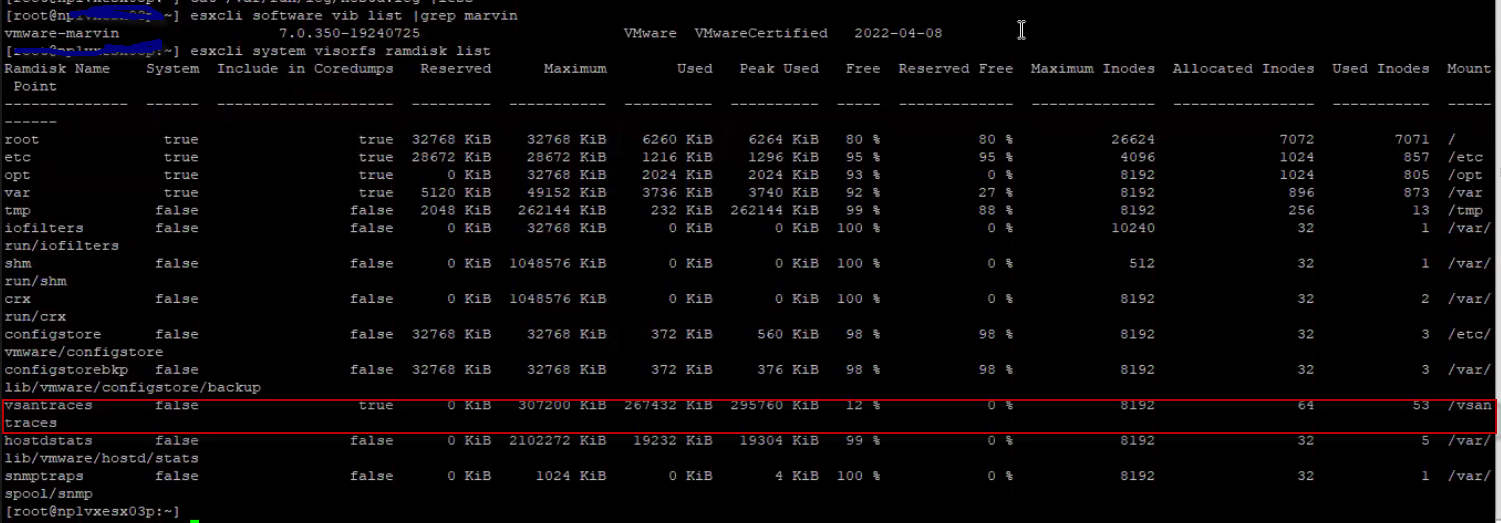
Figure 2. vsantraces and traces show as false
Resolution
Check: https://kb.vmware.com/s/article/2147956?lang=en_US (External Link)
Delete or move the current vsantraces files from the vsantraces folder /vsantraces/:
vsantraces--*.gzvsanObserver--*.gzvsanObserver--*.gzvsantracesUrgent--*.gz
The changes take effect immediately; there is no need to reboot the ESXi host.
Also, refer to https://kb.vmware.com/s/article/1003564 (External Link) for the troubleshooting space issue.