NetWorker: rule override does not work due to previously applied rules
Summary: More than one override rule can be added which, in this case, conflicts with a newly requested NetWorker rule override.
This article applies to
This article does not apply to
This article is not tied to any specific product.
Not all product versions are identified in this article.
Symptoms
In the Policy Action Wizard's third window, "Specify the Advanced Options."
At the bottom of the "Overrides" field, more than one override rule can be added with the "Add rule-based overrides" button.
If we are adding a new skip rule which falls under the specific date that conflicts with the previously applied override rules, the new override rule is not applied.
The following is an example, the new override rule "skip 2023-07-23" does not take effect.
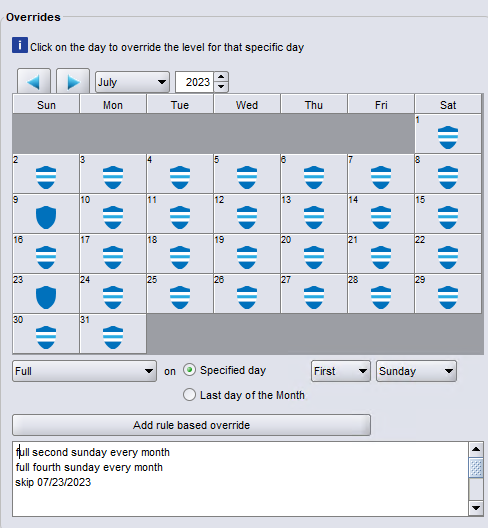
Figure 1: Example of the previous override rule "skip 2023-07-23" which conflicts with the newly requested override rule.
Cause
This behavior is reproducible in almost all current NetWorker releases.
Resolution
Workaround:
Engineering suggested putting the new override rule at the top of the list as a workaround for the issue. Manually adjust the newly added override rule to the top of the list, as shown below. The skip rule works as expected.
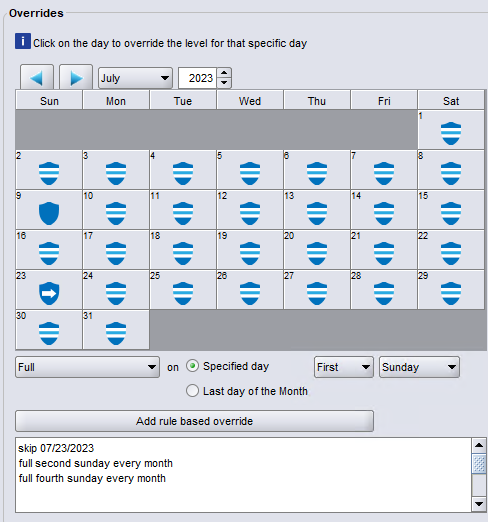
Figure 2: Manually adjust the newly added rule to the top of the list.
Engineering suggested putting the new override rule at the top of the list as a workaround for the issue. Manually adjust the newly added override rule to the top of the list, as shown below. The skip rule works as expected.
Figure 2: Manually adjust the newly added rule to the top of the list.
Article Properties
Article Number: 000215655
Article Type: Solution
Last Modified: 08 أبريل 2026
Version: 4
Find answers to your questions from other Dell users
Support Services
Check if your device is covered by Support Services.