Vxrail:NSX-T Manager 卸载后虚拟机迁移失败
Summary: 虚拟机迁移失败,因为交换机 (vDS) 显示不可用网络上的端口组并报告关闭状态。当 NSX-T Data Center (NSX-T) 管理器被删除,导致 N-vDS 关闭时,会发生这种情况。
This article applies to
This article does not apply to
This article is not tied to any specific product.
Not all product versions are identified in this article.
Symptoms
客户无法将虚拟机从原始主机迁移到另一个主机。
VDS 显示目标端口组:
Currently connected network interface "Network adapter 1" uses network XXXXX (Vmware HCIA Distributed Switch)", which is not accessible.
检查 vDS 状态,所有节点都显示 vDS 的“down”状态。
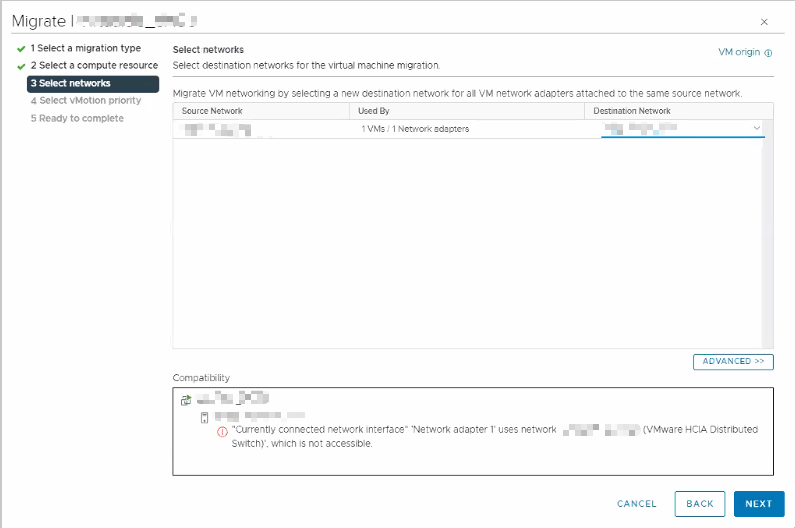
图 1: 显示网络选择步骤的戴尔迁移工具
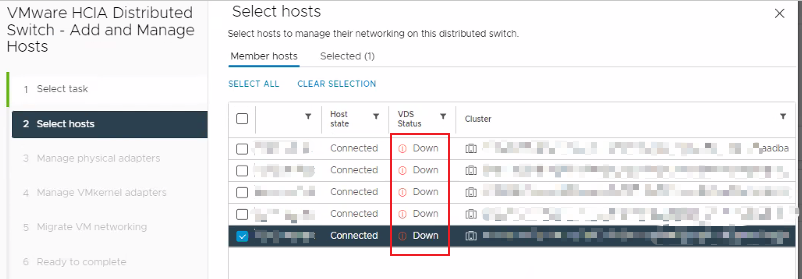
图 2: 显示主机状态的 VMware HCIA 分布式交换机主机管理界面。
Cause
此问题有两个已知原因:
- 客户可能未遵循 VMware 过程卸载 NSX-T。
- 删除 NSX-T 管理器时,N-vDS 会继续尝试与 NSX-T Manager 进行通信。这会导致主机的 vDS 状态显示为“down”状态。
有关详细信息 ,请参阅 Broadcom 文档 VMware NSX 4.1 安装指南 (外部链接)。
Resolution
如果客户有 NSX-T 虚拟机备份,请还原 NSX-T Manager。之后,按照 VMware 过程安全删除 NSX-T 解决方案。
如果客户没有备份,请创建新的 vDS,并将主机的所有 VMkernel 和虚拟机网络迁移到新的 vDS。
Affected Products
VxRail, VxRail Appliance SeriesArticle Properties
Article Number: 000225929
Article Type: Solution
Last Modified: 19 أغسطس 2026
Version: 3
Find answers to your questions from other Dell users
Support Services
Check if your device is covered by Support Services.