PowerFlex: STORAGE_POOL_UNBALANCED - SIO02.04.0000009
Summary: This article explains the meaning of Dial Home Symptom code SIO02.04.0000009 and how to troubleshoot it.
This article applies to
This article does not apply to
This article is not tied to any specific product.
Not all product versions are identified in this article.
Symptoms
The below alert can be observed in the PowerFlex Manager log events and Dial Home SIO02.04.0000009 will be triggered.
The Storage Pool relies too heavily (over 50%) on capacity from a single SDS or Fault Set.

Balance capacity over other SDSs or Fault Sets.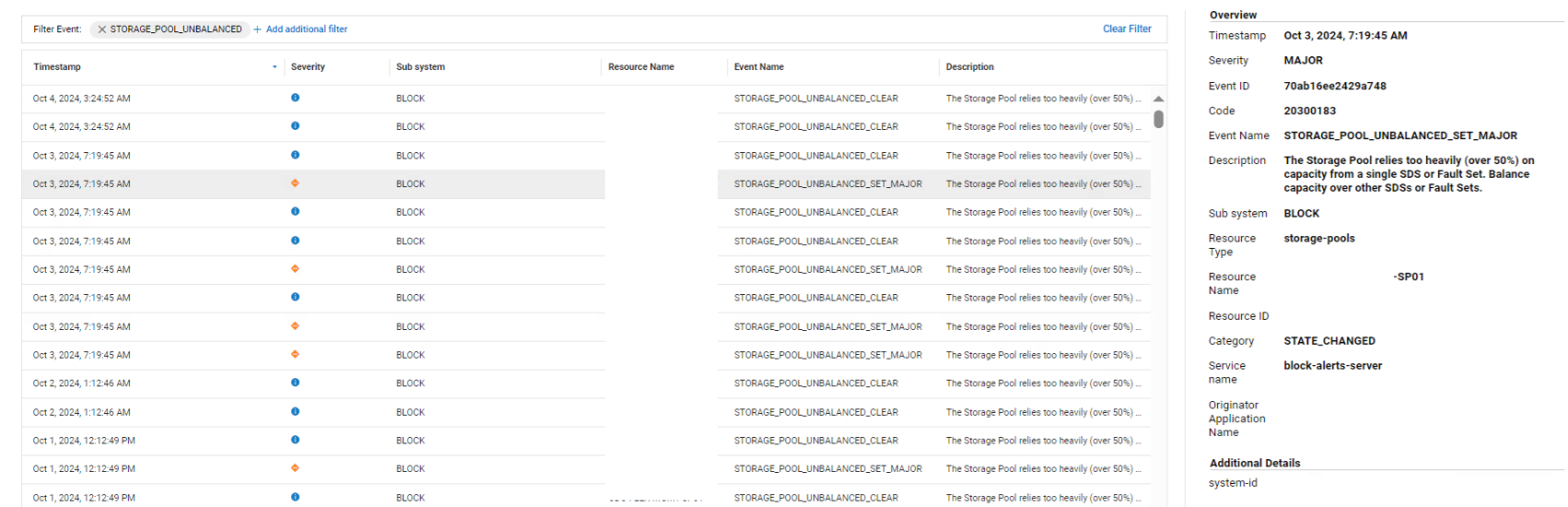
Cause
This alert can be triggered if you have SDSs or Fault Sets that are not equal in size which may result in one SDSs or Fault Set is handling 50% of the Storage Pool (SP) workload.
Resolution
- Alert may be cleared by itself if a maintenance operation was ongoing and rebalance didn't finish yet
- User may trigger rebalance manually by switching MDM node's role PowerFlex 4.X: How to Reconfigure MDM Nodes Role from PFMP - Change node Ownership
- If the SDSs or Fault sets are not symmetrical and equal in size, the recommended fix for this alert is group SDSs of the same size into separate Storage Pools (SP)
- Each SDS contribution to the Storage Pool must be symmetrical meaning, if one SDS has 5 disks of size\type X and 5 disks of size\type Y, then SDS disks of the same size and characteristics should be added together to a separate Storage Pool - and each SDS contribute to that given SP must be exactly the same capacity to have a balanced Storage Pool (each SDS share is equal)
- However, if your SDSs or Fault Sets are equal in size or not big different in size between them, this alert can be cosmetic and will be cleared by itself after few seconds as shown in the screenshot in the Symptoms section.
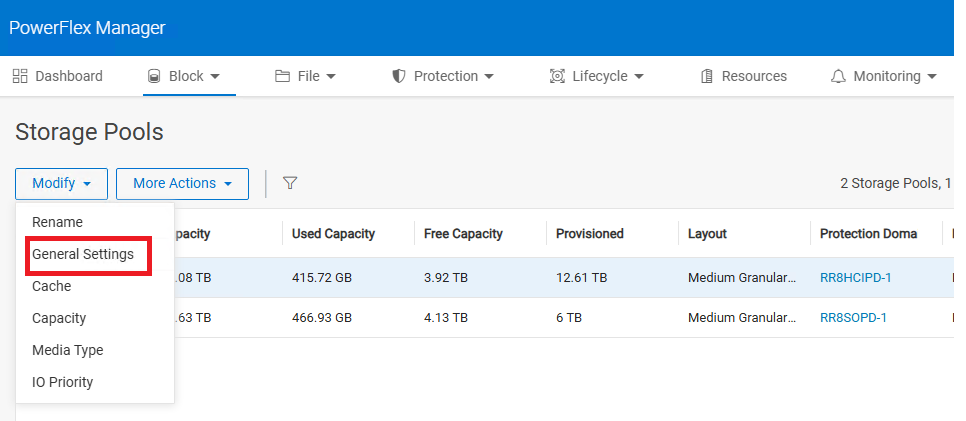
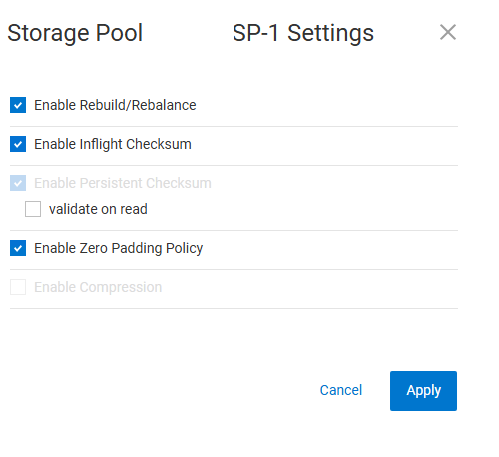
Note: Ensure that you have the Rebalance feature is enabled for the given Storage Pool (SP)
1- Go to Block => Storage Pools => Select the SP in Question => Modify => General Settings.
2- In General Settings for the given Storage Pool ensure that Enable Rebuild/Rebalance is checked.
Related article PowerFlex: False Alerts for Spare Capacity Storage Pool Unbalanced SPARE_CAPACITY_SMALLER_THAN_LARGEST_FAULT_UNIT
Affected Products
PowerFlex rack, ScaleIOArticle Properties
Article Number: 000381561
Article Type: Solution
Last Modified: 17 أغسطس 2026
Version: 3
Find answers to your questions from other Dell users
Support Services
Check if your device is covered by Support Services.