17G vSAN ReadyNode: Intermittent Power-On Hang at "Host Boot in Progress"
Summary: Systems may fail to power on or hang at host boot in progress; the issue occurs when Cold Redundancy is enabled by default by the V3 IDM, causing PSU handoff or timing problems with PDU's. ...
This article applies to
This article does not apply to
This article is not tied to any specific product.
Not all product versions are identified in this article.
Symptoms
Observed Symptoms
- Systems fail to power on.
- System hangs at "host boot in progress".
- When Cold Redundancy (CD) is enabled, iDRAC may place a PSU in standby, leading to power‑on failure.
Cause
When Cold Redundancy (CD) is enabled with A/B Grid Redundant, iDRAC attempts to maximize PSU efficiency by putting one PSU in a standby/light‑load state while the other carries most of the load. This can cause a PSU handoff problem, a timing issue during the power‑good assertion, or a misinterpretation of PSU status. These conditions may cause a rare intermittent power‑on failure and the system to hang at "host boot in progress".
Resolution
Prerequisites
- Access to the iDRAC interface with appropriate credentials.
Resolution Steps
- Access the iDRAC interface.
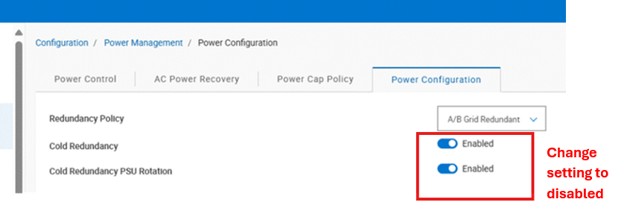
- Navigate to the Power Management settings.
- Manually disable the Cold Redundancy (CD) option.
- If the system displays amber blinking lights after power‑on, reboot the iDRAC.
- After the iDRAC reboot, optionally clear the system logs.
Verification
- System boots past “host boot in progress” and powers on normally.
- Disabling Cold Redundancy (CD) keeps both PSUs active continuously, preventing the issue.
NOTE: VSAN Ready nodes shipped with V4 IDM already have the Cold Redundancy (CD) option disabled by default.
Affected Products
Dell vSAN R670 Ready Node, Dell vSAN R6715 Ready Node, Dell vSAN R770 Ready Node, Dell vSAN R7715 Ready Node, Dell vSAN R7725 Ready NodeArticle Properties
Article Number: 000497899
Article Type: Solution
Last Modified: 14 أغسطس 2026
Version: 1
Find answers to your questions from other Dell users
Support Services
Check if your device is covered by Support Services.