DPA Agent Will Not Start
Summary: This article explains an issue where the DPA Agent service fails to start due to invalid or incomplete entries in the dpaagent_config.xml configuration file.
Symptoms
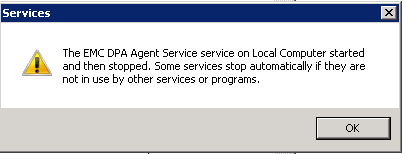
When starting the DPA Agent service, it fails to start.
If starting with Windows services, you may get an error box like the following:
Cause
The cause of this issue is not known at this time.
In one case, it was found that the dpagent_config.xml file was incorrect and this caused the agent to not start.
Resolution
Further Troubleshooting is required to resolve this issue.
The "dpaagent_config.xml" file is accessed on start up to configure the agent. If the xml tags in this file are not complete, are misspelled, or missing this can cause the agent to not start. In this case, the agent does not log any errors.
Below are the contents of the "dpaagent_config.xml" file, all these tags should be there, they may have other tags as well. All these must be complete and spelled correctly with valid data in them:
<AGENTCONFIG>                                                                            Open tag.
    <VERSION>600</VERSION>                                                       Major Agent Version
    <AGENTVERSION>6.4.0.102611</AGENTVERSION>               Full Agent Version
    <SERVERNAME>127.0.0.1</SERVERNAME>                            IP or FQDN or DPA APP server this agent is assigned to.
    <SERVERPORT>9002</SERVERPORT>                                  Port on DPA APP server to connect to, this should always be 9002 unless APP server port was changed.
    <SERVERSSL>true</SERVERSSL>                                            Should always be set to true, to use SSL connection.
    <LOGFILE>/opt/emc/dpa/agent/logs/dpaagent.log</LOGFILE>   Path to the DPA agent log
    <LOGLEVEL>Info</LOGLEVEL>                                                  Current log level of the agent, not that the APP will override this setting, so change in the DPA GUI
    <LOGFILEMAXSIZE>99614720</LOGFILEMAXSIZE>                Max size of the dpa agent log file.
    <JREDIR>/opt/emc/dpa/services/_jre</JREDIR>                          Java directory.
</AGENTCONFIG>                                                                             Close tag, if there is anything after this tag the agent will not start.
All values should be correct in this file, only the servername and log level values should be edited, if any of the others require editing, contact Dell Technologies support for assistance.
If any of the tags are misspelled, or part of them are missing, this has to be corrected. For example, in one case the servername tag was missing part of it as shown below:
<SERVERNAME>127.0.0.1RVERNAME>
The missing part of the tag "</SER" was added back and this resolved the issue and allowed the agent to start.
Contact Dell Technologies Technical Support for further details or information.