Avamar: How to configure secure SMTP on 19.10
Summary: From 19.10 version onwards Avamar supports both TLS and Non secure protocol for SMTP.
This article applies to
This article does not apply to
This article is not tied to any specific product.
Not all product versions are identified in this article.
Instructions
- SMTP details required to register are as below.
HostName (Mandatory) Port (Mandatory) User name (Optional) Password (Optional) Protocol
- Steps to configure smtp with a nonsecure protocol:
Login to AUI page.
Navigate to Setting -->SMTP
1) Mail Server Host Name : Mandatory
2) Mail From Address : Mandatory
3) Mail Server Port : Mandatory ( By default its port 25 )
4) Security Protocol : Select None
5) Click Save
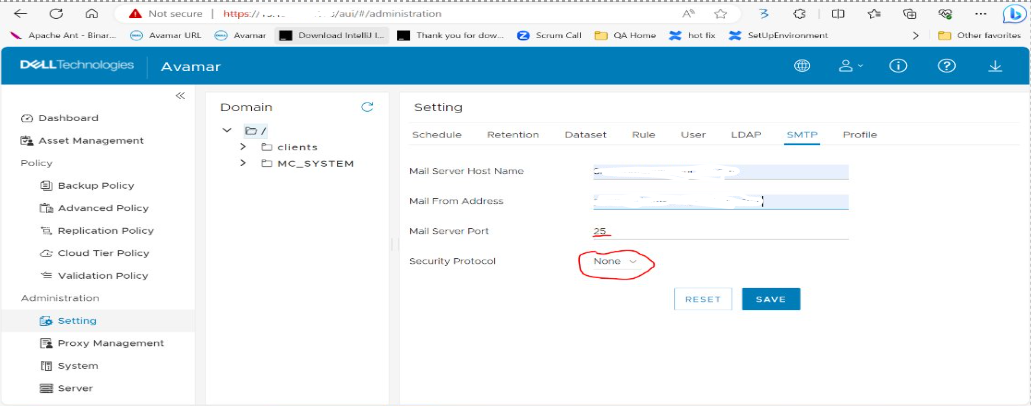
Note: Username and password are not required for nonsecure protocol configuration.
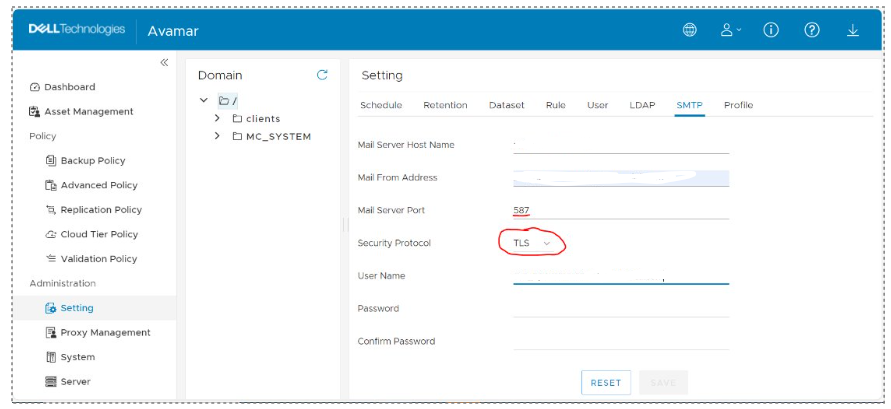
- Steps to configure smtp with secure protocol:
Login to AUI page.
Navigate to Setting -->SMTP
1) Mail Server Host Name : Mandatory
2) Mail From Address : Mandatory
3) Mail Server Port : Mandatory ( By default its port 587 )
4) Security Protocol : Select TLS
5) User Name: Mandatory
6) Password: Mandatory
7) Confirm Password: Mandatory
8) Click Save
Additional Information
References to consider:
- SSL protocol is not supported.
- Register the SMTP Port to the Avamar Firewall manually refer to: Avamar: How To Change the SMTP Port Avamar Uses
- Since the configuration is now on avlockbox, no smtp changes are needed in mcserver.xml.
- SMTP mail server configuration steps are available in Dell Avamar 19.10 Administration Guide page 221 and Dell Avamar 19.12 Product Security Guide page 174
Article Properties
Article Number: 000226737
Article Type: How To
Last Modified: 23 كانون الثاني 2026
Version: 1
Find answers to your questions from other Dell users
Support Services
Check if your device is covered by Support Services.