VCF on VxRail: General Upgrade Information
Summary: This document is an accumulation of questions, answers, and information relating to VCF on VxRail upgrades with RPS.
Instructions
Dell accepts VCF on VxRail upgrade requests from all customers with a valid ProSupport Plus contract. VCF Upgrades for federal customers are managed by the Remote Proactive Support (RPS) team in the U.S..
The below information is based on previous upgrade experience gained from VCF on VxRail product.
- What upgrades are supported?
- In-Family VCF on VxRail Upgrades:
- VCF 4.x. to VCF 4.x
- VCF 4.x. to VCF 5.x
- VCF 5.x. to VCF 5.x
- VCF on VxRail with Stretched Cluster Upgrades
- What Type of Upgrades are performed on VCF on VxRail?
- Full Stack upgrades = SDDC Manager uses LifeCycle Manager (LCM) to upgrade VMware and Dell Components. The following components are covered in the LCM upgrade process and RPS Team scope:
- SDDC Manager
- VMware vCenter Server Appliance (VCSA)
- Platform Services Controller (PSC)
- VMware ESXi
- VMware vSAN
- VMware NSX-T Data Center
- VMware vRealize Suite Lifecycle Manager**
- VxRail Manager
Customers are responsible for upgrading any additional add-on components, or they can engage VMware for assistance as this is outside the Dell scope.
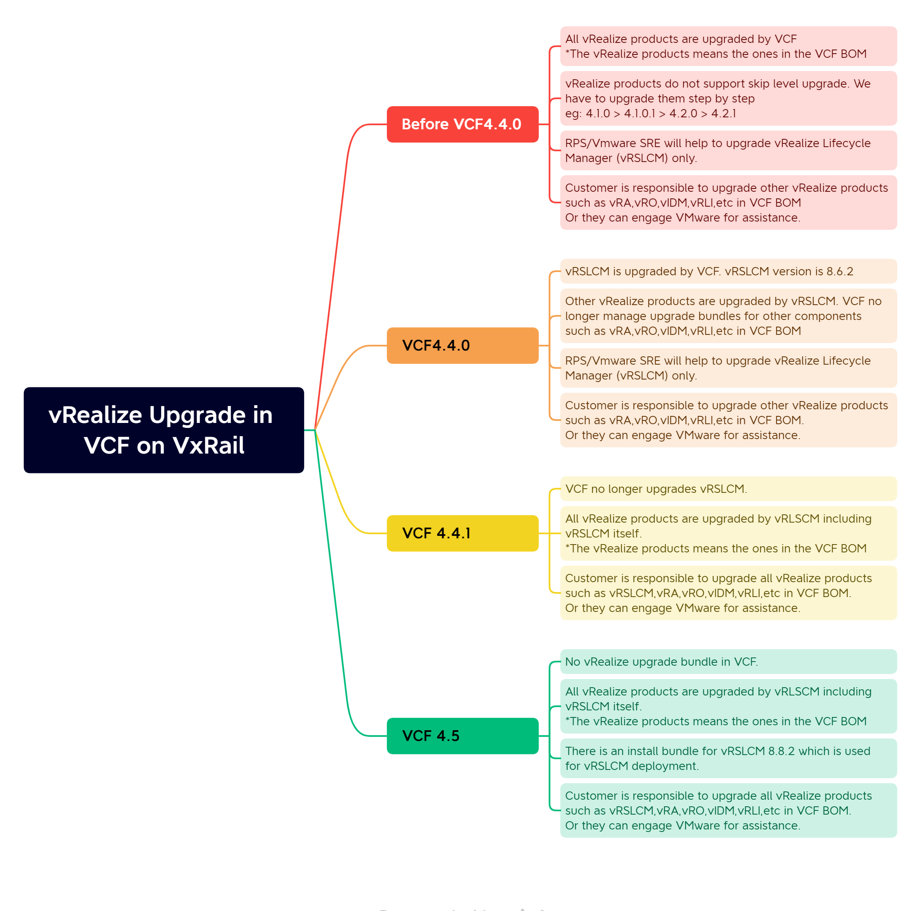
**After VCF 4.4.1 vRealize LifeCycle Manager (vRSLCM) is decoupled from the SDDC Manager and customers must manage all vRealize component upgrades as it is out of scope for the RPS team.
See the below chart for more information.
- Are VxRail Upgrades disruptive?
VCF on VxRail upgrades are considered non-disruptive, but management functions are unavailable at certain stages during the upgrade.
The upgrade consists of two sections, the VMware Software upgrades and the VxRail Upgrades.
Note the following:
- Run Pre-Checks in SDDC Manager before starting an upgrade.
- During VxRail upgrades, there are many checks performed to ensure the clusters upgrade readiness.
- During the appliance upgrades, Virtual Machines (VMs) are vMotioned and if this fails manual intervention is required.
* As with any system upgrade, we always recommend performing at times of low I/O and that a maintenance window is scheduled should there be any issues.
- During a VCF VxRail upgrade, the items upgraded include (but are not limited to) the following:
- SDDC Manager
- VMware vCenter Server Appliance (VCSA)
- VMware ESXi
- VMware vSAN
- VMware NSX-T Data Center
- VMware vRealize Suite Lifecycle Manager (up to VCF 4.4/vRSLCM 8.6.2)
- VxRail Manager
The items below are some of what is upgraded on Dell PowerEdge Nodes. Components are upgraded with the composite package depending on the specific code level and build numbers.
Dell PowerEdge Platform:
- PTAgent
- iSM
- BIOS
- iDRAC
- BOSS
- Packages used during a VxRail upgrade:
Downloads for VCF on VxRail upgrade are provided from VMware (VMware software) and Dell Depots (VxRail software/firmware) by SDDC manager.
If SDDC Manager does not have Internet access, the bundles must be downloaded manually (using another machine) and copied over to SDDC Manager.
- Important point to note regarding VCF on VxRail upgrades:
VCF on VxRail upgrade are always initiated from the SDDC Manager, updates should never be done by the VMware vCenter Update Manager (VUM) (on vCenter web client).
The VxRail clusters should never be upgraded using the VxRail Manager in a VCF on VxRail.
If the customer is self-upgrading the VCF on VxRail Environment, the Official documentation from the DELL side should be followed.
Take backups before the upgrade and if the customer needs help, a new SR should be opened for each issue the customer requests help with before/during/after the upgrade.
How long does or should I expect the VCF on VxRail upgrade take?
The duration of a VCF on VxRail upgrade depends on many factors:
- Number of Workload Domains
- Number of nodes in each domain
- Number of VMware Software Components
- Number of VMs on the system
- Size of VMs
- How many additional updates were included on the destination version (firmware updates and so forth.)
Indicator for Dell PowerEdge node updates: Estimated time per host = 1.5 - 2 hours
8. What is the upgrade sequencing in a VCF on VxRail Upgrade?
VCF 3.x Upgrades
VCF on VxRail are sequential upgrades when performed through the SDDC Manager that is 3.10.1.1 -> 3.10.1.2.
Larger jumps in code 3.9 -> 3.10.1.2 require the Skip Level Tool (SLT) provided by VMware. This allows faster upgrades by only upgrading SDDC Manager through the interim code levels.
The standard practice for VCF upgrades is as follows:
- Upgrade Management (MGMT) Domain (Mandatory first step).
- Upgrade WLD 1
- Upgrade WLD 2
- Upgrade WLD n
Once the MGMT workload domain is completed, users can choose which WLD to upgrade next. Each WLD should be completed (including the VxRail Clusters) before moving on to the next WLD.
VCF 4.x Upgrades
VCF on VxRail 4.1 code (and higher) now includes the ability to skip level using the SDDC Manager UI. This feature is only available for 4.1.x to any higher version. Versions prior to VCF 4.1 still require the CLI Skip Level Tool to upgrade to any non-sequential code version.
VCF 5.x Upgrades
Once SDDC Manager is upgraded to version 5.2 or later, new functionality is introduced to the upgrade planner that allows you to select specific target versions for each VMware Cloud Foundation component you want to upgrade.
See VMware's page on the Flexible BOM
9. For full details about the VCF on VxRail upgrade
See the VMware documentation VMware-Cloud-Foundation 5.2
10 VCF & Parallel Upgrades
VCF on VxRail supports parallel upgrades of VxRail clusters within a workload domain, meaning you can update multiple clusters simultaneously, rather than one after another.
Domain Upgrade Order:
The upgrade process is orchestrated by SDDC Manager, and it is crucial to upgrade the management domain first, followed by the workload domains.
Within a Domain:
Clusters within a workload domain support the upgrade in parallel. Refer to specific version of Broadcom upgrade document for details.
Multiple Workload Domains:
You can have multiple workload domains in a VCF deployment, and upgrades can be performed in parallel across these domains.
Upgrade Sequence:
During life cycle management operations, the management domain must be upgraded first, followed by the workload domain.