IDPA: SCG Registration Resolution Path
Summary: This is article is a Troubleshooting guide (TSG) or Problem Resolution Path (PRP) for IDPA components registration with Secure Connect Gateway (SCG)
Instructions
Introduction:
Secure Connect Gateway (SCG) offers bidirectional access between the customer's Dell equipment and Dell Technologies. This offers the following processes:
- Dell products can securely send individual device alerts and to Dell for automatic case creation for Critical issues.
- Managed devices can also send usage statistics and important files including logs.
- Customer Support Engineers can make Secure Remote Connection to customer's Dell devices.
- Remote Connections:
- SSH
- WebUI
- Other Device Specifics
- Small to large file transfers to customer devices using Managed File Transfer (MFT).
- Remote Connections:
Four IDPA Components get Registered to SCG:
- Appliance Configuration Manager (ACM) (in DP4400, ACM uses the box serial number, in non-DP4400 models, ACM uses the Data Protection Appliance software ID (SWID)
- Data Domain (DD) (in DP4400: DD uses DD SWID, in non-DP4400: DD uses the box serial number)
- Avamar (uses Avamar SWID)
- Data Protection Advisor (DPA) (uses DPA SWID)
To register IDPA with SCG:
IDPA Compatibility with Secure Connect Gateway
To register any of the components:
Click the "Unconfigure" box next to "Secure Remote Services."
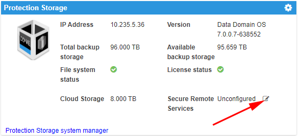
Enter the SCG gateway IP.
For the Username and Password, this has changed to an Access Key and PIN.
- For Username, enter the Access Key
- For Password, enter the PIN

Access Key and PIN Generation
- Using the SWID or serial number (SN) of the component to register, go to Dell Support Home
- Search by the SWID or SN to locate the product page.
- Select the link for "Generate Access Key."
- Follow the prompts to create a PIN and generate an Access Key.
- The key is emailed to the address specified.
More information about access key generation is in the following article: Generating an Access Key for Dell Products
Deployment:
Deployment is done by managed Installation Project team if they are not deployed in advance.
Testing connection and Dial Home through SCG:
IDPA: How to test Dial Home alerts on Integrated Data Protection Appliance ACM (Log in as a registered Dell Support user is required to view this article.)
Additional Information
Log Location on the ACM server:
/usr/local/dataprotection/var/configmgr/server_data/logs/server.log