PowerScale: OneFS: Protocol Auditing Failures Prevent Share Access
Summary: Users are denied access to shares that they should otherwise have access to and are presented with the following message: {Audit Failed} An attempt to generate a security audit failed.
Symptoms
Users attempting to access shares are presented with the following error message:
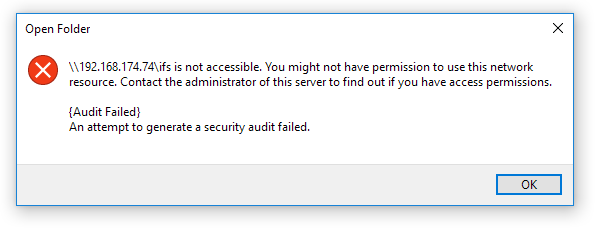
An attempt to generate a security audit failed.
STATUS_AUDIT_FAILED errors appear in packet captures:

Cause
This happens when protocol auditing is enabled and configured but is not functioning.
This is working as designed. Protocol auditing is used to log user activity on the file system. If auditing is not functional, users are denied access in order to prevent changes being made without logging.
Resolution
Confirm that the auditing services are enabled and that all related processes are running on all nodes.
Check that the auditing services are enabled:
isilon-1# isi services -a | grep audit
   isi_audit_cee        Audit Log Forwarder to CEE               Enabled
   isi_audit_d          Audit Log Server                         Enabled
   isi_audit_syslog     Audit Log Forwarder to Syslog            Enabled
Confirm that all auditing processes are running on all nodes:
isilon-1# isi_for_array -s 'ps auwxx | grep audit | grep -v grep'
isilon-1: root    2269  0.0  0.5 66128  9696  ??  Ss   12:31PM   0:00.36 /usr/sbin/isi_audit_d -d
isilon-1: root    2274  0.0  1.2 153400 23828  ??  S    12:31PM   0:00.03 /usr/libexec/isilon/isi_audit_cee /usr/bin/isi_audit_cee -p /var/run
isilon-1: root    2340  0.0  1.4 196656 29584  ??  I    12:31PM   0:00.06 /usr/libexec/isilon/isi_audit_syslog /usr/bin/isi_audit_syslog
If any processes are not running or have stopped responding, restart the associated service. It is advised to do this during a maintenance window to minimize impact to any workflows.
OneFS Audit Enable/Disable:
- Check to confirm Protocol Auditing is Enabled: # isi audit settings global view
- If Protocol Auditing Enabled is Yes, disable it:
# isi audit settings global modify --protocol-auditing-enabled=No - If Protocol Auditing Enabled is No, this issue does not apply.
- If Protocol Auditing Enabled is Yes, disable it:
- Disable the service:
# isi services -a <service> disable - Confirm that the related process has stopped:
# isi_for_array -s 'ps auwxx | grep audit | grep -v grep' - Reenable the service:
# isi services -a <service> enable - Reenable auditing:
# isi audit settings global modify --protocol-auditing-enabled=Yes