Avamar: Backup fails with "No Data", and the client log reports "Plugin disabled by MCS"
Summary: Avamar backups fail with "No Data" and the avagent.log reports "Plugin disabled by MCS".
Symptoms
A scheduled backup or a backup initiated from the Policy window fails immediately with a status of "No Data":

Hovering over the status shows "Activity Failed - client has no data specified by dataset":
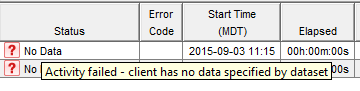
On the "Activity Report" tab, a status_code of 30915 and a status_code_summary "Activity failed - client has no data specified by dataset" is shown:


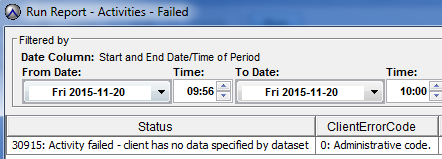
In the "Activities - Failed" report, it shows the status "30915: Activity failed - client has no data specified by the dataset":
Cause
There are several different causes for this error.
If errors other than those listed below are seen, go to the knowledge base to search for additional causes and resolutions.
1. Check if the client can be browsed from the backup tab in the "Backup, Restore, and Manage" window.
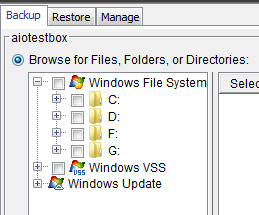
If the plugins are visible and the client can be browsed (as shown below), stop using this article. Go to the knowledge base to search for additional causes and resolutions.
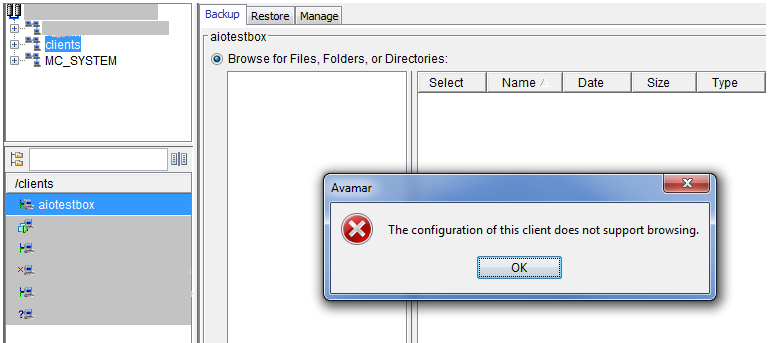
If the plugins are not visible and a message appears stating "The configuration of this client does not support browsing" (as shown below), then the avagent.log on the client machine must be examined.
The plugins are either being disabled by the Management Console Service (MCS) on the Avamar Server or by the client itself.
-
The
avagent.logis located inC:\Program Files\avs\varby default in windows -
The
avagent.logis located in/usr/local/avamar/varin UNIX
If the plugins are being disabled by MCS, warnings such as the following are recorded in the log:
avagent Info <7502>: Registration of client /clients/aiotestbox with MCS avamartestserver:28001 successful.
avagent Warning <5923>: Plugin disabled by MCS 0-update,Update plugin.
avagent Warning <5923>: Plugin disabled by MCS 0-Windows,Performs Windows filesystem snapups.
avagent Warning <5923>: Plugin disabled by MCS 0-VSS,Performs VSS snapup & restore.
avagent Info <5619>: Registration of client and plugins complete.
This indicates that although the registration of the client was successful, the MCS disabled the plugins.
If the plugins are being disabled by the client machine itself, stop using this article. Go to the knowledge base to search for additional causes and resolutions.
Resolution
-
Use an Avamar Client version that is the same or older than the Avamar Server version.
-
Upgrade the Avamar Server to be the same or newer than the Avamar Client version.
-
Perform a Client Catalog upgrade on the Avamar Server so that it accepts newer clients.
If further assistance is required, Create a Service Request to get assistance from the Dell Technologies Avamar Support team.
Additional Information
To determine the acceptable client versions, do the following:
1. Log in to the Avamar Utility Node as admin.
2. Run the following command to find the supported plugins:
Windows File system plugins:
mccli plugin show |grep "Windows File System"
The output should be similar to the following:
Windows File System                                 3001  4.0.0     ALL   No       Unsupported                No               No                No              Unsupported             No
Windows File System                                 3001  4.0.1     ALL   No       Unsupported                No               No                No              Unsupported             No
...
Windows File System                                 3001  19.8.100  ALL   No       No                         No               No                No              No                      No
Windows File System                                 3001  19.9.100  ALL   No       No                         No               No                No              No                      No
Windows File System                                 3001  19.10.100 ALL   No       No                         No               No                No              No                      No
Windows File System                                 3001  19.11.100 ALL   No       No                         No               No                No              No                      No
Windows File System                                 3001  19.12.100 ALL   No       No                         No               No                No              No                      No
Linux File System plugins:
mccli plugin show |grep "Linux File System"
The output should be similar to the following:
Linux File System                                   1001  4.0.0     ALL   No       No                         No               No                No              No                      No
Linux File System                                   1001  4.0.1     ALL   No       No                         No               No                No              No                      No
...
Linux File System                                   1001  19.8.100  ALL   No       No                         No               No                No              No                      No
Linux File System                                   1001  19.9.100  ALL   No       No                         No               No                No              No                      No
Linux File System                                   1001  19.10.100 ALL   No       No                         No               No                No              No                      No
Linux File System                                   1001  19.11.100 ALL   No       No                         No               No                No              No                      No
Linux File System                                   1001  19.12.100 ALL   No       No                         No               No                No              No                      No
Recovery Manager (RMAN) plugins:
mccli plugin show |grep "RMAN"
The output should be similar to the following:
AIX Oracle RMAN                                     5002  4.0.0     ALL   No       No                         No               Unsupported       No              No                      No
AIX Oracle RMAN                                     5002  4.0.1     ALL   No       No                         No               Unsupported       No              No                      No
AIX Oracle RMAN                                     5002  4.0.2     ALL   No       No                         No               Unsupported       No              No                      No
...
AIX Oracle RMAN                                     5002  19.10.100 ALL   No       No                         No               Unsupported       No              No                      No
AIX Oracle RMAN                                     5002  19.11.100 ALL   No       No                         No               Unsupported       No              No                      No
AIX Oracle RMAN                                     5002  19.12.100 ALL   No       No                         No               Unsupported       No              No                      No
HP-UX Oracle RMAN                                   4002  4.0.0     ALL   No       No                         No               Unsupported       No              No                      No
HP-UX Oracle RMAN                                   4002  4.0.1     ALL   No       No                         No               Unsupported       No              No                      No
HP-UX Oracle RMAN                                   4002  4.0.2     ALL   No       No                         No               Unsupported       No              No                      No
...
HP-UX Oracle RMAN                                   4002  19.10.100 ALL   No       No                         No               Unsupported       No              No                      No
HP-UX Oracle RMAN                                   4002  19.11.100 ALL   No       No                         No               Unsupported       No              No                      No
HP-UX Oracle RMAN                                   4002  19.12.100 ALL   No       No                         No               Unsupported       No              No                      No
Linux Oracle RMAN                                   1002  4.0.0     ALL   No       No                         No               Unsupported       No              No                      No
Linux Oracle RMAN                                   1002  4.0.1     ALL   No       No                         No               Unsupported       No              No                      No
Linux Oracle RMAN                                   1002  4.0.2     ALL   No       No                         No               Unsupported       No              No                      No
...
Linux Oracle RMAN                                   1002  19.10.100 ALL   No       No                         No               Unsupported       No              No                      No
Linux Oracle RMAN                                   1002  19.11.100 ALL   No       No                         No               Unsupported       No              No                      No
Linux Oracle RMAN                                   1002  19.12.100 ALL   No       No                         No               Unsupported       No              No                      No
Solaris Oracle RMAN                                 2002  4.0.0     ALL   No       No                         No               Unsupported       No              No                      No
Solaris Oracle RMAN                                 2002  4.0.1     ALL   No       No                         No               Unsupported       No              No                      No
Solaris Oracle RMAN                                 2002  4.0.2     ALL   No       No                         No               Unsupported       No              No                      No
...
Solaris Oracle RMAN                                 2002  19.10.100 ALL   No       No                         No               Unsupported       No              No                      No
Solaris Oracle RMAN                                 2002  19.11.100 ALL   No       No                         No               Unsupported       No              No                      No
Solaris Oracle RMAN                                 2002  19.12.100 ALL   No       No                         No               Unsupported       No              No                      No
Windows Oracle RMAN                                 3002  4.0.0     ALL   No       No                         No               Unsupported       No              No                      No
Windows Oracle RMAN                                 3002  4.0.1     ALL   No       No                         No               Unsupported       No              No                      No
Windows Oracle RMAN                                 3002  4.0.2     ALL   No       No                         No               Unsupported       No              No                      No
...
Windows Oracle RMAN                                 3002  19.10.100 ALL   No       No                         No               Unsupported       No              No                      No
Windows Oracle RMAN                                 3002  19.11.100 ALL   No       No                         No               Unsupported       No              No                      No
Windows Oracle RMAN                                 3002  19.12.100 ALL   No       No                         No               Unsupported       No              No                      No
All plugins: (the list will be long)
mccli plugin show
The output should be similar to the following:
W0,23000,CLI command completed successfully.
Plug-in                                             ID    Version   Build Disabled Scheduled Backups Disabled Restore Disabled Validate Disabled Browse Disabled Client Backups Disabled Obsolete
--------------------------------------------------- ----- --------- ----- -------- -------------------------- ---------------- ----------------- --------------- ----------------------- --------
AIX DB2                                             5009  4.0.0     ALL   No       No                         No               Unsupported       No              No                      No
AIX DB2                                             5009  4.0.1     ALL   No       No                         No               Unsupported       No              No                      No
AIX DB2                                             5009  4.0.2     ALL   No       No                         No               Unsupported       No              No                      No
AIX DB2                                             5009  4.0.3     ALL   No       No                         No               Unsupported       No              No                      No
...
ZFS via NDMP                                        15003 19.9.100  ALL   No       No                         No               Unsupported       No              No                      No
ZFS via NDMP                                        15003 19.10.100 ALL   No       No                         No               Unsupported       No              No                      No
ZFS via NDMP                                        15003 19.11.100 ALL   No       No                         No               Unsupported       No              No                      No
ZFS via NDMP                                        15003 19.12.100 ALL   No       No                         No               Unsupported       No              No                      No