NetWorker REST API: HTTP GET Requests are Intermittently Timing Out
Summary: The NetWorker representational state transfer (REST) application program interface (API) is used to request information (HTTP GET) from a NetWorker Server in the environment. The REST API queries intermittently time-out, and the restapi.log shows an internal server error message due to a Socket Timeout. ...
This article applies to
This article does not apply to
This article is not tied to any specific product.
Not all product versions are identified in this article.
Symptoms
The NetWorker REST API is used to request information (HTTP GET) from a NetWorker Server in the environment. The REST API queries intermittently time-out, and the restapi.log shows an internal server error message due to a Socket Timeout.
YYYY-MM-DD HH:MM:SS INFO [https-jsse-nio-9090-exec-26] c.e.n.w.WebApiResponse - Response status Method: 'GET', URI:'v3/global/backups', Status '200'
YYYY-MM-DD HH:MM:SS INFO [https-jsse-nio-9090-exec-26] c.e.n.w.WebApiResponse - Response status Method: 'GET', URI:'v3/global/backups', Status '500'
...
YYYY-MM-DD HH:MM:SS ERROR [https-jsse-nio-9090-exec-11] c.e.n.w.WebApiExceptionMapper - Status 'Internal Server Error', msg: java.io.IOException: Broken pipe
org.apache.catalina.connector.ClientAbortException: java.io.IOException: Broken pipe
	at org.apache.catalina.connector.OutputBuffer.realWriteBytes(OutputBuffer.java:333) ~[catalina.jar:9.0.10]
A curl command to the NetWorker Server REST API shows:
[root@NetworkerServer]# curl -X GET -H "Content-Type: application/json" "https://mynsr.mydomain.com:9090/nwrestapi/v3/global/backups" -u "administrator" -k -1
Enter host password for user 'administrator':
curl: (28) Operation timed out after 300406 milliseconds with 0 out of 0 bytes received
Cause
The REST API calls "
The NetWorker REST API services are hosted on an Apache Tomcat Java servlet container which is run on a Java Virtual Machine (JVM). The REST API uses JVM memory to process every request, and it is seen that not all the memory is released after a resource-intensive query. The increase in JVM memory utilization may eventually lead to other less resource-intensive REST API requests to timeout.
v3/global/backups," "v3/global/jobs," or "v3/global/volumes" alone are resource-intensive queries and can cause the request to timeout in larger environments.
NOTE: This issue is not limited to the listed REST API endpoints. It can occur on any large global endpoint, and observations may vary by server.
The NetWorker REST API services are hosted on an Apache Tomcat Java servlet container which is run on a Java Virtual Machine (JVM). The REST API uses JVM memory to process every request, and it is seen that not all the memory is released after a resource-intensive query. The increase in JVM memory utilization may eventually lead to other less resource-intensive REST API requests to timeout.
Resolution
Avoid using the resource intense requests to retrieve information from the NetWorker Server. For example, the "v3/global/backups" or "v3/global/clients/CLIENT_NUMBER/backups" with a defined time range can be used instead of using the global "v3/global/backups" to retrieve all the backups.
For example, restrict the results for saveTime between any specified time range. An example of a query for jobs which completed within the last 24 hours:
../global/backups example:
https://NETWORKER_SERVER_ADDRESS:9090/nwrestapi/v3/global/backups?q=saveTime:["START" TO "END"]
https://nsr.amer.lan:9090/nwrestapi/v3/global/backups?q=saveTime:["2024-07-24T00:00:01" TO "2024-07-24T23:59:59"]
../global/clients/client_resourceId_number/backups
https://NETWORKER_SERVER_ADDRESS:9090/nwrestapi/v3/global/clients/client_resourceID_number/backups?q=saveTime:["START" TO "END"]
https://nsr.amer.lan:9090/nwrestapi/v3/global/clients/87.0.90.20.0.0.0.0.196.80.99.102.192.168.9.150/backups?q=saveTime:["2024-07-24T00:00:01" TO "2024-07-24T23:59:59"]
../global/jobs:
https://NETWORKER_SERVER_ADDRESS:9090/nwrestapi/v3/global/jobs?q=endTime:["START" TO "END"]
https://nsr.amer.lan:9090/nwrestapi/v3/global/jobs?q=endTime:["2024-07-29T00:00:01" TO "2024-07-29T23:59:59"]
NOTE: Modify the YYYY-MM-DDTHH:mm:SS in the START and END times accordingly. These examples are provided for demonstration purposes only. Additional REST API query specifications or filter functions may be required to return the data wanted. Further information and examples are available in the REST API documentation: https://developer.dell.com/apis/2378/versions/v3/docs/GettingStarted.md
../global/volumes example:
https://NETWORKER_SERVER_ADDRESS:9090/nwrestapi/v3/global/volumes?q=type:"MEDIA_TYPE"&fl=location,name,mode,pool,written
https://nsr.amer.lan:9090/nwrestapi/v3/global/volumes?q=type:"Data Domain"&fl=location,name,mode,pool,written
Additional Information
See the REST API Developer Guide regarding NetWorker API calls, "query list filter" (q) and "field list filter" (fl) settings.
REST API debugging is defined in: NetWorker: How to Enable REST API Debugging
Alternatively, the following testing can be used:
Use the following options in the REST API command:
| Option | Purpose |
--max-time 3600 |
Sets a hard cap of 3600 seconds (1 hour) for the entire transfer (DNS, connect, TLS, request, and response body) - If the whole operation is not finished within 1 hour, curl stops with a timeout error. |
--connect-timeout 60 |
Limits the time allowed to establish the TCP/TLS connection to 60 seconds. If the curl cannot connect within 60 seconds, it fails that attempt. With --retry enabled, it can then try again (subject to below retry rules). This value can be changed as per your discretion. |
--retry 3 |
Instructs curl to retry up to three times on transient failures - This value can be changed as per your discretion.
Typical retry triggers:
|
--retry-delay 5 |
Sets a fixed wait of 5 seconds between retry attempts - After a transient failure, curl waits 5 seconds before the next attempt. This value can be changed as per your discretion. |
-H "X-NW-AUTHC-BASE-URL:REMOTE_AUTHC_SERVER_ADDRESS:9090" |
(Optional.) This is only required if the NetWorker host that is used to process login requests is separate from the NetWorker server in the REST API endpoint. See:
NetWorker REST API: How to use a remote AUTHC server when processing RESTAPI requests |
Windows Powershell:
curl.exe -k -v --compressed `
  --max-time 3600 `
  --connect-timeout 60 `
  --retry 3 `
  --retry-delay 5 `
  -u NETWORKER_USERNAME:'PASSWORD' `
  -H "Accept: application/json" `
  "https://NETWORKER_SERVER_ADDRESS:9090/nwrestapi/v3/global/volumes/ENDPOINT" `
| ConvertFrom-Json `
| ConvertTo-Json -Depth 20 `
| Out-File -Encoding UTF8 OUTPUT_FILE_NAME
NOTE:
-Depth 20 is a parameter for PowerShell’s ConvertTo-Json cmdlet. It controls how many levels of nested objects and arrays are included when PowerShell serializes your data to JSON. The number of nested objects (if any at all) can vary depending on the REST API endpoint used and any potential "query list filter" (q) or "field list filter" (fl) parameters used. 20 should be more than sufficient for NetWorker REST API calls.
Example:
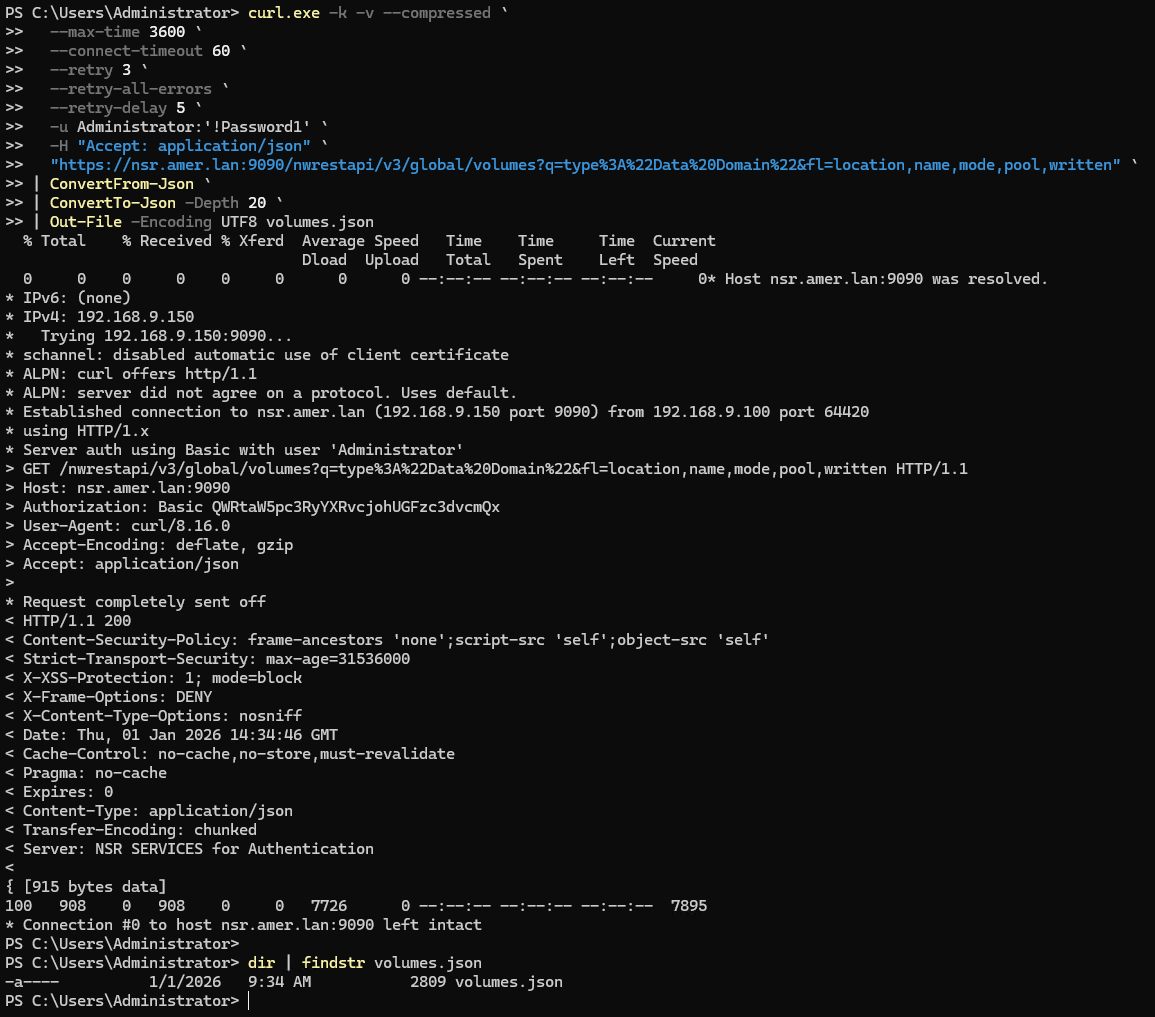
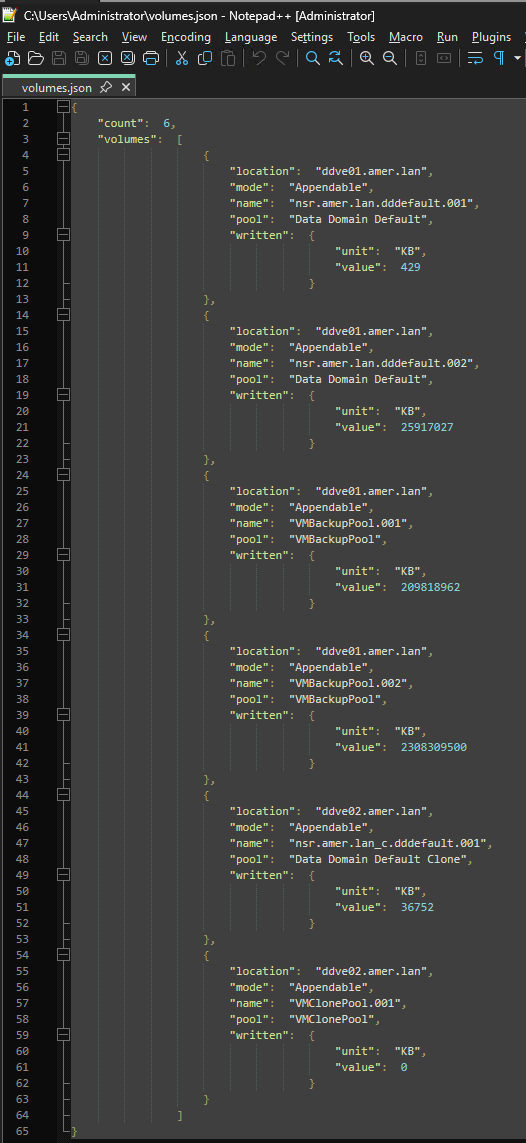
The above example created the
volumes.json file in the directory from which curl.exe was run. The contents of the file include the REST API payload:
Linux:
curl -k -v --compressed \
  --max-time 3600 \
  --connect-timeout 60 \
  --retry 3 \
  --retry-all-errors \
  --retry-delay 5 \
  -u NETWORKER_USERNAME:'PASSWORD' \
  -H "Accept: application/json" \
  "https://NETWORKER_SERVER_ADDRESS:9090/nwrestapi/v3/global/volumes/ENDPOINT" \
  -o volumes.json
Example (without -v for brevity):
[root@nsr ~]# curl -k --compressed \
  --max-time 3600 \
  --connect-timeout 60 \
  --retry 3 \
  --retry-all-errors \
  --retry-delay 5 \
  -u Administrator:'!Password1' \
  -H "Accept: application/json" \
  "https://nsr.amer.lan:9090/nwrestapi/v3/global/volumes?q=type%3A%22Data%20Domain%22&fl=location,name,mode,pool,written" \
  -o volumes.json
  % Total    % Received % Xferd  Average Speed   Time    Time     Time  Current
                                 Dload  Upload   Total   Spent    Left  Speed
100   908    0   908    0     0  22700      0 --:--:-- --:--:-- --:--:-- 22146
In this example, the file "volumes.json" was created in the same directory from which the command was run. Different tools can be used to parse the json formatting correctly, the tools used can vary depending on the installed OS and software.
[root@nsr ~]# cat volumes.json | python -m json.tool
{
    "count": 6,
    "volumes": [
        {
            "location": "ddve01.amer.lan",
            "mode": "Appendable",
            "name": "nsr.amer.lan.dddefault.001",
            "pool": "Data Domain Default",
            "written": {
                "unit": "KB",
                "value": 429
            }
        },
        {
            "location": "ddve01.amer.lan",
            "mode": "Appendable",
            "name": "nsr.amer.lan.dddefault.002",
            "pool": "Data Domain Default",
            "written": {
                "unit": "KB",
                "value": 25917027
            }
        },
        {
            "location": "ddve01.amer.lan",
            "mode": "Appendable",
            "name": "VMBackupPool.001",
            "pool": "VMBackupPool",
            "written": {
                "unit": "KB",
                "value": 209818962
            }
        },
        {
            "location": "ddve01.amer.lan",
            "mode": "Appendable",
            "name": "VMBackupPool.002",
            "pool": "VMBackupPool",
            "written": {
                "unit": "KB",
                "value": 2308309500
            }
        },
        {
            "location": "ddve02.amer.lan",
            "mode": "Appendable",
            "name": "nsr.amer.lan_c.dddefault.001",
            "pool": "Data Domain Default Clone",
            "written": {
                "unit": "KB",
                "value": 36752
            }
        },
        {
            "location": "ddve02.amer.lan",
            "mode": "Appendable",
            "name": "VMClonePool.001",
            "pool": "VMClonePool",
            "written": {
                "unit": "KB",
                "value": 0
            }
        }
    ]
}
Products
NetWorkerArticle Properties
Article Number: 000172472
Article Type: Solution
Last Modified: 30 نيسان 2026
Version: 12
Find answers to your questions from other Dell users
Support Services
Check if your device is covered by Support Services.