PowerProtect Data Manager: SQL Asset Configuration hangs indefinitely after adding asset to Protection Policy
Summary: After adding a Microsoft SQL Server database asset to a protection policy in PowerProtect Data Manager (PPDM), the system job "Configuring SQL Databases" hangs indefinitely and never completes. The asset appears to be added successfully in the PPDM UI — the policy asset count increases and the asset shows the correct policy assignment — but the configuration session never finishes. Backup jobs for the newly added asset also hang. The root cause is that the PowerProtect Agent Service child process responsible for spawning configuration jobs has crashed or is not running on the SQL Server host. The reason for the child process failure is currently unknown. ...
Symptoms
An administrator adds a SQL database asset to a protection policy in PPDM. The PPDM UI shows the asset as successfully added increasing the policy asset count by one and the asset appears under the correct policy in the Assets view. The PPDM system job "Configuring SQL Databases - [POLICY_NAME]" remains in a running state indefinitely and never completes.
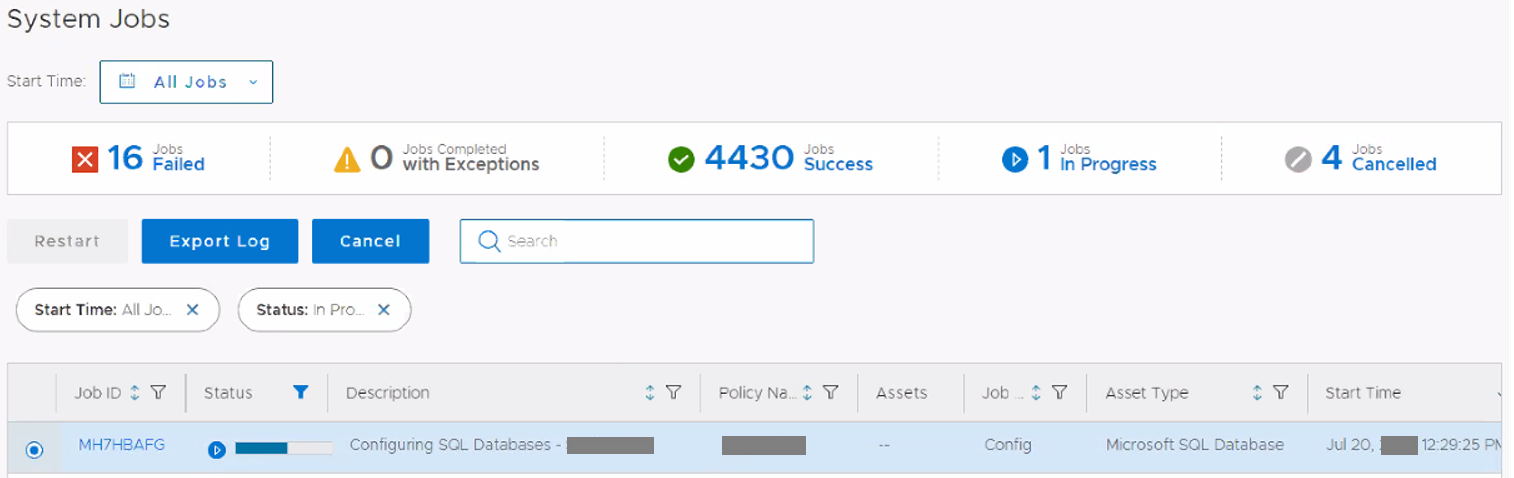
Figure 1. System Jobs Failed
If the administrator starts a backup job for the newly added asset, the backup also hangs indefinitely. The PPDM adm.log at /var/log/brs/adm/adm.log shows the configuration request was successfully submitted to the agent host, and a monitoring session was created but no additional progress is logged:
YYYY-MM-DDTHH:MM:SS.SSSZ INFO [] [pool-5-thread-7] [][][TASK_ID:a6a98b10aff41682][TRACE_ID:adce622b9ad7475d;JOB_ID:a47aff263b4c5a72][] [c.e.d.e.a.s.s.i.AutoConfigurationServiceImpl.sendAutoConfigurationRequestForR4(995)] -  Configuration request to host [HOST_IP] with payload: class AppDirectPayload {
    ...
    technology: APP_DIRECT
    configName: [POLICY_NAME]
    assetInfo: [class AppDirectAssetTargetInfoAssetInfo {
        assetId: [ASSET_ID]
        type: MICROSOFT_SQL_DATABASE
    }]
    ...
}
YYYY-MM-DDTHH:MM:SS.SSSZ INFO [] [pool-5-thread-7] [][][TASK_ID:a6a98b10aff41682][TRACE_ID:adce622b9ad7475d;JOB_ID:a47aff263b4c5a72][] [c.e.d.e.a.s.s.i.AutoConfigurationServiceImpl.sendAutoConfigurationRequestForR4(1024)] -  Submitting a job to monitor configuration session with id [SESSION_ID]
The agent service log (OpAgentSvc log) on the SQL Server host shows the configuration session was created with status IDLE but no additional activity occurs:
YYYY-MM-DD HH:MM:SS [INFO] HTTPServer.py-post_configuration_sessions()-Line 1600- POST /v1/agent/configuration-sessions
YYYY-MM-DD HH:MM:SS [INFO] HTTPServer.py-post_configuration_sessions()-Line 1647- Created CONFIGURATION Session, id=[SESSION_ID], status=IDLE
YYYY-MM-DD HH:MM:SS [INFO] HTTPServer.py-get_session()-Line 1990- GET /v1/agent/sessions/[SESSION_ID]
No errors appear in either the PPDM adm.log or the agent service log at the time of the hang. The absence of errors makes the issue difficult to diagnose without investigating the agent service process state. This issue is not version-specific and can occur on any PPDM version.
Cause
The PowerProtect Agent Service on the SQL Server host accepts the configuration request from PPDM and creates a configuration session. However, the agent service child process responsible for spawning and executing the configuration job has either crashed or is not running. Without this child process, the agent cannot execute the configuration task, and the session remains in an IDLE state indefinitely.
Because the agent service's HTTP listener is still operational (it accepts REST API calls and creates sessions), PPDM does not detect a connectivity failure. PPDM continues to poll the session status, which remains IDLE. This causes the "Configuring SQL Databases" system job to hang without error.
The reason for the agent service child process failure is currently unknown. The issue has not been successfully reproduced in customer environments or in Dell lab environments. This KB article will be updated if the root cause is identified and a permanent solution is available.
Resolution
Restart the PowerProtect Agent Service on the SQL Server Host
- Log in to the SQL Server host.
- Open the Windows Services console:
services.msc - Locate the PowerProtect Agent Service.
- Right-click the service and select
Restart. - Wait for the service to restart completely and confirm the status shows
Running.
Verify the Configuration Completes
- Return to the PPDM UI and check the system job
"Configuring SQL Databases - [POLICY_NAME]". - The configuration job should now complete successfully after the agent service restarts, and the child process resumes operation.
Verify Backup Functionality
- Run a manual backup for the SQL database asset that was added to the protection policy.
- Confirm the backup completes successfully without hanging.
Contact Dell Support
If the configuration job continues to hang after restarting the PowerProtect Agent Service, or if the agent service child process repeatedly crashes, contact Dell Support for additional investigation and reference this KB article. Dell Support may apply a diagnostic binary to capture additional information if the issue recurs.