Data Domain: How to use the embedded REST API for DD and DDMC
Summary: Both Data Domain (DD) (physical and virtual) and PowerProtect DD Management Center (DDMC) installs come with a REST service embedded. Customers may use it to build their own applications to interact with the DDs and DDMCs. ...
Instructions
The latest documentation can be found at https://developer.dell.com/apis/products/data-protection.
Both DDs and DDMCs came by default with a web-based REST API enabled. A REST API is a means to interact programmatically with DDs and DDMCs. This article uses examples for DDs from now on using a simple client and server protocol. HTTP protocol keeps no state and allows a client to read state from the DDs and run commands with specially crafted HTTP calls.
From the command line, the following command informs of the status for the web-based REST API service (web-service):
# adminaccess show
Service       Enabled   Allowed Hosts
-----------   -------   ---------------------
ssh           yes       -
scp           yes       (same as ssh)
telnet        no        DD3300.example.com
                        DD3300.example.com
ftp           no        DD3300.example.com
                        DD3300.example.com
ftps          yes       -
http          yes       -
https         yes       -
web-service   yes       N/A
-----------   -------   ---------------------
...
Note as the REST API is serviced from the same ports as the UI, there is no way to have it disabled separately. This poses no security risk as all requests to the API need be authenticated, in the same way as requests to the UI or CLI are.
The best way to get started with the REST API is using the bundled client on every DD and DDMC. It can be accessed at the following location:
https://DD_OR_DDMC_IP_ADDRESS/api/
This presents a page with links to several important resources, namely:
- API Documentation: Detailed list of all available API calls supported by the DD or DDMC
- REST Test Client: Test the API calls from the DD web interface itself
The API documentation is all that a programmer must use to leverage the DD REST API to build applications on top of the DD.
DD authentication is required to use the API. Two pieces of information are needed:
- X-DD-AUTH-TOKEN: A cookie which the DD provides upon successful authentication and must be used as the authenticator to any further requests.
- X-DD-UUID: The unique DD identifier to use for (most) requests to the API. Note for an individual DD this may look superfluous, but it is clearly necessary for DDMCs, where an individual DD may be chosen.
To authenticate against the DD, use the "/rest/v1.0/auth" method. To do so from any host with "curl" installed and network access to the DD, and issue the request as follows:
# curl --include --insecure -X 'POST' --header 'Content-Type: application/json' --header 'Accept: application/text' -d '{ "auth_info":{ "username":"sysadmin","password":"SomePass" } }' 'https://DD_OR_DDMC_IP_ADDRESS:3009/rest/v1.0/auth'
A few comments about the command line run above follow:
- Option "--include" is needed, as some of the query responses come back as HTTP response tags, not as part of the body
- Option "--insecure" is needed when curl is configured to check the server CA certificate against a list of known and trusted CA authorities. As the REST TEST client bundled with the DD does not add this option but it must be used to verify the CA certificates, or all commands run from within the test client fail (undefinedERROR Text Status: error). If trying to run an example "curl" from the command line instead, the error would be:
curl: (60) SSL certificate problem: self signed certificate in certificate chain
More details here: https://curl.haxx.se/docs/sslcerts.html

curl failed to verify the legitimacy of the server and therefore could not
establish a secure connection to it. To learn more about this situation and
how to fix it, please visit the web page mentioned above.
- We are using an HTTP method "POST." Every API method has its own method, which is clearly highlighted in the documentation.
- "--header" options are used to pass HTTP level headers or options to the called DD
- "-d" sends the body of the request to the DD, in this case, the username and password
- Finally, the URI calling the specific authentication method is called as the last parameter (https://DD_OR_DDMC_IP_ADDRESS:3009/rest/v1.0/auth). As we are using HTTPS, credentials travel encrypted over the wire. Note whereas the docs and the embedded test client are accessed through port 443, the REST API service entry point is at port 3009 and must use HTTPS (not HTTP) to work
The response to the authentication query above is shown below:
HTTP/1.1 201 Created
Content-Type: application/json
Content-Length: 112
X-DD-AUTH-TOKEN: 434f1d6dc1528bb8d3ad66c70dc7f74f9
X-DD-UUID: 7850d7a24f93f502:1346d63c57821e38
Access-Control-Allow-Credentials: true
Cache-Control: no-cache
Server: Data Domain OS
Access-Control-Expose-Headers: AUTHORIZATION, X-DD-AUTH-TOKEN, X-DD-JSON-RESPONSE-WITH-ROOT, X-DD-PEER-USERNAME

{"service_status": {"details": "success", "code": 0, "link": [{"rel": "related", "href": "/rest/v1.0/system"}]}}
Everything before the blank line is HTTP headers sent in the response. Content after is the response body, which in this case informs of success. For this method, the most important data are:
- X-DD-AUTH-TOKEN (434f1d6dc1528bb8d3ad66c70dc7f74f9) this is a temporary authentication token, which may be used for a given amount of time to authenticate further operations
- X-DD-UUID (7850d7a24f93f502:1346d63c57821e38) the ID for the DD being asked for, which must be used for later requests
For any further request, we must use those values. For example, let us say we want to find out information for a DD Filesystem. Go to the "API Documentation" to locate the call which best suits our needs, as in the screenshot below:
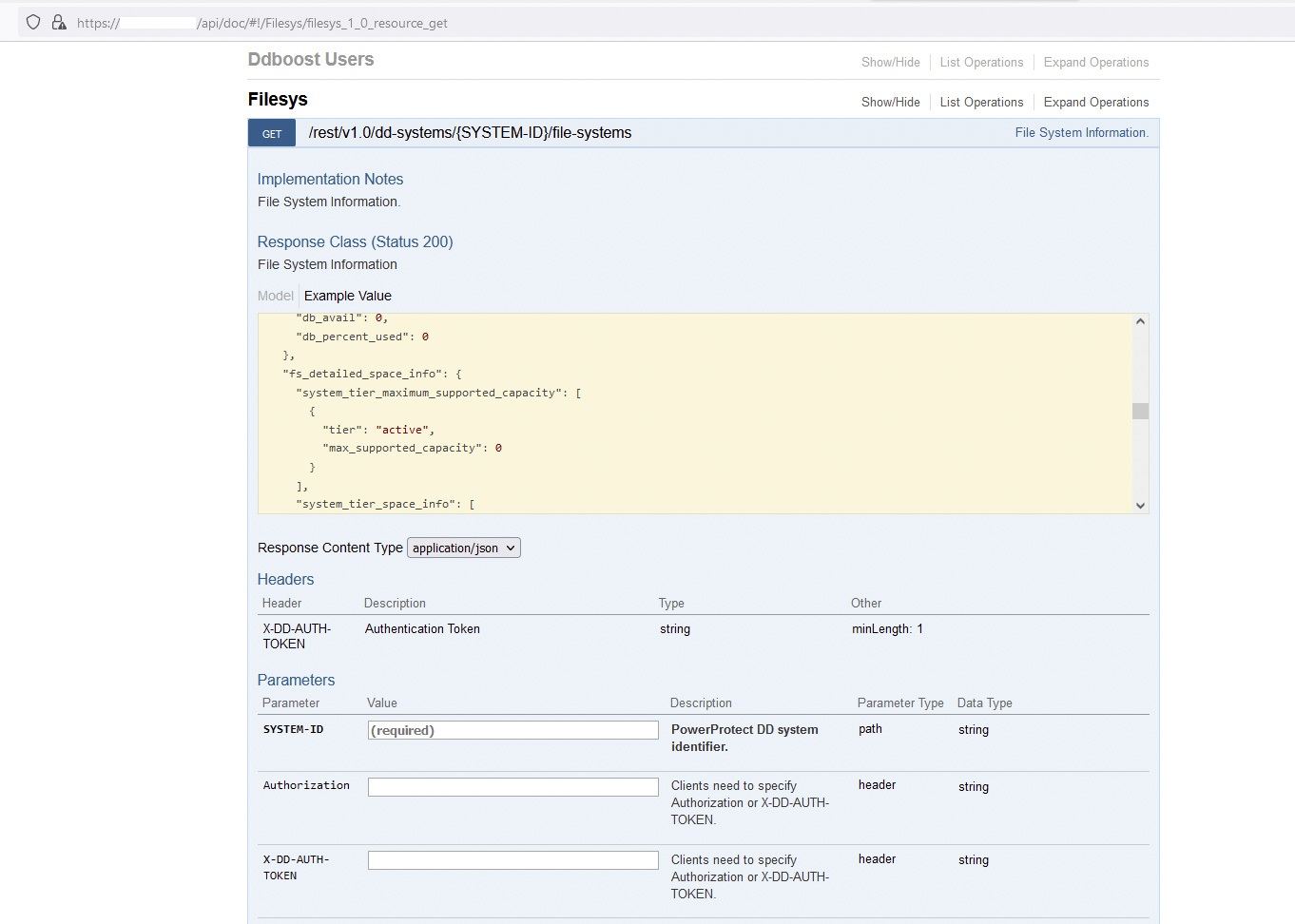
After checking the necessary parameters, we can build the request as below. Note in this case we run a "GET" type of request, instead of a "POST," such as the authentication method:
# curl --include --insecure -X 'GET' --header 'Content-Type: application/json' --header 'Accept: application/text' --header 'X-DD-AUTH-TOKEN:434f1d6dc1528bb8d3ad66c70dc7f74f9' 'https://DD_OR_DDMC_IP_ADDRESS:3009/rest/v1.0/dd-systems/7850d7a24f93f502%3A1346d63c57821e38/file-systems'
But we get the following response, indicating either the authentication token is invalid or has expired:
{"details": "**** Authentication token \"434f1d6dc1528bb8d3ad66c70dc7f74f9\" is invalid.", "code": 5427, "link": [{"rel": "self", "href": "/rest/v1.0/auth"}]}
We would have to generate a new authentication token to run the query and get the intended results, for example:
# curl --include --insecure -X GET --header 'Accept: application/json' --header 'X-DD-AUTH-TOKEN: 178a7b8f337ce3027acdcd889ed10446c' 'https://DD_OR_DDMC_IP_ADDRESS:3009/rest/v1.0/dd-systems/7850d7a24f93f502%3A1346d63c57821e38/file-systems'
HTTP/1.1 200 OK
Content-Type: application/json
Content-Length: 1123
X-DD-AUTH-TOKEN: 178a7b8f337ce3027acdcd889ed10446c
X-DD-UUID: 7850d7a24f93f502:1346d63c57821e38
Access-Control-Allow-Credentials: true
Cache-Control: no-cache
Server: Data Domain OS
Access-Control-Expose-Headers: AUTHORIZATION, X-DD-AUTH-TOKEN, X-DD-JSON-RESPONSE-WITH-ROOT, X-DD-PEER-USERNAME

{"hostname": "DD3300.example.com", "fs_status": "sn_enabled", "fs_clean_status": "inactive", "fs_cleaning_info": {"filesys_clean_info": {"cleaning_status": "inactive", "cleaning_dates": {"start_epoch": 1663879075, "end_epoch": 1663879131, "success_epoch": 1663679711}, "is_aborted": true, "abort_reason": "Cleaning was aborted by user.", "throttle": 50, "schedule": {"occurrence": "weekly", "days": ["Tue"], "time": "0600"}}, "cloud_clean_info": {"cleaning_status": "inactive", "cleaning_dates": {}, "is_aborted": false, "throttle": 50, "frequency": 0}}, "fs_uptime_secs": 344738, "fs_options": [{"key": "local-compression-type", "value": "gz"}, {"key": "marker-type", "value": "auto"}, {"key": "report-replica-as-writable", "value": "disabled"}, {"key": "staging-reserve", "value": "5% = 4271.2 GiB percent of total space"}, {"key": "warning-space-usage", "value": "90"}, {"key": "critical-space-usage", "value": "95"}], "link": [{"rel": "self", "href": "/rest/v1.0/dd-systems/7850d7a24f93f502%3A1346d63c57821e38/file-systems"}, {"rel": "parent", "href": "/rest/v1.0/dd-systems/7850d7a24f93f502%3A1346d63c57821e38"}]}
Output in the response body is sent to the caller in JSON format, which is the standard.