Dell VxRail: Secure Remote Services (SRS) retirement - June 2023
Summary: On August 20, 2021, Dell Technologies Services announced the availability of our next generation consolidated connectivity solution – Secure Connect Gateway 5.0 – for servers, networking, data storage, data protection, hyper-converged and converged systems. It provides customers with a single solution for managing their entire Dell environment in the data center. ...
This article applies to
This article does not apply to
This article is not tied to any specific product.
Not all product versions are identified in this article.
Instructions
What is happening?
Secure Remote Services 3.x will be retired for all VxRail products on June 15, 2023. If you are currently running Secure Remote Services (SRS) 3.42 - 3.52, please be aware that these products will be arriving at End of Service Life on June 15, 2023. Customers are strongly encouraged to proactively upgrade their enterprise connectivity to avoid disruptions in automated, intelligent support for systems:• You are encouraged to adopt the latest technology – Secure Connect Gateway – with minimal disruption. In-place upgrade paths are available for our Secure Remote Services 3.x platforms.
What versions are affected?
SRS versions 3.42 - 3.52 are all affected by this change.
How will it impact me?
All versions of the specified connectivity solution will reach their end of service life. As a result, support (including remediation and mitigation of security vulnerabilities) for the solution will be discontinued. The replacement solution is the new Secure Connect Gateway.
The proactive and predictive capabilities of legacy connectivity for Dell products will be discontinued unless the upgrade to the replacement technology is in place.
What do I need to do?
- You are encouraged to get acquainted with our newest connectivity solution – Secure Connect Gateway 5.x –and key resources.:
Web page | Technical Resources, Product Support Matrix and Software Downloads | Knowledge article on enterprise connectivity | Security paper | KB on Next Generation Connectivity for VxRail
- Your organization may need to have our latest technology formally evaluated by your network and security teams before you are ready to upgrade your systems. Thus, we recommend reviewing the technical documentation for Secure Connect Gateway, as well as our FAQs and security white paper , to help you jumpstart your evaluation and accelerate the process.
- You can reference VxRail specific KB: Dell VxRail: Next generation connectivity with VxRail 7.0.350 and later for specific upgrade paths.
If your VxRail cluster is not yet capable of upgrading or is not eligible for upgrading in a short time. You can migrate the SRS to SCG directly for your system.
- Before the update, please make sure the SRS VE is deployed and activated.
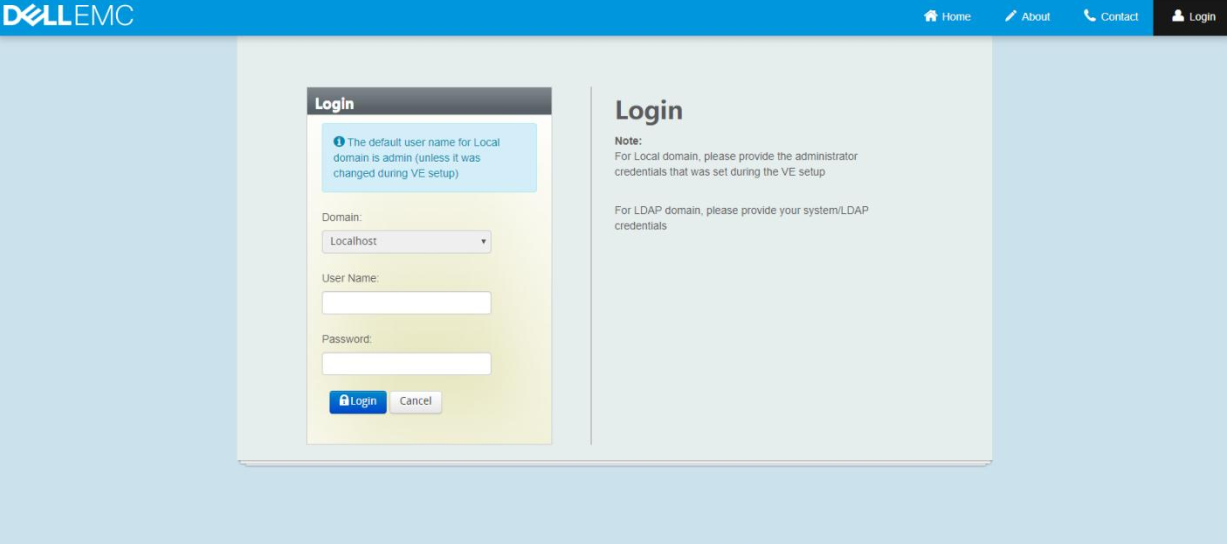
- Login SRS with the admin account within your browser https://<srs_ve_ip>:9443
- When you are eligible for upgrade, you will observe a banner indicating so.
- You can reference the official document to migrate the SRS to SCG, Secure Remote Services 3.52 Upgrade to Secure Connect Gateway.
- Migrating SRS to SCG will not affect or impact the VxRail LCM upgrade process in future.
Affected Products
VxRail, EMC Secure Remote Services, Secure Remote Services, EMC Secure Remote Services Gateway Configuration, Secure Remote Services Virtual Edition, VxRail Appliance Family, VxRail Appliance SeriesProducts
VMWare Cloud on Dell EMC VxRail E560F, VMWare Cloud on Dell EMC VxRail E560N, VxRail 460 and 470 Nodes, VxRail G410, VxRail G Series Nodes, VxRail D Series Nodes, VxRail D560, VxRail D560F, VxRail E Series Nodes, VxRail E460, VxRail E560
, VxRail E560 VCF, VxRail E560F, VxRail E560F VCF, VxRail E560N, VxRail E560N VCF, VxRail E660, VxRail E660F, VxRail E660N, VxRail E665, VxRail E665F, VxRail E665N, VxRail G560, VxRail G560 VCF, VxRail G560F, VxRail G560F VCF, VxRail Gen2 Hardware, VxRail P Series Nodes, VxRail P470, VxRail P570, VxRail P570 VCF, VxRail P570F, VxRail P570F VCF, VxRail P580N, VxRail P580N VCF, VxRail P670F, VxRail P670N, VxRail P675F, VxRail P675N, VxRail S Series Nodes, VxRail S470, VxRail S570, VxRail S570 VCF, VxRail S670, VxRail Software, VxRail V Series Nodes, VxRail V470, VxRail V570, VxRail V570 VCF, VxRail V570F, VxRail V570F VCF, VXRAIL V670F, VxRail VD-4000R, VxRail VD-4000W, VxRail VD-4000Z, VxRail VD-4510C, VxRail VD-4520C, VxRail VD Series Nodes
...
Article Properties
Article Number: 000209853
Article Type: How To
Last Modified: 20 تشرين الأول 2023
Version: 3
Find answers to your questions from other Dell users
Support Services
Check if your device is covered by Support Services.