vProtect: "Boot device not found" message when powering on vProtect on Nutanix
Summary: vProtect: "Boot device not found" is seen when powering on vProtect on Nutanix.
This article applies to
This article does not apply to
This article is not tied to any specific product.
Not all product versions are identified in this article.
Symptoms
The following error is seen when powering on vProtect on Nutanix:

Figure 1. Boot device not found message
Cause
The OVA file was directly uploaded without being unpacked.
Resolution
- The OVA file should be unpacked first. Do this using the command below:
tar -xvf <OVAname>

Figure 2. tar -xvf <OVAname> output
- This produces the files shown below.
The file that starts withf5should be uploaded, not the OVA file.
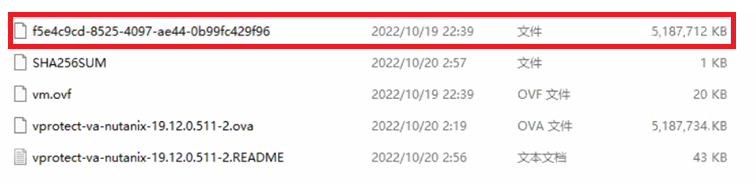
Figure 3. Upload f5 file
- Select Image Type as DISK, not OVA.
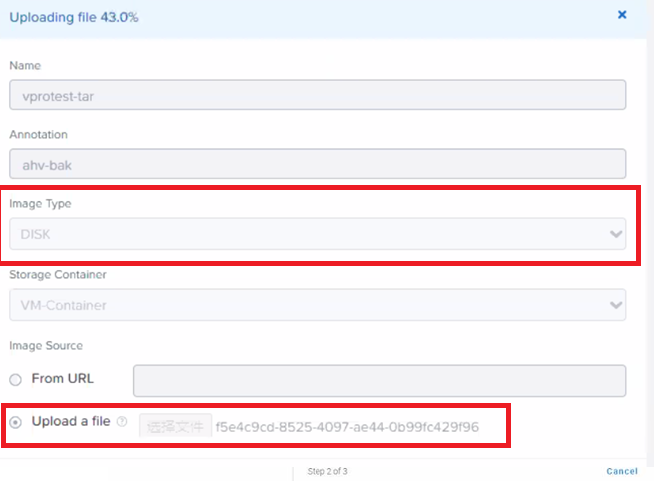
Figure 4. Select Image Type of DISK
Affected Products
vProtectArticle Properties
Article Number: 000210745
Article Type: Solution
Last Modified: 12 حزيران 2026
Version: 4
Find answers to your questions from other Dell users
Support Services
Check if your device is covered by Support Services.