PowerFlex Management Platform: Resource Group in Lifecycle mode after migration
Summary: After migrating a Legacy PowerFlex system to a 4.x PowerFlex Manager Platform (PFMP) setup, resource groups will be in Lifecycle mode.
Symptoms
- Legacy PowerFlex migration was completed to a PFMP 4.x system
- Templates on the legacy side were pointed to ISO images on the legacy local PFMP NFS share (127.0.0.1)
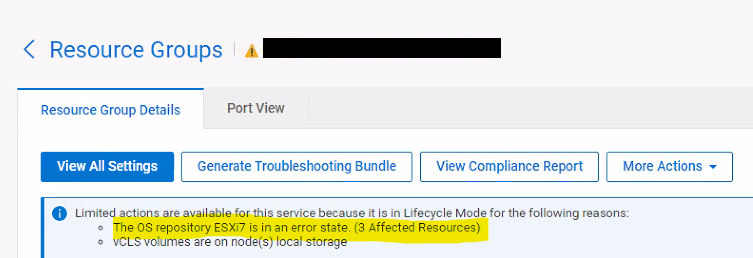
- ISO image locations are now in an error state in PFMP 4.x
- Resource Group is now in Lifecycle Mode (LCM):
Impact
Future upgrades and changes to the resource group will be blocked.
Cause
In the legacy 3.x PFxM system, the Services are pointing to templates that are using ISO images on the local NFS share. When the migration occurs, it pulls over everything, including ISO image locations, templates, and resource groups.
As the ISO image locations are pointing to a local share on the legacy 3.x PFxM system, they are not available on the 4.x PFMP and therefore show in an error state. This causes the Resource Groups using those ISO images to be placed in Lifecycle mode.
Resolution
There are two workarounds (only one of these must be run):
-
Upload the correct ISO image:
- Modify the Resource Group to point to the new custom ISO image
- Run the "Update Resource Group Details" on the Resource Group
-
Remove and re-import the Resource Group. This re-creates the Resource Group and database objects, avoiding the incorrect ISO image locations.
Impacted Versions
PFMP 4.x
Fixed In Version
PFMP 4.6