CloudIQ Cybersecurity Check for Unisphere Role Base Access Control
Summary: CloudIQ Cyber-SecIQ Policies applied to PowerMax arrays observe a misleading misconfiguration alert about Unisphere Role Base Access Control (RBAC) not being enabled.
Symptoms
The following alert is observed in CloudIQ:
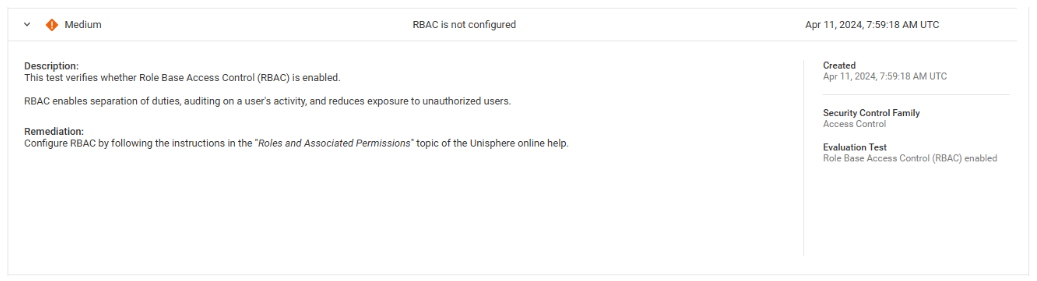
Test Name:
Role Base Access Control (RBAC) is enabled.
Description:
This test verifies whether Role-Based Access Control (RBAC) is enabled.
RBAC enables separation of duties, auditing on a user's activity, and reduces exposure to unauthorized users.
Issue Title:
RBAC is not configured.
Remediation:
Configure RBAC by following the instructions in the "Roles and Associated Permissions' topic of the Unisphere online help.
Cause
This check is for Solutions Enabler symauth and NOT Unisphere authorization for RBAC:
- RBAC is always enabled for Unisphere for PowerMax even if disabled for everything else.
- RBAC on PowerMax can be disabled for the array Solutions Enabler and "other Solutions Enabler API apps."
Resolution
A revised alert or check is planned to be implemented with a display as follows:
Test Name:
Role Base Access Control (RBAC) enabled - Solutions Enabler
Description:
This test verifies whether Role-Based Access Control (RBAC) is enabled in the Solutions Enabler command-line interface (SYMCLI).
RBAC enables separation of duties, auditing on a user's activity, and reduces exposure to unauthorized users.
Issue Title:
RBAC is not enabled in Solutions Enabler.
Remediation:
It is recommended to configure RBAC for the SYMCLI Solutions Enabler command-line interface by following the instructions in the "User and Group Authorization" chapter of the latest version of the "Dell Solutions Enabler Array Controls and Management CLI User Guide."