PowerVault ME52 : How to view ESE version
Summary: On PowerVault ME52xx series PowerVault Manager displays the ESE Version. Embedded Service Enabler (ESE) is the Dell API used by SupportAssist to send telemetry either direct to a Dell endpoint (esrs3-core.emc.com) or locally installed Secure Connect Gateway appliance endpoint. ...
This article applies to
This article does not apply to
This article is not tied to any specific product.
Not all product versions are identified in this article.
Instructions
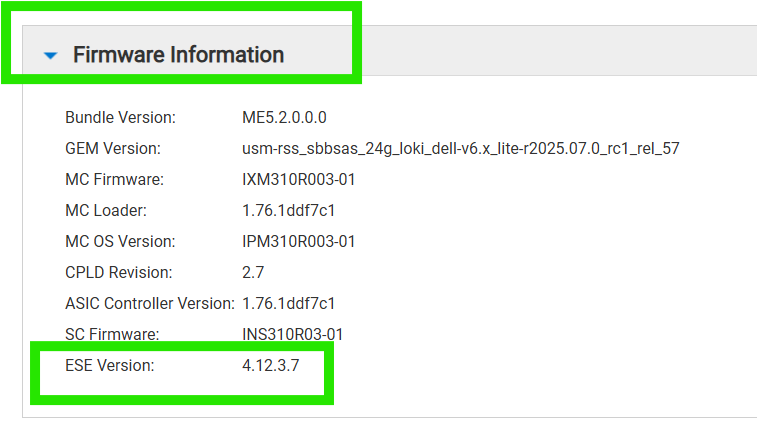
PowerVault ME52xx series displays the Embedded Support Enabler (ESE) API version. This API is used by SupportAssist. ESE may be updated when controller firmware updates are applied.
SupportAssist service enables the following:
- Receive notification of available controller or disk firmware updates.
- Automatic case creation in the event of component failure (e.g. disks, fans, controller components)
- Ability to send telemetry such as support logs to to Dell
- Sends telemetry used by Dell AIOps (formerly CloudIQ). for more information see APEX AIOps Observability: General Procedures to Onboard PowerVault ME Series Arrays
To view the ESE Version:
- Login to PowerVault Manager.
- The About panel (Maintenance > About) shows information about the system, its hardware, and its storage configuration.
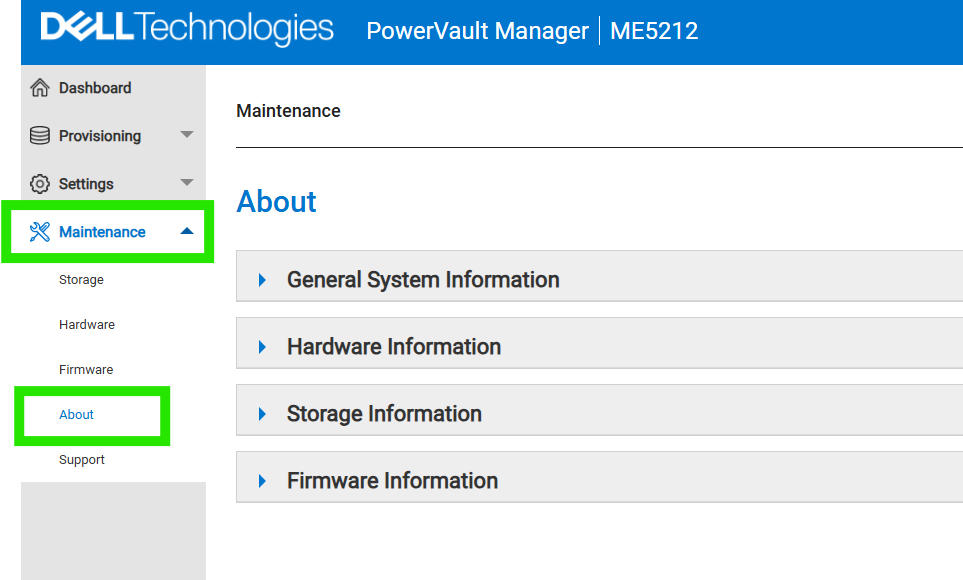
- Expand <Firmware Information>. The ESE Version information is shown.
Additional Information
Refer to this video:
PowerVault ME52 : How to view ESE version
Duration: 00:01:28 (hh:mm:ss)
When available, closed caption (subtitles) language settings can be chosen using the CC icon on this video player.
You can also view this video on YouTube.
Affected Products
ME Series, PowerVault ME5212, PowerVault ME5224, PowerVault ME5284Article Properties
Article Number: 000339518
Article Type: How To
Last Modified: 30 أيلول 2025
Version: 2
Find answers to your questions from other Dell users
Support Services
Check if your device is covered by Support Services.