PowerFlex 4.X: LACP enabled LAG is missing from VDS
Summary:
After upgrading from PowerFlex Manager (PFxM) version 3.x to PowerFlex Management Platform (PFMP) 4.x, a warning appears when attempting to upgrade a Resource Group (RG) component:
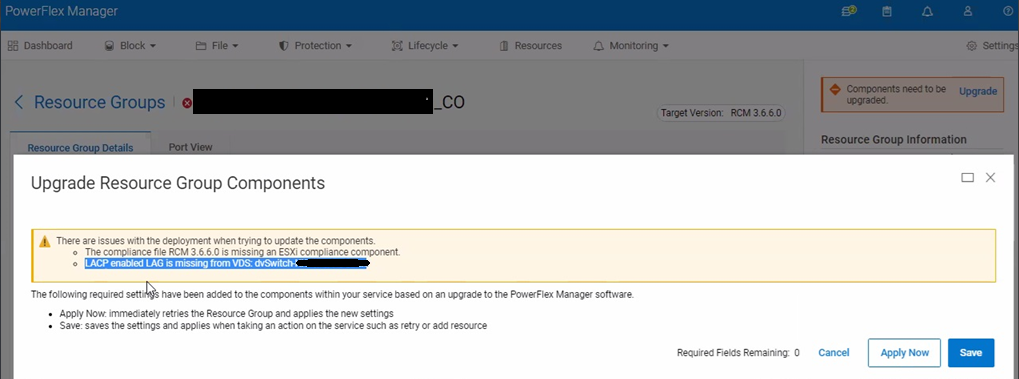
"LACP enabled LAG is missing from VDS: ".
...
This article applies to
This article does not apply to
This article is not tied to any specific product.
Not all product versions are identified in this article.
Symptoms
- Customer upgraded PFxM from 3.8.x to 4.6.1.
- The network is configured with Full Network Automation (FNA).
NOTE: The issue might appear when using Partial Network Automation (PNA).
- The RG network is configured with one Virtual Disk Service (VDS) for management network and one VDS for data network.
The management VDS was configured as TRUNK and the data VDS was configured with Link Aggregation Control Protocol (LACP). - The original RG template (on 3.x) was configured as LACP, and the RG network was modified over time.
- The following warning appears when trying to upgrade RG components:

Impact
Unable to upgrade any existing RG in the system.
Note: Upgrade is blocked because of LACP and Non-LACP mix and not because of Lifecycle mode
After Fixing the LACP Mix, RG may still be in Lifecycle mode for other reasons (ex NSX), but that will not block the upgrade
After Fixing the LACP Mix, RG may still be in Lifecycle mode for other reasons (ex NSX), but that will not block the upgrade
Cause
Starting with PFMP 4.x, using a mixed network configuration within the same RG is no longer supported.
The network must be configured as either LACP or TRUNK, but not in a mixed format.
Resolution
Migrate the mixed network configuration to either LACP or TRUNK.
Impacted Versions: PFMP 4.x
Additional Information
Related Articles:
Affected Products
PowerFlex rack, ScaleIOArticle Properties
Article Number: 000350970
Article Type: Solution
Last Modified: 01 أيار 2026
Version: 5
Find answers to your questions from other Dell users
Support Services
Check if your device is covered by Support Services.