Unisphere for PowerMax: Version 10.2 installation failed with " Could not create the Java virtual machine"
Summary: Unisphere for PowerMax installation failed with error "Could not create the Java virtual machine. A fatal exception has occurred. Program will exit."
This article applies to
This article does not apply to
This article is not tied to any specific product.
Not all product versions are identified in this article.
Symptoms
Unisphere for PowerMax installation failed with error "Could not create the Java virtual machine. A fatal exception has occurred. Program will exit."
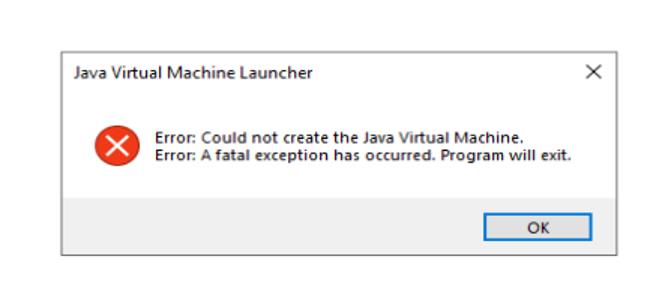
Figure 1. Fatal Exception Error
From the installer logs:
 com.zerog.ia.installer.actions.Exec -- Execute Command: "D:\EMC\SMAS\jre\bin\java" -Xss1024k -Xms256m -Xmx512m -cp "D:\EMC\SMAS\jboss\standalone\lib\dbManager.jar;D:\EMC\SMAS\jboss\standalone\lib\log4j.jar;D:\EMC\SMAS\jboss\standalone\lib\dom4j-1.6.1.jar;D:\EMC\SMAS\jboss\standalone\lib\jasypt-1.4.1.jar;D:\EMC\SMAS\jboss\standalone\lib\commons-logging-1.1.jar;D:\EMC\SMAS\jboss\standalone\lib\jaxen-1.1.1.jar;D:\EMC\SMAS\jboss\standalone\lib\lib\jboss-logging-spi.jar;D:\EMC\SMAS\jboss\standalone\lib\jbosssx.jar;D:\EMC\SMAS\jboss\standalone\lib\lib\jboss-javaee.jar;D:\EMC\SMAS\jboss\modules\system\layers\base\org\picketbox\main\picketbox-4.9.2.Final.jar" com.emc.em.common.database.DBManager -appname common -earfile common-em.ear -installpath "D:\EMC\SMAS" -task doPreUpgrade
 com.zerog.ia.installer.actions.ShowDialogAction -- Message Dialog: Unisphere for PowerMax  Configuration Error. Installation will be aborted.
 com.zerog.ia.installer.actions.NTServiceController -- Stopping Windows Service: EMC_smasdb
 com.zerog.ia.installer.actions.DeleteFolderAction -- Deleting Folder: pgsql
Unisphere for PowerMax installation succeeds using CMD as well as Wizard; however, the SMAS service never comes up.
The following parameters were added in the System Variable and tried with -Xmx512M and Xmx1024M, and the installation still fails with the same error.
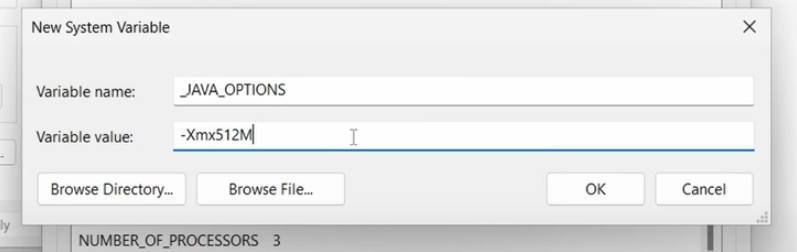
Figure 2. -Xmx512M Variable
Cause
As the error indicates, there were some anomalies in the Java of the Unisphere for PowerMax host.
Resolution
- Remove all the Java Parameters.
- Perform a through cleanup of the leftover files/folders by following KB article How to Manually Remove Unisphere for PowerMax.
- Install Unisphere for PowerMax as usual.
Article Properties
Article Number: 000373261
Article Type: Solution
Last Modified: 04 آب 2026
Version: 2
Find answers to your questions from other Dell users
Support Services
Check if your device is covered by Support Services.