ECS: How to disable the Transformsvc transformation service
Summary: Transformsvc can be used for the migration process from Centera to Content Address Storage (CAS) on ECS. Instances were found where it was not disabled after migration finished. This KB article outlines how to disable Transformsvc. ...
Instructions
Verify that Transformsvc is enabled. If 'Transformsvc enabled' displays as 'False', no further action is required. In this example, it is set to 'True'
# svc_node services status
svc_node v1.2.19 (svc_tools v2.25.0)                 Started 2025-10-09 11:15:52

Node r1n1:
    Transformsvc enabled: True

    Services running:
        fabric-agent

        blobsvc        (96597)  Started: 2025-10-03 09:41:35      cm             (29921)  Started: 2025-10-01 09:56:10
        coordinatorsvc (14197)  Started: 2025-09-01 09:11:54      dataheadsvc    (29795)  Started: 2025-10-01 09:56:09
        dm             (124970) Started: 2025-09-08 20:47:45      dtquery        (17963)  Started: 2025-09-01 09:13:02
        ecsportalsvc   (14353)  Started: 2025-09-01 09:11:54      eventsvc       (14326)  Started: 2025-09-01 09:11:54
        georeceiver    (14328)  Started: 2025-09-01 09:11:54      metering       (14320)  Started: 2025-09-01 09:11:54
        nginx          (19072)  Started: 2025-09-01 09:13:38      objcontrolsvc  (53652)  Started: 2025-10-09 01:04:16
        resourcesvc    (66887)  Started: 2025-09-02 12:17:50      rm             (60137)  Started: 2025-09-05 10:09:05
        sr             (14315)  Started: 2025-09-01 09:11:54      ssm            (14294)  Started: 2025-09-01 09:11:54
        stat           (36257)  Started: 2025-09-24 00:53:27      storageserver  (14291)  Started: 2025-09-01 09:11:54
        vnest          (14200)  Started: 2025-09-01 09:11:54

    Services not running:
        <none>
[...]
Confirm if the transformation is running an ongoing migration before disabling:
# svc_cas transformation status

v2.15.0)                 Started 2025-08-07 09:22:43

 Transformation Id                  urn:Transformation:Centera:4838df96-xxxx
 Transformation Current Phase       Reconciliation

 Enumeration                        Succeeded
 Indexing                           Succeeded
 Migration                          Succeeded
 PreCheck                           Succeeded
 Reconciliation                     Succeeded

 Namespace                          centera_xxxx
 Rg                                 urn:storageos:ReplicationGroupInfo:57796d33-6106-44fc-a343-eb826ef6xxxx:global
 Access_IP                          x.x.x.x
 Management_IP                      x.x.x.x

 Source_ID                          default/xxx
 Source_ID                          default/xxx

 Total Objects                      61561962
 Total Bytes                        13169033319403
 Total Bytes Migrated               13169033230680
 Total Objects Migrated             61561962
 Total Mismatch                     0
# svc_cas transformation progress
svc_cas v1.0.1 (svc_tools v2.15.0)                 Started 2024-08-07 09:23:09

 Transformation Id                  urn:Transformation:Centera:4838df96-1dd2-11b2-8dc8-c9a50c86cfba
 Transformation Current Phase       Reconciliation

 Tasks Succeeded                    615995
 Tasks Failed                       0
 Tasks Pending                      0
From the above, the CAS migration is complete. If tasks are still pending, wait until all tasks success before disabling
Log into GUI with 'root' user. Then press keys:
Ctrl + Alt + Shift + MA new menu entry appears:
Manage -> MigrationThere, you can disable Transformsvc as follows:
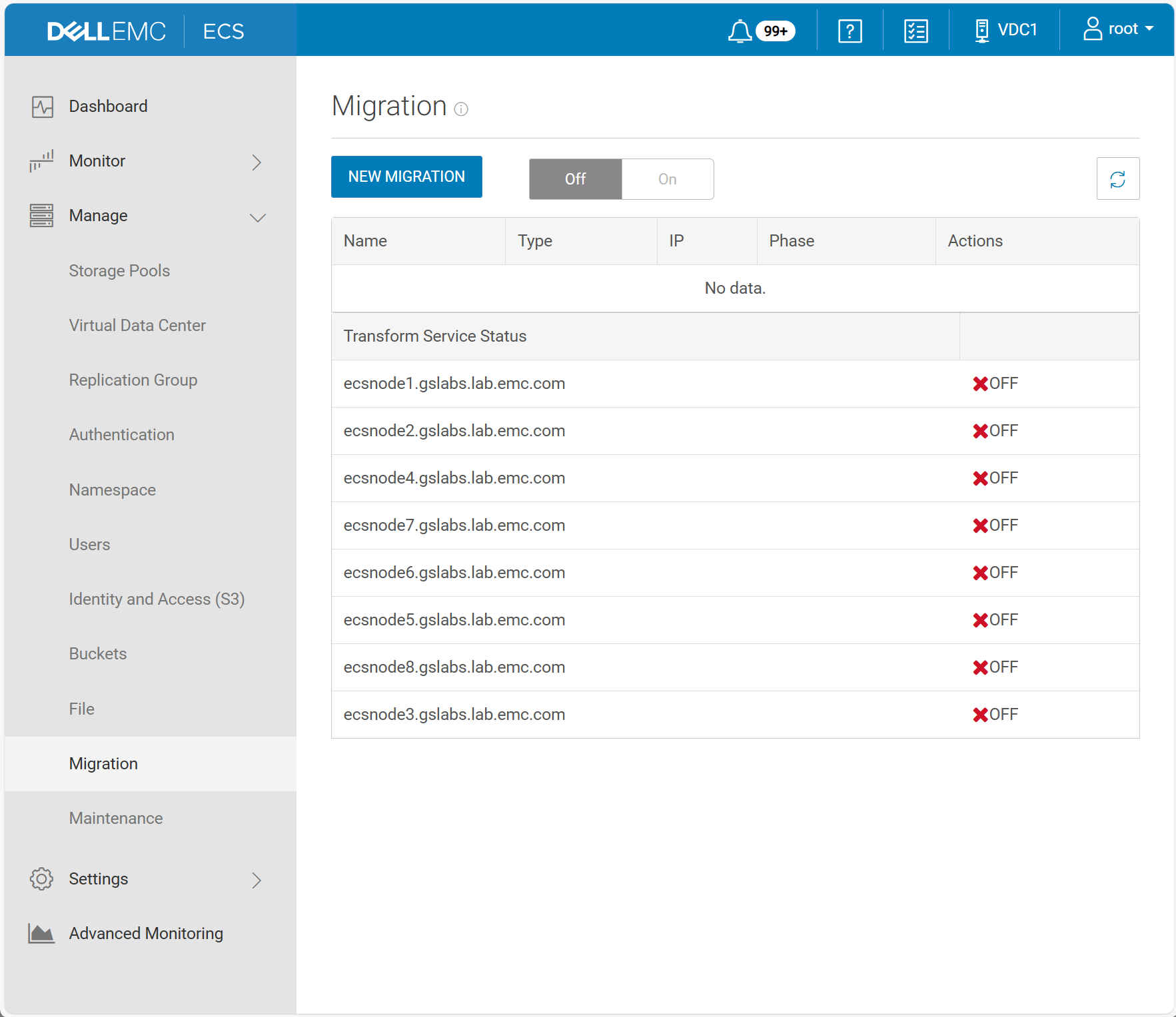
Additional Information
If unable to disable transformsvc from GUI, run the following commands. This will set the 'Transformsvc enabled' to 'False'. Note: this requires the GUI root user password
Command:
#svc_rest_cmd -u root -p <p/w> POST -xml -d '<service_control_param><action>stop</action></service_control_param>' -H "Content-Type: application/xml" /object/transformation/status
#svc_node info all | egrep 'Node at rack|Transformsvc enabled'
Example:
admin@Node1:~> svc_rest_cmd -u root -p ChangeMe POST -xml -d '<service_control_param><action>stop</action></service_control_param>' -H "Content-Type: application/xml" /object/transformation/status
svc_rest_cmd 1.0.17

<?xml version="1.0" encoding="UTF-8" standalone="yes"?>
<transform_service_status>
  <data_node_status_list>
    <data_node>Node1</data_node>
    <service_name>TransformSvc</service_name>
    <status>OFF</status>
  </data_node_status_list>
  <data_node_status_list>
    <data_node>Node2</data_node>
    <service_name>TransformSvc</service_name>
    <status>OFF</status>
  </data_node_status_list>
  <data_node_status_list>
    <data_node>Node3</data_node>
    <service_name>TransformSvc</service_name>
    <status>OFF</status>
  </data_node_status_list>
  <data_node_status_list>
    <data_node>Node4</data_node>
    <service_name>TransformSvc</service_name>
    <status>OFF</status>
  </data_node_status_list>
  <data_node_status_list>
    <data_node>Node5</data_node>
    <service_name>TransformSvc</service_name>
    <status>OFF</status>
  </data_node_status_list>
admin@Node1:~> svc_node info all | egrep 'Node at rack|Transformsvc enabled'
Node at rack 1, node 1 (r1n1):
    Transformsvc enabled: False
Node at rack 1, node 2 (r1n2):
    Transformsvc enabled: False
Node at rack 1, node 3 (r1n3):
    Transformsvc enabled: False
Node at rack 1, node 4 (r1n4):
    Transformsvc enabled: False
Node at rack 1, node 5 (r1n5):
    Transformsvc enabled: False