PowerEdge: 17G E825 HII Errors when changing SR-IOV and port configuration simultaneously
Summary: On PowerEdge 17G servers with Intel Ethernet E825 network interface card (NIC), performing simultaneous changes to SR-IOV settings and port configuration in the Host Interface Infrastructure (HII) results in a critical and warning error messages. This issue occurs during configuration changes in the system BIOS. ...
Symptoms
Critical error message displayed in HII when enabling SR-IOV and modifying port configuration simultaneously:
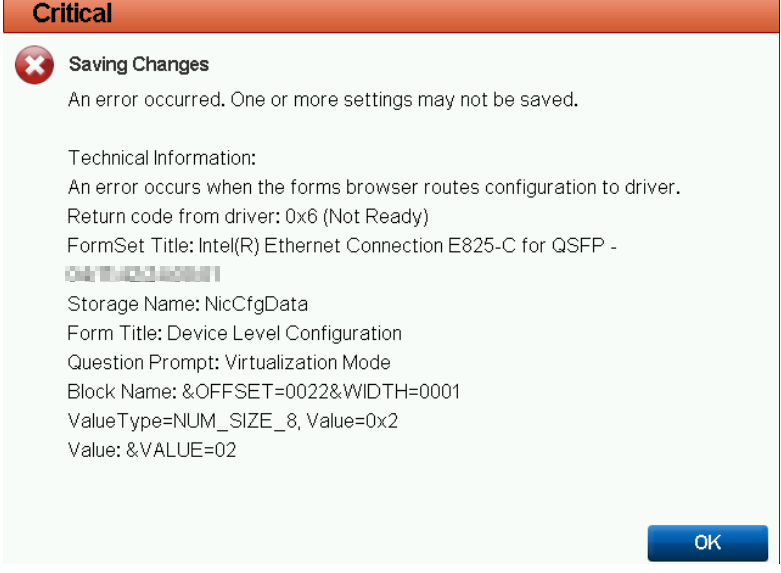
Configuration changes fail to apply as expected.
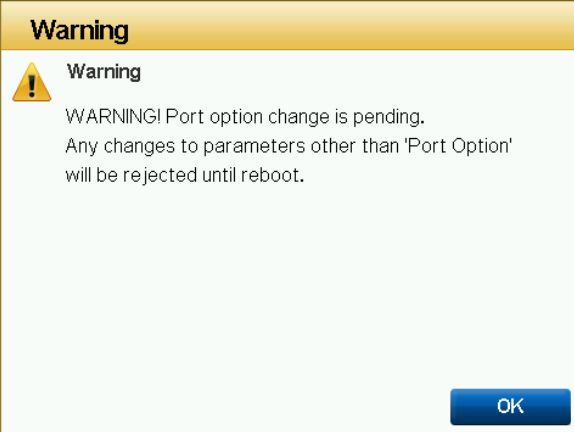
Modifying the port configuration and enabling SR‑IOV results in a warning message being displayed.
Cause
A conflict that arises when SR‑IOV settings and port‑configuration changes are applied concurrently in the same HII session is triggering this error. The NIC firmware is unable to process these simultaneous updates correctly.
Resolution
Use the following workaround:
1. Enable SR-IOV first, then reboot the system.
2. After reboot, apply port configuration changes separately.
Alternatively, applying the port configuration first and then enabling SR-IOV results in a warning instead of a critical error.
Additional Information
Which generation does my PowerEdge server belong to?