Broadcom 100Gbps network card (BCM57608) support for Dell PowerEdge AMD servers and VMware ESXi
Summary: Broadcom network device BCM57608 is not initialized and detected on Dell customized VMware ESXi 8.x and 9.0. This KB is to detail the issue, and the solutions offered.
Symptoms
Dell customized VMware ESXi 8.x and 9.0.0.0 fail to initialize BCM57608 network device on Dell PowerEdge AMD servers. The ESXi kernel logs indicate that “Unable to allocate 511 cookies: Out of resources” for the BCM57608 network ports. This is seen as part of “bnxtnet” network driver initialization during ESXi boot.
Cause
Older firmware versions of BCM57608 set the default MSI-X vector requirement as 512 for a given Physical Function (PF). Dell customized VMware ESXi 8.x and 9.0.0.0 booted on these systems do not initialize BCM57608 stating that it is running out of MSI-X resources. This is because of a bug in ESXi related to interrupt allocation logic in AMD IOMMU.
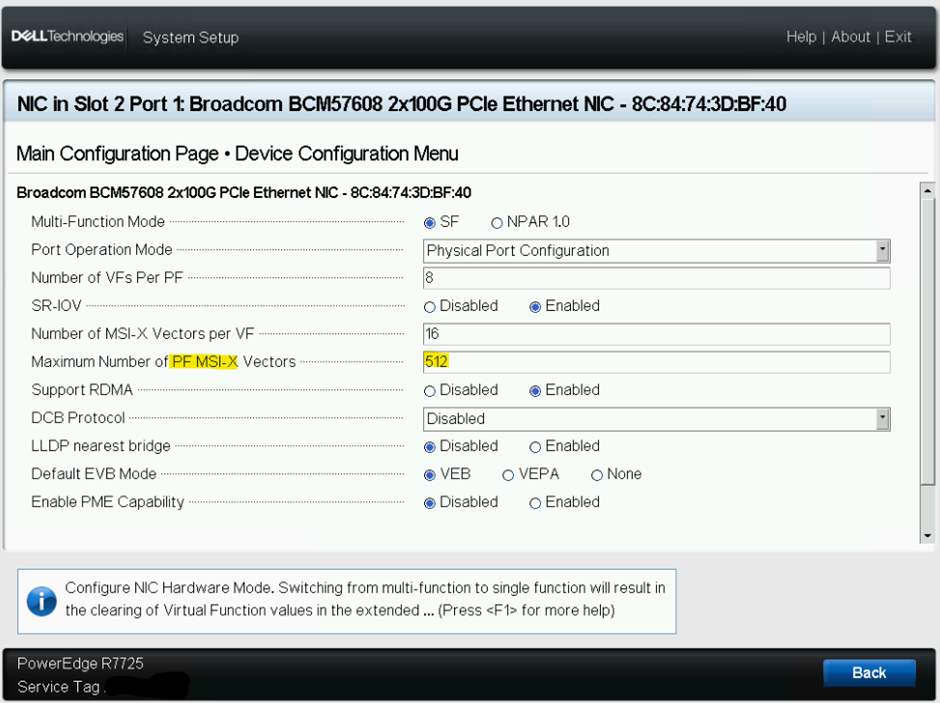
There is a known issue affecting ESXi 8.x and ESXi 9.0.0.0 branches. To resolve the issue, use the latest Network card firmware which is made available via support.dell.com. The issue is fixed in Dell customized ESXi 9.0.1.0 A03 which is available via Broadcom download page.
Resolution
Use the latest network card firmware available at support.dell.com (OR) Use the Dell customized ESXi 9.0.1.0 A03 image.
When the latest network card firmware is used, it is noticed that the MSI-X vectors value is set to 128 in the network device firmware settings.